Cloud-managed video surveillance systems in Allentown, PA give commercial and industrial organizations centralized control over cameras, users, recorded video, system health, remote access, and multiple locations through a securely managed video platform.
Northeast Remote Surveillance and Alarm, LLC designs, installs, configures, expands, upgrades, and supports cloud-managed surveillance systems for Allentown offices, warehouses, manufacturing facilities, medical offices, retail businesses, contractor yards, commercial campuses, institutional properties, and multi-site organizations.
This page focuses specifically on cloud-managed video surveillance architecture and administration. For broader camera-system planning involving camera placement, recording, parking areas, interiors, warehouses, offices, and other commercial applications, begin with Commercial Security Camera Systems in Allentown, PA.
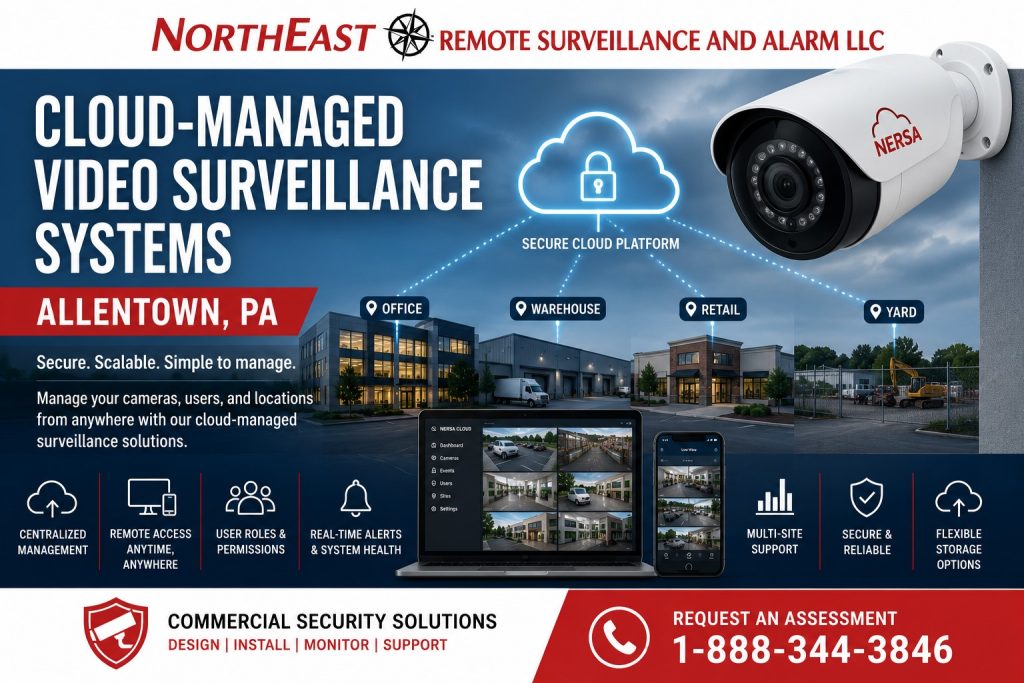
What Is a Cloud-Managed Video Surveillance System?
A cloud-managed surveillance system uses a secure online platform to help authorized users administer cameras, recorded video, permissions, alerts, system health, software updates, and multiple locations.
Depending on the selected platform, video may be:
- Stored primarily in the cloud
- Stored locally and managed through the cloud
- Stored through a combination of local and cloud resources
- Retained on cameras, appliances, servers, or network recorders
- Backed up to cloud storage for selected events or cameras
“Cloud-managed” does not always mean that all video is continuously transmitted to and stored in a remote data center. The architecture varies by manufacturer, bandwidth, retention requirements, cybersecurity policies, camera count, and facility needs.
NERSA evaluates the complete platform before recommending a cloud, locally recorded, or hybrid design.
Cloud Management Versus Traditional Local Recording
Traditional surveillance systems are commonly administered through a recorder or server located at the property.
Cloud-managed systems may provide a more centralized way to handle:
- Camera enrollment
- User accounts
- Permissions
- Remote access
- Software updates
- System-health reporting
- Alerts
- Multi-site administration
- Video sharing
- Device status
- Storage management
- Audit activity
A locally recorded system may remain appropriate when the organization requires:
- Complete local control
- Very long retention
- Limited internet dependency
- High camera counts
- Specialized integrations
- Existing server infrastructure
- Strict internal network policies
A cloud-managed platform may be preferred when the organization values simplified administration, secure remote accessibility, consistent multi-site management, and reduced dependence on traditional recorder interfaces.
The correct architecture depends on operating requirements rather than marketing terminology.
Cloud, Local and Hybrid Video Architectures
Fully Cloud-Recorded Systems
A fully cloud-recorded platform sends video or selected video data to remote cloud storage.
Potential benefits may include:
- Reduced reliance on an on-site recorder
- Off-site video availability
- Centralized account management
- Easier multi-location access
- Simplified software maintenance
- Protection against theft or damage to a local recorder
This design requires careful evaluation of internet bandwidth, recurring storage costs, camera count, retention, image quality, and connectivity reliability.
Cloud-Managed Local Recording
Some platforms record video locally to an appliance, network recorder, server, or camera while using a cloud portal for administration and remote access.
This model may provide:
- Local recording performance
- Centralized cloud management
- Reduced continuous upstream bandwidth
- Remote system-health reporting
- Simplified user administration
- Support for longer local retention
This architecture can be suitable for businesses that want cloud-style management without sending every recording stream continuously off site.
Hybrid Cloud Video Surveillance
A hybrid system combines local recording with selected cloud services.
Hybrid capabilities may include:
- Local continuous recording
- Cloud-managed users and devices
- Cloud storage for important events
- Off-site backup of selected video
- Centralized multi-site access
- Remote system-health monitoring
- Cloud-based search or analytics
- Local recording during internet interruptions
Hybrid architecture can provide flexibility for facilities that require dependable local retention and centralized remote management.
Centralized Video Management for Allentown Businesses
Cloud-managed surveillance can help organizations administer video across:
- One commercial building
- Multiple floors
- Detached buildings
- Business campuses
- Warehouses and offices
- Multiple Allentown properties
- Regional branches
- Distributed commercial locations
- Corporate and satellite facilities
Authorized users may access a consistent interface rather than managing different recorders, passwords, applications, and software versions at every location.
Centralized administration may include:
- Location-based camera groups
- Building and floor organization
- User-role templates
- Shared incident-review procedures
- Standardized retention policies
- System-health dashboards
- Centralized device status
- Remote software administration
- Corporate-level oversight
- Local manager permissions
The platform should be organized around the company’s operating structure rather than leaving every property as an unrelated camera system.
Secure Remote Video Access
Cloud-managed systems are often selected because authorized users need dependable access to live and recorded video away from the property.
Remote users may include:
- Business owners
- Facility managers
- Security personnel
- Corporate administrators
- Operations managers
- Regional managers
- IT personnel
- Authorized investigators
- Approved department supervisors
Access may be available through:
- Web browsers
- Desktop applications
- Mobile applications
- Security workstations
- Management dashboards
Remote access should be configured with appropriate controls rather than giving every user unrestricted access.
Security measures may include:
- Individual user accounts
- Role-based permissions
- Multi-factor authentication
- Strong password requirements
- Single sign-on where supported
- Session controls
- Login records
- Export permissions
- Limited administrative privileges
- Immediate removal of former users
Shared administrator accounts should be avoided when the platform supports individual accountability.
User Roles and Camera Permissions
Not every user should be able to view every camera, change system settings, export video, or manage other users.
Permissions may be assigned by:
- Property
- Building
- Floor
- Department
- Camera group
- Business function
- Live-view access
- Recorded-video access
- Export rights
- Administrative responsibility
Examples include:
- A property manager viewing exterior and common-area cameras
- A warehouse manager viewing shipping and storage areas
- A tenant viewing only cameras associated with its suite
- Corporate management viewing several locations
- A receptionist viewing entrances without accessing archived video
- IT personnel managing system health without routinely reviewing footage
Clear permissions protect the organization and make the system easier to manage.
Multi-Site Cloud-Managed Surveillance
Multi-site businesses are among the strongest candidates for cloud-managed video surveillance.
A centralized platform can help standardize:
- Camera names
- User roles
- Retention policies
- Video-export procedures
- System-health reporting
- Software versions
- Remote access
- Incident response
- Location organization
- Administrative control
Without centralized management, businesses may accumulate different systems, passwords, recorders, storage policies, camera naming methods, and user practices across each location.
A standardized platform can reduce that fragmentation and provide a more consistent operating experience.
System-Health Reporting and Notifications
A surveillance system provides limited value if a camera, storage device, network connection, or recording service fails without anyone noticing.
Depending on the platform, cloud management may provide notifications involving:
- Camera offline conditions
- Recording interruption
- Storage problems
- Appliance status
- Network connectivity
- Device communication
- Software status
- Camera obstruction
- Image-quality concerns
- System tampering
- Configuration changes
Health reporting does not eliminate the need for inspection, maintenance, and service, but it may help identify certain failures before an incident occurs.
Notifications should be directed to responsible personnel and reviewed as part of an established response process.
Cloud-Managed Video for Warehouses and Distribution Facilities
Warehouse systems may require cloud-managed access for:
- Loading docks
- Shipping and receiving
- Storage aisles
- Employee entrances
- Exterior yards
- Parking areas
- Trailer locations
- Controlled inventory
- Multiple buildings
Centralized management can help warehouse operators view several operational areas, coordinate user access, review incidents, and maintain consistent camera naming across large facilities.
Bandwidth, storage, camera count, image resolution, and retention should be calculated carefully before selecting a cloud architecture for a high-camera-count warehouse.
Cloud-Managed Video for Manufacturing Facilities
Manufacturing environments may use cloud-managed surveillance around:
- Facility entrances
- Production-support areas
- Material movement
- Shipping areas
- Equipment entrances
- Restricted rooms
- Exterior storage
- Parking areas
- Multiple buildings
- Remote facilities
The system should be planned around network reliability, cybersecurity requirements, operational continuity, image-retention needs, and the organization’s policies regarding production-area video.
Cloud management should not be used as a reason to place cameras without a defined purpose.
Cloud-Managed Video for Offices and Medical Properties
Office and medical-office properties may benefit from centralized administration of cameras covering:
- Entrances
- Lobbies
- Reception areas
- Common corridors
- Staff entrances
- Parking areas
- Delivery locations
- Restricted-room approaches
- Shared tenant spaces
User permissions are particularly important in multi-tenant and privacy-sensitive environments.
A building manager, tenant, practice administrator, corporate office, and service provider may each require a different level of access.
Cloud-Managed Video for Retail and Multi-Location Businesses
Retail and multi-location organizations may use cloud-managed surveillance to review:
- Entrances
- Sales floors
- Registers
- Stockrooms
- Deliveries
- Employee areas
- Parking lots
- Multiple branches
Centralized access may help corporate management maintain consistent visibility and user control across multiple properties.
The system should still account for site-specific camera placement, lighting, storage, internet service, and operational differences.
Internet Bandwidth and Connectivity Planning
Cloud-managed systems depend on reliable network connectivity for at least some platform functions.
Bandwidth requirements depend on:
- Camera count
- Camera resolution
- Frame rate
- Video compression
- Continuous or event-based cloud transmission
- Number of remote viewers
- Cloud-storage architecture
- Audio use
- Analytics
- Multiple concurrent users
- Available upstream bandwidth
A fully cloud-recorded system may require significantly more upstream bandwidth than a locally recorded system managed through a cloud portal.
NERSA evaluates:
- Available internet service
- Upload capacity
- Network reliability
- Firewall configuration
- Remote-user demand
- Camera traffic
- Local recording requirements
- Failover needs
- Future expansion
The surveillance system should not be deployed without understanding how it will affect the business network.
Recording During an Internet Outage
Internet interruption does not affect every cloud-managed platform in the same way.
Depending on the architecture:
- Local recording may continue normally
- Cameras may temporarily retain video
- An on-site appliance may continue recording
- Cloud recording may pause
- Remote viewing may become unavailable
- Video may synchronize after connectivity returns
- Certain alerts may be delayed
The expected behavior during an outage should be confirmed before the system is selected.
Businesses should understand:
- Whether recording continues
- Where video is retained
- How much temporary storage is available
- Whether events are uploaded later
- Which functions require internet access
- What happens during an extended outage
Recording Retention and Cloud Storage
Retention is the length of time recorded video remains available.
Cloud-managed platforms may provide retention through:
- Fixed cloud-storage plans
- Local storage appliances
- Camera-based storage
- Hybrid local and cloud retention
- Event-only cloud storage
- Tiered retention by camera
- Additional paid storage capacity
Retention planning should consider:
- Camera count
- Resolution
- Frame rate
- Compression
- Recording schedule
- Amount of activity
- Incident-reporting timelines
- Business requirements
- Recurring subscription costs
- Future camera additions
A low-cost entry package may become expensive if the organization later requires more cameras, longer retention, higher resolution, or additional analytics.
The total long-term operating cost should be reviewed before committing to a platform.
Subscription and Licensing Considerations
Cloud-managed surveillance systems commonly involve recurring software, device, storage, support, or feature licenses.
Licensing may be based on:
- Each camera
- Each device
- Storage duration
- Feature level
- Analytics
- Number of users
- Number of locations
- Support plan
- Software term
- Cloud-storage consumption
Before selecting a system, the organization should understand:
- Initial equipment cost
- Recurring subscription cost
- License term
- Renewal requirements
- Included storage
- Included software updates
- Included support
- Feature limitations
- Expansion cost
- Export and sharing capabilities
- Consequences of an expired subscription
NERSA evaluates the complete ownership model rather than comparing equipment price alone.
Cybersecurity and Account Administration
A cloud-managed surveillance system should be treated as part of the organization’s technology environment.
Planning may include:
- Individual user accounts
- Multi-factor authentication
- Role-based permissions
- Secure password policies
- Account-removal procedures
- Network segmentation
- Managed switches
- Firewall coordination
- Firmware and software management
- Device-encryption capabilities
- Audit activity
- Secure video sharing
- Vendor-access controls
Cloud management does not automatically make a surveillance system secure.
Security depends on platform design, account configuration, network practices, device support, user behavior, and ongoing administration.
Video Sharing and Incident Investigation
Cloud-managed systems may allow authorized users to share video through controlled links or platform-based access instead of manually copying large files.
Possible capabilities include:
- Date- and time-limited sharing
- Password-protected links
- User-specific access
- Download restrictions
- Audit records
- Watermarking
- Incident bookmarks
- Case-based organization
- Secure export
Sharing features vary by manufacturer and subscription level.
The organization should establish procedures governing who may export or share video and how long shared access should remain active.
Cloud-Based Video Analytics
Some cloud-managed platforms offer analytics or search tools that may assist with reviewing recorded activity.
Capabilities may include:
- Person detection
- Vehicle detection
- Motion classification
- Line crossing
- Area entry
- Object search
- Appearance-based search
- Occupancy information
- Camera-health analytics
- Event filtering
Analytics can reduce the amount of video that must be reviewed, but performance depends on:
- Camera placement
- Image quality
- Lighting
- Viewing angle
- Resolution
- Environmental conditions
- Platform configuration
- The specific analytic model
Analytics should support human review rather than be treated as infallible identification or decision-making systems.
Cloud Management Is Not Live Video Monitoring
Cloud-managed video surveillance and live remote video monitoring are not the same service.
Cloud management generally refers to:
- Platform administration
- Remote user access
- Recorded-video review
- System-health information
- Cloud or hybrid storage
- Centralized multi-site control
Live remote video monitoring generally involves trained personnel actively responding to defined events, reviewing alarm activity, issuing talk-down announcements, or following an established response procedure.
A cloud-managed platform may support monitored workflows, but cloud access by itself does not mean a monitoring center is watching the cameras continuously.
This page remains focused on cloud-managed surveillance technology and administration.
Expanding an Existing Cloud-Managed System
Cloud-managed systems may be expanded when a business adds:
- Cameras
- Doors or entrances
- Parking areas
- Buildings
- Floors
- Departments
- Storage areas
- Additional locations
- New users
- Longer retention
- Additional analytics
Expansion planning should evaluate:
- Camera compatibility
- Available licenses
- Subscription costs
- Network bandwidth
- PoE capacity
- Local storage
- Cloud retention
- Equipment-rack capacity
- User permissions
- Future growth
For projects focused specifically on adding cameras and extending coverage to a functioning platform, visit Video Surveillance System Expansions and Additional Cameras in Allentown, PA.
Migrating From a Traditional Recorder
Some businesses want to migrate from a conventional DVR, NVR, or locally managed server to a cloud-managed platform.
Migration may involve:
- Reusing compatible IP cameras
- Replacing unsupported cameras
- Installing a cloud-managed appliance
- Updating network switches
- Increasing PoE capacity
- Reorganizing camera names
- Creating new user roles
- Configuring retention
- Establishing secure remote access
- Removing old administrator accounts
- Documenting the final system
Not every existing camera will necessarily support every function of the new platform.
Compatibility, image quality, firmware support, cybersecurity, licensing, and long-term reliability should be evaluated before existing equipment is retained.
Vendor Lock-In and Platform Portability
Cloud-managed platforms may use proprietary cameras, appliances, subscriptions, software, or storage methods.
Businesses should understand:
- Whether third-party cameras are supported
- Whether existing cameras can be retained
- Whether video can be exported in standard formats
- What happens when subscriptions expire
- Whether equipment can operate without cloud service
- Whether another integrator can support the platform
- How difficult future migration may be
- Whether device ownership transfers between accounts
- Whether long-term data export is practical
A convenient platform may still create long-term limitations if future flexibility is not considered.
NERSA discusses these tradeoffs during system planning.
Network and Low-Voltage Infrastructure
Cloud management does not eliminate the need for dependable on-site infrastructure.
A commercial system may require:
- Category cabling
- Fiber connections
- Managed PoE switches
- Network cabinets
- Equipment racks
- Secure VLANs
- UPS backup power
- Surge protection
- Wireless building links
- Additional internet capacity
- Properly supported pathways
- Labeled patch panels
- Outdoor-rated enclosures
Camera reliability can be affected by:
- Insufficient PoE power
- Poor cabling
- Overloaded switches
- Weak wireless links
- Internet instability
- Incorrect firewall settings
- Unsupported network equipment
- Electrical surges
- Inadequate backup power
The cloud platform, cameras, network, storage, and low-voltage infrastructure should be planned as one system.
Documentation and Long-Term Administration
A cloud-managed surveillance system should be documented so the business can administer it after installation.
Documentation may include:
- Camera names and locations
- User-role structure
- Account ownership
- Administrator contacts
- License terms
- Renewal dates
- Retention policies
- Network information
- Device assignments
- Location hierarchy
- Export procedures
- Service information
- System-health responsibilities
- Recommended future capacity
Account ownership is particularly important.
The customer should understand who controls the primary administrative account, who can add or remove users, and how access is transferred when employees or service providers change.
Commercial and Industrial Properties We Support
NERSA provides cloud-managed surveillance systems for:
- Office buildings
- Medical offices
- Warehouses
- Distribution centers
- Manufacturing facilities
- Industrial properties
- Contractor yards
- Retail businesses
- Multi-tenant buildings
- Commercial campuses
- Institutional properties
- Municipal facilities
- Professional-service offices
- Multi-location businesses
- Mixed-use commercial facilities
Systems can support smaller commercial properties, large facilities, multi-building campuses, and organizations requiring centralized administration across numerous locations.
Why Allentown Businesses Choose NERSA
Northeast Remote Surveillance and Alarm, LLC focuses on commercial and industrial security systems.
Our cloud-managed surveillance planning considers:
- Camera coverage
- Platform architecture
- Local and cloud storage
- Internet bandwidth
- Network and PoE capacity
- User permissions
- Remote access
- Cybersecurity practices
- Licensing and subscriptions
- System-health reporting
- Multi-site management
- Future expansion
- Long-term serviceability
The objective is to provide centralized, usable video management without creating unnecessary recurring costs, unsupported equipment combinations, weak account controls, inadequate retention, excessive internet dependency, or long-term platform limitations.
Frequently Asked Questions
Does cloud-managed surveillance store all video in the cloud?
Not always. Some systems store video entirely in the cloud, while others record locally and use the cloud for administration and remote access. Hybrid platforms may combine local retention with selected cloud storage or backup.
Will the cameras continue recording if the internet fails?
That depends on the platform. Systems with local, appliance-based, or camera-based storage may continue recording during an internet outage. Fully cloud-dependent functions may become unavailable until connectivity returns.
Does a cloud-managed camera system require a subscription?
Most cloud-managed platforms require recurring licenses for software, device management, storage, support, analytics, or advanced features. The full long-term cost should be reviewed before selecting a system.
Can cloud-managed video support several business locations?
Yes. Multi-site administration is one of the primary advantages of many cloud-managed platforms. Authorized users can view and manage cameras across several properties through a centralized interface.
Can different users receive different camera permissions?
Yes. Depending on the platform, permissions may be limited by property, camera group, department, live view, recorded video, exports, or administrative function.
Is cloud-managed surveillance the same as remote video monitoring?
No. Cloud management provides centralized platform access and administration. Remote video monitoring involves trained personnel reviewing defined events and following an established response procedure.
Can existing cameras be moved to a cloud-managed platform?
Possibly. Compatibility depends on camera manufacturer, protocol, firmware, resolution, required features, licensing, cybersecurity, and the selected cloud platform.
How much internet bandwidth does cloud-managed video require?
Bandwidth requirements depend on whether video is stored locally or transmitted to the cloud, as well as camera count, resolution, frame rate, compression, analytics, and remote-viewing activity.
Can cloud-managed systems provide long video retention?
Yes, but retention capacity and cost vary by platform. Long retention may be provided through cloud storage, local appliances, network recorders, camera storage, or a hybrid architecture.
Does NERSA support both smaller systems and enterprise deployments?
Yes. NERSA supports smaller commercial systems as well as warehouses, manufacturing facilities, campuses, multi-building properties, and multi-site organizations requiring centralized administration, role-based permissions, scalable storage, network expansion, and standardized system management.
Request a Cloud-Managed Video Surveillance Assessment
If your Allentown business needs secure remote video access, centralized user management, multi-site administration, system-health reporting, cloud or hybrid recording, or a migration from a traditional recorder, Northeast Remote Surveillance and Alarm, LLC can evaluate the facility and recommend an appropriate surveillance architecture.
For broader citywide planning across video surveillance, access control, alarms, monitoring, upgrades, intercoms, and supporting infrastructure, visit Commercial Security Systems in Allentown, PA.
Call 1-888-344-3846 to request a cloud-managed video surveillance assessment.
Commercial and industrial systems only • Cloud-managed video • Secure remote access • Multi-site administration • Local, cloud and hybrid recording