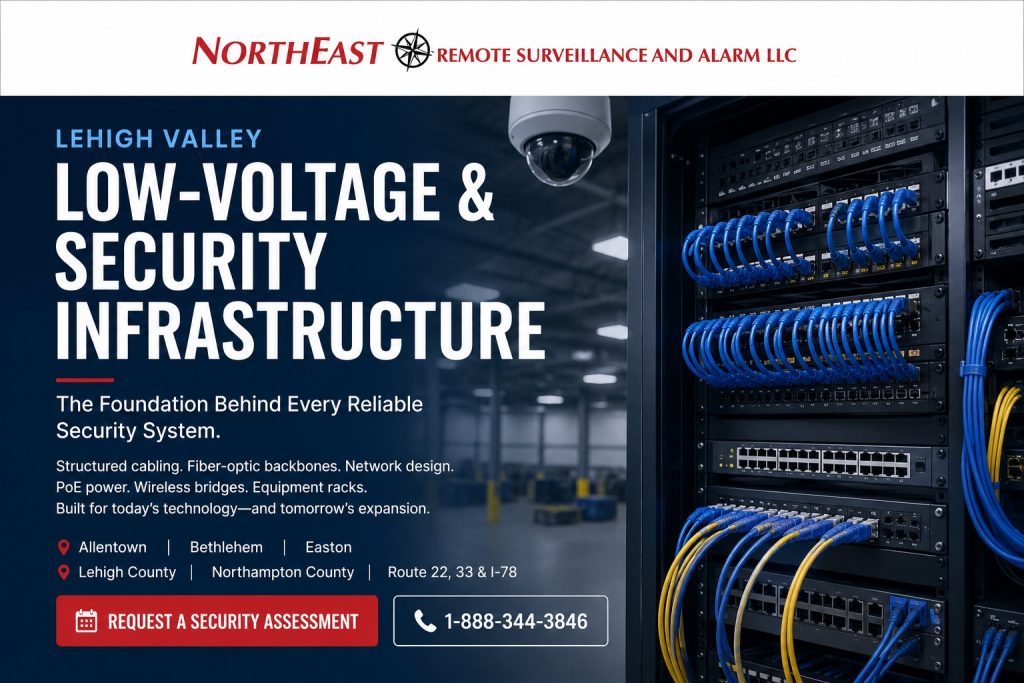
Lehigh Valley Low-Voltage and Security Infrastructure

Lehigh Valley low-voltage and security infrastructure should be planned as the physical foundation supporting cameras, access control, intrusion alarms, fire alarm communication, wireless devices, intercoms, monitoring equipment, network switches, servers, and connected building systems.

Northeast Remote Surveillance and Alarm, LLC designs, installs, upgrades, organizes, and supports commercial and industrial low-voltage infrastructure throughout Allentown, Bethlehem, Easton, Lehigh County, Northampton County, Route 22, Route 33, I-78, and surrounding Lehigh Valley business and industrial markets.

This regional infrastructure resource supports the broader Lehigh Valley Commercial and Industrial Security Systems pillar. For statewide structured cabling, fiber, equipment-rack, pathway, and security-network planning, visit Commercial and Industrial Infrastructure and Cabling.

Request a Lehigh Valley low-voltage infrastructure assessment or call 1-888-344-3846.

Lehigh Valley low-voltage and security infrastructure with structured cabling, fiber-optic backbones, PoE network switches, equipment racks, wireless bridges, and commercial security camera connectivity by Northeast Remote Surveillance and Alarm, LLC.

Low-Voltage Infrastructure Built Around the Facility

A security system can only perform as reliably as the cabling, pathways, network equipment, power, labeling, and documentation supporting it. High-resolution cameras, card readers, door controllers, alarm panels, wireless bridges, intercoms, and monitoring devices cannot overcome weak infrastructure.

Lehigh Valley commercial and industrial properties have different infrastructure requirements. An Allentown office may need organized data drops, wireless access point cabling, equipment-rack cleanup, and new connections for cameras and controlled doors. A Bethlehem manufacturing facility may require industrial pathways, fiber between buildings, protected enclosures, equipment-room connections, and network segmentation. A warehouse near Route 33 or I-78 may need long-distance backbone connectivity, remote network cabinets, PoE switching, loading-dock camera cabling, and infrastructure capable of supporting future expansion.

Low-voltage infrastructure planning may include:

  • Structured cabling
  • Cat6 and Cat6A cabling
  • Fiber-optic backbone cabling
  • Building-to-building fiber
  • Security-camera cabling
  • Access-control cabling
  • Intrusion-alarm cabling
  • Fire-alarm cabling within the approved project scope
  • Intercom and IP-speaker cabling
  • Wireless access point connections
  • PoE switches and power planning
  • Wireless network bridges
  • MDF and IDF buildouts
  • Equipment racks and wall-mounted enclosures
  • Patch panels and cable management
  • Conduit and pathway coordination
  • UPS and backup-power support
  • Surge protection and grounding coordination
  • Security-network segmentation
  • Cable labeling and system documentation
  • Infrastructure planning for future expansion

The objective is not simply to pull cable from one point to another. The objective is to create an organized, serviceable, scalable foundation that supports the facility’s current systems and makes future troubleshooting, upgrades, and expansion more practical.

Structured Cabling for Commercial and Industrial Properties

Structured cabling creates an organized physical connection system for security equipment, workstations, wireless access points, VoIP devices, network equipment, and other connected technology.

A structured cabling plan should address:

  • Device and outlet locations
  • Cable type and performance requirements
  • Run distance
  • Pathway capacity
  • Environmental exposure
  • Required separation from electrical wiring and interference sources
  • Equipment-room location
  • Patch-panel capacity
  • Switch-port availability
  • PoE requirements
  • Testing and labeling
  • Future additions

Well-organized structured cabling allows individual connections to be identified, tested, repaired, reassigned, or expanded without tracing undocumented cables through ceilings, warehouse spaces, or equipment rooms.

Cat6 and Cat6A Cabling

Cat6 and Cat6A cabling may support IP cameras, access-control panels, intercoms, network devices, wireless access points, workstations, VoIP equipment, and other Ethernet-connected systems.

The appropriate cabling category should be selected according to the device, bandwidth, distance, PoE requirements, pathway conditions, electromagnetic environment, network design, and future performance goals.

Commercial cabling installation may involve:

  • Office and workstation data drops
  • Security-camera network connections
  • Access-control panel connections
  • Intercom and IP-speaker connections
  • Wireless access point cabling
  • Warehouse and production-area connections
  • Network-printer and operational equipment drops
  • Connections between equipment rooms and field devices
  • Replacement of damaged or poorly routed cabling
  • Expansion of existing structured cabling systems

Cable selection should not be based only on the lowest initial cost. Pathway access, labor, future equipment, expected bandwidth, PoE demand, environmental conditions, and the difficulty of replacing the cable later should be considered.

Testing and Certification

New structured cabling should be tested according to the project requirements. Testing can help identify wiring faults, improper terminations, damaged cable, excessive length, pair problems, and other conditions that may affect connected equipment.

Project closeout may include:

  • Cable identification
  • Patch-panel labeling
  • Outlet labeling
  • Continuity or qualification testing
  • Certification testing when specified
  • Test-result documentation
  • Updated connection schedules
  • Equipment-room photographs
  • As-built pathway or device information where included

Fiber-Optic Backbone and Building-to-Building Connectivity

Fiber-optic cabling is often appropriate when security or network connectivity must extend beyond practical copper-cabling distances, cross between buildings, connect remote equipment rooms, support higher bandwidth, or reduce exposure to electrical interference.

Lehigh Valley fiber projects may support:

  • Connections between an MDF and remote IDFs
  • Warehouse-to-office connectivity
  • Building-to-building network backbones
  • Industrial-park and multi-building properties
  • Remote camera networks
  • Gatehouses and security buildings
  • Detached maintenance or storage buildings
  • Manufacturing and warehouse expansions
  • Long-distance network extensions
  • Redundant network paths where designed

Single-Mode and Multimode Fiber

Single-mode and multimode fiber serve different distance, equipment, bandwidth, and project requirements. Fiber type, strand count, connector type, transceivers, pathway, termination method, testing, and future capacity should be selected as part of one coordinated design.

A fiber project may include:

  • Indoor fiber cabling
  • Indoor-outdoor fiber cabling
  • Armored fiber where appropriate
  • Underground conduit pathways
  • Aerial pathways where approved
  • Fiber enclosures and termination panels
  • Splicing and connector termination
  • Fiber patch cords and transceivers
  • Link testing
  • Strand identification and documentation

Spare strands and enclosure capacity may provide a practical expansion path for future cameras, access-control systems, wireless networks, building automation, tenant requirements, or additional network closets.

Fiber Between Commercial Buildings

Copper connections between separate buildings can create distance, grounding, surge, and interference concerns. Fiber can provide a cleaner communication path because it does not conduct electricity between connected buildings.

Building-to-building planning should still account for:

  • Conduit and pathway condition
  • Water exposure
  • Pull-box and handhole access
  • Building-entry protection
  • Fiber type and strand count
  • Equipment compatibility
  • Available rack and enclosure space
  • Power at the remote building
  • UPS support
  • Switching and transceiver requirements
  • Testing and documentation
  • Future expansion

Security Camera Infrastructure

Commercial video surveillance systems depend on more than camera selection. Camera performance can be affected by cable condition, network bandwidth, PoE capacity, switch design, uplink capacity, equipment-room conditions, recording architecture, and power stability.

Camera infrastructure planning may include:

  • Camera cable pathways
  • Cat6 or fiber connections
  • PoE switch capacity
  • Remote switch locations
  • Network uplinks
  • Outdoor-rated cabling
  • Surge protection
  • Wireless bridges
  • Equipment cabinets
  • Recording-server or NVR connections
  • Bandwidth and retention requirements
  • VLAN and network-segmentation planning
  • UPS-backed equipment
  • Camera naming and documentation

A camera may power up on an undersized or poorly planned network and still perform unreliably during high-bandwidth events, nighttime operation, multiple simultaneous streams, remote viewing, firmware updates, or equipment expansion.

For camera placement, image quality, recording, analytics, evidence, and regional surveillance planning, visit Lehigh Valley Commercial Video Surveillance Systems.

Access-Control Infrastructure

Access control requires coordinated cabling and power for readers, controllers, locks, door-position switches, request-to-exit devices, intercoms, power supplies, network connections, fire-alarm interfaces, and other door components.

Access-control infrastructure may include:

  • Reader cabling
  • Lock-power cabling
  • Door-position switch cabling
  • Request-to-exit cabling
  • Controller network connections
  • Power-supply connections
  • Battery backup
  • Fire-alarm interface wiring
  • Intercom and video-entry cabling
  • Gate-controller communication
  • Building-to-building controller connectivity
  • Door and panel labeling

The correct cable and conductor count depend on the hardware, voltage, current, distance, locking method, system architecture, required interfaces, and approved door operation.

Security-door wiring should be coordinated with egress, fire-alarm release, accessibility, door hardware, and other applicable requirements. For complete credential, controller, door-hardware, and user-management planning, visit Lehigh Valley Commercial Access Control Systems.

PoE Switching and Power Planning

Power over Ethernet allows compatible network devices to receive communication and power through the same Ethernet connection. Commercial camera systems, wireless access points, intercoms, speakers, and other network devices may depend on PoE switching.

PoE planning should consider more than the number of available switch ports. The design should review:

  • Power required by each connected device
  • Total switch PoE budget
  • Power required during startup or high-demand operation
  • Camera heaters, illuminators, motors, and accessories
  • Wireless access point power requirements
  • Intercom and IP-speaker demand
  • Cable length and condition
  • Switch uplink capacity
  • Available rack space
  • Ventilation and operating temperature
  • UPS runtime
  • Future device additions

A switch with enough physical ports may still be undersized if its total PoE budget cannot support all connected devices. Capacity should be reserved for realistic operating demand and reasonable future expansion.

Remote PoE Switches

Large warehouses and industrial buildings may require remote PoE switches when cameras and connected devices are located too far from the primary equipment room.

A remote switch location should account for:

  • Fiber or network uplink
  • Available electrical power
  • UPS support
  • Environmental temperature
  • Dust and moisture exposure
  • Enclosure size
  • Ventilation
  • Physical security
  • Service access
  • Port and PoE capacity
  • Labeling and documentation

Wireless Bridges for Remote Security Devices

A properly designed point-to-point or point-to-multipoint wireless bridge can extend connectivity to gates, remote buildings, parking areas, maintenance facilities, guard buildings, detached warehouses, and other locations where new underground cabling is impractical.

Wireless bridge planning should review:

  • Clear line of sight
  • Distance between endpoints
  • Mounting height
  • Building and tree obstructions
  • Expected bandwidth
  • Channel conditions
  • Weather exposure
  • Mounting stability
  • Power at each endpoint
  • Surge protection
  • Network security
  • UPS support
  • Future construction or vegetation growth

Wireless connectivity should not be selected merely to avoid installing cable. The expected reliability, bandwidth, environmental conditions, service access, and operational importance of the connected devices should be considered.

Equipment Racks, Cabinets, and Network Closets

Equipment racks and enclosures should keep switches, patch panels, fiber enclosures, power equipment, recorders, servers, controllers, and communication devices organized and serviceable.

An equipment-room or enclosure review may include:

  • Rack size and available space
  • Wall-mounted versus floor-standing equipment
  • Patch-panel organization
  • Horizontal and vertical cable management
  • Fiber termination and bend protection
  • Power distribution
  • UPS equipment
  • Grounding and bonding coordination
  • Ventilation and temperature
  • Dust and moisture exposure
  • Door and lock security
  • Service clearances
  • Labeling
  • Future rack capacity

MDF and IDF Planning

The main distribution frame or primary equipment room generally serves as the central connection point for the facility. Intermediate distribution frames may extend structured cabling and network services into remote areas or additional floors.

MDF and IDF planning should coordinate:

  • Backbone fiber
  • Switching
  • Patch panels
  • Power and UPS support
  • Cooling and ventilation
  • Equipment security
  • Carrier handoffs
  • Security-system connections
  • Building-to-building links
  • Rack space and future expansion

Network Closet Cleanup

Existing network closets often accumulate abandoned cables, unidentified patch cords, unsupported switches, overloaded power strips, unused equipment, blocked ventilation, and incomplete labeling.

A cleanup project may involve:

  • Tracing active connections
  • Identifying security-system equipment
  • Removing abandoned cabling where included and appropriate
  • Replacing damaged patch cords
  • Installing cable management
  • Reorganizing patch panels
  • Correcting equipment mounting
  • Reviewing power and UPS arrangements
  • Updating labels
  • Creating a clearer connection schedule

Cleanup work should be planned carefully so active security, communication, access-control, monitoring, and business connections are not interrupted unintentionally.

UPS, Backup Power, and Surge Protection

Network and security equipment depend on stable power. A short power interruption can disable switches, wireless bridges, recorders, network connections, controllers, and communication devices if backup power is not provided where needed.

UPS Support

Uninterruptible power supplies may support:

  • Network switches
  • PoE camera switches
  • Fiber transceivers
  • Wireless bridge equipment
  • Video recorders
  • Security servers
  • Access-control network equipment
  • Communication devices
  • Remote equipment cabinets

UPS planning should account for connected load, required runtime, battery condition, environmental temperature, shutdown procedures, monitoring, service access, and future equipment.

Backup power does not create unlimited operating time. It is intended to support the defined equipment for a calculated or selected period and should be inspected and maintained according to the equipment and facility requirements.

Surge Protection

Outdoor devices, building-to-building copper connections, rooftop equipment, gate systems, poles, and remote network cabinets may have increased exposure to electrical surges and transient voltage.

Surge-protection planning may involve:

  • Ethernet surge protection
  • Low-voltage circuit protection
  • Power protection
  • Grounding and bonding coordination
  • Protected building entry points
  • Outdoor equipment enclosures
  • Wireless bridge endpoints
  • Gate and perimeter equipment

Surge protection should be coordinated with the complete electrical, grounding, equipment, and pathway design. A surge protector cannot correct improper grounding, unsuitable cabling, water intrusion, or unsupported installation practices.

Security-System Networks and Segmentation

Modern security systems frequently operate on IP networks. Cameras, recorders, access-control panels, intercoms, wireless bridges, monitoring devices, and management platforms may share physical infrastructure while requiring logical separation and controlled communication.

Security-network planning may include:

  • Dedicated security switches
  • Virtual local area networks
  • IP-address planning
  • Device naming
  • Network segmentation
  • Controlled routing between systems
  • Firewall coordination
  • Remote-access requirements
  • Bandwidth planning
  • Time synchronization
  • Firmware and device-management procedures
  • Credential and administrative control
  • Network diagrams and documentation

Network design should prevent security devices from being placed onto an undocumented flat network without considering access permissions, traffic, remote support, cybersecurity, business operations, and long-term administration.

Coordination With the Business IT Provider

NERSA can coordinate security-system network requirements with the property owner, internal IT department, managed service provider, network administrator, or other responsible technology provider.

Coordination may address:

  • Required IP addresses
  • VLAN assignments
  • Switch ports
  • Firewall rules
  • Internet access
  • Remote connectivity
  • DNS and time services
  • Bandwidth requirements
  • Cloud-platform communication
  • Administrative responsibilities

This page focuses on the physical and security-system infrastructure supporting connected technology. It does not represent complete managed IT services, general workstation support, business-software administration, or unrestricted management of a customer’s enterprise network.

Industrial Pathways and Environmental Conditions

Warehouses, manufacturing facilities, industrial parks, and logistics properties often require more robust pathways and enclosures than a standard office environment.

Industrial pathway planning may include:

  • Conduit
  • Cable tray
  • J-hooks and supports
  • Surface raceway
  • Underground pathways
  • Riser pathways
  • Building-to-building conduit
  • Outdoor-rated enclosures
  • Industrial network cabinets
  • Protected equipment locations

Pathway selection should consider:

  • Ceiling height
  • Forklift and equipment movement
  • Heat and cold
  • Dust
  • Moisture
  • Washdown activity
  • Vibration
  • Electrical interference
  • Roof and exterior exposure
  • Future service access
  • Building expansion

Cabling should be supported and routed in a manner appropriate to the environment rather than laid across ceilings, attached to unrelated building systems, or installed where normal operations can damage it.

Low-Voltage Infrastructure for Lehigh Valley Warehouses

Warehouse and distribution facilities may require infrastructure across large footprints, high ceilings, loading docks, warehouse aisles, office sections, equipment rooms, truck courts, gates, and detached buildings.

Warehouse infrastructure may support:

  • Interior and exterior security cameras
  • Loading-dock cameras
  • Overhead-door monitoring
  • Employee access control
  • Shipping-office connections
  • Wireless access points
  • Remote PoE switches
  • Fiber-connected IDFs
  • Intercoms and IP speakers
  • Alarm communication
  • Gate and vehicle systems
  • Future warehouse expansion

Warehouse pathways should account for changing storage arrangements, lift equipment, long cable distances, difficult service access, high ambient temperatures, and the possibility that new cameras or controlled doors will be required later.

For complete dock, yard, camera, alarm, access-control, and property-security planning, visit Lehigh Valley Warehouse Security Systems.

Low-Voltage Infrastructure for Manufacturing Facilities

Manufacturing environments may contain production equipment, electrical interference, dust, heat, moisture, vibration, restricted areas, maintenance spaces, utility rooms, offices, warehouses, and multiple operating shifts.

Manufacturing infrastructure planning may involve:

  • Industrial pathways
  • Protected network cabinets
  • Fiber between production and office areas
  • Camera cabling
  • Access-control wiring
  • Tool-room and restricted-area connections
  • Wireless access point cabling
  • Equipment-room cleanup
  • Network segmentation
  • UPS-backed switches
  • Outdoor and building-to-building connectivity
  • Expansion planning

The installation should be coordinated with production schedules, facility safety procedures, machinery, electrical systems, sanitation requirements, and restricted operating areas.

Infrastructure for Industrial Parks and Multi-Building Properties

Industrial parks and multi-building commercial properties may need shared backbone connectivity while maintaining separate tenant, building, security, and administrative responsibilities.

Multi-building planning may include:

  • Fiber between buildings
  • Building-specific network closets
  • Remote PoE switches
  • Shared camera networks
  • Tenant-specific access-control panels
  • Property-management equipment
  • Gatehouse connectivity
  • Wireless bridges
  • Separate VLANs or network segments
  • UPS support at remote buildings
  • Building and cable identification
  • Expansion capacity

Ownership and operational responsibilities should be defined so property managers, tenants, IT providers, and security administrators understand who controls each network, rack, enclosure, switch, pathway, and connected system.

For property-wide planning involving multiple buildings, tenants, parking areas, gates, and shared infrastructure, visit Lehigh Valley Industrial Park Security Systems.

Lehigh Valley Infrastructure Planning by Market

Allentown Low-Voltage Infrastructure

Allentown infrastructure projects may support offices, healthcare properties, municipal buildings, schools, warehouses, manufacturing facilities, retail properties, and multi-site commercial organizations.

Common needs may include network-closet cleanup, Cat6 or Cat6A cabling, fiber extensions, camera infrastructure, access-control wiring, wireless access point connections, PoE switching, and upgrades to older commercial cabling.

Bethlehem Industrial and Commercial Infrastructure

Bethlehem infrastructure projects may involve manufacturing plants, industrial buildings, warehouses, office campuses, healthcare properties, institutional facilities, industrial parks, and multi-building sites.

Projects may require protected pathways, fiber backbones, production-area cabling, remote network enclosures, access-control wiring, camera networks, equipment-room organization, and coordination around operating facilities.

Easton Commercial and Industrial Infrastructure

Easton infrastructure projects may support warehouses, logistics operations, Route 33 industrial properties, offices, schools, medical properties, contractor facilities, municipal buildings, and industrial parks.

Common needs may include structured cabling, fiber installation, remote switch locations, warehouse camera infrastructure, access-control cabling, wireless bridges, and organized network equipment.

Route 22, Route 33, and I-78 Infrastructure

Lehigh Valley corridor properties frequently include warehouses, distribution centers, manufacturing plants, industrial parks, truck facilities, offices, and multi-building commercial sites.

Infrastructure for these properties may need to support:

  • Large building footprints
  • Long cable distances
  • Remote network rooms
  • Loading-dock and yard cameras
  • Gate connectivity
  • Fiber between buildings
  • Wireless bridge links
  • PoE switching
  • UPS-backed equipment
  • Future facility expansion

Existing Low-Voltage Infrastructure Upgrades

Existing infrastructure should be reviewed when connected systems have become unreliable, difficult to service, poorly documented, or unable to support new equipment.

Common warning signs include:

  • Unlabeled cables and patch panels
  • Abandoned cabling mixed with active connections
  • Overloaded or unsupported switches
  • Insufficient PoE capacity
  • Frequent device disconnections
  • Damaged cable or connectors
  • Network closets with poor ventilation
  • Consumer-grade switches supporting critical systems
  • Unprotected outdoor cable
  • Copper runs exceeding practical distance
  • Building-to-building links with recurring failures
  • Remote cabinets without backup power
  • Improperly supported cable
  • Missing network diagrams
  • No available ports or rack space
  • Infrastructure that cannot support planned cameras or controlled doors

Infrastructure Assessment and Reuse

An assessment can help determine which cables, pathways, racks, switches, fiber strands, enclosures, power equipment, and network components may be retained, reorganized, expanded, or replaced.

Existing infrastructure should not be assumed usable merely because a device currently powers up. The review may need to consider:

  • Cable condition
  • Test results
  • Category and performance
  • Distance
  • Environmental rating
  • Termination quality
  • Pathway condition
  • Switch age and supportability
  • PoE capacity
  • Uplink bandwidth
  • UPS condition
  • Documentation
  • Compatibility with new equipment

Labeling and Documentation

Labeling and documentation are essential parts of a serviceable commercial infrastructure system. A technician should be able to identify where a cable begins, where it terminates, what it supports, and how it connects to the larger system.

Infrastructure documentation may include:

  • Cable identifiers
  • Outlet and device labels
  • Patch-panel schedules
  • Switch-port assignments
  • Rack elevations
  • Fiber-strand assignments
  • MDF and IDF identification
  • Building-to-building link information
  • Network diagrams
  • VLAN information where included
  • IP-device schedules
  • Wireless bridge endpoint information
  • UPS and power assignments
  • Test results
  • Equipment lists
  • As-built pathway information where included

Accurate documentation reduces troubleshooting time, supports future upgrades, improves coordination among contractors and IT providers, and helps prevent active connections from being disconnected accidentally.

Planning Infrastructure for Future Expansion

Commercial and industrial facilities change over time. New cameras, doors, tenants, warehouse sections, production areas, wireless devices, offices, gates, and remote buildings can create infrastructure requirements that were not part of the original installation.

Expansion planning may include:

  • Spare rack space
  • Unused patch-panel capacity
  • Available switch ports
  • Reserved PoE capacity
  • Spare fiber strands
  • Larger pathways
  • Additional enclosure space
  • UPS expansion capacity
  • Backbone bandwidth
  • Documented network standards
  • Consistent cable and device naming
  • Defined equipment standards

Future-ready planning does not require installing every possible device in advance. It means making practical decisions that reduce unnecessary replacement work when the facility expands.

Compliance, Safety, and Project Boundaries

Commercial low-voltage infrastructure may be affected by adopted building and electrical requirements, firestopping, cable ratings, pathway requirements, accessibility, fire-alarm coordination, equipment listings, manufacturer requirements, project specifications, workplace procedures, and AHJ direction.

Project-specific considerations may include:

  • Plenum and riser cable ratings
  • Fire-rated walls and penetrations
  • Firestopping
  • Cable support
  • Separation from power wiring
  • Grounding and bonding
  • Outdoor and wet-location exposure
  • Equipment-room clearances
  • Fire-alarm wiring requirements
  • Access-controlled door interfaces
  • Permitting and inspection responsibilities
  • Coordination with electrical and mechanical trades

NERSA supports commercial and industrial low-voltage infrastructure, security-system cabling, fiber backbones, equipment racks, PoE networks, wireless bridges, power coordination, labeling, and documentation within the defined project scope.

Final code interpretation, electrical-service work, engineering requirements, managed IT responsibilities, carrier services, permitting decisions, and AHJ approval remain with the appropriate responsible parties and project professionals.

Why Lehigh Valley Businesses Choose NERSA

Northeast Remote Surveillance and Alarm, LLC is headquartered in Bethlehem, Pennsylvania and focuses on commercial, industrial, institutional, municipal, healthcare, warehouse, logistics, manufacturing, and multi-site properties.

NERSA plans low-voltage infrastructure around the systems and operations it must support, including:

  • Video surveillance
  • Access control
  • Intrusion alarms
  • Fire alarm communication
  • Intercoms and IP speakers
  • Wireless connectivity
  • Network switching
  • Building-to-building communication
  • Remote monitoring
  • Equipment power and backup
  • Documentation
  • Long-term expansion

NERSA supports new infrastructure installations, building expansions, equipment-room cleanup, fiber extensions, security-network upgrades, camera and access-control cabling, wireless bridges, existing-system takeovers, documentation improvement, and coordinated low-voltage projects throughout the Lehigh Valley.

NERSA does not install residential security or home-network packages. The company’s work is focused on non-residential commercial and industrial environments.

Request a Lehigh Valley Low-Voltage Infrastructure Assessment

A low-voltage infrastructure project should begin with a review of the property, connected systems, network rooms, pathways, available power, existing cabling, equipment condition, operational requirements, and future expansion plans.

A Lehigh Valley infrastructure assessment may review:

  • Existing structured cabling
  • Cat6 and Cat6A requirements
  • Fiber backbone and building-to-building connections
  • MDF and IDF locations
  • Equipment racks and enclosures
  • Patch panels and cable management
  • Network and PoE switches
  • Switch-port and power capacity
  • Camera cabling
  • Access-control cabling
  • Alarm and communication pathways
  • Wireless bridges
  • Outdoor and industrial pathways
  • UPS and backup power
  • Surge-protection needs
  • Network segmentation requirements
  • Labeling and documentation
  • Damaged or abandoned cabling
  • Equipment supportability
  • Future cameras, doors, buildings, and connected devices

The objective is to establish what infrastructure is present, what is operating properly, what requires correction, what can reasonably be retained, and what foundation is needed to support dependable security and communication systems.

Request a Lehigh Valley Low-Voltage and Security Infrastructure Assessment or call 1-888-344-3846.

Frequently Asked Questions About Lehigh Valley Low-Voltage Infrastructure

What is low-voltage security infrastructure?

Low-voltage security infrastructure is the cabling, fiber, pathways, equipment racks, switches, power equipment, enclosures, wireless links, labeling, and documentation supporting cameras, access control, alarms, intercoms, monitoring equipment, and other connected systems.

What types of Lehigh Valley properties does NERSA support?

NERSA supports qualifying offices, warehouses, distribution centers, manufacturing facilities, industrial buildings, schools, healthcare properties, municipal facilities, contractor properties, industrial parks, multi-tenant buildings, and multi-site commercial organizations.

Does NERSA install Cat6 and Cat6A cabling?

Yes. NERSA installs commercial structured cabling for security equipment, network devices, wireless access points, workstations, intercoms, and other connected systems within the project scope.

When should fiber be used instead of copper cabling?

Fiber is often appropriate for longer-distance connections, building-to-building links, equipment-room backbones, high-bandwidth applications, and environments where electrical interference or electrical isolation between buildings is a concern.

Can NERSA install fiber between separate buildings?

Yes. NERSA can design and install qualifying building-to-building fiber connections, including cabling, termination, enclosures, transceivers, testing, labeling, and supporting network equipment within the defined scope.

What is an MDF?

An MDF is the main distribution frame or primary equipment location where major network, carrier, backbone, security, and structured cabling connections may be centralized.

What is an IDF?

An IDF is an intermediate distribution frame or remote network location used to extend connections into another floor, warehouse section, building area, or remote portion of a large property.

Can a network switch have enough ports but not enough PoE power?

Yes. A switch may have enough physical ports while lacking the total PoE budget needed to power all connected cameras, wireless access points, intercoms, or other devices. Port count and available power should both be reviewed.

Can wireless bridges connect security equipment at a remote building or gate?

Yes. A properly designed wireless bridge may connect cameras, access control, intercoms, network equipment, or other devices at remote buildings, gates, yards, and parking areas when a reliable wired pathway is not practical.

Are wireless bridges as dependable as fiber?

Each technology has different advantages and limitations. Fiber generally provides a highly stable physical backbone, while a wireless bridge may be practical where trenching or new pathways are difficult. Line of sight, interference, bandwidth, weather exposure, mounting, power, and operational requirements should be evaluated.

Can NERSA clean up an existing network or security equipment rack?

Yes. A cleanup project may include tracing active connections, reorganizing patch panels, replacing damaged patch cords, installing cable management, correcting equipment mounting, updating labels, and removing abandoned cabling where included and appropriate.

Does NERSA provide managed IT services?

This service focuses on physical low-voltage infrastructure and the networks supporting connected security systems. General workstation support, software administration, end-user help desk services, and complete managed IT responsibility should be coordinated with the customer’s IT provider.

Can existing low-voltage cabling be reused?

Sometimes. Reuse depends on the cable type, condition, distance, termination quality, environmental rating, test results, pathway, connected equipment, required performance, and project scope.

Why are cable labels and documentation important?

Labels and documentation help technicians identify connections, reduce troubleshooting time, prevent accidental disconnections, support future expansion, and improve coordination among facility personnel, security providers, and IT administrators.

Should security equipment be placed on a separate network?

Many commercial properties benefit from dedicated switching, VLANs, controlled routing, or another form of security-network segmentation. The appropriate design depends on the systems, cybersecurity requirements, business network, remote-access needs, and IT policies.

Can NERSA install UPS backup for security-network equipment?

Yes. UPS equipment may support switches, fiber links, wireless bridges, recorders, servers, communication devices, and other qualifying security infrastructure. The selected UPS should be sized around connected load and required runtime.

Does NERSA provide residential network cabling?

No. Northeast Remote Surveillance and Alarm, LLC focuses on commercial and industrial security infrastructure for non-residential properties.

Scroll to Top
1-888-344-3846