The commercial security project lifecycle is part of Commercial Security Trust & Project Standards because a professional security system should follow a clear process from first review through long-term support. This page explains how Northeast Remote Surveillance and Alarm, LLC approaches the full project lifecycle for commercial and industrial security systems, including assessment, planning, scope development, scheduling, installation, change management, testing, documentation, client training, service support, and future system planning. The goal is to help businesses understand how a security project moves from an initial need to a dependable, documented, and supportable system.
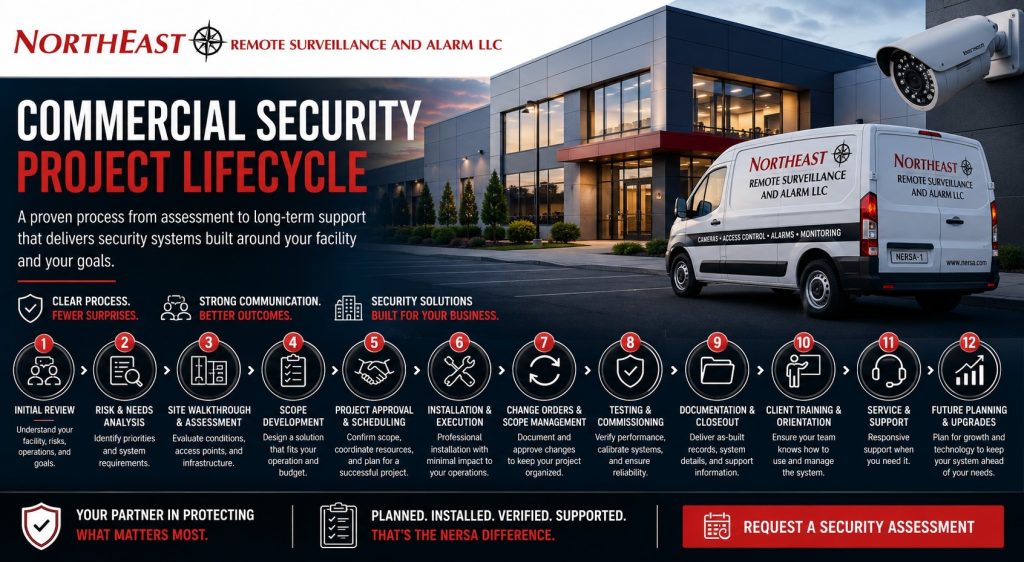
What the Commercial Security Project Lifecycle Means
A commercial security project lifecycle is the complete process used to review, plan, approve, install, verify, document, hand off, and support a security system. It is not limited to the installation day. A well-managed security project includes the planning before work starts, the coordination during installation, and the support needed after the system becomes part of daily operations.
For commercial and industrial facilities, the lifecycle may involve video surveillance, access control, intrusion alarms, alarm monitoring, remote video monitoring, intercoms, gate access, low-voltage cabling, network-connected devices, user permissions, documentation, and service planning.
This page does not replace the deeper standards pages for each individual project stage. Instead, it gives customers a complete overview of how those stages connect so the project does not become fragmented.
Why Commercial Security Project Lifecycle Matters
Commercial security systems affect real business operations. Cameras may support incident review. Access control may manage employee and vendor movement. Intrusion alarms may protect after-hours spaces. Monitoring instructions may affect response. Documentation may determine whether the system can be supported properly later.
Without lifecycle standards, a project can become disconnected. The walkthrough may not match the proposal. The proposal may not match the installation. The installation may not match the final documentation. The customer may receive a working system but not understand how to manage it, service it, or expand it.
Lifecycle standards help prevent those gaps. Each stage should support the next stage so the final system is not only installed, but also usable, organized, documented, and maintainable.
Stage 1: Initial Security Review
The lifecycle usually begins with an initial review of the customer’s facility, concerns, operating conditions, and security goals. This stage should focus on what the business is trying to protect and how the site actually operates.
For a warehouse, that may include loading docks, shipping areas, employee entrances, inventory areas, truck courts, trailer yards, and after-hours activity. For an office, it may include lobby access, employee entry, parking areas, server rooms, tenant spaces, and after-hours protection. For a manufacturing facility, it may include production areas, machine zones, contractor entrances, restricted rooms, industrial perimeters, and shift-change activity.
This stage should not be treated as a quick equipment recommendation. A commercial system should be built around the risk, layout, people, workflow, and daily operation of the facility.
Stage 2: Risk Review and System Needs
After the initial review, the project should identify the security needs that matter most. This may include camera coverage gaps, access-control weaknesses, alarm communication concerns, monitoring needs, user-permission issues, missing documentation, or support problems with an existing system.
The purpose of this stage is to define the operational problem before selecting equipment. A business may think it needs more cameras when the real issue is poor camera placement. A facility may ask for access control when the bigger problem is unmanaged employee permissions. A warehouse may already have alarms installed but still need clearer zone labeling, monitoring-path review, or better after-hours procedures.
A clear needs review helps prevent overbuilding, underbuilding, and designing around assumptions.
Stage 3: Site Walkthrough and Field Conditions
A site walkthrough helps confirm the physical realities of the project. Commercial buildings often have conditions that affect the final design, including wall construction, ceiling access, cable pathways, door frames, network locations, electrical rooms, lift access, active operations, tenant boundaries, exterior mounting points, and equipment-room limitations.
This stage is especially important for warehouses, schools, medical offices, industrial buildings, municipal facilities, contractor yards, and multi-site commercial properties. A design that appears simple during early planning may require different labor, hardware, cabling, scheduling, or coordination once the site is reviewed in person.
Field conditions should be understood before the final scope is approved whenever possible. This reduces surprises during installation and helps the customer make more informed decisions.
Stage 4: Scope Development
Scope development turns the review into a defined project plan. The scope should identify what is included, what is not included, which systems are being addressed, what devices are planned, where devices are generally located, how the system will be supported, and what assumptions affect pricing or delivery.
A strong scope helps the customer understand the project before approving it. It should avoid vague language that creates confusion later. A proposal should not simply say “install cameras” if the customer needs to understand which areas are covered, how many cameras are included, what recording method is planned, and whether remote access or monitoring is part of the project.
The supporting resource for this stage is Security Proposal and Scope Development Standards. A clear scope creates the foundation for a cleaner project lifecycle.
Stage 5: Project Approval and Scheduling
Once the scope is approved, the project moves into scheduling and preparation. This may include ordering equipment, coordinating site access, confirming customer contacts, reviewing work hours, planning lift access, coordinating with IT, confirming network requirements, reviewing door hardware conditions, and preparing for installation.
Commercial projects often involve more than one decision-maker or point of contact. The business owner, facility manager, IT contact, operations manager, property manager, general contractor, tenant representative, or procurement contact may all affect the schedule.
A project should not move forward on assumptions when coordination is required. Clear scheduling and preparation reduce delays and help protect the customer’s daily operations.
Stage 6: Installation and Field Execution
Installation is the stage where the approved scope becomes a physical system. This may include mounting cameras, pulling cable, installing access-control hardware, programming alarm devices, setting up monitoring paths, configuring recorders or cloud systems, installing power supplies, labeling devices, and coordinating with active facility operations.
Commercial installation should be handled with respect for the operating environment. Warehouses may have forklifts, dock traffic, and shipping deadlines. Offices may have employees and visitors. Manufacturing facilities may have production schedules, contractor activity, restricted areas, and industrial safety requirements. Medical offices, schools, and municipal buildings may require additional coordination around occupied spaces.
The supporting resource for this stage is Installation and Project Delivery Standards. Project delivery connects approved planning with professional field execution.
Stage 7: Change Orders and Scope Adjustments
Not every project remains exactly the same from approval to completion. Field conditions, customer requests, equipment changes, added risk areas, scheduling issues, or building limitations can require scope adjustments.
A lifecycle standard should include a clear process for change orders. Added work, removed work, equipment substitutions, schedule impact, pricing changes, and approval responsibility should be documented before work proceeds whenever practical.
The supporting resource for this stage is Change Order and Scope Change Standards. Change orders help keep the project controlled when the real-world project changes.
Stage 8: Testing and Commissioning
After installation, the system should be tested and commissioned before turnover. Testing confirms that devices operate correctly, cameras are recording, access-control doors report properly, alarm zones communicate, monitoring paths are active, notifications reach the right people, and system labels make sense.
Commissioning helps catch problems before the customer depends on the system. A camera can be online but aimed poorly. A door can unlock but fail to report forced-door events. An alarm can activate locally but fail to send the correct signal. A user can have access but be assigned to the wrong permission group.
The supporting resource for this stage is Security System Testing and Commissioning Standards. Testing helps confirm the system is ready for real commercial use.
Stage 9: Documentation and Closeout Records
A completed project should be turned over with useful documentation. The customer should understand what was installed, how the system is organized, who manages users, how devices are labeled, what monitoring information applies, and how support should be requested.
Documentation may include camera names, access-controlled door lists, alarm zone names, monitoring instructions, user-permission notes, administrator contacts, approved changes, service contacts, and as-built information where applicable.
The supporting resource for final records is Security System Documentation Handoff Standards. Documentation helps the system remain supportable after the installation team leaves.
Stage 10: Client Training and Orientation
Client training helps the customer understand how to use the finished system. This may include camera viewing, video playback, exporting footage, managing access-control users, reviewing door events, arming and disarming alarms, understanding notifications, using mobile apps, and knowing when to request support.
Training should be role-based. Owners, facility managers, office administrators, warehouse supervisors, IT contacts, security staff, reception staff, and backup administrators may need different levels of system access and instruction.
The supporting resource for this stage is Client Training and System Orientation Standards. Training turns the installed system into a tool the customer can actually use.
Stage 11: Service and Support
The project lifecycle does not end when the system is turned over. Commercial security systems need support as staff changes, buildings expand, devices age, permissions change, monitoring instructions evolve, and business operations grow.
Support may include troubleshooting, remote diagnostics, on-site service, user changes, camera adjustments, alarm communication testing, access-control updates, notification review, documentation updates, preventive maintenance, and lifecycle planning.
The supporting resource for long-term care is Commercial Security Service and Support Standards. Support helps the system remain reliable after installation.
Stage 12: Future Planning and System Improvement
Over time, a commercial security system may need upgrades or expansion. Cameras may need better resolution. Recording retention may need to increase. Access control may need mobile credentials or more doors. Alarm communication may need modernization. Monitoring requirements may change. The business may expand into additional buildings or locations.
Lifecycle planning helps the customer decide when repair is enough and when an upgrade is the better long-term decision. It also helps avoid rushed replacements after a failure.
A good security partner should help customers think ahead. The system should be reviewed as the business changes so cameras, doors, alarms, monitoring, infrastructure, documentation, and support procedures continue to match the facility’s real needs.
How the Lifecycle Prevents Project Confusion
A clear lifecycle helps prevent common commercial security project failures. It reduces the chance of unclear scope, undocumented changes, poor device labels, missing monitoring instructions, incomplete training, unverified camera views, weak user-permission control, and unsupported system changes after turnover.
Each stage creates a cleaner handoff to the next stage. The assessment informs the scope. The scope informs the installation. The installation is verified through testing. Testing supports documentation. Documentation supports training. Training supports long-term service.
This structure makes the project easier to manage, easier to understand, and easier to support.
Commercial and Industrial Operational Relevance
Commercial and industrial security projects should be planned around real operations. A project lifecycle for a warehouse should account for dock traffic, inventory movement, shift changes, after-hours delivery, trailer yards, employee entrances, and warehouse office areas. A lifecycle for a manufacturing facility should account for production areas, restricted zones, contractor access, machine areas, industrial infrastructure, and shift schedules. A lifecycle for an office, medical facility, school, or municipal building should account for visitor entry, employee access, privacy-sensitive areas, public-facing spaces, and after-hours protection.
The lifecycle should not be generic. It should reflect the facility type, risk profile, operating hours, staff structure, access needs, and long-term support requirements of the business.
That operational reality is what separates a professional commercial security project from a basic equipment installation.
Compliance and Inspection Relevance
Some parts of the commercial security project lifecycle may affect compliance, inspection readiness, or authority-having-jurisdiction coordination. This can apply when security systems interact with access-controlled egress, fire alarm interfaces, monitored communication, emergency release functions, restricted areas, or regulated commercial environments.
Not every security project is a compliance project, but the lifecycle should identify when careful coordination is needed. A door hardware change, monitoring-path change, alarm interface, or emergency release condition should not be treated casually.
Commercial projects benefit from documentation, testing, and clear responsibility because those steps support safer operations, service history, and inspection readiness when applicable.
Northeast Remote Surveillance and Alarm’s Lifecycle Approach
Northeast Remote Surveillance and Alarm, LLC approaches commercial security projects as complete lifecycle systems, not one-time equipment transactions. We focus on understanding the facility, defining the scope, coordinating installation, managing changes, testing major functions, documenting the system, training users, and supporting the customer after turnover.
Our lifecycle approach may include security review, site walkthrough, proposal development, project scheduling, installation, change order management, testing, commissioning, documentation handoff, client training, service support, and future upgrade planning.
The goal is to deliver security systems that are clear, dependable, supportable, and aligned with how the business actually operates.
When to Request a Project Lifecycle Review
A project lifecycle review may be useful when a business is planning a new system, upgrading an older system, taking over a poorly documented system, expanding into multiple sites, changing monitoring requirements, adding access control, replacing cameras, or trying to reduce service confusion.
It is also helpful when a business has experienced unclear proposals, unfinished documentation, weak training, repeated false alarms, missing support records, or uncertainty about what was actually installed.
If your commercial or industrial facility needs a clearer project path for cameras, access control, intrusion alarms, monitoring, documentation, training, change management, or support planning, request a security assessment. Northeast Remote Surveillance and Alarm, LLC can review your security goals, current system, operational needs, and project lifecycle requirements so your system is planned, delivered, and supported with greater clarity.
Frequently Asked Questions about Commercial Security Project Lifecycle
What is a commercial security project lifecycle?
A commercial security project lifecycle is the full process used to assess, design, approve, install, test, document, train, support, and improve a commercial or industrial security system.
Why does a security project need a lifecycle process?
A lifecycle process helps keep the project organized from beginning to end. It reduces confusion around scope, installation, change orders, testing, documentation, training, service, and long-term support.
What happens during the first stage of a security project?
The first stage usually involves reviewing the facility, security concerns, operating conditions, building layout, access points, camera needs, alarm requirements, monitoring needs, and customer goals.
How does scope development fit into the lifecycle?
Scope development defines what is included in the project before approval. It helps the customer understand the planned equipment, system areas, assumptions, responsibilities, and project expectations.
Why are change orders part of the project lifecycle?
Change orders are part of the lifecycle because real-world projects often change after approval. A documented change order helps clarify added work, removed work, pricing impact, schedule changes, equipment substitutions, and approval responsibility.
Why is testing important before project handoff?
Testing confirms that the system works before the customer depends on it. It helps verify cameras, access-control doors, alarm zones, monitoring communication, notifications, labels, and major system functions.
What documentation should be provided at the end of a project?
Documentation may include camera labels, door names, alarm zones, monitoring instructions, user permissions, administrator contacts, approved changes, support contacts, and system records relevant to the installed project.
Why is client training part of the lifecycle?
Client training helps the customer understand how to use the system after installation. It may include video playback, user management, alarm procedures, access-control events, mobile app use, and support expectations.
Does the lifecycle continue after installation?
Yes. The lifecycle continues through service, support, user changes, system reviews, documentation updates, preventive maintenance, and future upgrade planning.
Can Northeast Remote Surveillance and Alarm review an existing project lifecycle problem?
Yes. Northeast Remote Surveillance and Alarm, LLC can review existing commercial and industrial security systems for unclear scope, weak documentation, missing training, service confusion, alarm issues, access-control concerns, monitoring-path problems, and lifecycle planning needs.