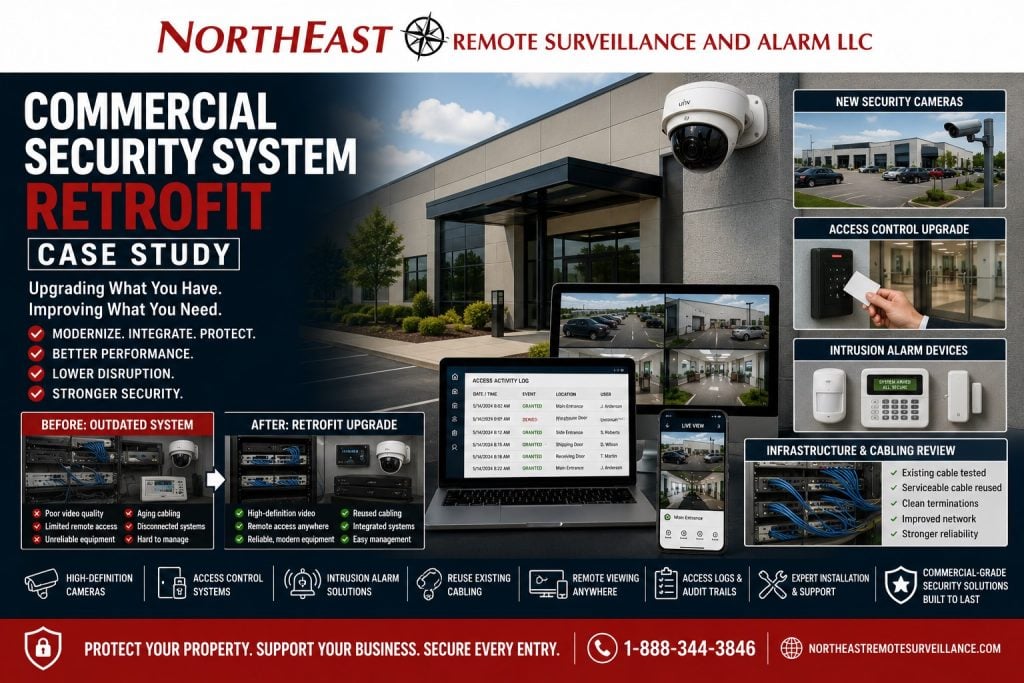
A commercial security system retrofit should improve protection without forcing a building owner to remove every usable part of the existing system. Northeast Remote Surveillance and Alarm, LLC helps commercial and industrial facilities modernize older cameras, access control, intrusion alarm devices, cabling, network equipment, and monitoring workflows through practical retrofit planning. This case study explains how a commercial security retrofit can turn an outdated, disconnected system into a more usable security platform while supporting the broader Case Studies by Northeast Remote Surveillance and Alarm, LLC library.
Project Snapshot
| Project Area | Details |
|---|---|
| Facility Type | Commercial / industrial property |
| Primary Concern | Older security equipment, disconnected systems, weak video review, limited access control, and aging infrastructure |
| Existing Condition | Mixed cameras, older recording equipment, legacy wiring, basic intrusion protection, and limited remote management |
| Upgrade Focus | Security cameras, access control, intrusion alarm, network equipment, reused pathways, documentation, and remote review |
| Main Goal | Improve security performance while reusing serviceable infrastructure where appropriate |
| System Approach | Retrofit existing commercial security system instead of unnecessary full replacement |
| Result | Better video review, stronger access control, improved alarm coverage, cleaner infrastructure, and a more supportable security system |
The Problem: The Building Had Security Equipment, But It Was No Longer Working as a System
The facility already had security equipment in place, but the system had become outdated, inconsistent, and difficult to manage.
The owner did not need a sales-driven recommendation to rip everything out. The owner needed a practical review of what could stay, what needed to be replaced, what was creating risk, and how the upgraded system could support daily operations.
The existing system created several issues:
- Older cameras had poor image quality.
- Some camera views were no longer useful.
- Recording equipment was outdated.
- Remote viewing was limited or unreliable.
- Access control was not organized around current staff needs.
- Intrusion alarm devices did not fully match current building use.
- Existing cabling needed to be evaluated before reuse.
- Documentation was incomplete.
- The system had been changed over time without a clean long-term plan.
- Service troubleshooting was harder than it needed to be.
The goal was to modernize the system without wasting budget on equipment or wiring that could still be used safely and reliably.
Why Commercial Security Retrofits Matter
Many commercial buildings do not need a complete security system replacement. They need a retrofit plan.
A retrofit is different from a basic replacement. It starts with the existing building, existing wiring, existing devices, existing head-end equipment, existing doors, existing camera locations, and existing operating needs. Then the security provider determines what should be reused, upgraded, relocated, replaced, integrated, or documented.
A strong retrofit plan can help a facility:
- Improve security without unnecessary demolition.
- Reuse working cable pathways where appropriate.
- Replace weak cameras while keeping useful mounting locations.
- Upgrade recording and remote viewing.
- Modernize access control.
- Improve alarm coverage.
- Clean up device labeling and documentation.
- Support future expansion.
- Reduce downtime during the upgrade.
- Avoid paying twice for work that does not need to be repeated.
For broader system planning, see Commercial & Enterprise Unified / Integrated Security Systems.
Existing System Challenges
The building had several common retrofit challenges.
Older Cameras Were Limiting Incident Review
The existing camera system recorded video, but some footage was not useful enough for real incident review.
That created problems when management needed to answer basic questions:
- Who entered the building?
- What vehicle was involved?
- What happened near the loading area?
- Which employee door was used?
- Was activity captured after hours?
- Could the footage be searched quickly?
- Could video clips be exported easily?
- Were the camera views aimed at the right areas?
A camera system that technically records but cannot provide usable review is not doing its job.
Recording Equipment Needed Modernization
Older DVRs and NVRs often become the weak point in a commercial security system.
Common problems include slow search, limited retention, failed hard drives, outdated remote access, poor mobile viewing, weak user permissions, unsupported firmware, and limited compatibility with newer cameras.
The retrofit plan included review of the recording platform so the owner could get better use out of the upgraded camera system.
Access Control Needed Better Organization
The facility had access needs that had changed over time. Staff roles, entrances, schedules, vendors, managers, and after-hours access were no longer aligned with the original security setup.
A retrofit was needed to organize controlled doors, users, schedules, credentials, and administrative permissions around how the building currently operated.
For related planning, see Commercial & Industrial Access Control Systems.
Intrusion Alarm Coverage Needed Review
Commercial buildings change. Walls move. Tenants change. Dock doors get added. Storage areas shift. Offices expand. Old alarm coverage does not always match the current risk.
The retrofit included review of the intrusion alarm layout so door contacts, motion detection, keypads, sirens, partitions, and monitoring requirements could be evaluated against the building’s current use.
Existing Cabling Needed to Be Tested Before Reuse
Reusing existing cabling can save money, but only if the cable is reliable, correctly routed, properly terminated, and suitable for the upgraded equipment.
NERSA reviewed existing pathways, terminations, network locations, camera drops, device locations, and head-end conditions before deciding what could be reused.
A good retrofit does not blindly reuse everything. It verifies what is worth keeping.
Upgrade Objectives
Northeast Remote Surveillance and Alarm, LLC planned the retrofit around practical commercial operation.
The main objectives were:
- Improve camera image quality and review value.
- Upgrade recording and remote viewing capability.
- Reuse serviceable cabling and pathways where appropriate.
- Replace outdated or unreliable equipment.
- Improve access control management.
- Review intrusion alarm coverage.
- Clean up system layout and documentation.
- Improve user permissions and administrative control.
- Reduce disruption to the business.
- Build a system that could be expanded in the future.
Recommended Solution
NERSA recommended a phased commercial security system retrofit.
The upgrade focused on improving the system where it mattered most while preserving useful infrastructure. Instead of treating the building like a blank slate, the retrofit was designed around the existing conditions.
The recommended solution included:
- Camera replacement in priority areas.
- Recording platform upgrade.
- Review and reuse of selected cable pathways.
- Access control improvements at selected doors.
- Intrusion alarm review and correction.
- Network and power cleanup.
- Remote viewing setup.
- User permission setup.
- Device labeling and documentation.
- Future expansion planning.
Scope of Work
The retrofit included planning, installation, testing, cleanup, and handoff.
The project scope included:
- Site walkthrough and existing system review.
- Camera location assessment.
- Existing cabling and pathway review.
- Recorder and head-end equipment review.
- Network and power review.
- Door and access control review.
- Intrusion alarm device review.
- Identification of equipment to reuse, replace, or remove.
- Replacement of outdated cameras in selected areas.
- Upgrade of recording equipment where needed.
- Access control updates for selected openings.
- Intrusion alarm coverage adjustments where needed.
- Remote viewing configuration for authorized users.
- User permission and administrative setup.
- Testing of cameras, access control, alarm devices, and remote access.
- Device labeling and basic documentation.
- Owner training and system handoff.
Camera Retrofit
The camera retrofit focused on usable video.
Newer camera locations were selected based on real review needs, not just where old cameras happened to be mounted. Some existing locations were still valuable. Others needed to be adjusted, replaced, or supplemented.
Camera planning focused on:
- Entrances
- Reception areas
- Employee doors
- Parking lots
- Loading docks
- Warehouse aisles
- Cash handling or transaction areas where applicable
- Exterior approaches
- Rear doors
- Equipment areas
- Shared corridors
- High-value storage areas
- After-hours activity zones
The goal was to give management better video when something happened, not just more cameras on the wall.
Recording and Remote Viewing Upgrade
The recording system was upgraded or corrected to support better review.
Important improvements included:
- Better video search.
- More reliable recording.
- Improved remote access.
- Better user permissions.
- Cleaner camera naming.
- More useful camera grouping.
- Better clip export support.
- Stronger support for future camera additions.
Remote viewing was configured for authorized users only. The owner could review cameras more efficiently without giving unnecessary access to every user.
Access Control Retrofit
The access control portion of the retrofit helped the facility improve how selected doors were managed.
A commercial access control retrofit can include card readers, mobile credentials, keypads, door controllers, electric strikes, electrified locks, request-to-exit devices, door contacts, power supplies, and user schedules.
The access control review focused on:
- Which doors actually needed electronic control.
- Which users needed access.
- Which schedules were required.
- Which credentials were still active.
- Which users needed to be removed.
- Which doors needed better event history.
- Whether existing hardware could be reused.
- Whether emergency egress was protected.
- Whether the system could support future doors.
The result was a more manageable access control structure instead of a patchwork of old keys, codes, and unclear permissions.
Intrusion Alarm Retrofit
The intrusion alarm portion of the retrofit focused on current building risk.
The existing alarm system was reviewed to determine whether the coverage still matched the facility. In many commercial buildings, alarm systems are installed years before the current use of the property. That can leave blind spots or unnecessary devices in areas that no longer matter.
Important alarm review areas included:
- Exterior doors
- Overhead doors
- Interior motion detection
- Warehouse areas
- Office areas
- Storage rooms
- Keypad locations
- Siren locations
- Communication path
- Monitoring setup
- User codes
- Partitions or arming areas
- After-hours procedures
For related alarm planning, see Commercial Burglar Alarm and Intrusion Detection Systems.
Reusing Existing Infrastructure
One of the most important parts of the retrofit was determining what could be reused.
Some existing infrastructure was still serviceable. Some was not.
NERSA evaluated:
- Existing camera cable
- Network cable
- Conduit paths
- Backboxes
- Equipment locations
- Power supplies
- Door hardware
- Alarm wire
- Head-end equipment
- Network switches
- Racks and cabinets
- Mounting locations
- Labeling condition
Reuse decisions were based on performance, safety, reliability, compatibility, and long-term support. The goal was to protect the customer’s budget without building a new system on weak infrastructure.
Before and After
| Before Retrofit | After Retrofit |
|---|---|
| Older cameras with weak review value | Improved camera views and clearer video |
| Outdated recorder or limited remote access | Better recording, search, export, and authorized remote review |
| Unclear access control permissions | Cleaner user roles, schedules, and administrative control |
| Alarm coverage did not fully match current use | Intrusion coverage reviewed and adjusted where needed |
| Existing wiring condition was uncertain | Cabling and pathways evaluated for reuse |
| Limited documentation | Better labeling, handoff, and support records |
| Disconnected security layers | Cameras, access control, and alarm planning aligned |
| Reactive service approach | More structured long-term security platform |
Why Retrofit Instead of Full Replacement?
Full replacement is sometimes necessary. In this case, a retrofit approach made more sense.
A full replacement may be needed when equipment is obsolete, wiring is damaged, device locations are wrong, records are missing, or the system cannot support the building’s needs. But when parts of the existing system are still useful, a retrofit can be the smarter path.
The retrofit approach helped the owner:
- Avoid unnecessary replacement.
- Spend budget on the weakest parts of the system.
- Improve system performance faster.
- Keep disruption lower.
- Preserve usable infrastructure.
- Build a cleaner path for future upgrades.
A good retrofit is not a shortcut. It is a disciplined way to modernize the system intelligently.
Network and Power Cleanup
Modern commercial security systems depend on clean network and power design.
The retrofit included review of network equipment, PoE capacity, equipment locations, power supplies, backup power, cable terminations, and device connectivity.
Security equipment is only as reliable as the infrastructure behind it. Cameras, access control panels, alarm communicators, and remote viewing platforms all depend on stable power, proper wiring, and clean network planning.
User Permissions and Administration
The system was configured so the owner could manage daily security without unnecessary confusion.
Administrative planning included:
- Authorized remote viewing users.
- Access control administrators.
- Alarm users.
- Credential holders.
- User removal process.
- Camera naming.
- Door naming.
- Event review permissions.
- Clip export permissions.
- Basic training for responsible users.
This matters because a modern system can still become a problem if too many users have too much access or old users are never removed.
Documentation and Handoff
Documentation is one of the biggest differences between a clean retrofit and a messy equipment swap.
NERSA documented the upgraded system so future service would be easier. Device names, camera views, controlled doors, alarm zones, head-end locations, and administrative structure were cleaned up as part of the project handoff.
The owner received a more supportable system, not just new equipment.
Results
The commercial facility gained a stronger and more usable security platform.
The retrofit helped deliver:
- Clearer camera review.
- Better recording and remote access.
- Improved access control management.
- Cleaner intrusion alarm coverage.
- Better use of existing infrastructure.
- Reduced unnecessary replacement cost.
- Better documentation.
- More supportable equipment layout.
- Improved user administration.
- A stronger foundation for future expansion.
The result was a practical commercial security upgrade designed around the existing building and the owner’s real needs.
Why This Project Was a Good Fit for NERSA
Northeast Remote Surveillance and Alarm, LLC focuses on commercial, industrial, institutional, and non-residential security systems.
Commercial retrofits require more than installing new hardware. They require understanding old systems, existing cable, doors, access control, cameras, alarm coverage, network equipment, user permissions, monitoring, and long-term service.
NERSA designs retrofit projects around the building as it exists today and the way the business needs to operate tomorrow.
What This Case Study Is and Is Not
This page is a commercial security system retrofit case study.
It is not a residential security page. It is not a single-camera product page. It is not a general IT article. It is not a fire alarm design page. It is not a generic alarm-only page.
This page focuses on retrofitting older commercial security systems: cameras, recording, access control, intrusion alarm, cabling, remote access, user permissions, documentation, and long-term support.
Lessons From This Case Study
This retrofit shows several important lessons:
- Existing systems should be evaluated before replacement.
- Usable infrastructure can sometimes be reused.
- Old cameras may record but still fail to provide useful review.
- Access control permissions need regular cleanup.
- Intrusion alarm coverage should match current building use.
- Remote access must be configured with proper user permissions.
- Documentation makes future service easier.
- Network and power design affect system reliability.
- Retrofit planning can reduce disruption.
- A phased upgrade can be smarter than a full rip-and-replace.
When a Business Should Consider a Security System Retrofit
A commercial facility should consider a retrofit if:
- Cameras are outdated or unclear.
- Video is difficult to search or export.
- Remote viewing is unreliable.
- Existing wiring may still be usable.
- Access control users are disorganized.
- Old employees or vendors may still have access.
- Alarm coverage no longer matches the building.
- Recording equipment is outdated.
- Multiple systems are disconnected.
- Documentation is missing.
- The business is expanding or changing layout.
- A full replacement may not be necessary.
Commercial Security Retrofit Planning Checklist
Before retrofitting a commercial security system, a business should evaluate:
- Existing cameras
- Camera views
- Recording equipment
- Remote viewing
- Network switches
- PoE capacity
- Cable condition
- Conduit and pathways
- Access-controlled doors
- Door hardware
- Alarm zones
- Keypad locations
- Motion detection
- Door contacts
- User codes
- Credential holders
- Administrative permissions
- Monitoring path
- Backup power
- Labeling
- Documentation
- Future expansion needs
Request a Commercial Security Retrofit Assessment
If your commercial building, industrial facility, warehouse, office, healthcare office, school, logistics property, or multi-tenant facility has an older security system that needs better cameras, access control, intrusion alarm coverage, remote viewing, cabling cleanup, or documentation, Northeast Remote Surveillance and Alarm, LLC can help.
Call 1-888-344-3846 or use Request a Security Assessment to schedule a commercial security system retrofit review.
Frequently Asked Questions About Commercial Security System Retrofits
What is a commercial security system retrofit?
A commercial security system retrofit upgrades an existing security system by reusing serviceable infrastructure where appropriate and replacing outdated equipment where needed. It may include cameras, recording equipment, access control, intrusion alarm devices, cabling, network equipment, remote viewing, monitoring paths, and documentation.
Is a retrofit the same as replacing the whole system?
No. A retrofit is different from a full replacement. A retrofit evaluates what already exists and determines what can be reused, upgraded, repaired, relocated, or replaced. A full replacement removes and replaces most or all of the system.
Can old camera wiring be reused?
Sometimes. Existing camera wiring can be reused only if it is in good condition, properly routed, correctly terminated, compatible with the upgraded equipment, and reliable enough for long-term service. NERSA evaluates wiring before recommending reuse.
Can NERSA upgrade an old DVR or NVR?
Yes. NERSA can evaluate older recording equipment and recommend upgrades when the system has poor search tools, limited remote viewing, failed storage, weak retention, outdated firmware, or limited compatibility with newer cameras.
Can access control be added to an existing commercial building?
Yes. Access control can often be added to existing buildings. The right design depends on the door hardware, frame condition, egress requirements, cable pathways, credential needs, schedules, power, and long-term management requirements.
Can an intrusion alarm system be retrofitted?
Yes. Existing intrusion alarm systems can often be reviewed, expanded, corrected, or upgraded. Door contacts, motion detectors, keypads, sirens, communicators, user codes, and monitoring paths may all need review during a retrofit.
What equipment should be replaced during a security retrofit?
Equipment should be replaced when it is outdated, unreliable, unsupported, poorly placed, incompatible, undocumented, or no longer meeting the facility’s needs. The exact scope depends on the existing system and the building’s security goals.
Does a retrofit reduce business disruption?
A well-planned retrofit can reduce disruption because it uses existing pathways and equipment where appropriate. NERSA plans retrofit work around the building, operating schedule, user needs, and system priorities.
How do we know whether to retrofit or fully replace the system?
The decision depends on the condition of the equipment, cabling, recording platform, access control hardware, alarm devices, network infrastructure, documentation, and long-term support needs. A site assessment is the best way to determine the right path.
How do we start a commercial security retrofit?
Call 1-888-344-3846 or use Request a Security Assessment. NERSA can review the existing cameras, access control, alarm system, cabling, network equipment, remote access, and documentation before recommending a retrofit plan.