
Compare cloud, on-premises, and hybrid video surveillance by storage, bandwidth, remote access, cybersecurity, ownership, recurring cost, and long-term support.

Request a commercial video-surveillance assessment
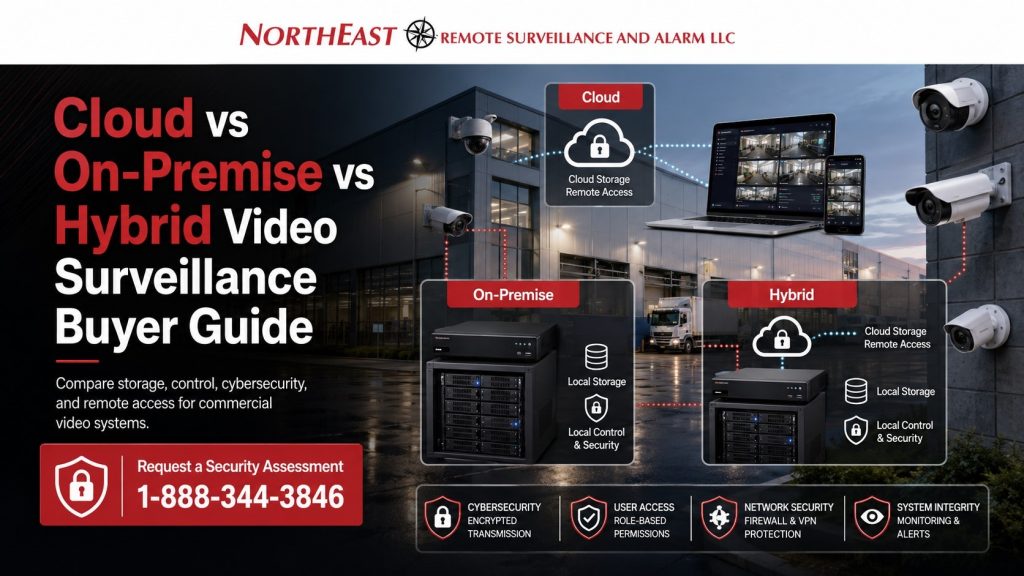
Start With Operating Requirements
The best architecture depends on the facility—not a universal technology preference. Define camera count, image detail, retention, remote users, locations, internet reliability, cybersecurity, IT support, integrations, incident workflow, and expected system life before selecting a platform.
Cloud systems use hosted services for management, storage, or both. On-premises systems primarily record to equipment at the property. Hybrid systems combine local recording with selected cloud access, administration, backup, analytics, or health services.
Quick Comparison
| Architecture | Common strengths | Questions to resolve |
|---|---|---|
| Cloud | Central administration, remote access, managed software, and multi-site consistency | Subscriptions, upload bandwidth, retention, export, service dependency, and data policy |
| On-premises | Local recording control, large storage options, and reduced dependence on cloud storage | Recorder sizing, maintenance, updates, backups, secure remote access, and replacement cycle |
| Hybrid | Local retention with selected cloud management, access, backup, or services | Which functions are local or hosted, licensing, administration, failure modes, and support |
Product definitions vary. A “cloud” camera may still record locally, and a local recorder may still use hosted services. Confirm the exact data path and behavior for the proposed system.
Storage, Retention, and Image Quality
Storage requirements change with camera count, resolution, frame rate, compression, scene activity, continuous or event recording, and retention days. The design should also define how quickly authorized users can find, export, and preserve relevant footage.
Cloud pricing may vary by camera, storage, retention, and feature tier. Local systems require correctly sized recorders, drives, servers, or appliances. Hybrid systems may keep routine footage locally while using hosted tools or selected cloud retention.
Network, Bandwidth, and Remote Access
Cloud and hybrid designs should be checked against upload capacity, internet reliability, firewall policy, VLANs, remote sites, and business-continuity requirements. On-premises recording can reduce continuous cloud traffic but still needs a secure method for authorized remote viewing and updates.
Multi-site organizations should define whether users need one dashboard, standardized permissions, shared investigation workflows, and centralized system health reporting.
Cybersecurity and Accountability
Every architecture needs strong account controls, multifactor authentication where supported, least-privilege access, prompt offboarding, network segmentation, updates, encryption, audit records, controlled vendor access, and a documented incident process.
Cloud security depends partly on the provider and account administration.
Local security depends heavily on the owner’s network and maintenance.
Hybrid systems require both responsibilities to be clearly assigned.
Review NERSA’s cybersecurity and data-protection standards.
Cost, Ownership, and Lifecycle
Compare total cost over several years. Include cameras, mounting, cabling, switching, recorders, drives, cloud subscriptions, support, warranties, replacement equipment, storage growth, exports, training, and expansion.
- Who owns the cameras, recorder, licenses, accounts, and footage?
- What continues working if internet service or a subscription stops?
- How can footage and configuration data be exported?
- Can installed cameras or infrastructure support a future platform?
Migration and Future Growth
An existing camera system may support a staged upgrade. NERSA can evaluate cameras, recorders, storage, cabling, networks, accounts, licenses, and manufacturer support to determine what can be retained. Expansion plans should include recording capacity, switch ports, PoE, bandwidth, rack space, naming, permissions, and documentation.
Frequently Asked Questions
Which architecture is most secure?
None is automatically most secure. Platform design, configuration, network controls, updates, permissions, monitoring, vendor practices, and day-to-day administration determine risk.
Which option costs less?
It depends on cameras, retention, storage, subscriptions, network work, support, and system life. Compare total ownership cost rather than installation price alone.
Is hybrid video a good warehouse option?
It can be when local recording and longer retention are important but authorized users also need remote access, alerts, health monitoring, or centralized administration.
Can an existing system move to a new architecture?
Often in phases. Compatibility, condition, cybersecurity, licensing, ownership, performance, and manufacturer support should be assessed before reuse.
Request a Video Platform Assessment
Request a commercial video-surveillance assessment to compare cloud, on-premises, and hybrid options.