
Video management systems help commercial and industrial facilities organize cameras, recording, user access, live viewing, video search, event review, evidence export, and long-term surveillance operations.

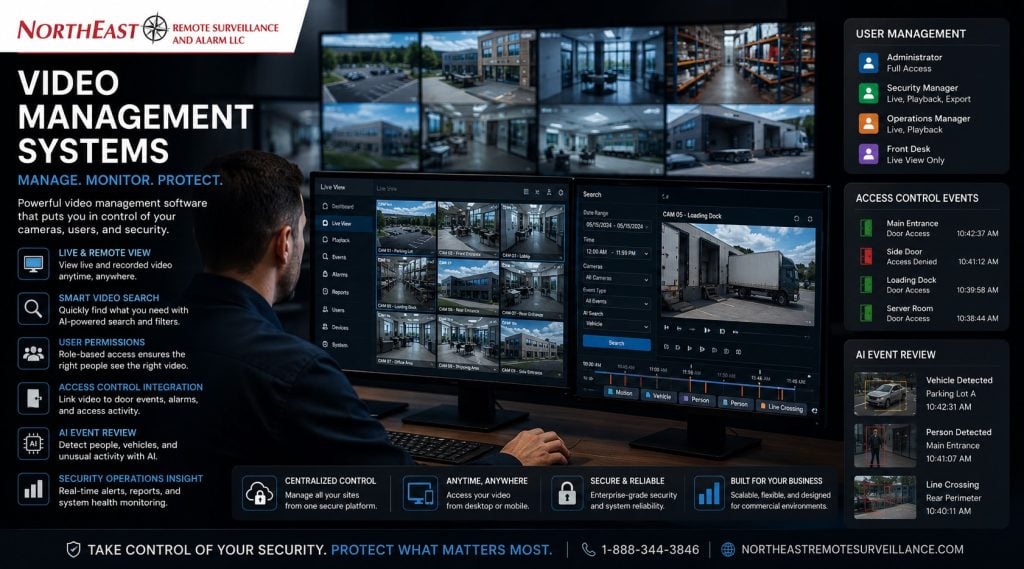
This guide covers how video management software supports commercial buildings, warehouses, manufacturing facilities, logistics sites, healthcare properties, municipal buildings, contractor yards, and multi-site organizations.
For broader camera system planning, start with Commercial and Industrial Video Surveillance Systems.
What Is a Video Management System?
A video management system, often called a VMS, is the software environment used to manage a commercial camera system. It helps users view live cameras, search recorded footage, manage users, export video clips, organize camera names, review events, monitor camera health, and connect surveillance footage to broader security workflows.
A VMS is not just a screen full of cameras. For commercial and industrial facilities, it becomes the control layer that determines how video is accessed, searched, retained, protected, and used during incidents.
A strong video management system should make surveillance easier to operate, not harder. If users cannot quickly find footage, review events, control permissions, or understand which camera covers which area, the camera system loses much of its value.
Why Commercial Facilities Need the Right Video Management Systems
Commercial properties often have more complex surveillance needs than small consumer camera systems. They may need multiple users, multiple locations, different permission levels, longer retention, remote access, camera health alerts, evidence exports, integration with access control, and support for future expansion.
A warehouse manager may need to review dock activity. A property manager may need lobby and parking lot footage. An operations director may need multi-site visibility. A school administrator may need controlled access to specific camera views. A municipal facility may need documented export procedures. An industrial plant may need footage tied to access-control events or after-hours alerts.
The video management system should support those workflows clearly.
Core Functions of a Video Management System
A commercial VMS may support many different functions depending on the platform and system design. The most important functions usually include live viewing, recording management, video search, permissions, evidence export, health monitoring, and integration.
Live Camera Viewing
Live viewing allows authorized users to see current activity across entrances, parking areas, loading docks, hallways, production areas, yards, gates, lobbies, and other monitored spaces. The system should be organized so users can find the right camera quickly.
A good VMS uses clear camera names, logical groups, site maps, favorites, and layouts instead of forcing users to search through confusing camera labels.
Recorded Video Search
Recorded video search is one of the most important parts of a VMS. When an incident occurs, users need to find footage quickly by camera, time, event, motion, analytics, or other searchable criteria.
The system should support practical investigation workflows. Searching footage should not require watching hours of irrelevant video.
User Permissions
User permissions define who can view cameras, search recordings, export footage, manage users, change settings, or access sensitive areas. Different users may need different levels of access.
A receptionist, facility manager, IT administrator, warehouse supervisor, executive, security director, and property owner should not automatically have the same permissions.
Evidence Export
Control and document video exports. Where supported, a commercial VMS should let approved users export footage in a usable format. Keep records of the footage exported, the time of export and who handled it.
This matters for incidents, insurance claims, workplace review, law enforcement requests, property damage, freight disputes, and internal investigations.
Camera Health Monitoring
Camera health monitoring helps identify offline cameras, recording failures, storage problems, network issues, and device communication errors. This is especially important for businesses that rely on surveillance for after-hours review, monitored events, or incident documentation.
A camera that has been offline for weeks is not a security system. It is a liability.
On-Premise, Cloud, and Hybrid Video Management Systems Options
Video management systems may be designed around on-premise recording, cloud management, or hybrid architecture. The right approach depends on the facility’s camera count, bandwidth, retention needs, cybersecurity expectations, management structure, and operational risk.
On-Premise VMS
An on-premise VMS uses local servers, recorders, or appliances to manage and store video. This approach is often useful for larger camera systems, industrial properties, warehouses, manufacturing plants, facilities with longer retention needs, and environments that require local control.
On-premise systems may reduce constant cloud bandwidth demand, but they require proper server planning, maintenance, cybersecurity, backup power, and lifecycle management.
Cloud Video Management Systems
A cloud VMS can support remote access, centralized management, easier multi-site visibility, and simplified administration. Cloud systems may be useful for offices, branch locations, smaller commercial facilities, or distributed organizations that need centralized control.
Cloud systems still require planning. Bandwidth, retention cost, cybersecurity, user permissions, and outage behavior should be reviewed before deployment.
Hybrid Video Management Systems
A hybrid VMS can combine local recording with cloud access or cloud management. This is often a strong model for commercial and industrial facilities that need local recording resilience while still giving authorized users remote visibility and centralized control.
For deeper cloud and hybrid recording planning, use Cloud Video Surveillance Recording with AI to evaluate cloud architecture, AI search, bandwidth, retention, and evidence governance.
Video Search and Investigation Workflows
A video management system should help users answer questions quickly after an incident. The system should make it easier to determine what happened, where it happened, when it happened, which camera captured it, and how the footage can be reviewed or exported.
Useful investigation tools may include:
- Timeline search
- Motion search
- AI event filtering
- Camera grouping
- Bookmarking
- Incident notes
- Export tools
- Multi-camera playback
- Access-event review
- Vehicle or person search where supported
- Camera maps or layouts
The system should be designed around how the business actually investigates events.
AI Analytics Inside Video Management Systems
Many modern video management systems include AI-supported search, event filtering, object detection, people detection, vehicle detection, line crossing, zone alerts, loitering alerts, or other analytics tools.
For supported event-to-video workflows, see OpenEye and Alarm.com integration planning.
AI can improve video review when it is planned correctly. It can help users filter footage, identify important activity, reduce nuisance events, and support faster investigations. However, AI is not a replacement for proper camera placement, lighting, recording, retention, or response procedures.
AI tools work best when cameras are positioned for the task, detection zones are defined carefully, schedules are set correctly, and users understand how alerts should be reviewed.
User Roles and Access Control
A commercial video management system should be built around defined user roles. Without role-based permissions, too many users may have access to sensitive video, export privileges, administrative settings, or cameras they do not need.
Common VMS user roles may include:
- View-only users
- Site managers
- Security supervisors
- Facility managers
- IT administrators
- Evidence custodians
- Executives
- Multi-site administrators
- Monitoring users
- Restricted camera users
The system should follow the principle of least privilege. Users should have access to the cameras and functions they need, not every camera and every setting by default.
Evidence Export and Retention Planning
Video management systems should support the way the business handles evidence. Footage may be needed for workplace incidents, parking lot damage, theft, trespassing, freight disputes, access-control events, vandalism, or insurance claims.
Important evidence planning questions include:
- Who can export footage?
- Are exports logged?
- How are files named?
- Where are exported clips stored?
- How long is footage retained?
- Can footage be protected from overwrite?
- Can incidents be bookmarked?
- Who approves sensitive exports?
- Are user permissions reviewed periodically?
Retention should be based on business risk, incident discovery windows, contractual requirements, insurance expectations, and operational needs. It should not be guessed after the system is installed.
Infrastructure Behind Video Management Systems
A VMS depends on more than software. It relies on cameras, PoE switches, cabling, fiber, servers, recorders, storage, workstations, firewalls, remote access paths, bandwidth, backup power, and system documentation.
Poor infrastructure can cause slow playback, dropped cameras, failed recording, limited remote access, incomplete exports, or weak multi-site performance.
For the infrastructure behind commercial video systems, use Commercial Security Infrastructure Planning to plan PoE switching, structured cabling, fiber, UPS backup, network segmentation, recording equipment, and long-term support.
Integration With Access Control, Alarms, and Monitoring
Video management systems become more useful when they support the rest of the security environment. A VMS may connect video footage to access-control events, intrusion alarm signals, intercom calls, gate activity, monitoring alerts, AI events, or license plate recognition data.
Access control can show who used a door. Video can show what happened at that door. An alarm can identify a triggered area. Video can help verify whether the event is real. Intercom activity can be reviewed with nearby camera footage.
For broader system coordination, use Commercial and Industrial Security System Integration to plan how cameras, access control, alarms, monitoring, intercoms, and reporting should work together.
Multi-Site Video Management Systems
Multi-site businesses often need centralized control over users, cameras, locations, retention, alerts, and system health. A strong VMS can help standardize camera naming, user permissions, recording rules, export procedures, and system administration across multiple facilities.
This is useful for:
- Regional warehouses
- Multi-site commercial offices
- Logistics networks
- Healthcare groups
- Municipal properties
- School systems
- Industrial campuses
- Contractor yard operators
- Property management portfolios
- Multi-tenant commercial groups
The more locations a business operates, the more important standardization becomes.
VMS Planning for Different Facility Types
A video management system should be matched to the way the property operates.
Office and Commercial Buildings
Office buildings may need camera groups for entrances, lobbies, hallways, parking lots, tenant spaces, rear doors, and shared areas. User permissions may differ between property managers, ownership, tenants, and maintenance staff.
Warehouses and Logistics Facilities
Warehouses may need VMS layouts for loading docks, shipping areas, trailer yards, employee entrances, truck courts, office areas, aisle views, and after-hours monitoring zones. Search tools and retention planning are often important because incidents may involve freight movement, vehicles, and dock activity.
Manufacturing and Industrial Facilities
Manufacturing plants may need camera groups for production floors, machine areas, restricted rooms, contractor entrances, utility areas, exterior yards, employee doors, and loading zones. Industrial facilities often require stronger infrastructure planning and more controlled user permissions.
Healthcare, School, and Municipal Properties
Healthcare, school, and municipal facilities may need more careful permissions, documentation, privacy awareness, and event review workflows. Camera access should be based on operational responsibility rather than broad system-wide access.
Cybersecurity and Video Management Systems Administration
A video management system should be administered like business-critical infrastructure. Weak passwords, shared logins, outdated software, unmanaged remote access, and broad user permissions can create unnecessary security risks.
Important cybersecurity controls may include:
- Unique user accounts
- Strong passwords
- Multi-factor authentication where supported
- Role-based permissions
- Secure remote access
- Regular software updates
- Audit logs where available
- Disabled unused accounts
- Network segmentation
- Controlled vendor access
- Documentation of user roles and system settings
Cybersecurity should be part of the VMS design, not an afterthought.
Documentation and Long-Term Support
A VMS is much easier to manage when the system is documented properly. Documentation helps with service, troubleshooting, user training, camera additions, system upgrades, and future expansion.
Useful documentation may include:
- Camera names
- Camera locations
- Camera groups
- Recording settings
- Retention rules
- User roles
- Export procedures
- Network notes
- Server or recorder details
- Software version information
- Remote access procedures
- Service records
A poorly documented VMS becomes harder to support every year.
Why Businesses Choose NERSA for Video Management Systems
Northeast Remote Surveillance and Alarm, LLC designs video management systems around real commercial and industrial operations. The goal is to make video easier to use, easier to search, easier to protect, and easier to manage over time.
NERSA helps businesses plan VMS architecture, camera organization, recording methods, retention strategy, user permissions, remote access, AI search, integration, infrastructure, documentation, and long-term support.
The right video management system should not just show cameras. It should help the organization manage video as a useful security and operational resource.
Request a Video Management System Assessment
NERSA can review your video management system for recording reliability, camera organization, user permissions, and remote access. We also assess AI search, evidence export, multi-site viewing, and integration with access control or alarms.
Call 1-888-344-3846 or use the Request a Security Assessment page to begin a video management system review.
Frequently Asked Questions about Video Management Systems
What is a video management system?
A video management system is software used to manage commercial surveillance cameras, live viewing, recorded footage, video search, user permissions, evidence export, camera health, alerts, and system administration.
What does Video Management Systems stand for?
VMS stands for video management system. It is the software platform or management environment used to organize and operate a commercial or industrial video surveillance system.
Why does a commercial camera system need a VMS?
A commercial camera system needs a VMS so users can manage cameras, search recorded video, control permissions, export footage, monitor camera health, and organize video across one or multiple locations.
Is a VMS the same as an NVR?
No. An NVR records network camera footage, while a VMS manages video operations. Some systems combine recording and management functions, but a VMS usually refers to the broader software environment used to view, search, manage, and administer video.
Can a VMS manage multiple locations?
Yes. Many video management systems can support multi-site camera management, centralized user permissions, remote viewing, camera health monitoring, and standardized reporting across multiple commercial locations.
Can video management systems use AI analytics?
Yes. Many modern video management systems support AI search, people detection, vehicle detection, line crossing, zone alerts, loitering detection, object filtering, and event review tools. These features work best when camera placement and alert rules are planned correctly.
Can a VMS integrate with access control?
Yes. A VMS can often integrate with access control so users can review video tied to door events, badge activity, forced-door alarms, held-door events, gate access, and restricted-area movement.
Who should have access to a commercial VMS?
Access should be based on job role. Facility managers, security supervisors, IT staff, executives, reception staff, and site managers may all need different permissions. Not every user should have export rights or administrative access.
How long should video be retained in a VMS?
Retention depends on the facility type, risk level, storage capacity, insurance expectations, incident history, and investigation needs. Retention should be documented and reviewed instead of guessed.
Can a VMS be cloud-based?
Yes. Some video management systems are cloud-based, some are on-premise, and some are hybrid. The right model depends on camera count, bandwidth, retention needs, cybersecurity requirements, remote access needs, and facility risk.
What is the difference between cloud VMS and on-premise VMS?
A cloud VMS uses cloud infrastructure for management, access, or storage, while an on-premise VMS uses local servers or recorders. A hybrid VMS combines local recording with cloud access or cloud management.
Why is cybersecurity important for a VMS?
A VMS controls access to live and recorded video. Weak credentials, broad permissions, outdated software, or poor remote access controls can create security risks. VMS administration should include strong passwords, user roles, updates, and network controls.
Can a VMS help with evidence export?
Yes. A VMS can help authorized users export video clips, organize incidents, review footage, and maintain clearer evidence workflows. Export permissions should be limited and documented.
What is the next step for choosing a video management system?
The next step is a site-specific assessment. NERSA reviews the facility layout, camera count, recording needs, user roles, remote access requirements, integration goals, network infrastructure, and long-term support expectations before recommending a VMS approach.