
Use AI-assisted video analytics to detect, classify, search and review relevant activity at commercial and industrial properties throughout Allentown, Bethlehem, Easton and the surrounding Lehigh Valley.

Lehigh Valley AI Video Assessment
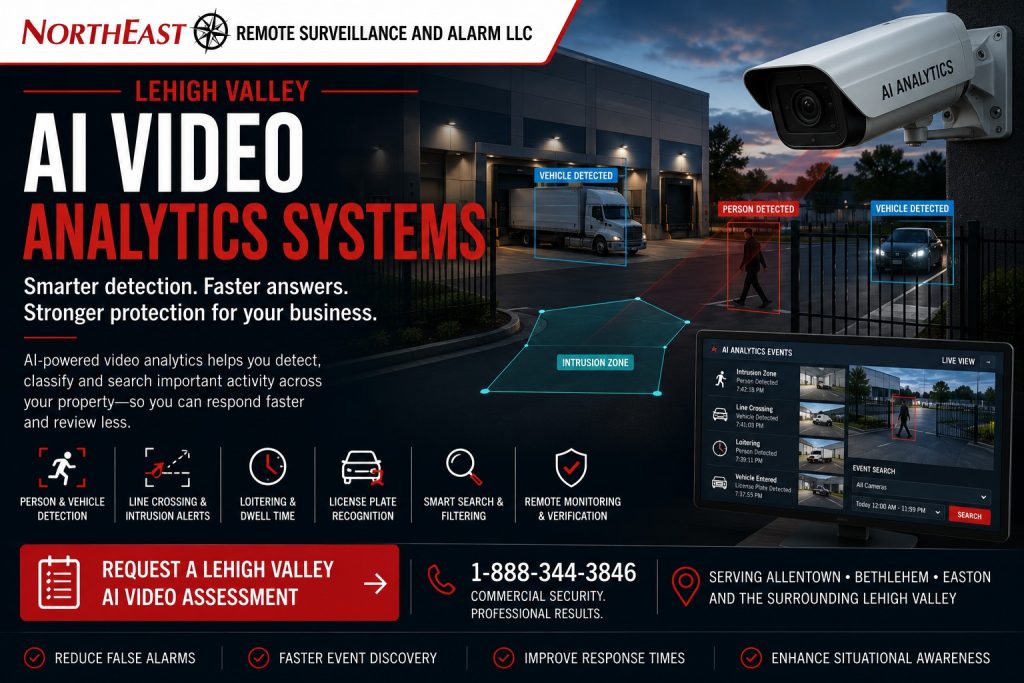
This focused regional resource is part of NERSA’s Lehigh Valley Commercial and Industrial Security Systems guide, which organizes commercial and industrial security planning across the region.
A traditional camera system records what happens.
An AI-assisted video system can also help authorized users find important activity, distinguish people from vehicles, identify movement within defined areas and generate alerts based on selected conditions.
On this page: Analytics explained · Planning process · Common questions · Assessment
Northeast Remote Surveillance and Alarm, LLC designs, installs, integrates, upgrades and supports AI video analytics in the Lehigh Valley. We serve warehouses, manufacturing plants, distribution centers, logistics sites, contractor yards and fleet facilities. Other properties include offices, healthcare sites, schools, municipal buildings, industrial parks, parking areas and organizations with several locations.
A properly planned analytics system may coordinate person and vehicle detection, line crossing, intrusion zones, loitering alerts, object search, appearance search, license plate recognition, alarm verification, remote video monitoring and event-based recording.
The objective is not to generate the largest possible number of alerts.
The objective is to identify useful events, reduce unnecessary review and help authorized personnel respond to activity that matters to the property.
Where analytics requires additional cameras or improved camera placement, review commercial security camera installation in the Lehigh Valley before selecting software features.
Commercial and industrial systems only • Person detection • Vehicle detection • Perimeter analytics • Event search • Alarm verification • Remote monitoring • Multi-site video
Project availability may depend on property location, camera position, image quality, lighting, network capacity, recording platform, software licensing, manufacturer support, administrator access, equipment ownership, analytics requirements, monitoring procedures and long-term service needs.
What Are AI Video Analytics?
AI video analytics use software, camera processing or a combination of both to evaluate recorded or live video for selected objects, movements and event conditions.
Depending on the selected platform, analytics may help identify:
- People
- Passenger vehicles
- Commercial trucks
- Bicycles
- Objects entering a defined area
- Objects crossing a virtual line
- Activity during selected schedules
- Loitering
- Direction of travel
- Vehicles entering or leaving
- Activity near gates or doors
- Movement around loading docks
- Repeated activity in restricted areas
- Selected visual characteristics
- License plates
- Unusual event patterns
Analytics do not understand a property in the same way an experienced employee does.
The system must be configured around the actual camera view, operating schedule, facility activity and response objective.
AI-Assisted Video Versus Traditional Motion Detection
Traditional video motion detection reacts to changes in an image.
It may activate because of:
- Rain
- Snow
- Shadows
- Headlights
- Trees
- Insects
- Camera vibration
- Changing light
- Moving equipment
- Reflections
- Steam or exhaust
- Animals
AI-assisted analytics may classify an object before creating an event.
For example, a system may be configured to alert when a person enters a fenced equipment area after hours while ignoring routine changes in light or vegetation.
Classification can improve event relevance, but it does not eliminate every unwanted alert or guarantee that every person or vehicle will be detected.
Camera position, image quality, weather, obstructions, object size and configuration all affect performance.
Why Lehigh Valley Businesses Use AI Video Analytics
Find Recorded Events Faster
Reviewing hours of video manually can delay an investigation.
AI-assisted search may help authorized users narrow recorded video by:
- Person
- Vehicle
- Time
- Camera
- Direction of travel
- Area
- Object type
- Visual characteristics
- License plate
- Event classification
Search results should still be reviewed by an authorized person before conclusions are made.
Improve After-Hours Detection
Analytics may identify people or vehicles entering selected areas after the property closes.
This can be useful around:
- Loading docks
- Truck courts
- Trailer yards
- Contractor yards
- Exterior storage
- Parking areas
- Vehicle gates
- Fence lines
- Utility areas
- Building approaches
Reduce Unnecessary Event Review
Properly configured analytics can help separate selected person or vehicle events from routine scene movement.
This may reduce the amount of irrelevant video presented to authorized users or monitoring personnel.
Support Alarm Verification
A camera analytic event may provide visual information that helps determine whether activity involves an employee, visitor, delivery, animal, equipment movement or unauthorized person.
Analytics may also be associated with traditional intrusion-alarm signals when the selected systems support integration.
Improve Multi-Site Video Management
Organizations with several Lehigh Valley properties may use centralized analytics and search to review events across multiple buildings or locations.
User permissions should limit each person to the sites and functions required for their role.
Create More Useful Operational Awareness
Some businesses use video analytics to understand vehicle flow, recurring activity, loading-area use or patterns around entrances.
Operational analytics should have a defined business purpose and should not be treated as exact measurements unless the platform and conditions support that use.
Person and Vehicle Classification
Person and vehicle classification can help distinguish objects within a camera view.
A qualifying system may identify:
- Person detected
- Vehicle detected
- Person entering an area
- Vehicle entering an area
- Person crossing a line
- Vehicle crossing a line
- Person present during a restricted schedule
- Vehicle stopped in a selected zone
Classification depends on whether the object is large and clear enough in the image.
A distant person occupying only a small number of pixels may not be classified reliably. A partially hidden vehicle, crowded loading area or poorly lit scene may also reduce performance.
The camera must first provide a usable image before analytics can add meaningful value.
Perimeter Intrusion Analytics
Perimeter analytics may monitor selected exterior areas for people or vehicles during defined schedules.
Potential applications include:
- Fence-line approaches
- Restricted yards
- Exterior equipment areas
- Trailer storage
- Vehicle gates
- Loading docks
- Utility compounds
- Rooftop approaches
- Building perimeters
- Vacant areas
- Repeated trespassing locations
A detection zone should focus on the area where action is required.
Making the entire image one large alarm zone may generate unnecessary events from public roads, sidewalks, neighboring properties or routine employee activity.
Perimeter analytics should be tested during daytime, nighttime and changing weather conditions.
Virtual Line-Crossing Detection
A virtual line can be placed within the camera view to identify people or vehicles moving across a defined boundary.
Line-crossing analytics may be used at:
- Gates
- Driveways
- Employee entrances
- Restricted corridors
- Loading areas
- Fence openings
- Warehouse aisles
- Exterior storage
- Parking entrances
- Pedestrian routes
Some platforms can distinguish direction of travel.
For example, a camera may generate an event when a person crosses toward a restricted yard while ignoring movement away from the area.
The virtual line must be placed where people or vehicles appear clearly enough for dependable classification.
Loitering and Dwell-Time Analytics
Loitering analytics may identify when a person remains within a selected area longer than an approved period.
Potential applications include:
- Closed business entrances
- Loading docks
- Vehicle gates
- Exterior equipment
- Utility areas
- Employee-only entrances
- Parking-lot corners
- Trailer yards
- Repeated trespassing locations
The dwell time should reflect normal operations.
A setting that is too short may alert on employees, drivers or visitors performing legitimate tasks. A setting that is too long may delay review of meaningful activity.
Loitering detection should be paired with clear response procedures.
Object and Appearance Search
Some video-management platforms can help users search recorded video by selected visual characteristics.
Search options may include:
- Person
- Vehicle
- Clothing color
- Vehicle color
- Direction
- Camera
- Time
- Entry or exit point
- Object type
Appearance search can help narrow an investigation, but it should not be treated as positive identification of a person.
Lighting, camera color reproduction, distance, obstruction and image quality can affect the displayed characteristics.
Search results should be verified by reviewing the original video.
Vehicle Analytics
AI-assisted vehicle analytics may help document activity around:
- Commercial gates
- Employee parking
- Truck entrances
- Service drives
- Shipping and receiving
- Contractor yards
- Fleet areas
- Industrial parks
- Loading docks
- Restricted vehicle routes
Potential functions may include:
- Vehicle classification
- Direction of travel
- Line crossing
- Dwell time
- Vehicle-counting estimates
- Entrance and exit events
- Wrong-direction alerts
- Stopped-vehicle alerts
- Associated plate capture
A general vehicle analytic is not the same as license plate recognition.
AI Analytics at Commercial Gates
A commercial gate may combine:
- Vehicle detection
- Person detection
- Gate-position monitoring
- Credential events
- Intercom calls
- Entrance cameras
- Exit cameras
- License plate recognition
- Tailgating review
- Remote release
- Remote video monitoring
Analytics may help identify a vehicle approaching after hours, a person walking around the gate or a second vehicle following through during one access event.
No analytic should be relied upon as the only gate safety device.
Vehicle loops, photo eyes, monitored safety edges, reversing devices and other required gate-safety components serve different purposes from video analytics.
AI Analytics for Loading Docks
Loading docks include frequent movement by employees, drivers, forklifts, trailers and freight.
Analytics may help identify:
- Activity after hours
- People entering restricted dock areas
- Vehicles approaching closed docks
- Movement near staged freight
- Repeated activity at inactive doors
- People crossing designated boundaries
- Vehicles remaining in selected zones
Dock analytics require careful configuration because normal operations can be highly active.
Schedules, detection areas and event rules should reflect shipping and receiving activity rather than treating all motion as a security concern.
AI Analytics for Parking Areas
Parking-lot analytics may support review of:
- Vehicles entering or leaving
- People near building entrances
- After-hours activity
- Loitering
- Wrong-direction movement
- Vehicles in restricted areas
- Repeated activity around isolated sections
- Pedestrian routes
- Building approaches
A parking-area analytic does not replace proper camera placement, lighting or general video coverage.
The camera must provide useful identification and overview views if the business expects to investigate incidents later.
AI Analytics for Warehouses and Distribution Centers
Warehouses and distribution centers may use analytics around:
- Employee entrances
- Shipping and receiving
- Loading docks
- Truck courts
- Trailer rows
- Inventory areas
- Restricted cages
- Overhead doors
- Gate lanes
- Exterior storage
- Parking areas
A system may help identify activity during restricted schedules or direct investigators to relevant recorded video.
Analytics should be configured around the facility’s shifts, cleaning crews, drivers, maintenance work and recurring deliveries.
A schedule that assumes the property is empty overnight may be unsuitable for a facility operating multiple shifts.
AI Analytics for Manufacturing Facilities
Manufacturing properties may include production areas, tool rooms, maintenance spaces, material storage, employee entrances, shipping areas and industrial yards.
Analytics may support:
- Restricted-area detection
- After-hours activity review
- Vehicle movement
- Contractor access review
- Event search
- Loading-area monitoring
- Gate activity
- Exterior perimeter alerts
Video analytics should not be represented as a replacement for industrial safety systems, machine guarding, process controls or required occupational-safety procedures.
Security analytics can provide awareness and documentation, but they do not make industrial decisions or guarantee prevention of workplace incidents.
AI Analytics for Contractor Yards and Exterior Properties
Contractor yards may contain vehicles, trailers, tools, machinery, materials and exterior storage.
Analytics may help detect:
- People entering after hours
- Vehicles approaching closed gates
- Movement near equipment
- Activity around trailers
- Fence-line crossing
- Loitering
- Repeated trespassing
- Vehicles remaining in restricted areas
These properties may benefit from combining analytics with Lehigh Valley Remote Video Monitoring and Live Talk-Down.
A detected event can be presented to trained personnel for review when an approved monitoring service and response procedure are in place.
AI Analytics for Offices and Multi-Tenant Properties
Office and multi-tenant properties may use analytics around:
- Main entrances
- Common doors
- Parking areas
- Loading entrances
- Shared corridors
- Restricted service areas
- After-hours building approaches
Tenant permissions should be separated appropriately.
One tenant should not automatically receive access to another tenant’s cameras, event searches or analytics.
Property management should define who administers shared cameras, alert rules and retention.
AI Analytics for Healthcare, Schools and Institutions
Healthcare, educational and institutional properties may require careful planning around:
- Public entrances
- Staff-only areas
- Visitor movement
- Parking areas
- Restricted rooms
- Exterior approaches
- After-hours activity
- Privacy-sensitive locations
- Emergency procedures
Camera placement, user access and alert workflows should account for privacy, organizational policy and life-safety requirements.
Analytics should support approved facility procedures rather than operate as an independent decision-making system.
AI Video Analytics and Remote Monitoring
Analytics can identify a qualifying event, but an alert alone does not create a response.
A remote-monitoring workflow may allow trained personnel to:
- Review the triggering camera
- Review nearby cameras
- Determine whether visible activity matches the alert
- Follow property-specific instructions
- Issue a live audio warning
- Contact designated personnel
- Escalate the event when appropriate
- Document operator actions
Analytics used for monitoring should be configured to produce a manageable number of meaningful events.
Too many unnecessary alerts can reduce operator effectiveness and make important activity harder to identify.
AI Video Analytics and Alarm Verification
AI-assisted camera events may be associated with intrusion-alarm zones or other security events.
A coordinated workflow may provide:
- Alarm-zone information
- Associated live video
- Pre-event video
- Post-event video
- Person or vehicle classification
- Site map
- Access-control activity
- Gate status
- Response instructions
This may help authorized personnel understand what is visible around the alarm event.
For broader regional monitoring planning, review Lehigh Valley Commercial Alarm Monitoring and Video Verification.
Edge Analytics, Recorder Analytics and Cloud Analytics
AI processing may occur in different parts of the video environment.
Edge Analytics
Edge analytics are processed within the camera.
Potential advantages may include:
- Faster event generation
- Reduced server processing
- Camera-specific configuration
- Continued local analytics under selected conditions
Capabilities depend on the camera model, firmware and platform support.
Recorder or Server Analytics
Analytics may be processed by a recorder, server or video-management platform.
This may support centralized rules across compatible cameras but can require sufficient processing capacity and licensing.
Cloud Analytics
Cloud-connected analytics may process or index video through an online service.
Cloud services may support remote management, multi-site search and centralized event review, but they depend on connectivity, subscription terms, account ownership and cybersecurity-aware administration.
The appropriate architecture depends on the property, existing equipment, network, retention and long-term support requirements.
Existing Camera System AI Upgrades
A business may not need to replace every installed camera to add selected analytics.
NERSA may evaluate existing equipment to determine whether an upgrade could involve:
- Retaining compatible cameras
- Adding analytics-capable cameras
- Replacing selected cameras
- Upgrading the recorder
- Adding video-management software
- Adding analytics licenses
- Improving camera placement
- Correcting lighting
- Expanding storage
- Improving network capacity
- Reconfiguring user permissions
- Adding remote monitoring
- Completing a phased migration
Existing cameras must provide sufficient image quality and platform compatibility for the intended analytic.
A camera that records usable general video may still be unsuitable for reliable object classification at the required distance.
Camera Placement for AI Analytics
Analytics performance begins with camera placement.
The design should consider:
- Camera height
- Camera angle
- Distance to the detection area
- Object size in the image
- Direction of travel
- Field of view
- Lighting
- Backlighting
- Nighttime conditions
- Obstructions
- Weather exposure
- Camera vibration
- Scene complexity
- Overlapping objects
- Expected speed
A camera mounted too high may show a useful overview while providing weak classification of people.
A camera aimed across several vehicle lanes may generate less dependable vehicle events than a camera aligned with one controlled route.
The analytic goal should be defined before the camera position is finalized.
Lighting and Nighttime Analytics
AI analytics require usable images.
Nighttime performance may be affected by:
- Insufficient light
- Excessive infrared reflection
- Headlights
- Deep shadows
- Snow
- Rain
- Fog
- Wet pavement
- Insects
- Camera noise
- Fast-moving objects
- Backlighting
A camera may produce a visible image while still lacking enough detail for dependable classification.
Testing should include realistic nighttime activity rather than relying only on daytime configuration.
Analytics Zones and Schedules
Detection areas should be configured around the specific event the business wants to know about.
A property may use:
- Inclusion zones
- Exclusion zones
- Virtual lines
- Direction rules
- Dwell-time rules
- Daytime schedules
- After-hours schedules
- Holiday schedules
- Different rules by camera
- Different rules by facility area
Schedules must reflect real operations.
Cleaning crews, maintenance teams, late shifts, drivers and seasonal activity can create legitimate events outside normal office hours.
Analytics should be updated when facility use changes.
Alert Handling and Response Procedures
An analytic alert is useful only when someone knows what to do with it.
The organization should define:
- Who receives alerts
- Which alerts require immediate review
- Which alerts are recorded only
- What video should be checked
- When site personnel should be contacted
- When live audio may be used
- When escalation is appropriate
- How events are documented
- How recurring unwanted alerts are corrected
- Who may change analytics settings
Alerts should not be sent to a large group without clear responsibility.
A high-volume stream of unreviewed notifications does not create an effective security response.
Analytics Accuracy and False Events
No AI video analytic is perfect.
Unwanted or missed events may result from:
- Poor camera placement
- Small objects
- Obstruction
- Crowded scenes
- Weather
- Shadows
- Headlights
- Animals
- Reflections
- Clothing blending with the background
- Vehicles overlapping
- Camera vibration
- Changing lighting
- Incorrect detection zones
- Incorrect schedules
- Unsupported camera settings
- Network interruptions
- Software limitations
Analytics should be tuned after observing real operating conditions.
A system should not be represented as eliminating all false alerts or detecting every event.
Facial Recognition and Identity Claims
General person detection or appearance search is not the same as facial recognition.
A system may classify that a person is present or help search for similar visual characteristics without identifying who that person is.
Facial-recognition features, where available, require separate legal, privacy, policy, accuracy and administrative review.
This regional resource is focused on commercial AI video analytics such as person and vehicle classification, event search, perimeter detection and monitored-video workflows—not biometric identification.
Counting and Occupancy Analytics
Some platforms may estimate:
- People entering
- People leaving
- Vehicles passing
- Directional traffic
- Occupancy
- Activity by time period
Accuracy depends on camera position, traffic flow, overlapping objects, lighting and platform capability.
Security cameras should not automatically be treated as certified counting, payroll, production or regulatory measurement systems.
Where exact counts are required, the intended use and accuracy expectations should be evaluated separately.
Privacy and Responsible Analytics Use
Commercial analytics should be used for a defined and legitimate business purpose.
The organization should consider:
- Which areas are being monitored
- Why analytics are being used
- Who may view events
- Who may search video
- How long records are retained
- Whether audio is recorded
- Whether employees or visitors require notice
- How exports are controlled
- How former users are removed
- How multi-tenant permissions are separated
- Which organizational policies apply
Analytics should not be placed in areas where recording would be inappropriate or prohibited.
NERSA can assist with technical system design, but the customer remains responsible for its policies, notices, employment practices and legal obligations.
Network, Storage and Infrastructure Requirements
AI video analytics may require:
- Compatible IP cameras
- Analytics-capable recorders
- Video-management servers
- Cloud connectivity
- Ethernet cabling
- Fiber
- PoE switching
- Network capacity
- VLANs and segmentation
- Reliable time synchronization
- Software licensing
- Database storage
- Video retention
- UPS protection
- Surge protection
- Secure remote access
- Device labeling
- System documentation
- Expansion capacity
Analytics can increase server, storage or network requirements depending on where processing occurs and how events are retained.
Infrastructure should be sized for the complete system rather than the first several cameras.
User Permissions and Administrative Control
AI video platforms may include live video, recorded video, event search, analytics rules, watch lists, exports, cloud administration and remote-monitoring functions.
Administrative procedures should define:
- Who can view live video
- Who can search recorded events
- Who can export video
- Who can create analytics rules
- Who can change schedules
- Who receives alerts
- Who can manage multiple sites
- Who can change retention
- Who owns the cloud account
- Who can grant remote access
- How former users are removed
- How administrator access is recovered
Not every camera user should automatically be able to modify analytics or alert procedures.
Individual accounts and role-based permissions should be used where supported.
Cybersecurity-Aware AI Video Planning
AI video systems may connect cameras, recorders, servers, cloud platforms, mobile applications and remote users.
Cybersecurity-aware planning may include:
- Supported equipment
- Individual administrator accounts
- Strong credentials
- Multi-factor authentication where supported
- Network segmentation
- Secure remote access
- Controlled cloud administration
- Software and firmware maintenance
- Removal of obsolete users
- Documented account ownership
- Limited vendor access
- Event logs
- Backup and recovery planning
- End-of-support planning
An analytics platform should not be selected solely for features if it cannot be securely administered or supported over its expected service life.
Multi-Site AI Video Analytics
Organizations with several properties may use centralized analytics when the selected platform, networks and licensing support it.
A multi-site environment may standardize:
- Camera naming
- Detection rules
- Alert categories
- User roles
- Event-search procedures
- Monitoring instructions
- Retention standards
- Export procedures
- System documentation
- New-site deployment
Each site may still require different zones and schedules.
A contractor yard, office and distribution center should not automatically use identical analytic rules simply because they share one platform.
When AI Analytics May Not Be the Right Solution
AI analytics may not provide sufficient value when:
- Cameras cannot provide usable images
- The detection area is too distant
- Activity is heavily obstructed
- The scene is continuously crowded
- Lighting cannot be controlled
- The organization has no defined response
- Alerts will not be reviewed
- Existing equipment is incompatible
- Licensing costs exceed operational benefit
- Privacy responsibilities are unresolved
- The network cannot support the platform
- Ordinary recorded video meets the actual need
A better camera view, improved lighting, access-control change or traditional intrusion device may sometimes solve the problem more effectively than adding analytics.
The NERSA AI Video Analytics Planning Process
1. Define the Event That Matters
The process begins with the activity the organization needs to detect, find or review.
Examples may include a person entering a trailer yard after hours, a vehicle approaching a closed gate or activity near exterior equipment.
2. Review the Property and Existing Cameras
NERSA reviews camera position, image quality, lighting, recording, networks, software, licensing and existing security procedures.
3. Select the Appropriate Analytic
The proposed analytic may involve person detection, vehicle detection, line crossing, intrusion zones, loitering, object search, LPR or a monitored-video event.
4. Define Zones and Schedules
The detection area, direction, operating schedule and exclusions should match real facility activity.
5. Establish the Response Workflow
The customer should determine who receives the event, what video is reviewed and what action is authorized.
6. Confirm Infrastructure and Platform Requirements
Camera compatibility, processing capacity, storage, licensing, network and cybersecurity requirements should be defined before deployment.
7. Configure and Test Under Real Conditions
Testing should include representative people, vehicles, daytime conditions, nighttime conditions and routine facility activity.
8. Tune, Train and Document
Analytics should be adjusted based on actual results.
Authorized users should understand how to review events, search video, manage alerts and report unwanted or missed activity.
Questions to Answer Before Selecting AI Video Analytics
A business should determine:
- What activity needs to be detected?
- Which cameras cover that activity?
- Is the current image quality sufficient?
- Are people, vehicles or both involved?
- Is a line-crossing rule appropriate?
- Is a defined intrusion zone required?
- Is loitering detection needed?
- Is recorded-event search the main goal?
- Are exterior areas involved?
- What happens after hours?
- Who receives alerts?
- Who reviews the video?
- Is remote monitoring required?
- Are live audio warnings appropriate?
- Is LPR required?
- Are multiple properties involved?
- How long should video and events be retained?
- Who may administer analytics?
- What privacy policies apply?
- How will unwanted alerts be reported and corrected?
The correct analytics should be selected around a defined event and response process rather than a list of available features.
Related Lehigh Valley Video Analytics Resources
Lehigh Valley Commercial and Industrial Security Systems
Explore Lehigh Valley security services by city, corridor, system, facility type and operational need.
Lehigh Valley Commercial Video Surveillance Systems
Use this regional resource for camera placement, recording, retention, remote access, evidence quality and broader commercial video planning.
Lehigh Valley Remote Video Monitoring and Live Talk-Down
Use this resource when AI-generated events require active operator review, live audio warnings or documented escalation.
Lehigh Valley Commercial Alarm Monitoring and Video Verification
Use this resource when analytics or camera views need to support intrusion-alarm verification and monitored response procedures.
Lehigh Valley Commercial Security System Upgrades, Retrofits and Takeovers
Use this resource when an aging or inherited video system requires platform upgrades, new analytics-capable cameras or phased modernization.
Request a Lehigh Valley AI Video Assessment
A commercial AI video assessment should begin with the event the organization needs to detect, find or verify—not with a predetermined camera or software platform.
NERSA can evaluate:
- Existing cameras
- Camera position and image quality
- Person detection
- Vehicle detection
- Line crossing
- Intrusion zones
- Loitering detection
- Recorded-event search
- Exterior perimeter analytics
- Loading-dock analytics
- Gate and vehicle analytics
- Parking-area analytics
- License plate recognition
- Alarm verification
- Remote video monitoring
- Live talk-down
- Networks and storage
- Software licensing
- User permissions
- Multi-site administration
- Retention
- Future expansion
The assessment can help determine which analytics are practical, which camera views require improvement and how detected events should be reviewed and handled.
Frequently Asked Questions About Lehigh Valley AI Video Analytics
What are AI video analytics?
AI video analytics use camera or software processing to classify selected objects and identify events such as people, vehicles, line crossing, restricted-area entry or loitering.
Are AI analytics the same as ordinary motion detection?
No. Traditional motion detection reacts to image changes, while AI-assisted analytics may classify people, vehicles or other selected objects before creating an event.
Can AI analytics eliminate false alerts?
No. Proper classification and configuration may reduce unwanted events, but weather, lighting, obstructions, animals, scene complexity and camera position can still affect performance.
Can AI analytics work with existing cameras?
Possibly. Compatibility depends on the cameras, recorder, video-management platform, software versions, licensing, image quality and processing capacity.
Do all AI analytics require cloud service?
No. Processing may occur in the camera, recorder, onsite server or cloud platform depending on the selected system.
Can analytics detect people after hours?
Yes, qualifying systems may detect people entering defined areas during selected schedules when the camera view and conditions support reliable classification.
Can analytics distinguish people from vehicles?
Supported systems may classify people and vehicles, but performance depends on object size, image quality, lighting and obstruction.
Can AI analytics detect loitering?
Some platforms can create an event when a person remains in a selected area longer than a configured period.
Can AI analytics monitor loading docks?
Yes. Analytics may identify after-hours activity, people entering selected areas or vehicles approaching closed docks when the cameras and rules are properly configured.
Can AI analytics monitor parking lots?
Yes. Qualifying analytics may identify people, vehicles, direction of movement, loitering and selected after-hours activity.
Can analytics be connected to remote monitoring?
Yes. Qualifying events may be presented to trained monitoring personnel for video review and approved response procedures.
Can analytics trigger live talk-down?
Qualifying remote-monitoring systems may allow an operator to issue live audio warnings after reviewing the detected event.
Can AI analytics verify intrusion alarms?
Supported platforms may associate camera events or recorded video with intrusion-alarm zones for authorized review.
Is vehicle detection the same as license plate recognition?
No. Vehicle detection identifies that a vehicle is present, while LPR is designed to capture and search the plate.
Can analytics count people or vehicles?
Some platforms provide estimated counting functions, but accuracy depends on camera placement, traffic flow, obstruction and operating conditions.
Is appearance search the same as identifying a person?
No. Appearance search may find similar visual characteristics in recorded video, but it does not establish a person’s identity.
Can several Lehigh Valley properties use one analytics platform?
Yes, when the platform, licensing, networks and user permissions support centralized multi-site administration.
Does NERSA install single-family home AI camera systems?
This resource is intended for commercial, industrial, institutional, municipal, healthcare, educational, warehouse, manufacturing, logistics, contractor, fleet and multi-site properties rather than single-family home camera packages.
How much do commercial AI video analytics cost?
Cost depends on the number of cameras, existing equipment, analytics functions, software licensing, servers or cloud services, storage, network requirements, monitoring and installation conditions.
How does a business begin an AI video analytics project?
Begin with a Lehigh Valley AI Video Assessment so the cameras, scene conditions, detection objective, infrastructure and response procedures can be reviewed before analytics are recommended.