
Plan Lehigh Valley commercial alarm monitoring around intrusion events, available video verification, authorized contacts, and documented response procedures.

Lehigh Valley Alarm Monitoring Assessment
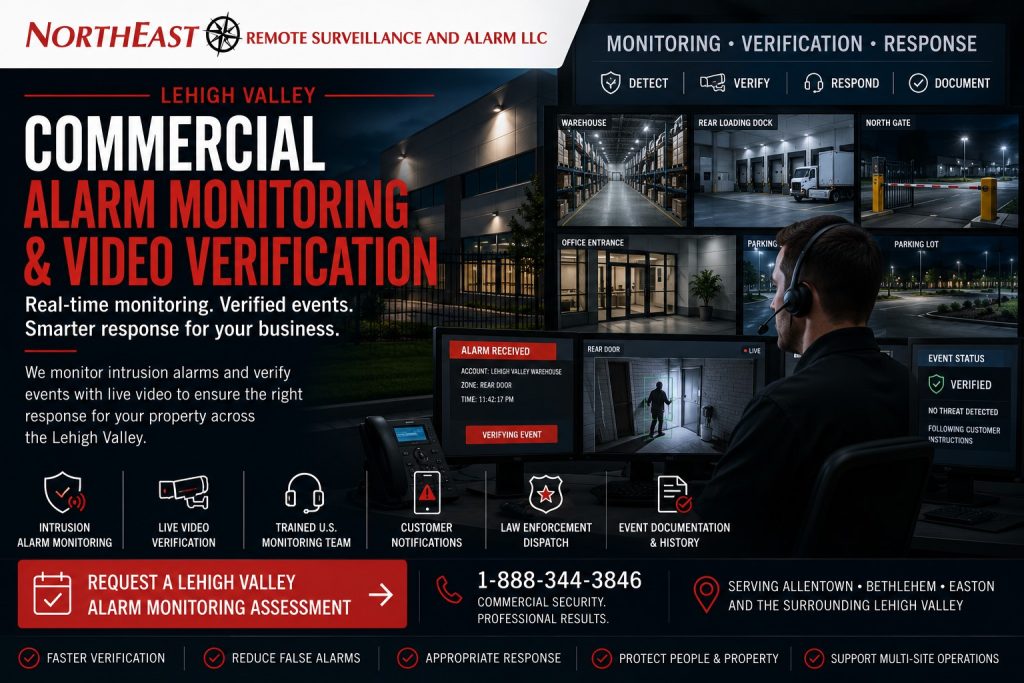
This focused regional resource is part of NERSA’s Lehigh Valley Commercial and Industrial Security Systems guide, which organizes commercial and industrial security planning across the region.
An alarm signal can report that activity occurred, but it may not explain what caused the event, whether the condition is still active or what response is appropriate.
On this page: Video verification · Planning process · Common questions · Assessment
Northeast Remote Surveillance and Alarm, LLC designs, installs, upgrades, takes over and supports qualifying commercial alarm-monitoring and video-verification systems for warehouses, manufacturing facilities, distribution centers, logistics operations, offices, healthcare properties, schools, municipal buildings, contractor yards, industrial parks, multi-tenant properties and multi-site organizations throughout the Lehigh Valley.
A properly planned monitoring environment may coordinate intrusion detection, alarm communication, event information, associated cameras, operator review, customer contacts, dispatch instructions, live audio warnings, escalation procedures and incident documentation.
The objective is not simply to transmit more signals. The objective is to provide useful information, clear instructions and an appropriate response process when qualifying activity occurs.
Commercial and industrial systems only • Intrusion monitoring • Video verification • Alarm communication • Response procedures • Multi-site monitoring • System takeovers
Project availability may depend on property location, installed alarm and camera platforms, equipment ownership, monitoring agreements, communication paths, software licensing, administrator access, network conditions, camera placement, lighting, system condition, project scope and long-term support requirements.
What Is Commercial Alarm Monitoring?
Commercial alarm monitoring provides off-site receipt and processing of qualifying signals from a protected property.
Depending on the installed system and approved monitoring service, signals may include:
- Intrusion alarms
- Exterior-door alarms
- Overhead-door alarms
- Interior detection
- Panic or duress events
- Environmental conditions
- Equipment or temperature conditions
- Communication failures
- Trouble conditions
- Low-battery conditions
- Opening and closing activity
- Supervisory conditions
- Selected fire-alarm signals
- Video-verification events
The monitoring process should define what signal was received, which property or area is involved, who should be contacted and what response instructions apply.
Monitoring does not correct weak detection, outdated contacts, inaccurate zone names or poor response procedures. Those elements must be reviewed as part of the complete alarm environment.
What Is Video Verification?
Video verification associates an alarm or qualifying analytic event with camera footage from the affected area.
Depending on the system, authorized monitoring personnel may review:
- Live video
- Recorded pre-event video
- Recorded post-event video
- Additional nearby cameras
- Door or gate activity
- Vehicle movement
- Person movement
- Site maps
- Zone information
- Customer instructions
- Previous event history
Video may help distinguish between an employee, delivery, animal, weather condition, equipment movement, trespassing or potentially criminal activity.
Video verification does not guarantee that every event can be identified conclusively. Camera position, image quality, lighting, obstructions, network performance and activity outside the camera view can limit what is available for review.
Alarm Monitoring, Video Verification and Remote Video Monitoring
These services are related but serve different purposes.
Commercial Alarm Monitoring
Alarm monitoring begins when the installed alarm system transmits a qualifying signal.
The signal may come from a door contact, motion detector, panic device, environmental sensor, communicator or another connected alarm device.
Video Verification
Video verification adds visual context to a qualifying alarm signal or event.
The monitoring workflow may review associated cameras before following the customer’s approved notification or escalation procedures.
Remote Video Monitoring
Remote video monitoring may begin with camera analytics or other video-based detection rather than a traditional alarm-zone signal.
Qualified operators may review activity, follow site instructions, issue live audio warnings or escalate the event when appropriate.
Businesses requiring active camera-based exterior monitoring can review Lehigh Valley Remote Video Monitoring and Live Talk-Down.
A property may use one, two or all three approaches depending on its risks, systems and response requirements.
Why Lehigh Valley Businesses Use Video-Verified Alarm Monitoring
Add Context to Alarm Signals
A traditional alarm signal may identify a zone but provide limited information about what is occurring.
Associated video can help authorized personnel understand whether activity is visible and which response procedure should be followed.
Improve Event Prioritization
A verified person moving through a warehouse after hours may require a different response from an alarm caused by an unsecured door, authorized employee or environmental condition.
Better information can help the monitoring process follow the correct escalation path.
Support Faster Incident Review
Alarm times, zone names and associated video can create a clearer event history for customer personnel reviewing what occurred.
Reduce Repeated False-Alarm Problems
Video may help identify recurring causes such as animals, loose materials, cleaning personnel, delivery activity, poor sensor placement or incorrect schedules.
The underlying alarm condition should still be corrected rather than repeatedly dismissed.
Protect Exterior Areas
Traditional interior intrusion detection may not provide early warning around parking areas, yards, loading docks, gates, trailers, exterior equipment or fence lines.
Video analytics and remote review may add another layer for exposed areas.
Standardize Response Across Multiple Sites
Multi-site businesses may have inconsistent contact lists, zone names, notification rules and after-hours procedures at each location.
A coordinated monitoring program can create clearer standards while preserving site-specific instructions.
Commercial Intrusion Alarm Signals
A monitored commercial intrusion system may report activity from:
- Exterior doors
- Interior doors
- Overhead doors
- Loading-dock doors
- Windows
- Glass-break detectors
- Interior motion detectors
- Restricted rooms
- Office areas
- Shipping and receiving
- Warehouse zones
- Tool rooms
- Server rooms
- Inventory areas
- Vehicle gates
- Panic devices
- Duress devices
- Environmental sensors
- Communication paths
The alarm design should reflect how the property is divided, occupied and armed.
A large facility may require separate partitions, schedules, user groups and response instructions for warehouses, offices, production areas, loading docks or tenant spaces.
For broader regional alarm planning, review Lehigh Valley Commercial Intrusion Alarm Systems.
Video Verification for Interior Alarm Events
Interior alarm verification may use cameras associated with:
- Entry doors
- Warehouse aisles
- Shipping offices
- Reception areas
- Restricted rooms
- Storage areas
- Production-support spaces
- Tool rooms
- Interior corridors
- Server or communications rooms
Camera placement should provide useful context without unnecessarily recording private or inappropriate areas.
The associated camera should be close enough to the alarm zone to help determine what occurred.
A camera elsewhere in the building may not provide meaningful verification even when it is technically connected to the same system.
Video Verification for Exterior Alarm Events
Exterior verification may help review activity around:
- Loading docks
- Truck courts
- Trailer yards
- Contractor yards
- Vehicle gates
- Fence lines
- Parking areas
- Exterior storage
- Utility areas
- Building approaches
- Rooftop access
- Vacant areas
- Repeated trespassing locations
Exterior analytics may be affected by rain, snow, shadows, headlights, animals, vegetation, insects, moving equipment and changing lighting.
Detection zones and camera views should be configured and tested under realistic site conditions.
Video-Verified Overhead-Door Alarms
Overhead doors can create substantial commercial exposure because they provide large access points into warehouses, shops, distribution centers and industrial buildings.
A video-verified overhead-door alarm may coordinate:
- Door contact
- Alarm zone
- Nearby overview camera
- Interior camera
- Exterior dock camera
- Alarm partition
- User schedule
- Monitoring instructions
- After-hours response
Video may help determine whether the door was opened by an authorized employee, delivery activity, wind, equipment impact or unauthorized entry.
The alarm contact, door condition, camera position and operating schedule should be reviewed together.
Panic and Duress Monitoring
Panic and duress systems may be used in reception areas, offices, healthcare properties, schools, municipal buildings, retail environments or other locations where employees may need to request assistance.
A monitored panic or duress system may include:
- Fixed buttons
- Wireless devices
- Keypad duress functions
- Mobile devices
- Associated cameras
- Location information
- Customer procedures
- Notification instructions
- Escalation procedures
Panic and duress workflows should be carefully planned and tested.
Users should understand when the device should be used, what information is transmitted and what response is expected.
Video association may provide additional context, but privacy, camera placement and organizational policy should be considered.
Alarm Communicators and Communication Paths
A commercial alarm system cannot provide dependable monitoring when its communication path is inactive, unstable or unsupported.
Communication may use:
- Cellular service
- IP or network communication
- Dual-path communication
- Radio communication
- Legacy telephone lines
- Approved combinations of communication methods
A communication-path review may examine:
- Signal strength
- Network availability
- Account status
- Communicator age
- Power and battery condition
- Reporting formats
- Test signals
- Trouble conditions
- Legacy phone-line replacement
- Carrier changes
- Internet-provider changes
- Monitoring compatibility
Replacing a communicator does not automatically correct inaccurate contacts, unclear zone names or unsupported field devices.
The complete reporting environment should be reviewed.
Dual-Path Alarm Communication
Dual-path communication uses two approved communication methods when the platform and monitoring arrangement support it.
For example, an alarm system may use cellular and IP communication.
Dual-path design may improve resiliency, but it should not be assumed that both paths are operating correctly merely because both are installed.
Testing should confirm:
- Primary-path reporting
- Secondary-path reporting
- Path supervision
- Failure reporting
- Account configuration
- Monitoring receipt
- Power and backup
- Network coordination
The value of dual-path communication depends on proper configuration, testing and continued support.
Alarm Zone Names and Event Information
An alarm signal is more useful when the monitoring operator and customer can understand where it originated.
Zone descriptions should be clear and specific.
Useful descriptions may include:
- North warehouse employee entrance
- Shipping office rear door
- Dock doors 1 through 6
- Second-floor records room
- Main reception panic button
- East contractor gate
- Tool crib motion detector
- South trailer-yard beam
Descriptions such as “Zone 3,” “Door 2” or “Motion 7” provide limited value unless the customer and monitoring personnel have accurate documentation.
Zone names should be reviewed after renovations, expansions, tenant changes and system takeovers.
Monitoring Contacts and Call Lists
Monitoring contacts should reflect current responsibility for the property.
A contact list may include:
- Facility manager
- Operations manager
- Security contact
- Property manager
- Business owner
- Maintenance contact
- IT contact
- Local site contact
- After-hours contact
- Regional management
The organization should define:
- Who is called first
- Who is called after hours
- Who may cancel or modify response
- Who may change account information
- Who should receive trouble notifications
- Who should receive opening and closing alerts
- Who is responsible for maintaining the list
Former employees and outdated phone numbers should be removed promptly.
A monitoring service cannot follow accurate procedures when the customer’s contact information is obsolete.
Alarm Response Instructions
Each property should have clear response instructions.
Instructions may define:
- Which signals require immediate escalation
- Which signals require contact verification
- Which users may cancel an alarm
- How duress signals are handled
- How video verification affects the workflow
- Which conditions should be documented
- Which areas have special access procedures
- What happens when no contact answers
- How repeated trouble is handled
- How after-hours employees are treated
- Which sites have guards or onsite personnel
Instructions should be realistic and understandable.
Overly complicated procedures can delay action and create inconsistency.
Opening and Closing Monitoring
Commercial alarm systems may report when authorized users arm or disarm the system.
Opening and closing information may help identify:
- Early openings
- Late closings
- Missed closings
- After-hours access
- Unexpected disarming
- Individual user activity
- Location-specific schedules
These records should be interpreted carefully.
A late closing may reflect legitimate overtime, maintenance, inventory activity or an employee who forgot to arm the system.
Opening and closing reports should support management procedures rather than replace communication with employees.
Video Verification at Commercial Gates
A gate alarm, access-denied event, forced-gate condition or after-hours vehicle event may be associated with:
- Entrance camera
- Exit camera
- Driver view
- License plate recognition
- Intercom call
- Gate-position status
- Access credential
- Remote release
- Property instructions
This can help monitoring or customer personnel understand which vehicle is involved and what occurred around the gate.
Video Verification and License Plate Recognition
LPR may provide additional vehicle information during a gate, parking or yard event.
A monitored vehicle event may include:
- Plate record
- Vehicle overview
- Direction of travel
- Gate status
- Time of activity
- Associated watch-list alert
- Access credential
- Additional camera views
LPR does not identify the driver and should not be treated as conclusive proof of who was operating the vehicle.
Live Talk-Down and Audio Warnings
Live talk-down may allow authorized monitoring personnel to issue an audio warning after reviewing qualifying activity.
A warning may be used to inform a person that:
- The property is closed
- The area is restricted
- Video is being monitored
- The person should leave
- The gate should not be approached
- A response is being requested
- The individual should contact site personnel
Live audio should follow approved customer instructions.
The purpose is to support deterrence and response, not to create an uncontrolled conversation with every person appearing on camera.
Audio coverage, speaker volume, environmental noise, network conditions and property layout should be evaluated.
Multi-Site Alarm Monitoring
Organizations with several locations may need consistent monitoring while preserving site-specific details.
A multi-site program may standardize:
- Account naming
- Zone descriptions
- Contact roles
- Response instructions
- Opening and closing rules
- Video-verification procedures
- User administration
- Communicator standards
- Trouble reporting
- Documentation
- Service responsibility
Centralization should not erase important differences between facilities.
A warehouse, office, contractor yard and healthcare property may require different escalation procedures even when the same monitoring provider and management team are involved.
Alarm Monitoring for Lehigh Valley Warehouses
Warehouse monitoring may involve:
- Overhead-door alarms
- Employee entrances
- Shipping offices
- Interior motions
- Inventory areas
- Tool rooms
- Truck courts
- Trailer yards
- Gates
- Video verification
- Remote monitoring
- Communication-path supervision
The system should reflect operating shifts, cleaning crews, drivers, maintenance activity and after-hours access.
A single alarm partition may not be practical when different areas operate on different schedules.
Alarm Monitoring for Manufacturing Facilities
Manufacturing properties may include production areas, maintenance rooms, raw-material storage, finished goods, tool rooms, contractor entrances and employee shifts.
Monitoring plans may require:
- Multiple partitions
- User-specific permissions
- Shift schedules
- Contractor procedures
- Restricted-area alarms
- Video associations
- Communication supervision
- After-hours response
- Multi-building administration
Alarm procedures should support production operations without creating uncontrolled exceptions or shared codes.
Alarm Monitoring for Offices and Multi-Tenant Properties
Office and multi-tenant properties may require:
- Suite partitions
- Common-area alarms
- Tenant user management
- After-hours access
- Shared entrances
- Parking-area video
- Visitor-entry coordination
- Property-management contacts
- Separate tenant instructions
One tenant should not automatically have authority over another tenant’s alarm users, video or response instructions.
Administrative responsibility should be documented.
Alarm Monitoring for Contractor Yards and Exterior Properties
Contractor yards may contain vehicles, trailers, tools, machinery, materials and exterior storage.
A layered monitoring plan may include:
- Building intrusion alarms
- Gate events
- Exterior analytics
- Vehicle records
- Remote video monitoring
- Live talk-down
- Fence-line cameras
- Equipment-area cameras
- After-hours response procedures
Exterior monitoring should be configured around realistic activity and environmental conditions.
Alarm Monitoring for Healthcare, Educational and Institutional Properties
These properties may require careful planning around:
- Occupied spaces
- Staff schedules
- Visitor access
- Duress devices
- Restricted rooms
- After-hours personnel
- Emergency procedures
- Privacy-sensitive camera placement
- Life-safety coordination
- Multiple departments
Monitoring instructions should align with approved organizational procedures and should not conflict with emergency access or life-safety requirements.
Existing Alarm Monitoring Takeovers
A business may inherit an alarm system and monitoring account without accurate passwords, zone lists, contacts or documentation.
A takeover review may examine:
- Equipment ownership
- Panel condition
- Communicator condition
- Monitoring agreement
- Account status
- Administrator or installer access
- User codes
- Zone names
- Partitions
- Contact lists
- Response instructions
- Video associations
- Network communication
- Licensing
- Manufacturer support
A monitoring transfer should be coordinated carefully.
The customer should understand when the previous provider’s responsibility ends, when the new arrangement begins and which signals have been tested.
Camera Requirements for Video Verification
Video verification depends on useful camera coverage.
The associated camera should provide enough information to review the alarm area.
Camera planning may consider:
- Field of view
- Image detail
- Nighttime performance
- Lighting
- Backlighting
- Camera height
- Obstructions
- Recording reliability
- Pre-event video
- Post-event video
- Time synchronization
- Network capacity
- Analytics
- User permissions
- Retention
A camera that shows only part of the area or is blocked by inventory may not provide useful verification.
Network, Power and Infrastructure Requirements
Alarm monitoring and video verification may depend on:
- Alarm cabling
- Cellular communicators
- Network communication
- Internet service
- Ethernet cabling
- PoE switching
- Wireless bridges
- Camera recording
- Cloud services
- Equipment racks
- Power supplies
- Backup batteries
- UPS protection
- Surge protection
- Time synchronization
- Secure remote access
- Device labeling
- System documentation
A video-verification system may fail to provide useful information when the camera network is offline even though the traditional alarm signal still reports.
The design should define what happens when one communication path or connected system is unavailable.
User Permissions and Administrative Control
Commercial monitoring environments may include alarm users, contact lists, video users, cloud accounts, mobile applications and monitoring instructions.
Administrative procedures should define:
- Who may add alarm users
- Who may change monitoring contacts
- Who may change response instructions
- Who may view associated video
- Who may cancel alarms
- Who may place systems on test
- Who may review event history
- Who owns cloud accounts
- Who may change camera associations
- How former employees are removed
- How administrator access is recovered
- How multi-site permissions are separated
Not every person with camera access should automatically have authority to change monitoring instructions or cancel alarms.
Individual accounts and role-based permissions should be used where supported.
Cybersecurity-Aware Alarm Monitoring
Modern alarm monitoring may involve cellular communication, IP communicators, cloud services, cameras, mobile applications and remote administration.
Cybersecurity-aware planning may include:
- Supported equipment
- Individual administrator accounts
- Strong credentials
- Multi-factor authentication where supported
- Network segmentation
- Secure remote access
- Controlled cloud administration
- Removal of obsolete users
- Software and firmware maintenance
- Documented account ownership
- Limited vendor access
- Event logs
- Backup communication
- End-of-support planning
A monitoring system should not rely on shared or undocumented administrative access.
False Alarms and Recurring Alarm Conditions
Repeated false alarms should be investigated.
Potential causes may include:
- Loose doors
- Damaged contacts
- Incorrect motion placement
- Animals
- Cleaning crews
- Shared user codes
- Incorrect schedules
- Weak batteries
- Communication trouble
- Poor zone names
- Improper arming
- Environmental conditions
- Unsupported equipment
- Uncontrolled after-hours access
Video verification may help identify the cause, but it does not eliminate the need to correct the underlying condition.
Repeated unnecessary dispatches can create operational problems and may be subject to local policies or fees.
Monitoring Limitations
Alarm monitoring and video verification may be limited by:
- Communication failure
- Power loss
- Network outage
- Cellular outage
- Camera failure
- Poor image quality
- Obstructed views
- Missing administrator access
- Unsupported software
- Expired licensing
- Provider-owned equipment
- Inaccurate contacts
- Incorrect zone names
- Incomplete response instructions
- Unavailable video
- Third-party cloud outages
- Environmental conditions
- Activity outside the camera view
- Delayed customer response
- Conditions outside the approved service scope
Monitoring cannot guarantee that every loss, incident or unauthorized event will be prevented.
The system should be evaluated as one layer within the property’s broader security plan.
The NERSA Alarm Monitoring Planning Process
1. Review the Facility and Risks
The process begins by identifying the areas, assets, schedules and events that require detection or monitoring.
2. Review the Existing Alarm and Camera Systems
NERSA reviews alarm zones, partitions, users, communicators, cameras, recording, networks, contacts, monitoring information and documentation.
3. Define the Monitoring Workflow
The customer should determine:
- Which signals require monitoring
- Which events require video review
- Who should be contacted
- What response instructions apply
- What happens after hours
- How duress is handled
- How video affects escalation
- Which sites require different procedures
4. Correct Zone Names and Account Information
Zone descriptions, contact lists, addresses, call lists and response instructions should be accurate before the system is relied upon.
5. Configure Video Associations
Qualifying alarm zones or events may be associated with the most useful cameras when the platforms support integration.
6. Test Communication and Event Processing
Testing may include:
- Alarm signals
- Trouble signals
- Communication paths
- Video associations
- Contact procedures
- Account information
- Opening and closing events
- Panic or duress devices
- System test modes
- Multi-site operation
7. Train and Document
Authorized customer personnel should understand how to arm and disarm the system, manage users, report false alarms, place the system on test, update contacts and request service.
Questions to Answer Before Selecting Alarm Monitoring
A business should determine:
- Which areas require intrusion detection?
- Which alarm events require video verification?
- Are exterior areas included?
- Are cameras positioned for useful review?
- Who should receive alarm calls?
- Who may cancel an alarm?
- What happens when no contact answers?
- Are panic or duress devices included?
- Are opening and closing reports required?
- Are multiple partitions needed?
- Are employees present after hours?
- Which communication paths are available?
- Is dual-path communication required?
- Are gate or vehicle events involved?
- Is remote video monitoring needed?
- Are live audio warnings appropriate?
- What documentation is required?
- Are multiple locations being monitored?
- Who owns and administers the accounts?
- How will future changes be managed?
The correct monitoring plan should be based on the facility’s operations and response procedures rather than a generic call list.
Related Lehigh Valley Alarm and Monitoring Resources
For an Allentown property, start with Allentown commercial intrusion alarm systems for alarm design and signal monitoring, or Allentown remote video monitoring for camera-based event review and site response instructions.
Lehigh Valley Commercial and Industrial Security Systems
Use the primary regional guide for broader Lehigh Valley planning by city, corridor, security system, facility type and operational risk.
Lehigh Valley Commercial Intrusion Alarm Systems
Use this regional resource for detection devices, partitions, users, communication paths and broader intrusion-alarm planning.
Lehigh Valley Commercial Video Surveillance Systems
Use this regional resource for camera placement, recording, retention, remote access and video quality.
Lehigh Valley Remote Video Monitoring and Live Talk-Down
Use this resource when the property needs active camera-based event review, live audio warnings or exterior after-hours monitoring.
Lehigh Valley Commercial Security System Upgrades, Retrofits and Takeovers
Use this resource when the property has an aging, inherited or under-supported alarm, communicator, camera or monitoring environment.
Request a Lehigh Valley Alarm Monitoring Assessment
A commercial alarm-monitoring assessment should begin with the property’s protected areas, operating schedules, users, communication paths, cameras and response procedures—not with a predetermined monitoring package.
NERSA can evaluate:
- Existing intrusion alarms
- Alarm panels
- Zones and partitions
- Users and codes
- Cellular and IP communicators
- Dual-path communication
- Monitoring accounts
- Contact lists
- Response instructions
- Opening and closing activity
- Panic and duress devices
- Associated cameras
- Video verification
- Remote video monitoring
- Live talk-down
- Gate and vehicle events
- Multi-site administration
- Network and power
- Documentation
- System upgrades and takeovers
The assessment can help determine which signals should be monitored, which events should receive video review and how the response process should be documented.
Frequently Asked Questions About Lehigh Valley Alarm Monitoring and Video Verification
What is commercial alarm monitoring?
Commercial alarm monitoring provides off-site receipt and processing of qualifying alarm, trouble, panic, environmental or communication signals from a business property.
What is video verification?
Video verification allows authorized monitoring personnel to review cameras associated with an alarm or qualifying event before following approved response instructions.
Does video verification replace an intrusion alarm?
No. Video verification adds visual context to an alarm or event but does not replace properly designed detection, communication and response procedures.
Can existing alarm systems use video verification?
Possibly. The alarm panel, monitoring platform, camera system, software, licensing, network and event-integration capabilities must be evaluated.
Can cameras be linked to specific alarm zones?
Supported systems may associate selected cameras with doors, motions, overhead doors, gates or other alarm zones.
Does video verification eliminate false alarms?
No. It may help identify the cause of an alarm, but damaged devices, poor placement, incorrect schedules and user errors still need to be corrected.
Can NERSA take over an existing monitoring account?
NERSA can evaluate qualifying commercial alarm systems, communicators, monitoring agreements, account information, contacts and platform support to determine whether a takeover is practical.
Can an alarm communicator be upgraded?
Qualifying communicators may be replaced or modernized when the panel, monitoring platform, communication service and applicable requirements support the change.
What is dual-path alarm communication?
Dual-path communication uses two supported reporting methods, such as cellular and IP, to improve communication resiliency.
Can monitoring contacts be updated?
Yes. Authorized customer contacts, phone numbers and notification procedures should be reviewed and updated when personnel or responsibilities change.
Can several Lehigh Valley locations be monitored together?
Yes. Multi-site organizations may use standardized monitoring administration while maintaining separate contacts, users, zones and response instructions for each property.
Can monitoring include panic or duress devices?
Qualifying systems may monitor panic or duress devices when the equipment, account configuration and approved response procedures support them.
Can exterior cameras be monitored after hours?
Yes. Qualifying cameras and analytics may support remote video monitoring for yards, docks, gates, parking areas and other exterior locations.
Can monitoring personnel speak through onsite speakers?
Qualifying remote-video-monitoring systems may support live audio warnings when the equipment, service and approved site procedures allow it.
Does video verification work during an internet outage?
It may not be available if the camera system or verification platform depends on the affected internet connection, although a separate alarm communication path may continue reporting.
Can fire alarm signals be video verified?
Fire alarm monitoring and life-safety response require separate code- and authority-aware planning; video should not delay or replace required fire alarm processing.
Does monitoring prevent every loss or intrusion?
No. Monitoring is one layer of security and cannot guarantee that every event will be detected, verified or prevented.
How much does commercial alarm monitoring cost?
Cost depends on the installed system, number of accounts, communication paths, monitored signals, video integration, remote monitoring, software, licensing and service requirements.
Does NERSA monitor single-family home alarm systems?
This resource is intended for commercial, industrial, institutional, municipal, healthcare, educational, warehouse, manufacturing, logistics, contractor and multi-site properties rather than single-family home packages.
How does a Lehigh Valley business begin a monitoring project?
Begin with a Lehigh Valley Alarm Monitoring Assessment so the alarm system, communication paths, users, cameras, contacts and response procedures can be reviewed before service is recommended.