
Plan segmented, supportable and cybersecurity-aware networks for commercial video surveillance, access control, intrusion alarms, intercoms, cloud platforms and integrated security systems throughout Allentown, Bethlehem, Easton and the surrounding Lehigh Valley.

Lehigh Valley Security Network Assessment
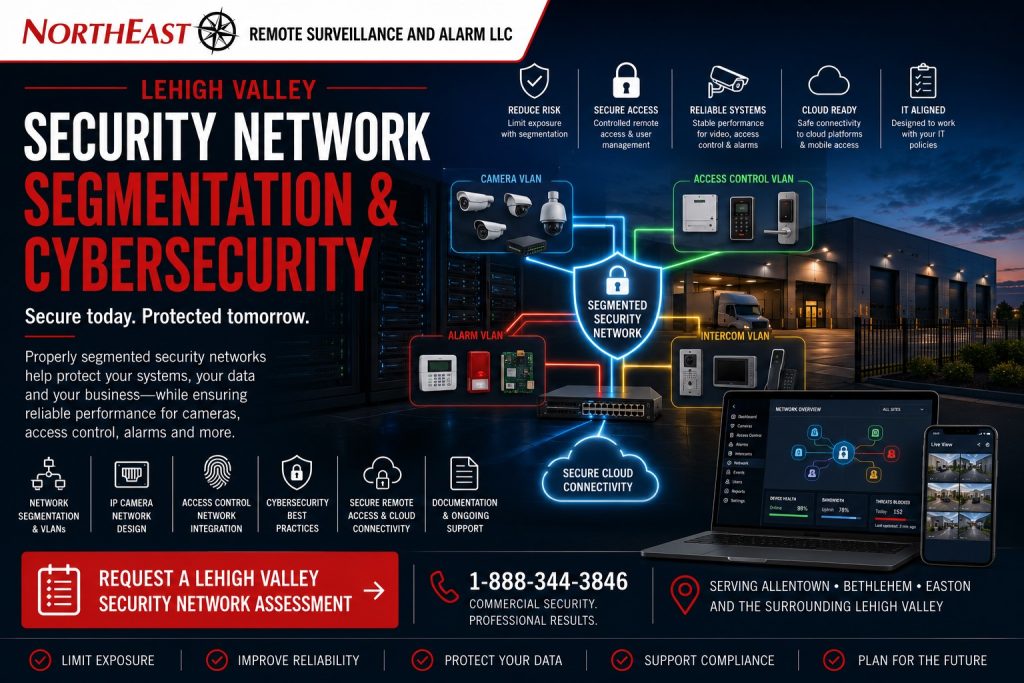
This focused regional resource is part of NERSA’s Lehigh Valley Commercial and Industrial Security Systems guide, which organizes commercial and industrial security planning across the region.
Modern commercial security systems increasingly depend on IP cameras, network video recorders, access-control panels, intercoms, alarm communicators, cloud platforms, mobile applications, remote monitoring and centralized multi-site administration.
Connecting these systems without a clear network architecture can create unreliable video, difficult troubleshooting, uncontrolled remote access, shared credentials, unsupported devices and unnecessary exposure between security equipment and the organization’s broader business network.
Northeast Remote Surveillance and Alarm, LLC plans, installs, upgrades, and documents qualifying security networks throughout the Lehigh Valley. We serve warehouses, manufacturers, distribution centers, logistics properties, and industrial parks. Other sites include offices, healthcare buildings, schools, municipal properties, contractor yards, multi-tenant buildings, and multi-site organizations.
A security network may use dedicated switches, VLANs, and segmentation to separate traffic. Controlled internet access, secure remote connections, and individual administrator accounts help manage access. Planning should also cover IP address records, supported firmware, equipment-health monitoring, and coordination with your authorized IT staff.
The objective is not to isolate every security device without purpose or connect every system to the business network for convenience. The objective is to create a dependable, manageable and appropriately separated environment that supports security operations without introducing avoidable risk.
Commercial and industrial systems only • Network segmentation • Security VLANs • Secure remote access • IP camera networks • Access-control networks • Cloud connectivity • Multi-site systems
Project availability may depend on property location, customer IT policies, installed equipment, administrator access, network ownership, software licensing, manufacturer support, internet service, firewall coordination, cybersecurity requirements, documentation, project scope and long-term support needs.
Why Commercial Security Systems Need Network Planning
A security camera, access-control panel or intercom may be physically installed correctly and still perform poorly because the supporting network is undocumented, overloaded, unstable or improperly configured.
Common network-related security problems may include:
- Cameras repeatedly going offline
- Delayed or missing recorded video
- Overloaded PoE switches
- Conflicting IP addresses
- Weak wireless bridges
- Uncontrolled internet exposure
- Shared administrator passwords
- Unsupported firmware
- Recorder communication failures
- Mobile applications that no longer connect
- Cloud platforms owned by former employees
- Security devices mixed into production networks
- Remote access dependent on unsafe port forwarding
- Multi-site systems with inconsistent addressing
- Unknown vendor access
- No backup record of network settings
A dependable security design should consider cameras, controllers, recorders, servers, cloud services, users, switches, firewalls, internet connections and remote support as one connected environment.
What Is Network Segmentation?
Network segmentation separates devices, systems or traffic into defined network areas instead of placing everything on one shared network.
A segmented security environment may use:
- Dedicated security switches
- Separate VLANs
- Isolated IP ranges
- Firewall rules
- Controlled routing
- Restricted internet access
- Limited vendor access
- Separate camera and access-control segments
- Dedicated management interfaces
- Site-to-site connectivity
- Documented network boundaries
Segmentation can help limit unnecessary communication between security equipment and unrelated business systems.
For example, an IP camera may need to communicate with its recorder and approved management platform but may not need direct access to employee computers, accounting systems or production equipment.
The correct level of separation depends on the property, customer IT standards, installed platforms and operational requirements.
Security VLANs
A virtual local area network, or VLAN, can logically separate security devices even when they share managed network hardware with other systems.
A commercial security VLAN may contain:
- IP cameras
- Network video recorders
- Video-management servers
- Access-control panels
- Intercom stations
- Gate controllers
- Alarm communicators
- Monitoring appliances
- Security workstations
- Cloud gateways
A VLAN alone does not create complete security.
Its effectiveness depends on:
- Proper switch configuration
- Firewall rules
- Routing controls
- Administrator access
- Device credentials
- Network documentation
- Ongoing support
- Coordination with customer IT
- Appropriate internet access
A poorly documented VLAN can become as difficult to support as an unsegmented network.
Dedicated Security Networks
Some properties benefit from a physically separate network used only for security equipment.
A dedicated network may include:
- Separate cabling
- Dedicated switches
- Dedicated router or firewall
- Independent internet connection
- Separate wireless bridges
- Isolated equipment racks
- Dedicated UPS protection
- Separate addressing and documentation
This approach may be useful where:
- Customer IT does not permit security equipment on the production network
- The property has many cameras
- Multiple buildings require security-only connectivity
- Existing business infrastructure lacks capacity
- Remote monitoring requires a dedicated path
- The organization wants clearer support responsibility
- Industrial or production networks should remain isolated
A dedicated network still requires secure administration, supported equipment and documented remote-access controls.
Shared Networks With Security Segmentation
A customer may prefer to use existing managed switches, fiber, internet service and firewall infrastructure.
This can be practical when:
- Capacity is available
- Customer IT approves the design
- VLANs are supported
- PoE requirements are understood
- Routing and firewall rules are documented
- Administrative responsibilities are clear
- Security traffic does not interfere with business operations
Shared infrastructure should not mean uncontrolled access.
The security environment should have defined boundaries, approved switch ports, documented IP ranges and clear responsibility for changes.
IP Camera Network Planning
Commercial camera networks can generate substantial continuous traffic.
Planning should consider:
- Number of cameras
- Resolution
- Frame rate
- Compression
- Bitrate
- Continuous or event recording
- Multicast or unicast requirements
- Recorder location
- Remote viewing
- AI analytics
- LPR
- Cloud connectivity
- Storage architecture
- Network uplinks
- Fiber connections
- PoE capacity
- Future expansion
A switch with enough physical ports may still lack sufficient PoE power, uplink capacity or processing performance.
The network should be sized for the expected video load and reasonable expansion rather than only the first installation phase.
Access-Control Network Planning
Modern access-control systems may connect controllers, readers, gateways, servers, cloud platforms and remote administrators.
Network planning may need to address:
- Controller communication
- Cloud connectivity
- Server communication
- Multi-building links
- Door-event reporting
- Video integration
- Intercom integration
- Gate access
- Mobile credentials
- Remote administration
- Firmware management
- User synchronization
- Backup communication
Access-control panels should continue performing essential local door functions according to their design when temporary network or cloud interruptions occur.
The system architecture should clearly explain which functions remain available during a communication failure.
Intercom and Visitor-Entry Networks
Commercial intercoms may depend on:
- Ethernet
- PoE
- SIP communication
- Cloud services
- Mobile applications
- Desktop software
- Access-control interfaces
- Video recording
- Remote door release
- Multi-site administration
Visitor-entry systems capable of unlocking doors or gates should not rely on unmanaged accounts or undocumented network access.
The network design should address call routing, audio and video quality, account ownership, remote users and outage behavior.
Alarm Communicators and Network Security
Commercial alarm and fire alarm communicators may use cellular, IP or dual-path communication.
An IP communicator may require:
- Approved network connection
- Reliable internet service
- Documented addressing
- Firewall coordination
- Power backup
- Path supervision
- Testing
- Clear customer and provider responsibility
Security-system network changes can unintentionally disrupt alarm communication.
Router replacements, firewall changes, internet-provider changes and network restructuring should be coordinated and tested when monitored systems depend on IP communication.
Cloud-Connected Security Systems
Cloud-managed cameras, access control, intercoms and monitoring platforms require internet access, account administration and recurring platform support.
Cloud planning should address:
- Which devices communicate externally
- Which cloud destinations are required
- Who owns the account
- Who controls administrators
- Whether multi-factor authentication is supported
- What licensing applies
- What happens when service expires
- What functions continue during an outage
- Whether local recording or control remains available
- How former users are removed
- How provider access is limited
- How the system can be migrated later
Cloud connectivity does not automatically make a system secure.
Poor account control, shared passwords, unsupported devices and excessive user permissions can create risk even when the platform itself is capable.
Secure Remote Access
Authorized users may need remote access to live video, recorded video, access-control administration, system status or service tools.
Remote access may use:
- Manufacturer cloud portals
- Secure VPN connections
- Supported remote-management platforms
- Site-to-site VPNs
- Managed mobile applications
- Controlled browser access
- Approved remote-support tools
Direct public exposure and unmanaged port forwarding should be avoided when a more secure supported method is available.
Remote access should define:
- Who may connect
- Which systems they may reach
- Which functions they may perform
- Whether multi-factor authentication is available
- How activity is logged
- How access is revoked
- How vendor accounts are controlled
- How emergency access is recovered
Port Forwarding and Public Exposure
Older security systems frequently use direct port forwarding to expose recorders or devices to the public internet.
This method may create unnecessary risk when devices are unsupported, passwords are weak or administrative interfaces are publicly reachable.
An existing-system review may identify:
- Publicly exposed recorders
- Publicly exposed cameras
- Default or weak credentials
- Unused open ports
- Obsolete mobile applications
- Unsupported web interfaces
- Outdated encryption
- Unknown remote users
- Vendor-created access that was never removed
The recommended correction may involve a supported cloud platform, VPN, gateway, updated recorder, network redesign or removal of unnecessary public exposure.
Individual Accounts and Administrator Control
Shared administrator accounts make it difficult to determine who changed settings, viewed video, exported evidence or opened a gate.
Where supported, systems should use individual accounts and role-based permissions.
Administrative planning should establish:
- Primary customer account owner
- Secondary recovery administrator
- NERSA service access
- Customer IT access
- Facility-management access
- Security-user access
- Mobile-user permissions
- Multi-site roles
- Tenant separation
- Former-employee removal
- Password recovery procedures
- Vendor-access expiration
The customer should not lose control of a security system because one employee leaves or one provider relationship ends.
Password and Credential Management
Security-system credentials should be:
- Unique
- Appropriately strong
- Documented securely
- Limited by role
- Changed when necessary
- Removed when users leave
- Protected from casual sharing
- Different from default credentials
- Recoverable through an approved process
Default manufacturer passwords should be changed during system commissioning when the platform allows it.
Credentials should not be written on equipment, left in unsecured documents or shared across unrelated customer accounts.
Multi-Factor Authentication
Multi-factor authentication can add another layer of account protection where supported.
It may be appropriate for:
- Cloud video administration
- Access-control administration
- Remote monitoring portals
- Multi-site management
- Mobile applications
- Incident-sharing platforms
- Remote support
- Customer administrator accounts
The organization should also plan for recovery when a user changes phones, loses access to an authenticator or leaves employment.
Multi-factor authentication should strengthen access without leaving the organization dependent on one unmanaged personal device.
Firmware and Software Support
Connected security devices depend on supported firmware, operating systems, applications and cloud services.
An equipment review may examine:
- Current firmware
- Available updates
- Manufacturer support status
- Known compatibility limits
- Recorder operating system
- Server software
- Mobile applications
- Browser support
- Cloud-platform support
- Security patches
- End-of-life notices
- Licensing status
Updates should be planned carefully.
Installing unsupported firmware or applying updates without reviewing compatibility can interrupt recording, integrations, remote access or device communication.
End-of-Support Planning
A device may continue operating after the manufacturer stops supporting it.
That does not mean it remains suitable for long-term network use.
End-of-support concerns may include:
- No security updates
- No replacement parts
- Unsupported software
- Expired certificates
- Obsolete encryption
- Incompatible browsers
- Inability to add users
- Unavailable cloud service
- Unsupported mobile applications
- No integration with modern platforms
A phased replacement plan can help avoid emergency migration after a critical platform stops functioning.
Network Switches and PoE Capacity
IP cameras, intercoms and other devices may receive power through PoE switches.
Planning should consider:
- Number of ports
- PoE standard
- Per-port power
- Total power budget
- Uplink speed
- Fiber modules
- Environmental rating
- Managed-switch capability
- VLAN support
- Redundancy
- Rack space
- UPS support
- Expansion capacity
A switch may have available ports while lacking enough power for all connected devices.
Pan-tilt-zoom cameras, heaters, intercoms, wireless radios and high-performance cameras may require more power than standard fixed cameras.
Fiber and Building-to-Building Security Networks
Warehouses, campuses, industrial parks and multi-building properties may require fiber between equipment rooms or buildings.
Fiber may support:
- Camera networks
- Access-control panels
- Intercoms
- Gate systems
- Remote monitoring
- Multi-building recording
- Shared management platforms
- Redundant network paths
Fiber planning may include:
- Single-mode or multimode fiber
- Strand count
- Existing pathways
- Splice locations
- Patch panels
- Transceivers
- Environmental protection
- Building-entry protection
- Labeling
- Testing
- Future capacity
Wireless bridges may be appropriate in selected conditions, but they should not be assumed to provide the same reliability as properly installed fiber.
Wireless Bridges
Wireless bridges can connect remote cameras, gates, yards or buildings where trenching or fiber installation is impractical.
Planning should consider:
- Distance
- Clear line of sight
- Building materials
- Trees
- Seasonal foliage
- Interference
- Mounting stability
- Weather
- Throughput
- Latency
- Power
- Surge protection
- Security configuration
- Future obstructions
A wireless link that works during initial installation may become unreliable when trees grow, construction changes the path or interference increases.
Critical systems should have a realistic maintenance and recovery plan.
Network Addressing and Documentation
Security systems become difficult to support when device addresses are undocumented or inconsistent.
Useful documentation may include:
- Device name
- Device type
- Manufacturer
- Model
- MAC address
- IP address
- Subnet
- VLAN
- Switch and port
- Physical location
- Recorder association
- Controller association
- Cloud account
- Firmware version
- Administrator responsibility
- Communication path
- Service notes
Addressing should be organized so technicians and customer IT personnel can identify devices without repeatedly rediscovering the network.
DNS, NTP and Time Synchronization
Accurate time is important for:
- Recorded video
- Access events
- Alarm events
- Intercom calls
- Monitoring records
- LPR records
- Incident investigation
- Multi-site review
Security systems may use network time protocol, cloud time services or customer-approved time sources.
Incorrect time can make it difficult to compare video with access-control or alarm records.
Time configuration should be documented and tested, especially after network, firewall or internet changes.
Firewall Coordination
Security systems may require controlled communication through customer firewalls.
Coordination may involve:
- Approved outbound destinations
- Supported inbound access
- VPN configuration
- Cloud-platform requirements
- Remote-support access
- Alarm communication
- Mobile applications
- Video-sharing services
- Software updates
- Time services
- DNS access
Firewall rules should be limited to the communication actually required.
Unnecessary broad rules should not be created merely to make troubleshooting easier.
Customer IT should approve and document production-firewall changes.
Logging and Event Records
Supported security platforms may provide logs for:
- Administrator login
- User creation
- Permission changes
- Video export
- Door unlock
- Alarm changes
- Device offline
- Firmware update
- Remote connection
- Cloud-account activity
- Configuration changes
Logs can help determine what changed and who performed the action.
Logging should be enabled and retained when it provides practical value and the platform supports it.
Backup and Recovery Planning
Security-system recovery planning may include:
- Configuration backups
- Recorder configuration exports
- Access-control database backups
- User lists
- Camera configuration
- Network diagrams
- License information
- Cloud-account recovery
- Administrator contacts
- Replacement-device procedures
- Server backup
- Restore testing
- Spare equipment planning
A backup that has never been verified may not provide a dependable recovery path.
The organization should understand which components are backed up, where the backup is stored and who is authorized to restore it.
Cybersecurity for Multi-Site Security Systems
Multi-site organizations may centralize cameras, doors, alarms and users across several Lehigh Valley properties.
A multi-site plan may standardize:
- Network addressing
- VLAN structure
- Device naming
- Administrator roles
- Cloud ownership
- Remote-access methods
- Firmware standards
- Switch models
- Event logging
- Documentation
- Backup procedures
- New-site deployment
- Vendor access
- End-of-support planning
Each site may still require different network rules based on bandwidth, customer IT, local equipment and operational needs.
Centralization should not grant every user unrestricted access to every property.
Security Networks for Warehouses and Distribution Centers
Warehouses may require network support for:
- Large camera counts
- Loading-dock coverage
- Truck courts
- Trailer yards
- Employee entrances
- Gate systems
- LPR
- Access control
- Intrusion alarms
- Wireless bridges
- Remote monitoring
- Multi-shift administration
These facilities may generate substantial video traffic and may include long cable distances, multiple IDF locations and outdoor network links.
The design should account for fiber, switch capacity, rack space, UPS support and future camera expansion.
Security Networks for Manufacturing Facilities
Manufacturing facilities may have production networks that should remain separate from physical-security equipment.
Planning may require:
- Dedicated security VLANs
- Separate switches
- Customer IT approval
- Industrial-area fiber
- Restricted remote access
- Multi-building connectivity
- Shift-based users
- Contractor access
- Cloud-platform rules
- Cybersecurity documentation
NERSA should not connect security devices to industrial-control or production networks without explicit authorization and an approved architecture.
Security Networks for Offices and Multi-Tenant Properties
Office and multi-tenant properties may involve shared building infrastructure and separate tenant responsibilities.
The design should define:
- Building-owner devices
- Tenant devices
- Common-area cameras
- Shared entrances
- Separate access-control databases
- Tenant VLANs
- Property-management access
- Cloud-account ownership
- User separation
- Service responsibility
- Tenant turnover procedures
One tenant should not automatically have network or system access to another tenant’s security environment.
Security Networks for Contractor Yards and Exterior Properties
Contractor yards may require connectivity for:
- Exterior cameras
- Gate access
- LPR
- Remote monitoring
- Live talk-down
- Wireless bridges
- Cellular communication
- Solar-powered devices
- Remote equipment cabinets
Exterior networks need appropriate environmental protection, surge protection, grounding, power backup and communication monitoring.
A network cabinet exposed to weather or uncontrolled access can become the weak point of the entire system.
Security Networks for Healthcare, Schools and Institutions
Healthcare, educational and institutional properties may require stricter coordination around:
- User permissions
- Privacy-sensitive camera groups
- Customer IT policy
- Network segmentation
- Remote access
- Cloud services
- Incident export
- Administrator logs
- Multi-building management
- Emergency procedures
- Life-safety interfaces
Security networks should support approved institutional procedures without introducing unapproved access to other protected systems.
Security-System Cybersecurity Assessment
A security network assessment may review:
- Cameras
- Recorders
- Access-control panels
- Intercoms
- Alarm communicators
- Cloud gateways
- Network switches
- Wireless bridges
- Firewalls
- Internet connections
- IP addressing
- VLANs
- Administrator accounts
- Remote access
- Firmware
- Software
- Licensing
- Account ownership
- User permissions
- Documentation
- Backup and recovery
- End-of-support conditions
The assessment should identify practical priorities rather than produce a generic list of theoretical risks.
Existing-System Network Upgrades
An existing security network may be improved without replacing every connected device.
Possible corrections may include:
- Creating security VLANs
- Replacing unmanaged switches
- Increasing PoE capacity
- Reorganizing IP addressing
- Removing public port forwarding
- Implementing secure remote access
- Replacing unsupported recorders
- Updating firmware
- Changing default credentials
- Removing former users
- Correcting cloud-account ownership
- Adding UPS protection
- Improving wireless links
- Adding fiber
- Documenting devices
- Completing a phased modernization
Businesses with inherited, aging or poorly documented systems should review Lehigh Valley Commercial Security System Upgrades, Retrofits and Takeovers.
Customer IT and NERSA Responsibilities
Security-network projects require clear coordination.
Customer IT may be responsible for:
- Production-network approval
- Firewall rules
- VLAN creation
- Routing
- DHCP or static-address policy
- Internet service
- Corporate cybersecurity standards
- User identity systems
- VPN standards
- Network monitoring
- Change management
NERSA may be responsible for:
- Security-device requirements
- Camera and controller addressing
- Security-switch configuration within the approved scope
- Device installation
- Platform configuration
- Supported remote-access setup
- System testing
- Security-system documentation
- Coordination of cloud endpoints
- Identification of equipment limitations
Responsibilities should be established before installation.
NERSA should not make unapproved changes to a customer’s production network, firewall, domain or administrative systems.
Cybersecurity Limitations
Physical-security integrators can improve device, account and network practices, but they do not replace the customer’s complete cybersecurity program.
A project may be limited by:
- Customer IT restrictions
- Unsupported devices
- Proprietary platforms
- Missing administrator access
- Unknown network conditions
- Expired licenses
- Provider-owned accounts
- Outdated operating systems
- Unavailable firmware
- Customer-controlled firewalls
- Third-party cloud outages
- Inadequate internet service
- Shared network ownership
- Missing documentation
- Unapproved legacy equipment
- Budget or operational constraints
A security-network assessment does not constitute penetration testing, managed cybersecurity service, legal compliance certification or a guarantee that a system cannot be compromised.
When Segmentation May Not Be Sufficient
Network segmentation improves control but does not correct every security weakness.
Additional correction may be required when equipment uses:
- Default credentials
- Unsupported firmware
- Insecure remote access
- Exposed public interfaces
- Shared administrator accounts
- Uncontrolled cloud users
- Expired certificates
- Obsolete encryption
- Provider-owned accounts
- Unsupported mobile applications
- Unknown vendor access
A segmented but poorly administered device can still create risk within its assigned network.
The NERSA Security Network Planning Process
1. Identify the Connected Security Systems
The process begins by identifying cameras, recorders, access control, intercoms, alarm communicators, gates, cloud services, monitoring platforms and remote users.
2. Review the Existing Network
NERSA reviews available switches, PoE, fiber, wireless links, addressing, VLANs, internet service, firewalls, equipment racks and documentation within the approved scope.
3. Define System Communication Requirements
The design should identify which devices need to communicate with:
- Local recorders
- Access-control servers
- Cloud platforms
- Monitoring services
- Mobile users
- Customer workstations
- Remote administrators
- Other security systems
4. Establish Segmentation and Access Rules
The customer and authorized IT personnel should determine which devices belong together, which networks must remain separate and which communication paths are approved.
5. Define Administrator Ownership
The plan should establish customer account ownership, NERSA service access, IT responsibilities, recovery procedures and former-user removal.
6. Implement Infrastructure and Configuration
Approved work may involve switches, VLANs, addressing, fiber, wireless links, UPS protection, device configuration, cloud setup and secure remote access.
7. Test Security-System Operation
Testing may include:
- Camera recording
- Remote viewing
- Access-control communication
- Intercom calls
- Alarm communication
- Cloud connectivity
- Monitoring
- User permissions
- Internet-outage behavior
- Multi-site access
- Time synchronization
- Device-health reporting
8. Document and Train
Documentation may include device names, addresses, switch ports, VLANs, account ownership, administrator responsibilities, remote-access methods and support procedures.
Authorized personnel should understand how to request changes and who controls each part of the environment.
Questions to Answer Before Designing a Security Network
A business should determine:
- Which security systems are connected?
- Who owns the network?
- Is customer IT involved?
- Should security devices use a dedicated network?
- Are VLANs available?
- How many cameras are involved?
- What PoE capacity is required?
- Are multiple buildings connected?
- Is fiber available?
- Are wireless bridges required?
- Which devices need internet access?
- Which cloud platforms are used?
- Who owns each cloud account?
- Is remote access required?
- Which users need remote access?
- Is multi-factor authentication supported?
- Are devices publicly exposed?
- Are default credentials still in use?
- Is firmware supported?
- How are backups handled?
- What happens during an internet outage?
- Are multiple locations involved?
- Who will maintain documentation?
- How will future expansion be managed?
The correct design should be based on actual communication and operational requirements rather than placing every device on the same network for convenience.
Related Lehigh Valley Network and Security Resources
Lehigh Valley Commercial and Industrial Security Systems
Use the primary regional guide for broader Lehigh Valley planning by city, corridor, security system, facility type and operational risk.
Lehigh Valley Low-Voltage and Security Infrastructure
Use this regional resource for structured cabling, fiber, PoE switching, wireless bridges, equipment racks, power protection and broader physical infrastructure.
Cybersecurity and Data Protection Standards
Use this standards resource for NERSA’s broader approach to connected security equipment, administrative access, credentials, cloud platforms and data protection.
Lehigh Valley Cloud and Hybrid Video Surveillance Systems
Use this resource when network planning must support cloud-managed cameras, local recording, remote video access, centralized management and multi-site administration.
Lehigh Valley Unified Commercial Security Systems
Use this resource when cameras, access control, alarms, intercoms, monitoring and reporting need to share supported information across a coordinated security environment.
Lehigh Valley Commercial Security System Upgrades, Retrofits and Takeovers
Use this resource when an inherited or under-supported security network requires documentation, segmentation, platform upgrades or phased modernization.
Request a Lehigh Valley Security Network Assessment
A commercial security-network assessment should begin with the connected systems, communication requirements, customer IT policies, remote-access needs and account ownership—not with a predetermined switch or firewall configuration.
NERSA can evaluate:
- IP camera networks
- Network video recorders
- Video-management servers
- Access-control panels
- Intercoms
- Gate systems
- Alarm communicators
- Cloud platforms
- Network switches
- PoE capacity
- Fiber
- Wireless bridges
- Cellular connections
- VLANs
- IP addressing
- Remote access
- Public exposure
- Administrator accounts
- Cloud-account ownership
- Firmware and software support
- Internet bandwidth
- UPS and power
- Multi-site connectivity
- Documentation
- Existing-system upgrades
- Future expansion
The assessment can help determine which devices should be segmented, which communication paths are required, what network corrections are practical and how customer IT and NERSA responsibilities should be divided.
Frequently Asked Questions About Lehigh Valley Security Network Segmentation
What is security-system network segmentation?
Network segmentation separates cameras, access control, intercoms, alarms and related devices into defined network areas instead of placing every device on one shared business network.
What is a security VLAN?
A security VLAN is a logical network segment used to separate qualifying security devices and traffic on managed network equipment.
Does a VLAN make security equipment completely secure?
No. VLANs must be combined with appropriate firewall rules, credentials, supported devices, administrator control and documentation.
Should security cameras be on a separate network?
Often, but the correct design depends on camera count, customer IT policy, network capacity, cloud requirements and operational needs.
Can cameras use the company’s existing switches?
Possibly. Existing switches must have adequate ports, PoE capacity, uplink performance, VLAN support and customer IT approval.
What is PoE capacity?
PoE capacity is the amount of electrical power a switch can provide to connected cameras, intercoms and other supported devices.
Can access control share the camera network?
It may be possible, but many properties benefit from separate VLANs or communication rules based on system function and customer policy.
Can an alarm communicator use the customer’s internet connection?
Qualifying IP communicators may use approved customer network connectivity, but communication, power, firewall and monitoring requirements must be reviewed.
Is port forwarding safe for remote camera access?
Direct port forwarding may create unnecessary exposure, especially with unsupported devices or weak credentials; supported cloud or VPN-based access is generally preferable when available.
Can NERSA remove unsafe remote access?
NERSA can evaluate qualifying recorders, cameras, cloud accounts and network settings to recommend a more supportable remote-access method.
Who should own cloud security accounts?
The customer should have clearly documented ownership and recovery control over the primary account, with integrator access limited appropriately.
Should every employee use the same security-system login?
No. Individual accounts and role-based permissions should be used where the selected platform supports them.
Does NERSA recommend multi-factor authentication?
Multi-factor authentication should be considered for supported cloud and remote-access platforms, especially for administrator accounts.
Can old cameras create cybersecurity concerns?
Yes. Unsupported cameras may lack firmware updates, use obsolete software or depend on insecure remote-access methods.
Does updating firmware always improve security?
Updates can address known issues, but compatibility and system impact should be reviewed before firmware is changed.
Can NERSA connect separate buildings?
NERSA may design qualifying fiber or wireless connections for security systems when the property, pathway, distance, power and customer network requirements support the project.
Can wireless bridges support security cameras?
Yes, in qualifying conditions, but line of sight, interference, weather, throughput, mounting and long-term serviceability must be evaluated.
Can several Lehigh Valley properties share one security platform?
Yes, when the platforms, networks, licensing and permissions support secure multi-site administration.
Is a security-network assessment the same as penetration testing?
No. NERSA evaluates physical-security network design, equipment, connectivity, administration and support conditions; formal penetration testing is a separate specialized cybersecurity service.
Does network segmentation prevent every cyberattack?
No. Segmentation can reduce unnecessary exposure and communication, but it does not replace supported equipment, strong credentials, user management, updates and broader organizational cybersecurity practices.
How much does security-network segmentation cost?
Cost depends on existing infrastructure, camera and device count, managed switches, VLANs, fiber, wireless links, firewall coordination, documentation, upgrades and project complexity.
Does NERSA provide single-family home network-security services?
This resource is intended for commercial, industrial, institutional, municipal, healthcare, educational, warehouse, manufacturing, logistics, contractor and multi-site security systems rather than single-family home networking.
How does a Lehigh Valley business begin a security-network project?
Begin with a Lehigh Valley Security Network Assessment so the connected devices, switches, network boundaries, administrator accounts, remote access and customer IT requirements can be reviewed before changes are recommended.
Compliance, Codes & Project Standards
NERSA plans commercial and industrial security work with applicable code, documentation, inspection and authority-having-jurisdiction requirements in mind. Requirements vary by system, property and jurisdiction. These resources support project planning; they do not establish legal compliance, certification or AHJ approval.
Related guidance: Regulatory compliance & inspection readiness · NERSA project standards · Documentation, testing & inspection readiness