
Evaluate Verkada Command for the security functions, user permissions, event review, and site administration your organization needs.

Request a Commercial Security Assessment
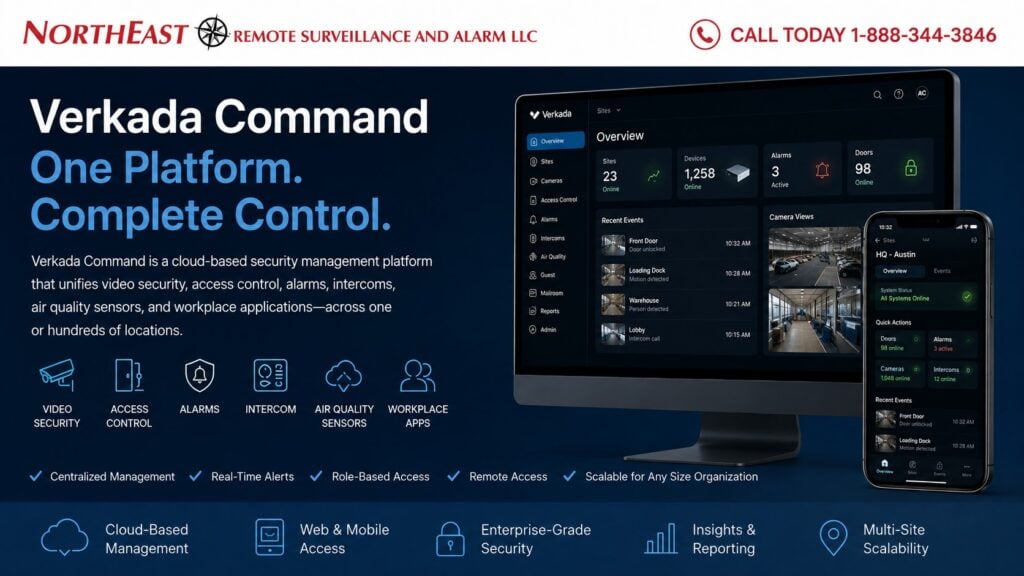
Verkada Command is the cloud-based management environment used to administer supported Verkada physical-security systems from one centralized interface.
This is an independent reference to Verkada Command Commercial Security Management. Product information does not establish a NERSA partnership, certification, authorization or brand-specific service capability. Confirm those details with the proposed provider.
Verkada describes Command as a unified platform for physical security, allowing organizations to manage video security, access control, alarms, intercoms, air quality, Guest, Mailroom, and other supported applications through one environment. (Verkada)
For broader Verkada platform planning, visit Verkada Commercial Security Systems.
Commercial & Industrial Properties Only • Centralized Administration • Multi-Site Management • Remote Access • System Health
Before procurement, confirm the proposed equipment, subscription terms, support scope and acceptance tests.
One Management Environment for Physical Security
Commercial properties often operate several security technologies at once.
A larger facility may have:
- Video surveillance
- Access-controlled doors
- Intrusion alarms
- Intercom entrances
- Environmental sensors
- Visitor management
- Multiple buildings
- Numerous administrators
- Multiple business locations
Without centralized administration, users may need to move between unrelated applications to review incidents, manage access, investigate events, or determine system health.
Verkada Command is designed to provide a unified management view across supported Verkada systems.
Verkada specifically presents Command as a single environment for navigating between cameras, access control, alarms, air quality, intercoms, Mailroom, and Guest. (Verkada)
The objective is not merely to place several products on the same screen.
The real value is helping authorized personnel understand related events, administer users consistently, monitor system condition, and respond to security activity across the organization.
Centralized Site Management
Command can support organizations ranging from one commercial property to large multi-location environments.
Verkada states that Command can manage devices, users, and sites from one platform, including deployments ranging from a few devices at one location to thousands of devices across hundreds of locations. (Verkada)
A centralized environment can help organizations manage:
- Site organization
- Building structure
- Device groups
- Users
- Administrators
- Permissions
- Licenses
- Security events
- Device status
- Regional responsibilities
The final structure should reflect the customer’s actual organization.
A corporate office, warehouse, manufacturing plant, branch office, and remote yard may all need different local permissions while remaining visible to approved corporate administrators.
Role-Based User Permissions
Not every Command user should have access to every site, camera, door, or administrative function.
Verkada supports role-based access controls that allow permissions to be assigned according to user responsibilities. (Verkada)
A commercial organization may establish different roles for:
- Corporate security personnel
- Regional managers
- Local facility managers
- Receptionists
- Human-resources administrators
- IT personnel
- Security officers
- Loss-prevention staff
- Property managers
- Approved service personnel
A receptionist may need access to intercom calls without permission to administer every camera.
A regional manager may need visibility across several properties while local employees remain restricted to their assigned site.
Permissions should be based on operational responsibility rather than convenience.
Centralized User Management
Verkada Command can support centralized user administration and integration with existing identity systems.
Verkada currently documents support for Okta and Azure AD authentication, SCIM-based user and group provisioning, and Google Workspace user synchronization. (Verkada)
For larger commercial environments, centralized identity management can help reduce duplicated user administration and improve consistency when employees:
- Join the organization
- Transfer locations
- Change departments
- Receive temporary responsibilities
- Leave the company
Identity integration should still be coordinated with the customer’s IT and security policies.
The security system should not automatically grant physical access simply because a user exists in the corporate directory.
Multi-Site Commercial Security Management
One of the strongest applications for Command is centralized administration across multiple locations.
A multi-site organization may need to manage:
- Cameras
- Doors
- Credentials
- Alarms
- Intercoms
- Environmental sensors
- Users
- Administrators
- Sites
- Alerts
- Investigations
Command provides cross-site visibility through a web browser and supported mobile applications.
Verkada states that remote access is available without conventional port forwarding or VPN requirements for Command access. (Verkada)
For dedicated portfolio-level planning, visit Verkada Multi-Site Commercial Security Systems.
Video Security Through Command
Supported Verkada cameras are administered and investigated through Command.
Authorized users may use the platform to:
- View live video
- Review recorded video
- Search events
- Investigate activity
- Associate video with other security events
- View cameras across multiple locations
- Monitor device status
Verkada also positions Command around rapid event search and the ability to surface events such as doors held open, visitor activity, and environmental changes while presenting associated video context. (Verkada)
For camera-specific planning, visit Verkada Commercial Video Surveillance Systems.
Access Control Through Command
Verkada access-control systems can be administered through Command alongside other supported physical-security technologies.
Depending on the deployment, authorized users may manage:
- Controlled doors
- Users
- Credentials
- Permissions
- Schedules
- Door events
- Held-open conditions
- Forced-door conditions
- Multi-site access
The value of centralized access management increases when the same organization operates several buildings or locations.
For detailed controller, reader, credential, door, and permission planning, visit Verkada Commercial Access Control Systems.
Alarm Management Through Command
Verkada alarm systems can also operate within the Command environment.
This can help authorized personnel review intrusion-related events together with:
- Cameras
- Door activity
- Site information
- Alarm devices
- User activity
- Relevant event history
The objective is to provide more useful context during an alarm rather than forcing personnel to investigate several unrelated systems.
For alarm-specific planning, visit Verkada Commercial Intrusion Alarm Systems.
Intercom Management Through Command
Supported Verkada intercoms can be incorporated into the Command environment for visitor communication and controlled-entry applications.
Depending on the project, authorized personnel may be able to:
- Receive intercom calls
- View entrance video
- Communicate with visitors
- Release controlled openings
- Review related events
- Manage several entrances
For dedicated visitor-entry and intercom planning, visit Verkada Commercial Intercom Systems.
Air Quality and Environmental Information
Verkada Air Quality Sensors can also report through Command.
Environmental information can be useful in areas such as:
- Server rooms
- Network closets
- Manufacturing spaces
- Storage rooms
- Laboratories
- Equipment areas
- Other monitored commercial environments
Command can surface environmental changes alongside other security information, including associated video where supported. (Verkada)
For dedicated environmental monitoring planning, visit Verkada Commercial Air Quality Sensors.
Event Search and Investigation
A centralized security platform becomes most valuable when it improves investigation.
Verkada states that Command can search and surface relevant events quickly and can associate events such as a held-open door, visitor check-in, or air-quality change with relevant video context. (Verkada)
Commercial investigations may involve:
- Access events
- Video activity
- Alarm conditions
- Visitor events
- Environmental changes
- Intercom activity
- Device status
- User activity
The system should be organized with consistent site, camera, door, and device naming so personnel can understand event information without unnecessary confusion.
Real-Time Alerts
Command can support configurable alerts for selected security conditions.
Verkada currently identifies examples such as:
- Line crossing
- Tailgating
- Off-hours badge activity
- Person-of-interest sightings
Verkada also states that alerts can be acted upon through Command and its mobile application. (Verkada)
Alert configuration should reflect actual facility operations.
An alert that activates constantly during normal activity quickly loses value.
Configure notifications around the operating schedule, responsible personnel and documented response process. Test delivery and escalation before handover.
Mobile Security Management
Command provides supported mobile access for authorized users.
Verkada states that users can monitor premises, review device status, and respond to selected threats from the Command mobile application. (Verkada)
Mobile access may be useful for:
- Facility managers
- Regional managers
- Security personnel
- Operations staff
- Approved administrators
Remote administration should still be controlled through appropriate permissions and account-security practices.
Security System Health
Command provides device-health visibility across the organization.
Verkada states that administrators can review device health and status and receive awareness when devices go offline. (Verkada)
System-health visibility can help identify:
- Offline devices
- Communication problems
- Device availability
- Site-specific issues
- Larger recurring outages
Health monitoring does not eliminate preventive maintenance or physical inspection, but it can help identify problems earlier than relying only on user complaints.
Audit Logs and Administrative Accountability
Verkada provides audit logging within Command.
Verkada states that Command can track user access, interactions with sites and devices, and administrative actions. (Verkada)
Audit records can help organizations understand:
- Who accessed the system
- Which areas were viewed
- Which administrative actions occurred
- When changes were made
- Which sites or devices were affected
Administrator accounts should be individually assigned wherever practical rather than shared among several employees.
Device Deployment and Expansion
Verkada describes Command device deployment as supporting serial-number entry, QR scanning, and bulk CSV workflows. (Verkada)
This can be useful when an organization is adding:
- Cameras
- Doors
- Alarm devices
- Intercoms
- Environmental sensors
- New locations
A scalable administrative environment can make expansion more manageable, but each new device still needs to be properly installed, named, assigned, configured, tested, and documented.
Remote Access Without Traditional Port Forwarding
Command is designed around secure cloud-based administration rather than exposing security devices through traditional external port-forwarding configurations.
Verkada states that Command can be accessed through a web browser or mobile application without conventional VPNs or port forwarding for platform access. (Verkada)
This can simplify remote administration, particularly across multiple sites.
Network architecture, firewall policies, internet availability, cybersecurity, and customer IT requirements should still be reviewed as part of the project.
Command for Warehouses and Distribution Facilities
Warehouse organizations may benefit from centralized management when security needs include:
- Loading docks
- Employee entrances
- Truck areas
- Trailer yards
- Inventory spaces
- Vehicle gates
- Alarm events
- Remote video review
- Multiple buildings
Command can provide one administrative environment while individual Verkada product families handle their specific security functions.
The platform should be configured around the warehouse’s actual operating schedule and responsibilities.
Command for Manufacturing Facilities
Manufacturing properties may require centralized security across:
- Production buildings
- Employee entrances
- Restricted processes
- Contractor entrances
- Shipping areas
- Exterior yards
- Multiple plants
- Environmental conditions
- Video systems
- Access control
Central management can be particularly valuable when several departments or facilities need different permissions while corporate administrators require broader oversight.
Command for Multi-Building Commercial Campuses
Commercial campuses can contain several buildings, entrances, parking areas, users, and administrators.
A properly organized Command environment may help centralize:
- Building-level security
- Camera access
- Door administration
- Visitor entry
- Alarm information
- Device health
- User permissions
- Site naming
Local employees can remain limited to their assigned responsibilities while approved administrators maintain broader visibility.
Command and Existing Security Systems
A Verkada Command project should begin by identifying what equipment already exists.
The property may contain:
- Cameras
- Access-control equipment
- Readers
- Credentials
- Alarm systems
- Intercoms
- Cabling
- Network infrastructure
- Existing cloud platforms
- Administrator accounts
Some existing systems may be candidates for migration, integration, phased replacement, or continued independent operation.
The decision should be based on compatibility, condition, operational requirements, security policies, and long-term supportability.
For broader migration planning, visit Verkada Security System Migration & Takeovers.
Why Businesses Use Verkada Command
Command may be attractive to organizations prioritizing:
- Centralized physical-security administration
- Multi-location visibility
- Remote access
- Unified event investigation
- Role-based permissions
- Device-health visibility
- Central user management
- Audit logging
- Mobile access
- Scalable administration
The platform should still be evaluated against the organization’s licensing requirements, cybersecurity policies, connectivity, data-management requirements, existing equipment, integrations, and long-term operating costs.
Confirm these requirements before selecting the platform.
Frequently Asked Questions About Verkada Command
What is Verkada Command?
Verkada Command is Verkada’s cloud-based physical-security management platform for supported cameras, access control, alarms, intercoms, air quality sensors, Workplace applications, users, devices, and sites. (Verkada)
Can Command manage multiple business locations?
Yes.
Verkada specifically positions Command for centralized administration of devices, users, and sites across both small and large multi-location environments. (Verkada)
Can administrators have different permissions?
Yes.
Command supports role-based permissions that can be assigned according to user or group responsibilities. (Verkada)
Does Command show device health?
Yes.
Verkada states that Command provides device-health and status information across the organization. (Verkada)
Can Command integrate with corporate identity systems?
Verkada documents support for identity-management integrations including Okta, Azure AD, SCIM, and Google Workspace user synchronization. (Verkada)
Does Command require a VPN for remote access?
Verkada states that Command provides browser and mobile access without requiring conventional VPNs or port forwarding for platform access. (Verkada)
Can Command connect access events with video?
Supported Verkada systems can present related security information within the same management environment, including access and associated video context.
Can Command be used on a mobile device?
Yes.
Verkada provides a Command mobile application for monitoring supported systems and responding to selected events. (Verkada)
Does Command replace each individual security product?
No. Command is the management environment. Cameras, access-control hardware, alarm devices, intercoms, sensors, and other products still perform their individual physical-security functions.
What should a multi-site provider confirm?
Ask the proposed provider to document its authorization, relevant deployment experience, support responsibilities and the scope of the multi-site configuration. This guide does not establish those capabilities for NERSA.
Prepare for a Commercial Security Assessment
Prepare a site inventory, existing equipment list, retention requirements, administrator roles and support expectations for a commercial security assessment. Confirm brand-specific capability and licensing with the proposed provider.