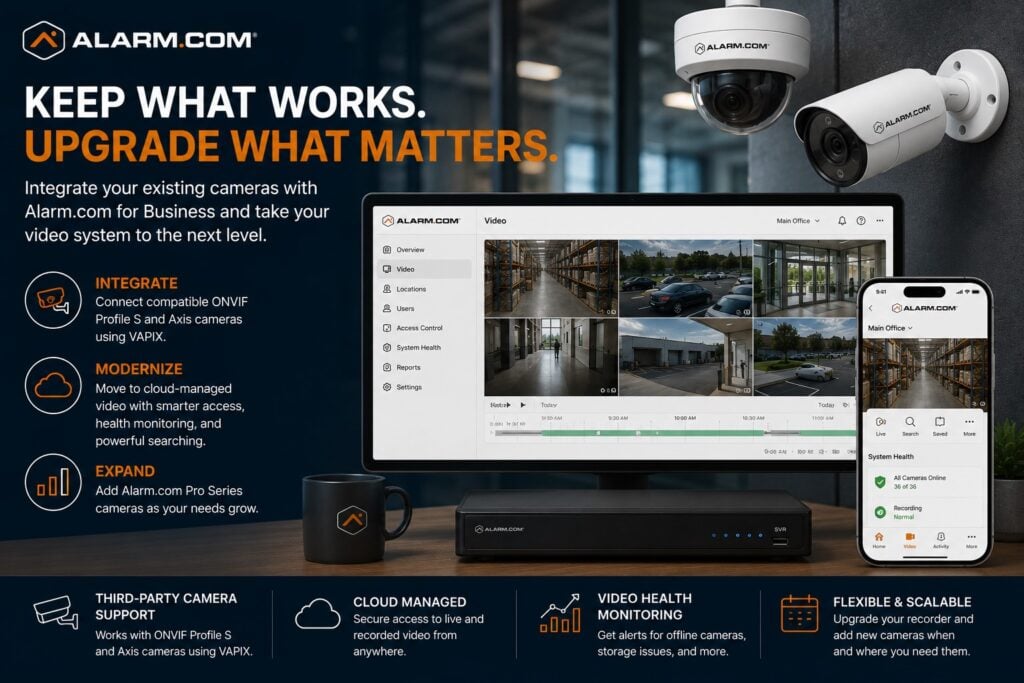
A business may be able to move an existing video system into Alarm.com for Business without replacing every camera.

Request a Commercial Security Assessment
For the complete Alarm.com commercial platform, visit Alarm.com for Business Security Systems.
This is an independent reference to Alarm.com Existing Camera Integration & Upgrades. Product information does not establish a NERSA partnership, certification, authorization or brand-specific service capability. Confirm those details with the proposed provider.
Supported Alarm.com Commercial SVR hardware can connect compatible third-party cameras to the business video platform.
Options include compatible ONVIF Profile S cameras and Axis cameras using VAPIX.
Alarm.com specifically positions this capability as a way to upgrade an existing video system to its cloud-managed platform and expand with Alarm.com Pro Series cameras over time. (Alarm.com)
Start With the Existing Camera System
A camera-upgrade project should begin with an evaluation of what is already installed.
Important questions may include:
- What camera manufacturers are in use?
- Are the cameras IP-based?
- Do they support ONVIF Profile S or Axis VAPIX?
- What resolution do they provide?
- Are they still supported by the manufacturer?
- Is the image quality adequate?
- Are the cameras positioned correctly?
- Is the existing recorder still reliable?
- Is the network properly designed?
- Are administrator credentials available?
- Is the system documented?
- How much retention is currently available?
- Are additional cameras planned?
The objective is not to replace equipment simply because it is older.
The objective is to determine which parts of the existing system remain technically and operationally useful.
Third-Party Camera Support
Alarm.com supports compatible third-party cameras in its commercial video environment.
Alarm.com states that businesses can install or retain existing cameras while gaining access to the capabilities of the Alarm.com for Business platform, provided the cameras and system meet the required integration standards. (Alarm.com)
This can be useful when a property already has:
- Good-quality IP cameras
- Acceptable camera placement
- Existing network cabling
- PoE infrastructure
- Cameras from supported manufacturers
- Cameras that still meet the business’s security requirements
Keeping compatible equipment can avoid needless replacement. The business may still be able to upgrade how staff manage the video system.
ONVIF Camera Integration
Alarm.com supports compatible third-party IP cameras that conform to ONVIF Profile S requirements.
ONVIF is an interoperability standard used by many IP-camera manufacturers to support basic video-streaming compatibility across different systems.
Alarm.com specifies that compatible third-party cameras must meet its supported technical requirements, including ONVIF Profile S where applicable. (Knowledge Base)
An ONVIF label alone should not be treated as a guarantee that every feature will work.
Before migration, verify the camera model, firmware, compression, networking, and supported functions.
Axis Camera Integration
Alarm.com also supports compatible Axis cameras using the VAPIX protocol.
VAPIX is Axis Communications’ proprietary application interface and is specifically supported in Alarm.com’s commercial third-party camera architecture. (Alarm.com)
Some existing Axis cameras may be suitable for reuse with Alarm.com video management. Confirm support for the specific camera and intended functions.
Before reusing a camera, review its condition, image quality, firmware support, network design, and intended functions.
Commercial SVR Integration
Compatible Commercial SVR hardware handles third-party camera integration into Alarm.com.
Alarm.com’s commercial video platform supports third-party ONVIF and VAPIX cameras through compatible CSVR configurations, allowing the business to use local recording while gaining Alarm.com cloud-management capabilities. (Alarm.com)
Choose the recorder architecture around:
- Camera count
- Camera resolution
- Storage requirements
- Network topology
- Retention expectations
- Existing infrastructure
- Future expansion
Alarm.com’s commercial SVR platform also supports live and recorded multi-camera viewing and its 24/7 Smart View timeline for reviewing and exporting footage. (Alarm.com)
Retain What Still Works
Start by checking the existing equipment. Do not assume that a video-system upgrade requires every part to be removed.
Potentially reusable components may include:
- IP cameras
- Network switches
- PoE infrastructure
- Ethernet cabling
- Fiber
- Mounting locations
- Camera housings
- Equipment racks
- UPS equipment
- Existing pathways
Evaluate each component independently.
A camera may be compatible but poorly positioned.
A switch may function but lack sufficient PoE capacity.
Existing cabling may remain useful even when the recorder and cameras are replaced.
Base each decision on condition, compatibility, performance, and future requirements.
Replace Cameras That No Longer Meet the Need
Compatibility does not automatically mean a camera should be retained.
Replacement may be appropriate when an existing camera has:
- Poor resolution
- Inadequate low-light performance
- Damaged optics
- Unsupported firmware
- Unreliable operation
- Excessive age
- Poor placement
- Inadequate field of view
- Insufficient identification detail
- Limited analytics support
The goal is not maximum reuse.
The goal is appropriate reuse.
A hybrid upgrade can combine compatible existing cameras with new Alarm.com Pro Series cameras where better imaging or newer capabilities are required.
Alarm.com specifically describes its third-party camera support as allowing service providers to retain existing cameras and expand the system with Pro Series cameras as customer needs evolve. (Alarm.com)
Upgrade the Recorder Without Replacing Every Camera
In some properties, the largest weakness is not the camera itself.
The existing recorder may be:
- Difficult to administer
- Unsupported
- Unreliable
- Inaccessible remotely
- Poorly secured
- Difficult to search
- Limited in export capabilities
- Out of storage
- Poorly documented
If the cameras are compatible, it may be more practical to upgrade the recorder and management tools while keeping those cameras.
Alarm.com’s commercial video platform provides cloud-managed access, local and cloud recording options, video health monitoring, and event-based review tools. (Alarm.com)
Cloud-Managed Video Benefits
Compatible cameras may work with Alarm.com’s cloud-managed commercial video features. That can offer an upgrade path without replacing them all.
Depending on the supported configuration, businesses may gain:
- Remote live viewing
- Recorded video access
- 24/7 recording
- Smart View timeline
- Video export
- Video health monitoring
- Multi-camera viewing
- Centralized system access
Alarm.com also provides 24/7 video health reporting that can help identify offline cameras, recording issues, storage conditions, and obstructed views. (Alarm.com)
The new platform should make video easier to review and the system easier to support. Changing the viewing screen alone may not solve the problem.
Existing Cameras and Video Analytics
Not every third-party camera will support every Alarm.com analytics feature.
A reused camera may support live views and recordings but lack other features. Business Activity Analytics, Perimeter Guard, or other advanced tools may need selected Alarm.com Pro Series cameras.
Consider this distinction when planning the upgrade.
Where advanced AI tools are needed, check whether new cameras are required for those views. Compatible existing cameras may still be useful in other areas.
For broader camera-system capabilities, visit Alarm.com Commercial Video Surveillance Systems.
Existing Camera Systems and OpenEye
Some commercial properties may be better suited to OpenEye rather than direct Alarm.com third-party camera integration.
OpenEye, an Alarm.com subsidiary, provides a cloud-managed commercial video platform that integrates Alarm.com access-control and intrusion events with OpenEye video.
The integration can associate security events with corresponding camera footage and streamline incident review. (Alarm.com)
Network Assessment Before Migration
Existing-camera integration depends heavily on the network.
Before migration, evaluate the video network for:
- IP addressing
- DHCP or static addressing
- VLAN structure
- PoE capacity
- Switch condition
- Bandwidth
- Camera connectivity
- Network security
- Internet connectivity
- Recorder placement
- Remote-access requirements
Alarm.com’s third-party camera requirements vary based on the network topology and whether cameras are connected upstream or downstream from the CSVR. (Knowledge Base)
Review the network design before assuming you can migrate an existing camera system without changes.
Administrator Access Matters
A business cannot properly modernize an existing camera system if nobody has access to the equipment.
An upgrade review should identify:
- Camera usernames
- Camera passwords
- Recorder credentials
- Network credentials
- IP addresses
- Manufacturer information
- Existing configuration
- Firmware versions
- System documentation
Missing administrator access can affect whether existing cameras can be reconfigured or reused.
Recovering system control should be part of the planning process.
Phased Camera-System Modernization
Large properties may not need to replace or migrate the entire video system at one time.
A phased project may involve:
- Evaluating existing cameras.
- Retaining compatible units.
- Replacing the recorder.
- Adding Alarm.com CSVR infrastructure.
- Replacing weak cameras in priority areas.
- Adding Alarm.com Pro Series cameras where advanced features are needed.
- Expanding additional areas later.
This approach can allow a business to modernize gradually while maintaining useful existing infrastructure.
Existing Camera Integration Is Not Universal
Third-party camera support should not be interpreted as universal camera compatibility.
Alarm.com currently requires supported third-party cameras to meet specific technical criteria, including compatible ONVIF or VAPIX communication, H.264 compression, wired Ethernet communication, and supported CSVR architecture. (Knowledge Base)
Evaluate each existing system before promising compatibility.
Professional Upgrade Design Matters
A successful camera migration depends on more than whether a camera can produce a video stream.
Evaluate:
- Camera compatibility
- Image quality
- Camera placement
- Network topology
- PoE infrastructure
- Storage
- Recorder requirements
- Administrator access
- Analytics requirements
- Expansion plans
- Documentation
Record which devices can remain, which need replacement and the migration sequence. Obtain model-specific compatibility confirmation before procurement.
Frequently Asked Questions
Can existing cameras work with Alarm.com?
Some can.
Alarm.com supports compatible third-party cameras using ONVIF Profile S and Axis VAPIX through supported commercial SVR hardware. (Alarm.com)
Do I need to replace every camera?
No. You may be able to keep compatible cameras if they remain reliable, properly positioned, supported, and suitable for your business.
Can existing Axis cameras work with Alarm.com?
Compatible Axis cameras using VAPIX can be integrated through supported Alarm.com commercial video architecture. (Alarm.com)
Does every ONVIF camera work?
No.
The specific camera must meet Alarm.com’s supported requirements, including ONVIF Profile S and other technical criteria.
Verify compatibility by model. (Knowledge Base)
Can new Alarm.com cameras be added alongside existing cameras?
Yes.
Alarm.com specifically supports upgrading an existing video system and expanding it with Pro Series cameras over time. (Alarm.com)
Can an existing recorder be retained?
Sometimes, but direct Alarm.com third-party camera integration relies on supported Alarm.com commercial SVR architecture, so the recording design should be evaluated before assuming the old recorder remains part of the final system. (Knowledge Base)
Will existing third-party cameras support every Alarm.com feature?
Not necessarily. Some advanced Alarm.com analytics and camera-specific capabilities may require supported Alarm.com Pro Series cameras.
Can Alarm.com integrate with OpenEye?
Yes.
OpenEye video can integrate with Alarm.com access-control and intrusion events for streamlined event review and video verification. (Alarm.com)
Prepare for a Commercial Security Assessment
For a review, list camera models, firmware, recorders, network connections, and storage needs. State which parts must keep working during the changeover.
Request a Commercial Security Assessment.
When access or intrusion events need associated OpenEye video, review the OpenEye and Alarm.com integration planning guide to distinguish event integration from a camera migration.
Compliance, Codes & Project Standards
NERSA plans commercial and industrial security work with applicable code, documentation, inspection and authority-having-jurisdiction requirements in mind. Requirements vary by system, property and jurisdiction. These resources support project planning; they do not establish legal compliance, certification or AHJ approval.
Related guidance: Regulatory compliance & inspection readiness · NERSA project standards · Documentation, testing & inspection readiness