Cloud vs On-Premise vs Hybrid Video Surveillance Buyer Guide

Cloud vs On-Premise vs Hybrid Video Surveillance Buyer Guide – Cloud, on-premise, and hybrid video surveillance systems each have different costs, responsibilities, storage models, cybersecurity considerations, and long-term ownership requirements. This buyer guide helps commercial and industrial buyers compare the three approaches before choosing a recording platform, camera system, remote access model, or multi-site video strategy. For the broader pricing structure, start with Commercial & Industrial Security System Costs, Comparisons & Buyer Guides.

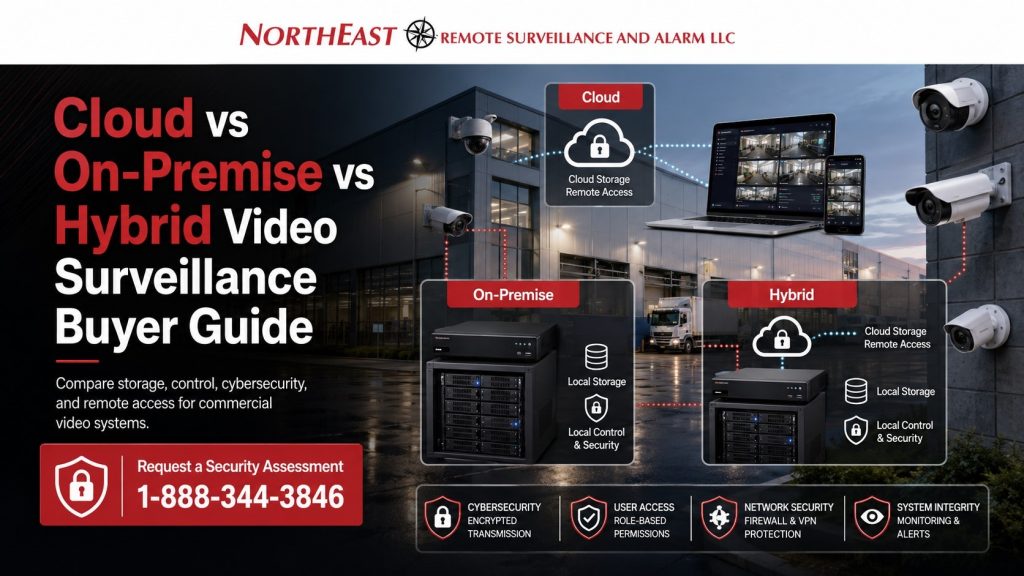
Cloud vs on-premise vs hybrid video surveillance buyer guide graphic showing cloud storage, local recorder, hybrid video architecture, commercial cameras, cybersecurity controls, remote access software, and Northeast Remote Surveillance and Alarm, LLC branding.

Cloud vs On-Premise vs Hybrid Video Surveillance Buyer’s Guide for Planning

Video surveillance is no longer only about choosing cameras. The recording architecture matters just as much as the camera layout, network design, retention period, cybersecurity plan, remote access needs, and long-term support expectations.

A cloud system stores or manages video through a cloud platform. An on-premise system stores video locally using recorders, servers, or appliances at the property. A hybrid system combines local recording with cloud access, cloud backup, cloud management, or selected cloud features.

The right choice depends on the business, not on a generic technology preference. A small office, warehouse, logistics yard, school, manufacturing site, healthcare support property, and multi-site business may all need different video storage and management strategies.

What Changes Video Surveillance Platform Cost

The cost difference between cloud, on-premise, and hybrid video surveillance is shaped by more than the cameras.

Major cost drivers include:

  • camera count
  • recording retention period
  • cloud licensing
  • local recorder or server cost
  • storage capacity
  • remote access requirements
  • bandwidth availability
  • cybersecurity requirements
  • multi-site management
  • software updates
  • user permissions
  • system health monitoring
  • backup needs
  • IT involvement
  • support expectations
  • future expansion

A system with lower upfront hardware cost may have higher recurring software cost. A system with higher upfront recorder or server cost may have lower monthly licensing. A hybrid system may balance both, but it still needs proper design.

Cloud Video Surveillance

Cloud video surveillance can be useful when a business wants easier remote access, simplified software management, centralized administration, and less dependence on local recording hardware.

Cloud systems may appeal to businesses that need multi-site visibility, remote management, fast user access, automatic updates, mobile viewing, event-based search, or simplified administration.

Cloud systems may also include recurring licensing, cloud storage fees, bandwidth requirements, platform dependency, and subscription-based ownership. Buyers should understand what is included, how long video is retained, what happens if service changes, and how users access footage.

Cloud video is often strongest when the business values convenience, remote administration, software features, and standardized management across multiple sites.

On-Premise Video Surveillance

On-premise video surveillance stores video locally using a network video recorder, server, appliance, or storage system installed at the property.

For broader camera system planning, use Commercial and Industrial Video Surveillance Systems.

On-premise systems may be useful when a business wants local control, large storage capacity, longer retention, reduced cloud dependency, direct network ownership, or a system that can operate with limited cloud reliance.

This approach can work well for warehouses, manufacturing facilities, industrial properties, logistics centers, high-camera-count systems, and businesses with strong IT support or specific storage requirements.

On-premise systems may require more planning around hardware sizing, storage capacity, firmware updates, cybersecurity, backups, remote access, maintenance, and eventual equipment replacement.

Hybrid Video Surveillance

Hybrid video surveillance combines local recording with cloud-based features. This may include local storage with cloud remote access, cloud health monitoring, cloud backup for selected events, centralized user management, or cloud-based search tools.

Hybrid systems are often a strong fit for commercial and industrial properties that want the reliability of local recording with the convenience of cloud access.

A hybrid system can be useful when the business wants local retention for high-resolution recording but still needs remote access, multi-site management, alerts, or selected cloud services.

Hybrid does not mean automatic simplicity. It still requires planning around local hardware, cloud services, user permissions, network security, bandwidth, storage retention, and long-term support.

Storage, Retention, and Recording Quality

Storage is one of the biggest differences between cloud, on-premise, and hybrid systems. Buyers should define how long video needs to be retained and at what quality.

A system recording thirty cameras for thirty days will have different storage needs than a system recording one hundred cameras for ninety days. Resolution, frame rate, compression, motion settings, analytics, and continuous versus event-based recording all affect storage requirements.

Cloud storage may be priced by camera, retention length, features, or subscription tier. On-premise storage may require larger recorders, servers, hard drives, or storage appliances. Hybrid storage may split critical video between local retention and selected cloud retention.

The retention plan should match the real business need. Some properties only need short-term review. Others need longer retention for incident investigation, compliance support, operational review, insurance documentation, or multi-site management.

Bandwidth and Network Readiness

Cloud and hybrid systems depend heavily on the network. Upload speed, internet reliability, firewall rules, VLAN design, remote access security, and bandwidth usage can all affect performance.

A cloud-heavy video system can place more demand on internet upload capacity. This matters for warehouses, multi-camera properties, remote sites, or facilities with limited broadband options.

On-premise systems may reduce cloud bandwidth demand because video is stored locally, but remote access and software features still require secure network planning.

A proper design should review the network before the platform is selected. Video surveillance should not be placed on a weak or unmanaged network without considering reliability, segmentation, cybersecurity, and long-term support.

Cloud vs On-Premise vs Hybrid Video Surveillance Buyer’s Guide for Cybersecurity and Data Protection

Video surveillance systems should be planned as networked security infrastructure, not isolated camera equipment. User permissions, remote access, passwords, firmware, encryption, network segmentation, vendor access, and data retention all affect risk.

For broader security technology governance, use Cybersecurity & Data Protection Standards.

Cloud systems require careful review of platform security, user access, account controls, storage policies, and vendor dependency. On-premise systems require secure local network design, software updates, remote access controls, and equipment maintenance. Hybrid systems require both.

The right approach should protect video access, reduce unnecessary exposure, control who can view footage, and support reliable system administration.

Remote Access and Multi-Site Management

Remote access is one of the biggest reasons businesses compare cloud, on-premise, and hybrid video systems.

Cloud platforms often make remote access easier because users can log in through a managed platform. On-premise systems can also support remote access, but they may require stronger IT coordination, secure firewall configuration, VPN planning, or remote access gateway setup.

Hybrid systems can give businesses local recording with cloud-style access and user management.

Multi-site businesses should pay close attention to this issue. A business with several offices, warehouses, yards, or facilities may benefit from centralized user management, standardized camera platforms, common retention rules, and consistent remote access controls.

Cloud vs On-Premise vs Hybrid Video Surveillance Buyer’s Guide One-Time Costs vs Recurring Costs

Cloud, on-premise, and hybrid video surveillance systems often differ in how costs are distributed.

Cloud systems may reduce some local hardware needs but add recurring licensing, storage, software, or platform fees.

On-premise systems may require more upfront investment in recorders, servers, storage, and network infrastructure, but may reduce certain recurring platform costs.

Hybrid systems may include both local hardware and recurring cloud services.

The right buying decision should compare total cost over time, not just installation cost. Buyers should evaluate the first-year cost, five-year cost, licensing model, warranty, support expectations, equipment lifecycle, storage growth, and future expansion.

Platform Ownership and Vendor Dependency

Buyers should understand what they own, what they license, and what happens if they change platforms later.

Cloud systems may depend more heavily on a specific manufacturer or service provider. On-premise systems may give the business more local ownership of recording hardware and storage. Hybrid systems may offer flexibility, but still need careful review of software licensing and platform limits.

Important questions include:

  • Who owns the footage?
  • How is footage exported?
  • What happens if licensing stops?
  • Can cameras be reused later?
  • Can the system expand with other manufacturers?
  • How are users removed?
  • How are software updates handled?
  • How long will the platform be supported?

A good video surveillance design should avoid trapping the business in a system that cannot scale, cannot be supported, or cannot meet future operational requirements.

Which System Is Best for Commercial Properties?

There is no single best choice for every commercial property.

Cloud video may be best when the business values simple remote access, centralized management, automatic updates, and subscription-based software.

On-premise video may be best when the business needs local control, high camera count, long retention, larger storage capacity, or less cloud dependency.

Hybrid video may be best when the business wants local recording reliability with cloud access, cloud management, or selected cloud features.

The best system is the one that matches the property, the risk, the network, the retention need, the management process, and the long-term budget.

Cloud vs On-Premise vs Hybrid Video Surveillance Buyer’s Guide Best Fit by Property Type

Office buildings may benefit from cloud or hybrid video when remote access, simple user management, and clean administration are priorities.

Warehouses may benefit from on-premise or hybrid video when camera counts are higher, retention needs are longer, and local recording reliability matters.

Manufacturing facilities may require on-premise or hybrid systems when network segmentation, system uptime, and local control are important.

Logistics yards and exterior-heavy sites may need hybrid designs when local recording, monitoring support, and remote access all matter.

Multi-site businesses may benefit from cloud or hybrid management when standardized access, user permissions, and centralized review are required.

Why Generic Platform Advice Fails

Generic advice often says cloud is always better, or on-premise is always safer, or hybrid is always the best compromise. That is not how real commercial and industrial video surveillance should be planned.

The right answer depends on the property and the operating requirements. A small office with five cameras does not have the same needs as a warehouse with loading docks, a truck yard, exterior storage, employee entrances, and multi-shift operations.

The platform should be selected after reviewing camera count, retention, remote access, cybersecurity, bandwidth, storage needs, IT resources, monitoring requirements, and long-term support.

When to Choose Cloud Video Surveillance

Cloud video surveillance may be worth considering when the business needs easy remote access, fast deployment, centralized administration, mobile viewing, software-managed updates, multi-site oversight, and simple user management.

It may be a strong fit for smaller commercial offices, multi-location businesses, executive users, professional buildings, and organizations that want less local recording hardware to manage.

Cloud may not be the best fit when the property has limited internet upload speed, very high camera counts, long retention needs, strict local storage requirements, or concerns about long-term subscription dependency.

When to Choose On-Premise Video Surveillance

On-premise video surveillance may be worth considering when the business needs strong local recording control, larger storage capacity, high camera counts, longer retention, local network ownership, or reduced dependence on cloud storage.

It may be a strong fit for warehouses, manufacturing facilities, industrial sites, logistics properties, and businesses with IT support.

On-premise may not be the best fit when the business lacks support for maintenance, updates, remote access security, server management, storage replacement, or long-term system administration.

When to Choose Hybrid Video Surveillance

Hybrid video surveillance may be worth considering when the business wants local recording reliability with cloud access, cloud management, selected cloud backup, remote user administration, alerts, or event-based review.

It may be a strong fit for commercial and industrial properties that need both local retention and modern remote access.

Hybrid may not be the best fit when the design is poorly defined. A hybrid system should not be a confusing mix of hardware and subscriptions. It should have a clear purpose: what records locally, what uses cloud services, who manages access, and how the system is supported.

Why Businesses Choose Northeast Remote Surveillance and Alarm, LLC

Northeast Remote Surveillance and Alarm, LLC designs video surveillance systems around real commercial and industrial needs. The goal is not to force every buyer into cloud, on-premise, or hybrid. The goal is to choose the architecture that fits the property, the network, the retention requirement, the cybersecurity expectations, and the operating process.

NERSA helps businesses compare platform options, camera requirements, recorder or cloud storage needs, remote access expectations, cybersecurity controls, bandwidth conditions, and long-term support.

The right video surveillance platform should make footage easier to manage, easier to protect, easier to access, and easier to use when something happens.

Request a Video Surveillance Platform Assessment

If your business is comparing cloud video, on-premise video, hybrid video, recorder upgrades, cloud-managed cameras, multi-site video management, or long-term storage options, Northeast Remote Surveillance and Alarm, LLC can help.

A site-specific assessment can review camera count, retention needs, existing infrastructure, bandwidth, network conditions, cybersecurity requirements, remote access needs, storage expectations, and future expansion.

Call 1-888-344-3846 or Request a Security Assessment.

Frequently Asked Questions About Cloud, On-Premise, and Hybrid Video Surveillance

What is cloud video surveillance?

Cloud video surveillance uses a cloud-based platform for video storage, management, remote access, software features, or event review. Some systems store all video in the cloud, while others use the cloud mainly for access and management.

What is on-premise video surveillance?

On-premise video surveillance stores video locally using a recorder, server, appliance, or storage system installed at the property. It may still support remote access, but the primary recording is kept on-site.

What is hybrid video surveillance?

Hybrid video surveillance combines local recording with cloud features. This may include cloud remote access, cloud health monitoring, selected cloud backup, centralized user management, or event-based cloud tools while still retaining video locally.

Which is cheaper: cloud, on-premise, or hybrid video surveillance?

It depends on the camera count, retention period, licensing, storage needs, network conditions, and support expectations. Cloud may reduce some hardware costs but add recurring subscriptions. On-premise may cost more upfront but reduce certain recurring platform fees. Hybrid may include both local hardware and cloud services.

Is cloud video surveillance secure?

Cloud video surveillance can be secure when the platform uses strong account controls, encryption, user permissions, update management, and proper administration. Buyers should still review access controls, vendor policies, data retention, and account security.

Is on-premise video surveillance more secure than cloud?

Not automatically. On-premise systems can provide more local control, but they still need secure passwords, updates, network segmentation, remote access controls, and maintenance. A poorly managed on-premise system can be less secure than a properly managed cloud platform.

Is hybrid video surveillance good for warehouses?

Yes. Hybrid video surveillance can be a strong option for warehouses because it can support local recording, longer retention, remote access, event review, and multi-site management depending on the design.

What is the best option for multi-site businesses?

Cloud or hybrid systems are often easier for multi-site management because they can support centralized access, common user permissions, remote administration, and standardized video review. The final choice should still consider bandwidth, storage, cybersecurity, and long-term cost.

What is the best way to choose a video surveillance platform?

The best way to choose is to review camera count, retention needs, remote access requirements, bandwidth, cybersecurity, storage expectations, user management, monitoring needs, IT support, and future expansion before selecting the platform.


F

Scroll to Top
1-888-344-3846