Compare commercial camera options by checking applicable procurement restrictions separately from image quality, cybersecurity, compatibility, and support requirements.

Commercial buildings, warehouses, logistics properties, municipal facilities, healthcare offices, industrial sites, and multi-site businesses need video surveillance systems that support security performance, cybersecurity expectations, long-term serviceability, and compliance-aware planning.
For broader commercial security education, start with the Commercial & Industrial Security Knowledge Center.
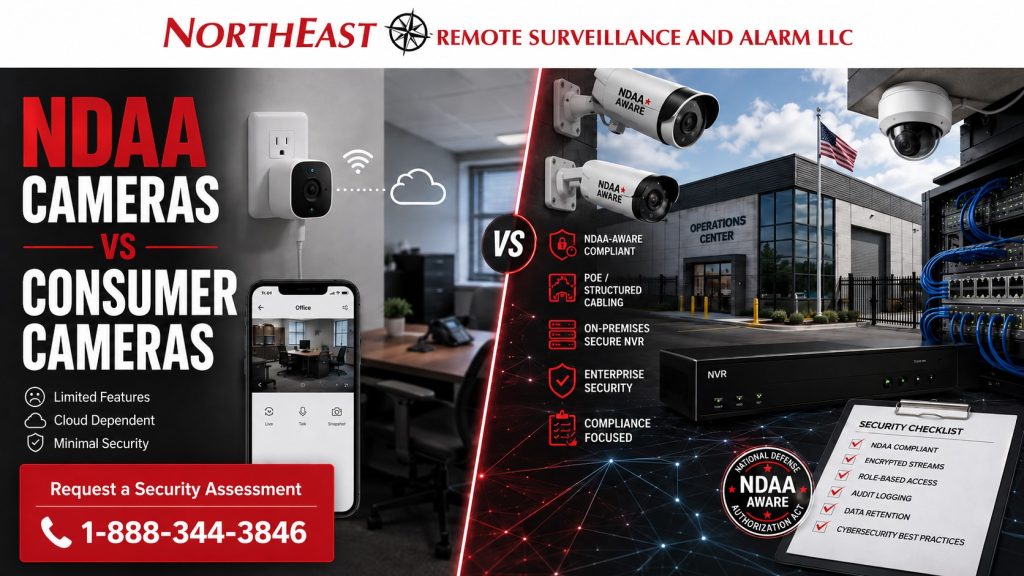
Consumer cameras may look affordable at first, but they are usually designed for homes, small retail convenience, or basic app-based viewing. NDAA-aware commercial camera systems are selected for business environments where uptime, network security, video retention, user permissions, camera placement, evidence quality, warranty support, and procurement risk all matter.
This guide explains the difference between NDAA cameras and consumer cameras so commercial buyers can make better decisions before investing in a security camera system.
What Are NDAA Cameras?
NDAA cameras generally refer to video surveillance cameras selected to avoid manufacturers and equipment categories restricted under federal procurement rules, especially Section 889 of the National Defense Authorization Act.
Section 889 restricts federal agencies and certain federal contractors from procuring or using covered telecommunications and video surveillance equipment or services as a substantial or essential component of a system, unless an exception or waiver applies. (Acquisition.gov)
For commercial buyers, “NDAA camera” should not be treated as a loose marketing label. It should mean the camera, manufacturer, firmware path, recorder, software, and system design are being evaluated with procurement risk, cybersecurity, and long-term commercial support in mind.
NDAA-aware camera planning is especially important for:
- Municipal buildings
- Schools and public-sector facilities
- Healthcare properties
- Government contractors
- Logistics and transportation operations
- Critical infrastructure support businesses
- Warehouses and industrial sites
- Multi-site commercial organizations
- Businesses that may pursue federal, state, institutional, or regulated contracts
The FCC Covered List is another important reference point because it identifies communications equipment and services that pose an unacceptable risk to U.S. national security.
Federal Communications Commission
What Are Consumer Cameras?
Consumer cameras are app-based cameras commonly sold online or in retail stores for homeowners, small shops, and basic convenience monitoring. They may offer simple features such as motion alerts, cloud clips, two-way audio, mobile viewing, and plug-in installation.
That does not make them suitable for commercial security.
Most consumer camera systems are not designed around commercial retention needs, multi-user access control, IT review, facility mapping, evidence export, cyber policy, structured cabling, PoE switching, VMS integration, or long-term service support. They are usually built for convenience, not commercial risk management.
For a business, that difference matters.
A consumer camera may show that something happened. A commercial video surveillance system should help document what happened, where it happened, when it happened, who was involved, how the event moved through the property, and whether the footage can be securely retained, exported, and used.
NDAA Cameras vs Consumer Cameras: The Real Difference
The biggest difference is not just the camera body. It is the entire system standard behind the camera.
NDAA-aware commercial camera systems are planned around risk, infrastructure, compliance, documentation, service, and operational use. Consumer camera systems are usually planned around quick installation and basic viewing.
A commercial system should consider:
- Camera manufacturer and supply-chain risk
- Recorder or VMS platform
- Firmware and software support
- Network segmentation
- User permissions
- Admin control
- Evidence export
- Retention period
- Camera placement
- Lighting conditions
- Low-voltage cabling
- PoE switching
- Cybersecurity expectations
- Long-term maintenance
- Multi-site management
- Integration with access control, alarms, monitoring, or analytics
That is why two cameras with similar resolution on a product box may perform very differently in a real commercial property.
Why Consumer Cameras Create Risk for Businesses
Consumer cameras can create operational, legal, cybersecurity, and procurement problems when they are used as a substitute for a commercial surveillance system.
1. Weak Procurement Confidence
Businesses that work with public agencies, regulated customers, institutional buyers, logistics partners, utilities, defense-adjacent clients, or government contractors may need to answer questions about the equipment used in their environment.
If the camera system includes questionable manufacturers, unclear supply chains, unsupported firmware, or equipment associated with restricted procurement categories, it can create unnecessary risk.
2. Limited Cybersecurity Control
Consumer cameras often depend heavily on mobile apps, cloud accounts, vendor-controlled platforms, and simplified setup methods. That may be acceptable for a home, but commercial environments usually need stronger control over users, passwords, firmware, remote access, network exposure, and administrative permissions.
For commercial environments, camera systems should be reviewed as part of the larger network and security infrastructure.
3. Poor Evidence Management
A business camera system is often needed after a theft, workplace incident, vehicle accident, access dispute, delivery issue, trespassing event, vandalism incident, or insurance claim.
Consumer cameras may not provide the retention, export, search, timestamp accuracy, image quality, chain-of-custody discipline, or multi-camera coverage needed for business evidence.
4. Limited Coverage Design
Consumer cameras are often installed where they are easy to mount, not where they are operationally necessary.
Commercial systems should be designed around real property risks such as:
- Loading docks
- Employee entrances
- Visitor entrances
- Truck courts
- Trailer yards
- Parking areas
- Shipping and receiving doors
- Interior aisles
- Cash handling areas
- IT rooms
- Utility rooms
- Perimeter gates
- Office entrances
- Low-light exterior areas
Camera placement matters as much as camera selection.
5. Weak Serviceability
When a consumer camera fails, loses connection, stops recording, changes cloud terms, or reaches end-of-life, the business may have limited support options.
Commercial systems should be serviceable. That means documented equipment, proper wiring, known network paths, replaceable components, warranty support, recorder access, administrator control, and a company responsible for maintaining the system.
Why NDAA-Aware Commercial Cameras Are Better for Business Security
NDAA-aware commercial cameras are better suited for businesses because they support stronger planning, cleaner procurement, better documentation, and more reliable system performance.
A properly selected commercial system can help a business:
- Avoid high-risk or restricted equipment categories
- Strengthen procurement confidence
- Improve cybersecurity posture
- Support municipal, institutional, and contractor requirements
- Maintain better control over video data
- Improve long-term serviceability
- Support higher-quality evidence
- Integrate with access control, intrusion alarms, monitoring, or analytics
- Standardize camera systems across multiple properties
- Reduce the chance of replacing the system prematurely
For commercial video surveillance planning, the primary service page is Commercial Video Surveillance Systems.
NDAA Compliance Is Not Just a Camera Label
One of the biggest mistakes buyers make is assuming that an online listing marked “NDAA compliant” is enough.
A camera claim does not automatically confirm that the entire system is appropriate for a commercial property. The recorder, software, cloud service, firmware, components, vendor relationship, and installation design can all affect the risk profile.
A proper review should ask:
- Who manufactured the camera?
- Is the manufacturer on a restricted or covered list?
- What recorder or VMS will manage the camera?
- Where is video stored?
- Who controls remote access?
- How are firmware updates handled?
- What users have administrator access?
- How long will video be retained?
- Can footage be exported cleanly?
- Is the system documented?
- Is the equipment appropriate for the buyer’s contracts, industry, and risk level?
For deeper compliance planning, use the NDAA Compliance for Commercial Security Cameras page.
Where Consumer Cameras May Be Acceptable
Consumer cameras may be acceptable for very limited, non-critical convenience use where the business does not need serious evidence quality, compliance confidence, multi-user permissions, long-term retention, IT oversight, or professional support.
Examples may include a small temporary interior view, a non-sensitive convenience camera, or a low-risk supplemental camera that is not part of the security system.
Even then, businesses should be careful.
Once a camera is used to protect people, vehicles, inventory, restricted areas, customer spaces, employee entrances, commercial property, or operational assets, it should be treated as part of the business security system.
Where Consumer Cameras Should Not Be Used
Consumer cameras should not be used as the primary camera system for:
- Warehouses
- Distribution centers
- Manufacturing facilities
- Municipal buildings
- Healthcare offices
- Schools
- Contractor yards
- Truck yards
- Industrial parks
- Multi-tenant commercial buildings
- Office campuses
- Logistics properties
- Facilities with regulated clients
- Businesses pursuing government or institutional work
- Properties with recurring theft, trespassing, vandalism, or liability concerns
These environments need professionally planned commercial video surveillance, not convenience cameras.
Camera Selection Should Match the Property Risk
The right commercial camera system depends on the facility.
A warehouse may need cameras at docks, employee entrances, forklift aisles, shipping areas, trailer parking, and perimeter doors. A medical office may need entrance coverage, reception visibility, exterior parking coverage, and controlled access documentation. A municipal building may need public-entry visibility, evidence-quality recording, retention planning, and procurement confidence. A contractor yard may need perimeter cameras, gate coverage, license plate capture, and after-hours monitoring.
That is why camera selection should begin with a site assessment, not a shopping cart.
A proper assessment looks at:
- Property layout
- Business hours
- Vehicle movement
- Employee flow
- Visitor access
- Lighting
- Existing cabling
- Network conditions
- Storage needs
- Retention requirements
- Remote access needs
- Compliance concerns
- Monitoring options
- Expansion plans
For facility-specific planning, the next step is the Security Assessment Process.
Comparison: NDAA Cameras vs Consumer Cameras
| Category | NDAA-Aware Commercial Cameras | Consumer Cameras |
|---|---|---|
| Primary purpose | Commercial security and risk management | Home or convenience viewing |
| Procurement confidence | Better suited for regulated, institutional, municipal, and commercial review | Often unclear or unsuitable for serious procurement review |
| Manufacturer review | Selected with supply-chain and covered-equipment concerns in mind | Often selected by price, app features, or online reviews |
| Cybersecurity control | Can be planned with IT, network, firmware, and access-control policies | Often dependent on simplified cloud/app ecosystems |
| Evidence quality | Designed for useful coverage, retention, search, and export | May provide limited clips or inconsistent evidence |
| Retention | Planned around business needs | Often limited by subscription or device storage |
| Multi-site support | Can support standardized commercial deployments | Often difficult to manage at scale |
| Serviceability | Supported through documentation, replacement planning, and professional maintenance | Often disposable or difficult to support long-term |
| Integration | Can connect with VMS, access control, alarms, monitoring, and analytics | Usually limited integration |
| Best use | Commercial, industrial, municipal, healthcare, logistics, and multi-site environments | Low-risk convenience viewing |
The Cheap Camera Problem
The cheapest camera system is rarely the lowest-cost system over time.
A business may save money upfront with consumer cameras, but lose money later through poor coverage, missed evidence, subscription limitations, downtime, cybersecurity concerns, lack of support, replacement costs, or procurement issues.
A low-cost camera that cannot identify a person, vehicle, license plate, employee entrance event, dock incident, or after-hours trespasser is not really saving money. It is just delaying the cost of doing the system correctly.
Commercial security camera systems should be designed for the real cost of risk.
What Businesses Should Ask Before Buying Cameras
Before buying cameras, commercial buyers should ask:
- Is this system appropriate for a commercial or industrial property?
- Is the manufacturer acceptable for our procurement requirements?
- Are there NDAA, FCC Covered List, or contractor concerns?
- Who controls the camera accounts and administrator access?
- Where is video stored?
- How long will video be retained?
- Can footage be exported in a usable format?
- Is the system documented?
- Can the system be serviced locally?
- Can it integrate with access control, alarms, monitoring, or analytics later?
- Will the system still be supportable in five years?
- Does the camera layout actually cover our risk areas?
If those questions cannot be answered clearly, the system is not ready for a serious commercial environment.
NDAA Cameras and Commercial Cybersecurity
Video surveillance is part of the business network. Cameras, recorders, cloud portals, mobile apps, remote access tools, and user permissions can all affect cybersecurity.
A commercial camera system should be planned with:
- Strong passwords
- Controlled administrator access
- Firmware management
- Network segmentation where appropriate
- Secure remote access
- User permission levels
- Documented equipment
- Deactivated unused accounts
- Reliable update paths
- IT coordination
Consumer camera systems often make these controls harder to manage at a business level.
For commercial and industrial buyers, cybersecurity should be part of the camera conversation from the beginning.
NDAA Cameras, AI Analytics, and Remote Monitoring
NDAA-aware commercial camera planning also matters when a business wants advanced features such as AI video analytics, license plate recognition, remote video monitoring, live talk-down, intrusion verification, or multi-site video management.
Advanced features depend on more than resolution. They require the right cameras, placement, bandwidth, storage, software, analytics capability, and monitoring workflow.
A camera used for AI detection at a warehouse gate, truck yard, loading dock, or fenced perimeter must be selected differently than a consumer camera used to watch a front porch.
Commercial outcomes require commercial design.
Northeast Remote Surveillance and Alarm’s Position
Northeast Remote Surveillance and Alarm, LLC does not treat security cameras as simple retail devices. Commercial video surveillance should be planned around the property, the risk, the buyer’s procurement environment, the network, the required evidence quality, and the long-term support needs of the organization.
For commercial, industrial, municipal, healthcare, logistics, warehouse, and multi-site properties, we recommend NDAA-aware commercial camera planning instead of consumer-grade camera systems.
That does not mean every project needs the most expensive camera. It means the system should be appropriate for the risk, the facility, the buyer, and the long-term use case.
Frequently Asked Questions for NDAA Cameras vs Consumer Cameras for Commercial Security Systems
What is the difference between NDAA cameras and consumer cameras?
NDAA cameras are commercial surveillance cameras selected with federal procurement restrictions, manufacturer risk, supply-chain concerns, and long-term business use in mind. Consumer cameras are typically designed for residential or basic convenience viewing and may not be appropriate for commercial security, evidence retention, cybersecurity control, or regulated procurement environments.
Are consumer cameras illegal for businesses?
Consumer cameras are not automatically illegal for businesses, but they may be inappropriate for many commercial, industrial, municipal, healthcare, logistics, and government-adjacent environments. The concern is not only legality. The bigger issue is whether the system is secure, supportable, evidence-ready, procurement-safe, and suitable for the business risk.
What does NDAA compliant mean for security cameras?
In the commercial security market, NDAA compliant usually means the camera system is selected to avoid covered telecommunications and video surveillance equipment restricted under federal procurement rules. Buyers should be careful because “NDAA compliant” can be used loosely in marketing. The full system, including cameras, recorders, software, cloud services, firmware, and vendor support, should be reviewed.
Why do federal contractors care about NDAA cameras?
Federal contractors may be affected by rules restricting the use of covered telecommunications and video surveillance equipment or services.
Section 889 rules can apply even when the equipment is not directly used to perform a specific federal contract, depending on the contract and situation.
Contractors should review requirements carefully with qualified procurement or legal advisors. (Acquisition.gov)
Are Hikvision and Dahua cameras allowed in commercial buildings?
A private business may have different obligations than a federal agency or federal contractor, but Hikvision, Dahua, and other covered manufacturers raise significant procurement, cybersecurity, and long-term support concerns for many commercial environments. Businesses that serve government, institutional, critical infrastructure, healthcare, logistics, or regulated customers should be especially careful.
Are NDAA cameras only for government buildings?
No. NDAA-aware camera planning is useful for many private commercial and industrial properties, especially when the business works with public agencies, institutional clients, government contractors, logistics partners, utilities, healthcare organizations, or regulated customers. It can also help reduce long-term cybersecurity and procurement risk.
Are consumer cameras good enough for a small business?
Consumer cameras may be enough for very limited convenience viewing, but they are usually not the right choice for serious business security. A small business still needs reliable coverage, secure access, footage retention, evidence export, serviceability, and support. The system should match the risk, not just the size of the business.
Do NDAA cameras cost more than consumer cameras?
NDAA-aware commercial camera systems usually cost more upfront than consumer cameras because they involve better equipment, professional planning, cabling, mounting, storage, configuration, documentation, and support. The higher upfront cost can reduce long-term risk by improving reliability, evidence quality, cybersecurity control, and procurement confidence.
Can consumer cameras be mixed with commercial cameras?
It is usually better to avoid mixing consumer cameras into a commercial security system. Mixed systems can create support problems, inconsistent footage, weak permissions, fragmented storage, cybersecurity concerns, and confusion during investigations. Commercial properties should standardize around a professional camera platform whenever possible.
What should a business do before replacing consumer cameras?
A business should start with a security assessment. The assessment should review the property layout, current cameras, blind spots, network conditions, retention needs, procurement concerns, user access, lighting, mounting locations, and future integration needs before selecting replacement cameras.
Request an NDAA-Aware Commercial Camera Assessment
Consumer cameras may be convenient, but commercial security requires stronger planning. Northeast Remote Surveillance and Alarm, LLC helps commercial, industrial, warehouse, logistics, municipal, healthcare, office, and multi-site businesses evaluate camera systems, avoid unnecessary procurement risk, and design video surveillance around real property conditions.
For a site-specific review, request a Security Assessment.
Compliance, Codes & Project Standards
NERSA plans commercial and industrial security work with applicable code, documentation, inspection and authority-having-jurisdiction requirements in mind. Requirements vary by system, property and jurisdiction. These resources support project planning; they do not establish legal compliance, certification or AHJ approval.
Related guidance: Regulatory compliance & inspection readiness · NERSA project standards · Documentation, testing & inspection readiness