
Compare a commercial security integrator with a DIY installation by project scope, installation responsibilities, compatibility, testing, ongoing support, and total ownership cost.

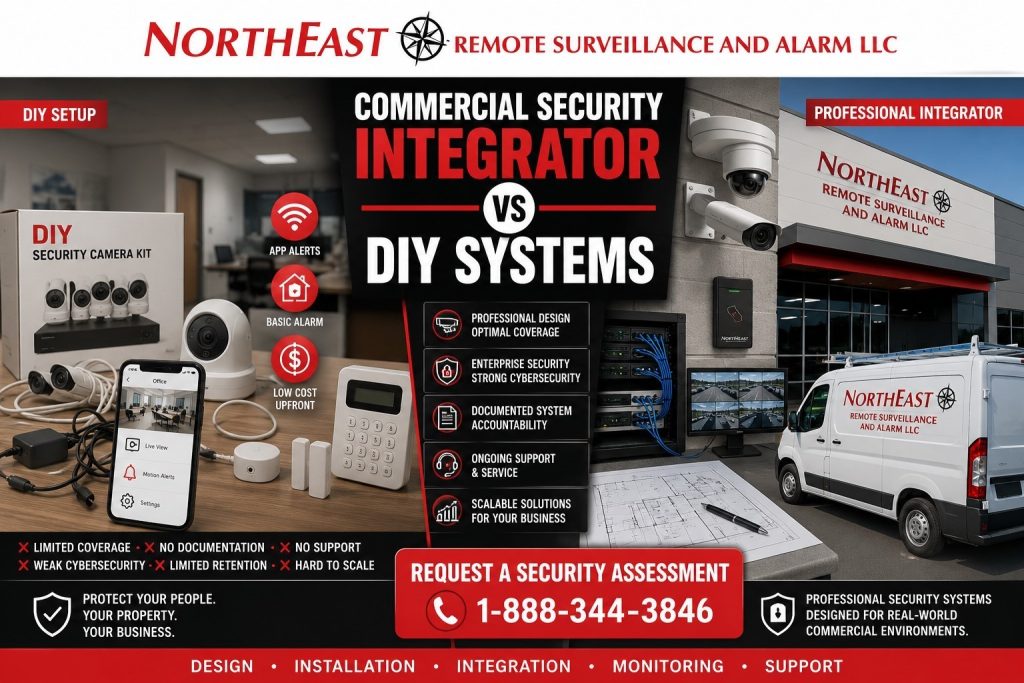
Commercial buildings, warehouses, logistics properties, medical offices, municipal facilities, office buildings, contractor yards, and multi-site businesses need systems designed around real risk, infrastructure, documentation, serviceability, cybersecurity, and long-term support.
For broader buyer education, start with the Commercial & Industrial Security Knowledge Center.
DIY systems can look attractive because they seem fast, inexpensive, and simple to order. A few cameras, a wireless alarm kit, or an app-based access device may appear to solve the problem at first. The issue is that commercial security is rarely about one device.
Commercial security design starts with the layout, staff movement, visitor access, deliveries and vehicles. It considers inventory exposure and risk after hours. The plan also covers networks, retention, alarm response, permissions, compliance considerations and long-term maintenance.
That is where a commercial security integrator and a DIY system are very different.
What Is a Commercial Security Integrator?
A commercial security integrator is a professional security company that designs, installs, configures, documents, services, and supports security systems for business and industrial environments.
A true commercial integrator does not just sell equipment. The integrator evaluates the property, identifies operational risks, selects appropriate technology, coordinates infrastructure, installs the system properly, configures users and permissions, and supports the system after installation.
Commercial security integrators commonly design and support:
- Video surveillance systems
- Access control systems
- Intrusion alarm systems
- Fire alarm and life-safety coordination
- Remote video monitoring
- Live talk-down systems
- Intercoms and controlled entry
- License plate recognition systems
- Gate access systems
- Low-voltage cabling
- Network-connected security infrastructure
- Multi-site security platforms
- Commercial monitoring and verification workflows
What Is a DIY Security System?
A DIY security system is usually a self-installed or lightly installed system built from retail cameras, app-based alarms, plug-in devices, wireless sensors, consumer subscriptions, or basic packaged equipment.
DIY systems are usually designed for convenience. They may be useful for simple viewing, basic alerts, temporary coverage, or low-risk non-critical spaces. They are not usually designed for commercial liability, evidence retention, employee access control, alarm verification, network policy, multi-user administration, system documentation, or long-term service support.
A DIY system may include:
- Retail camera kits
- Plug-in wireless cameras
- Consumer cloud camera subscriptions
- App-based alarm kits
- Wireless door/window sensors
- Basic keypad systems
- Smart locks
- Consumer video doorbells
- Unmanaged cloud portals
- Self-installed NVR kits
- Handyman-installed cameras without documentation
The problem is not that DIY equipment never works. The problem is that it is usually not designed around how a commercial property actually operates.
The Main Difference Between an Integrator and DIY Security
The biggest difference is accountability.
A DIY system leaves the business responsible for design, installation, wiring, camera placement, network setup, user permissions, service, troubleshooting, video retention, equipment replacement, cybersecurity decisions, and future expansion.
A commercial security integrator takes responsibility for building a system around the facility’s risk and operational needs.
That difference matters when something happens.
When there is a theft, break-in, workplace incident, delivery dispute, unauthorized access event, vehicle accident, after-hours trespassing issue, or insurance claim, the system has to provide usable information. A camera that was cheap but pointed in the wrong direction does not help. An alarm that sends alerts to the wrong person does not help. An access system with unmanaged users does not help.
Commercial security is not just about having equipment. It is about having a system that performs when the business needs it.
Commercial Integrator vs DIY Systems Comparison
| Category | Commercial Security Integrator | DIY Security System |
|---|---|---|
| Planning | Designed around property risk, workflow, and business operations | Usually based on product features or convenience |
| Installation | Professionally installed with proper mounting, wiring, and configuration | Self-installed or lightly installed with limited documentation |
| Camera placement | Planned around entrances, docks, yards, parking, interior flow, and blind spots | Often placed where installation is easiest |
| Access control | Built around doors, credentials, permissions, schedules, and user management | Often limited to basic smart locks or app-based access |
| Alarm response | Can support monitoring, verification, escalation, and documented response paths | Often depends on app alerts or self-response |
| Evidence quality | Designed for retention, review, export, and incident documentation | May rely on short clips, subscriptions, or inconsistent storage |
| Cybersecurity | Can be coordinated with IT policies, users, firmware, and network design | Often depends on consumer accounts and unmanaged remote access |
| Serviceability | Supported through documentation, parts, warranty, and professional service | Often difficult to troubleshoot or replace cleanly |
| Scalability | Can grow across buildings, doors, cameras, departments, and sites | Often becomes fragmented as the business grows |
| Best fit | Commercial, industrial, municipal, healthcare, logistics, warehouse, and multi-site properties | Low-risk convenience viewing or temporary non-critical use |
Common Gaps to Check Before a DIY Installation
Choosing devices before reviewing daily operations can leave gaps in a security system, whether it is self-installed or professionally installed.
A business does not just need a camera. It needs coverage of the correct area, at the correct angle, with the correct lighting, recording quality, retention period, user permissions, and review process.
A business does not just need a lock. It needs controlled access, credential management, employee changes, door hardware coordination, egress awareness, schedules, audit history, and emergency planning.
A business does not just need an alarm. It needs detection strategy, communication paths, monitoring procedures, contact lists, verification options, and response expectations.
Check the proposed installation for these potential gaps:
- Poor camera placement
- Weak nighttime visibility
- No documented system layout
- Unmanaged user accounts
- Weak password practices
- App dependency
- Unclear administrator ownership
- Limited video retention
- Poor footage export
- No service documentation
- No expansion plan
- No local accountability
- No coordination with IT
- No integration between cameras, alarms, access control, and monitoring
A system may appear functional until the business actually needs it.
The Hidden Cost of DIY Security
DIY security looks cheaper upfront, but the hidden cost can be much higher.
Costs can grow when equipment fails, footage is missing or products lose support. Subscription limits, poor wiring and unsuitable camera positions can add work. An incident without useful evidence may reveal those limits too late.
Common hidden costs include:
- Replacing consumer cameras with commercial cameras later
- Paying twice for labor because the first installation was not serviceable
- Losing footage because retention was too short
- Missing important events because cameras were poorly placed
- Wasting staff time managing alerts and apps
- Creating cybersecurity exposure through unmanaged devices
- Losing access when an employee controls the account
- Needing a complete rebuild when the business expands
- Failing to provide usable video for police, insurance, or internal review
The cheapest system is not always the lowest-cost system. For a commercial property, the lowest-cost system is the one that performs correctly, remains serviceable, and reduces long-term risk.
Why Commercial Properties Need Professional Design
Commercial properties have more moving parts than a typical DIY system is built to handle.
A warehouse may need dock coverage, forklift aisle visibility, employee entrance control, trailer yard monitoring, alarm verification, and after-hours perimeter protection. A medical office may need entrance coverage, controlled staff areas, visitor flow documentation, and parking lot visibility. A municipal facility may need public entry coverage, employee-only access, evidence retention, and procurement confidence. A contractor yard may need gate cameras, perimeter detection, license plate visibility, and remote monitoring after business hours.
The system has to match the property.
Professional design should evaluate:
- Building layout
- Entry points
- Employee movement
- Visitor movement
- Loading docks
- Truck courts
- Parking areas
- Perimeter exposure
- Interior restricted areas
- Lighting conditions
- Network availability
- Low-voltage cabling paths
- Power availability
- Video retention needs
- Alarm response expectations
- User permissions
- Future expansion
- Service access
- Monitoring options
For door and credential planning, the supporting service page is Commercial Access Control Systems.
DIY Cameras vs Commercial Video Surveillance
DIY cameras are often selected by resolution, price, app reviews, or cloud subscription features.
Commercial video surveillance is selected by use case.
A commercial camera system should consider:
- What needs to be seen
- At what distance
- Under what lighting
- From what mounting height
- During what hours
- With what retention period
- By which users
- For what type of incident
- With what export requirements
- Under what network conditions
- With what long-term support plan
A 4K consumer camera may still be unsuitable for the site. Poor angles, excessive mounting height, harsh conditions or glare can limit the image. Weak Wi-Fi and cloud-clip subscription limits can also affect its usefulness.
Commercial video surveillance is not just image quality. It is coverage design, infrastructure, retention, review, service, and reliability.
DIY Access Control vs Commercial Access Control
DIY access control is often built around smart locks, app-based credentials, or simple keypad devices.
That may work for a low-risk interior convenience door, but it is not the same as a commercial access control system.
Commercial access control needs to account for:
- Door hardware
- Electric strikes or electrified locks
- Egress requirements
- Fire alarm interface where applicable
- Credential management
- Employee onboarding and termination
- User permissions
- Time schedules
- Audit trails
- Door position monitoring
- Request-to-exit devices
- Emergency operation
- Multi-door control
- Long-term serviceability
A commercial door is not just a lock. It is part of the building’s security, life-safety, employee flow, and operational control.
DIY Alarms vs Commercial Intrusion Systems
DIY alarm kits often rely on wireless sensors, self-managed apps, and basic notification workflows.
Commercial intrusion systems need stronger planning.
A commercial intrusion alarm should consider:
- Protected openings
- Interior motion detection
- Glass break exposure
- High-value areas
- After-hours schedules
- Employee access patterns
- Arming and disarming responsibility
- Monitoring paths
- Verification options
- Contact lists
- Police response expectations
- Communication backup
- Service testing
- Expansion needs
An alarm system that only sends a notification to a phone may not be enough for a warehouse, office building, medical office, contractor yard, logistics facility, or industrial property.
Cybersecurity and Account Control Matter
Security devices are connected technology. Cameras, recorders, access control panels, alarm communicators, intercoms, mobile apps, cloud dashboards, and remote access tools all create account and network considerations.
DIY systems can leave ownership and control unclear. Identify the administrator account owner and who can use the app. Check former employees’ credentials, firmware updates and whether security devices are properly separated from the business network.
A commercial integrator can help coordinate:
- Administrator ownership
- User roles
- Password standards
- Firmware management
- Remote access control
- Network coordination
- Device documentation
- Account recovery
- Credential removal
- Multi-site administration
- IT involvement
For compliance-aware security planning, use Regulatory & Compliance for Commercial Security, Fire Alarm & Life Safety.
When DIY Security May Be Acceptable
DIY security may be acceptable for limited, non-critical, temporary, or convenience use where the business does not depend on the system for serious security outcomes.
Examples may include:
- A temporary camera during a short project
- A non-critical interior view
- A basic convenience alert
- A small supplemental device that is not part of the main security system
- A low-risk area where evidence quality is not important
Even then, the business should understand the limitations.
When a business depends on security for incident records or controlled access, evaluate whether the proposed system meets those needs. Confirm installation responsibilities, testing, administration, and support before deciding who will deliver the project.
When a Commercial Security Integrator Is the Better Choice
A commercial security integrator is the better choice when the business needs the system to perform reliably, scale properly, and support real security decisions.
Use a commercial integrator when the property has:
- Multiple entrances
- Employee-only areas
- Loading docks
- Parking lot exposure
- Vehicle gates
- Inventory or equipment risk
- Customer or visitor traffic
- After-hours activity
- Multiple departments
- Multiple buildings
- Multiple sites
- Alarm monitoring needs
- Access control requirements
- Insurance concerns
- Incident documentation needs
- IT or cybersecurity requirements
- Compliance or procurement concerns
- Fire alarm or life-safety coordination
- Long-term service expectations
These environments need professional planning, not just products.
The Integrator Advantage
A commercial security integrator brings value before, during, and after installation.
Before installation, the integrator helps identify risk areas, define goals, select appropriate technology, and design the system around the facility. During installation, the integrator handles mounting, wiring, configuration, programming, testing, and documentation. After installation, the integrator supports service, changes, expansion, troubleshooting, and long-term system improvement.
The advantage is not only better equipment. The advantage is a better process.
A strong integrator helps the business avoid:
- Wrong product selection
- Poor camera placement
- Weak wiring paths
- Unusable footage
- Unmanaged access credentials
- Alarm response confusion
- Network security gaps
- Unsupported devices
- Subscription surprises
- Inconsistent multi-site systems
- Premature system replacement
That is why commercial security planning should start with the facility, not the shopping cart.
Questions Businesses Should Ask Before Choosing DIY
Before choosing a DIY system, a business should ask:
- Who will design the system layout?
- Who will decide camera placement?
- Who owns the administrator account?
- Who removes former employee access?
- How long is video retained?
- Can footage be exported clearly?
- What happens if a device fails?
- Who documents the system?
- Who services the system after installation?
- Can the system expand to more doors, cameras, or buildings?
- Does the system meet IT expectations?
- Can the system support monitoring or verification?
- Can the business recover access if the app account is lost?
- Will the system still be supported in five years?
- Will the system provide usable evidence after an incident?
If those questions do not have clear answers, the system is not ready for serious commercial use.
Northeast Remote Surveillance and Alarm’s Position
Northeast Remote Surveillance and Alarm, LLC does not recommend treating commercial security as a DIY equipment project. Business security should be planned around the property, the risk, the people using the system, the infrastructure supporting it, and the long-term service expectations of the organization.
Not every business needs the most expensive system. It needs a design that fits its facility. That may be a single office, medical practice, contractor yard, warehouse, municipal building or large logistics operation.
Commercial security should be scalable, documented, serviceable, and accountable.
Frequently Asked Questions
What is the difference between a commercial security integrator and a DIY security system?
A commercial security integrator designs, installs, configures, documents, and supports a security system around the business property and its risks. A DIY security system is usually self-installed or lightly installed using retail cameras, app-based alarms, smart locks, or packaged devices. The main difference is that an integrator is responsible for building a system that works as part of the business operation, while DIY systems usually place design and support responsibility on the business.
Are DIY security systems good enough for small businesses?
DIY systems may be enough for limited convenience viewing or low-risk temporary use, but they are often not enough for serious commercial security. Small businesses still need reliable coverage, secure account control, usable video retention, alarm response planning, serviceability, and employee access management. The system should match the risk, not just the size of the business.
Why do commercial camera systems cost more than DIY cameras?
Commercial camera systems cost more because they include professional planning, proper mounting, low-voltage cabling, network coordination, storage design, configuration, documentation, warranty support, and serviceability. The camera itself is only part of the system. The real value comes from correct design and long-term reliability.
Can a DIY camera system provide evidence after an incident?
A DIY camera system may provide footage, but it may not provide the right footage. Evidence depends on camera placement, lighting, resolution at distance, retention settings, timestamp accuracy, export quality, and whether the system was recording at the time. Commercial systems are designed to improve the chance that footage is usable after an incident.
Is DIY access control the same as commercial access control?
No. DIY access control usually involves smart locks, app-based devices, or simple keypad locks. Commercial access control involves door hardware, credentials, schedules, audit trails, user permissions, egress considerations, door monitoring, and long-term support. Commercial doors require more planning than a basic app-controlled lock.
Are app-based alarm systems reliable for businesses?
App-based alarm systems can provide basic alerts, but commercial businesses often need monitoring, verification, communication paths, user accountability, contact lists, testing, and escalation planning. A phone notification alone may not be enough when a business has after-hours risk, inventory exposure, employee access concerns, or insurance requirements.
What are the biggest risks of DIY security for commercial properties?
The biggest risks are poor design, weak coverage, missing footage, unmanaged users, cybersecurity exposure, limited retention, unsupported equipment, unclear account ownership, and lack of service documentation. These issues often appear after an incident, when the business needs the system most.
Can a commercial integrator use some existing equipment?
Sometimes. A commercial integrator may be able to evaluate existing cameras, wiring, recorders, access hardware, or alarm components and determine whether any parts should remain. However, consumer-grade equipment, unsupported devices, poor wiring, or insecure platforms may need to be replaced to create a reliable commercial system.
When should a business upgrade from DIY to a commercial security system?
A business should upgrade when security becomes important to operations, liability, insurance, employee access, customer safety, inventory protection, after-hours monitoring, or incident documentation. Growth is also a trigger. Once a business adds employees, doors, vehicles, inventory, multiple sites, or regulated customers, DIY security usually becomes too limited.
What should a business do before buying any security equipment?
Start with a site assessment before choosing equipment. Review the layout, risk areas, entrances, staff and visitor movement, parking and docks. Check wiring, networks, retention needs, alarm response and access control. Include plans for future growth.
Request a Commercial Security Assessment
DIY systems may look simple, but commercial security requires stronger planning, better documentation, and long-term accountability. Northeast Remote Surveillance and Alarm, LLC helps commercial, industrial, warehouse, logistics, municipal, healthcare, office, contractor yard, and multi-site organizations design security systems around real property risk.
For a site-specific review, request a Security Assessment.
Compliance, Codes & Project Standards
NERSA plans commercial and industrial security work with applicable code, documentation, inspection and authority-having-jurisdiction requirements in mind. Requirements vary by system, property and jurisdiction. These resources support project planning; they do not establish legal compliance, certification or AHJ approval.
Related guidance: NERSA project standards · Documentation, testing & inspection readiness