A school security upgrade should improve controlled entry, strengthen video review, support staff procedures, and protect daily operations without creating a system that is difficult to manage. Northeast Remote Surveillance and Alarm, LLC helps schools, education facilities, commercial campuses, and institutional properties plan access control and camera upgrades around real building use, staff movement, visitor entry, after-hours activity, and long-term service needs. This case study explains how a school access control and camera upgrade can connect managed entry, usable video, permissions, documentation, and accountability into one practical security plan.
For related planning, visit Case Studies by Northeast Remote Surveillance and Alarm, LLC, Commercial & Industrial Access Control Systems, and Commercial Video Surveillance Systems.
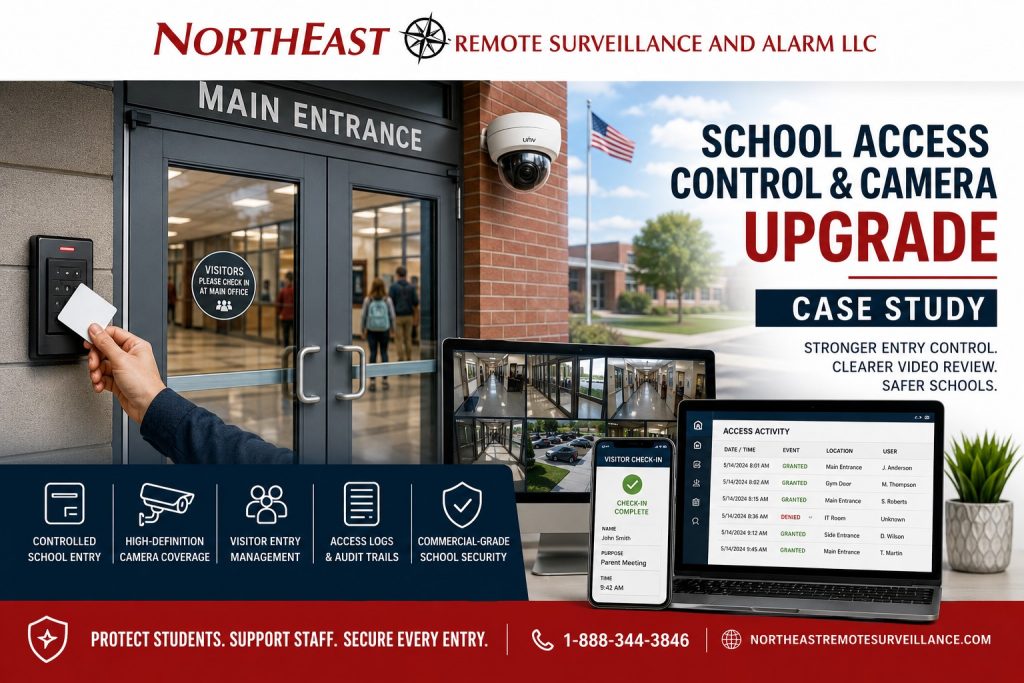
Project Snapshot
| Project Area | Details |
|---|---|
| Facility Type | School / education facility |
| Primary Concern | Outdated entry control, limited video review, and disconnected security systems |
| Existing Condition | Key-based access, older cameras, limited accountability, and inconsistent review capability |
| Upgrade Focus | Access control, security cameras, controlled entry, video review, user permissions, and documentation |
| Main Goal | Improve daily entry management and incident review without disrupting school operations |
| System Approach | Commercial-grade access control and camera upgrade designed around staff, visitor, student, and after-hours workflows |
| Result | Stronger controlled entry, clearer video review, better administrative oversight, and improved long-term support |
The Problem: The School Needed Better Control and Better Video Review
The school had multiple security concerns that could not be solved by cameras alone or by door hardware alone.
The existing system created several operational problems:
- Key control was difficult to manage.
- Staff access was not easy to update or restrict.
- Older cameras did not provide consistent review quality.
- Entry activity and video review were not connected in a useful way.
- Administrators needed better visibility into public-facing and staff-only areas.
- After-hours use of the building required better accountability.
- The school needed a security system that could be managed without creating unnecessary complexity.
The goal was not to turn the building into a locked-down environment. The goal was to improve control, review, and documentation while keeping the school functional, safe, and manageable for authorized staff.
Why This Upgrade Was Needed
Schools have more complicated access needs than many standard commercial buildings. Staff, administrators, students, visitors, vendors, maintenance workers, coaches, custodial teams, substitute staff, and event users may all interact with the building differently.
A simple key-based system does not always provide enough control.
Keys can be copied, lost, shared, or left in circulation after a staff change. Cameras can record activity, but if the footage is unclear, poorly positioned, difficult to retrieve, or disconnected from door events, the school may still struggle to determine what happened.
A stronger school security upgrade should bring the core layers together:
- Controlled entry
- Staff credentials
- Door schedules
- Visitor entry support
- Video review
- User permissions
- Audit trails
- Remote management
- Documentation
- Long-term service support
Existing System Challenges
The school’s previous setup had several limitations.
Key-Based Entry Created Management Problems
The building relied heavily on physical keys. That made it harder to manage who had access, when they had access, and whether old keys were still in circulation.
Physical keys can work for some openings, but they become difficult to manage when a school has multiple staff groups, schedule changes, turnover, shared spaces, and after-hours activities.
Older Cameras Limited Investigation Quality
Some existing camera views did not provide the detail needed for strong incident review. In school environments, camera placement and video quality matter because the system may need to help administrators understand what occurred before, during, and after an event.
Poor review quality can create problems when trying to evaluate entry activity, hallway movement, parking lot incidents, exterior approaches, or activity around shared school spaces.
Door Events and Video Were Not Connected
Access control and video are more useful when they support each other.
A door log may show that a credential was used. A camera can show what happened at the door. When these layers are planned together, administrators can review access events with better context.
The School Needed a Long-Term Platform
The school did not need a temporary patch. It needed a system that could support future doors, additional cameras, changing users, updated schedules, and long-term maintenance.
Upgrade Objectives
Northeast Remote Surveillance and Alarm, LLC designed the upgrade around practical school operations.
The main objectives were:
- Improve controlled access at selected school entry points.
- Reduce dependence on unmanaged physical keys.
- Support staff credentials and permission groups.
- Improve video review at approved school security areas.
- Strengthen visibility around entrances, shared spaces, parking areas, and exterior approaches.
- Give administrators better tools for reviewing access activity.
- Support after-hours building use and schedule-based access.
- Protect emergency egress and life-safety requirements.
- Provide user training and documentation.
- Build a system that could grow over time.
Recommended Solution
NERSA recommended a combined access control and camera upgrade.
The access control portion focused on controlled entry, credential management, permissions, door schedules, and event review. The camera portion focused on usable video quality, practical camera placement, recording reliability, remote review, and investigation support.
The system was designed to help the school manage who enters certain areas, when access is allowed, and how activity can be reviewed when questions arise.
Scope of Work
The school access control and camera upgrade included a complete planning and installation process.
The project scope included:
- Site walkthrough and security review.
- Review of existing doors, cameras, network paths, and equipment conditions.
- Identification of priority access-controlled openings.
- Door hardware review for controlled entry and emergency egress.
- Access control controller and reader planning.
- Credential and user group planning.
- Door schedule setup.
- Camera replacement or upgrade in selected areas.
- Video recording and remote review configuration.
- Administrative user permission setup.
- Access event and video review coordination where supported.
- Testing of controlled doors.
- Verification of camera views and recording.
- Staff training on basic system use.
- Documentation and system handoff.
Access Control Upgrade
The access control upgrade helped the school move away from loose key dependency and toward controlled, manageable access.
A properly planned access control system can help school administrators:
- Add users quickly.
- Remove users when staff changes occur.
- Limit access by role.
- Set schedules for certain doors.
- Review access activity.
- Reduce rekeying costs after lost keys or turnover.
- Control selected staff-only and operational spaces.
- Support after-hours access for approved personnel.
- Create a more accountable entry process.
The system was built around school workflow, not generic door control. Different users may need different permissions. Administrators, teachers, custodial staff, maintenance staff, coaches, office personnel, and approved vendors may not all need the same access.
Camera System Upgrade
The camera upgrade focused on usable video, not just adding more cameras.
A school camera system should help authorized administrators review activity clearly and efficiently. That means the system must be designed around field of view, mounting location, lighting conditions, image quality, recording retention, user permissions, and the areas the school is approved to monitor.
The upgraded camera plan supported review of areas such as:
- Main entry areas
- Selected exterior approaches
- Parking areas
- Common areas
- Hallways
- Administrative areas
- Shared-use spaces
- After-hours activity areas
- Building perimeter views
- Approved exterior and interior security zones
Camera planning was done with privacy, policy, and operational boundaries in mind. The goal was to support safety, review, and accountability while respecting the school’s approved monitoring practices.
Access Control and Video Working Together
The strongest part of the upgrade was the way access control and video could support each other.
When door activity and camera review are planned together, administrators can better evaluate:
- Credential use
- Denied access attempts
- Held-open doors
- Forced-door conditions
- After-hours entries
- Visitor entry events
- Staff-only door activity
- Exterior entry activity
- Incidents near controlled openings
Access control tells the school what the system recorded at the door. Video helps show what actually happened.
That combination is much stronger than disconnected systems.
Before and After
| Before Upgrade | After Upgrade |
|---|---|
| Heavy dependence on physical keys | Credential-based access control at selected doors |
| Limited ability to remove access quickly | Users can be added, changed, or removed more efficiently |
| Older camera views with limited review value | Improved camera coverage and clearer video review |
| Door activity and video were disconnected | Access events and camera review can support each other |
| Harder after-hours accountability | Better schedule-based control and activity review |
| Limited system documentation | Better training, records, and support path |
| Reactive security management | More structured, manageable security operations |
School Entry Control Planning
Entry control is one of the most important parts of a school security upgrade.
The correct plan depends on the building, grade level, policies, staff workflow, visitor procedures, emergency planning, and existing door hardware. Access control should not be installed in a way that creates unsafe egress, code conflicts, or confusion during emergencies.
Northeast Remote Surveillance and Alarm, LLC reviews the door opening before recommending hardware. That includes the door type, frame condition, existing lock hardware, fire rating where applicable, request-to-exit method, door contact, power transfer, reader location, credential method, controller location, and serviceability.
A controlled door should improve security while still allowing safe, code-compliant exit.
For more school entry planning, see School Entry Security & Access Control Systems in Allentown, PA.
User Permissions and Credential Management
Access control is only effective when permissions are organized correctly.
The school needed a system that could support multiple user groups without becoming difficult to manage. NERSA helped organize access based on real operating needs.
Common school user groups may include:
- Administrators
- Teachers
- Office staff
- Maintenance staff
- Custodial teams
- Coaches
- Approved vendors
- Temporary users
- Event staff
- After-hours authorized users
Each group may need different access times and different authorized doors. A good access control system helps the school avoid giving everyone the same access level just because the system is hard to manage.
Door Schedules and After-Hours Access
Schools often operate beyond normal classroom hours. Activities, staff work, meetings, athletics, maintenance, community use, deliveries, and cleaning schedules can all create after-hours movement.
The upgraded system supported more structured schedule planning.
Door schedules can help reduce unnecessary open access while still allowing approved users to enter during authorized times. That creates better accountability and can reduce the risk of doors being left unmanaged outside normal operating hours.
Video Review and Incident Documentation
The camera upgrade improved the school’s ability to review incidents after they occurred.
Good video review can help administrators understand:
- Who approached an entry area.
- What happened near a controlled door.
- Whether an exterior area had activity after hours.
- Whether a hallway or common area incident needs review.
- Whether a parking lot incident was captured.
- Whether a door event matches the surrounding activity.
- Whether additional training or procedure changes are needed.
The value of the system comes from usable video. A camera that records but cannot show meaningful detail is not enough.
Administrative Access and System Management
The system was configured so authorized school personnel could manage daily needs without relying on emergency service calls for every change.
Administrative functions may include:
- Adding and removing users.
- Assigning access levels.
- Adjusting schedules.
- Reviewing access activity.
- Searching video.
- Exporting incident clips when authorized.
- Checking camera status.
- Reviewing system health.
- Managing user permissions.
NERSA helped the school understand how the system should be used day to day and how to avoid common management problems, such as leaving old users active or giving unnecessary permissions.
Life Safety and Door Hardware Considerations
School access control must always respect life-safety requirements.
Controlled doors still need to support safe egress. Depending on the door, building use, adopted code, fire alarm interface, and AHJ expectations, access control may require careful coordination with door hardware, emergency release, request-to-exit devices, power supplies, locking method, and signage.
A strong system does not create a conflict between safety and security. It balances both.
NERSA plans access-controlled doors with attention to:
- Emergency egress
- Door hardware condition
- Fire alarm coordination where required
- Request-to-exit operation
- Door position monitoring
- Power supply and backup power
- ADA considerations
- AHJ expectations
- Long-term service access
Privacy and Policy Awareness
School camera systems should be planned carefully.
Cameras should support security, safety, accountability, and incident review in approved areas. They should not be treated as a replacement for school policy, supervision, staff procedures, or administrative judgment.
The school’s camera layout, user permissions, viewing access, retention, and export procedures should align with internal policy and applicable requirements. NERSA helps schools think through the practical security system design while the school maintains control over its own policies and procedures.
Implementation Approach
The upgrade was planned to reduce disruption to school operations.
NERSA coordinated installation around the building’s schedule, active areas, and administrative priorities. The installation approach focused on clean workmanship, careful testing, practical communication, and system handoff.
Key implementation steps included:
- Reviewing existing site conditions.
- Prioritizing the most important doors and camera views.
- Coordinating work around school activity.
- Installing access control hardware and camera equipment.
- Confirming controlled doors operated correctly.
- Testing camera recording and remote review.
- Setting up authorized users.
- Reviewing access schedules and permissions.
- Training staff on basic system use.
- Providing documentation for future service and support.
Results
The school gained a more manageable security system.
The upgrade helped deliver:
- Better controlled entry.
- Reduced dependence on physical keys.
- More useful camera coverage.
- Clearer incident review.
- Better after-hours accountability.
- Stronger administrative oversight.
- Access logs that support investigations.
- Camera review that supports access events.
- A more scalable platform for future growth.
- Better documentation and support.
The result was not just a camera upgrade and not just a door upgrade. It was a better security management system for a school environment.
Why This Project Was a Good Fit for NERSA
Northeast Remote Surveillance and Alarm, LLC focuses on commercial, industrial, institutional, and non-residential security systems.
Schools need a security provider that understands access control, camera placement, door hardware, user permissions, life safety, video review, network infrastructure, service support, and long-term management. A school security upgrade should not be treated like a basic residential camera package or a one-door lock job.
NERSA designs systems around how the facility actually operates.
Lessons From This Case Study
This school access control and camera upgrade shows several important lessons:
- Cameras and access control work best when planned together.
- Key control is often one of the first problems schools need to solve.
- Better video review depends on camera placement, lighting, and recording quality.
- Controlled doors must still support safe egress.
- Staff permissions should match real roles and schedules.
- User management matters after installation.
- Documentation and training are part of the project, not an afterthought.
- A scalable system can support future doors, cameras, and operational changes.
When a School Should Consider an Access Control and Camera Upgrade
A school should consider an upgrade if:
- Physical keys are difficult to manage.
- Staff changes make rekeying a recurring problem.
- Exterior doors need better accountability.
- Camera footage is unclear or hard to retrieve.
- Administrators cannot easily review incidents.
- After-hours activity needs better oversight.
- Door events and video are disconnected.
- Visitor entry needs better support.
- The system cannot scale.
- The school needs better documentation and service support.
School Security Upgrade Planning Checklist
Before upgrading access control or cameras, a school should evaluate:
- Which doors need controlled access.
- Which doors must remain exit-only or emergency egress paths.
- Which user groups need credentials.
- Which schedules need to be supported.
- Which areas need camera review.
- Whether existing cameras are still usable.
- Whether network infrastructure can support the upgrade.
- Whether recording retention is sufficient.
- Who should have administrative access.
- How incident video will be reviewed and exported.
- How old users will be removed.
- How the system will be supported after installation.
Request a School Security Assessment
If your school, education facility, training center, institutional property, or commercial campus needs better access control, clearer camera review, stronger entry management, or a more unified security system, Northeast Remote Surveillance and Alarm, LLC can help.
Call 1-888-344-3846 or use Request a Security Assessment to schedule a school access control and camera upgrade review.
Frequently Asked Questions About School Access Control and Camera Upgrades
What is a school access control and camera upgrade?
A school access control and camera upgrade improves how a school manages entry, staff permissions, door schedules, video review, and incident documentation. It may include card readers, door controllers, credentials, electric locking hardware, cameras, recording equipment, remote review, and administrative training.
Why should schools upgrade from physical keys to access control?
Access control gives schools a better way to add, remove, limit, and review access. Unlike physical keys, credentials can be changed or disabled without rekeying the building every time a key is lost or a staff member leaves.
Can access control and cameras work together?
Yes. Access control shows door activity, while cameras help show what happened at the same time. When the systems are planned together, administrators can review credential use, denied access, held-open doors, forced-door events, and after-hours activity with better context.
Does access control replace school safety procedures?
No. Access control is a security tool, not a replacement for school policy, supervision, staff training, emergency procedures, or administrative judgment. The best system supports the school’s procedures instead of trying to replace them.
What areas should school cameras cover?
School cameras are commonly used for approved security areas such as entries, exterior approaches, parking areas, common areas, hallways, administrative areas, and other review zones approved by the school. Camera coverage should be planned with policy, privacy, and operational needs in mind.
Do controlled doors still need to allow emergency exit?
Yes. Access-controlled doors must still support safe egress and applicable life-safety requirements. Door hardware, request-to-exit devices, fire alarm coordination, emergency release, and AHJ expectations should be reviewed before installation.
Can school staff manage the system after installation?
Yes. A properly configured system can allow authorized school administrators to add users, remove users, adjust schedules, review activity, search video, and manage permissions. Training and documentation are important parts of the project.
Is this only for large schools?
No. Access control and camera upgrades can help private schools, charter schools, training centers, education campuses, administrative school buildings, and institutional facilities. The system should be scaled to the size, risk, budget, and operating needs of the facility.
Can NERSA upgrade an older school camera system?
Yes. NERSA can evaluate older cameras, weak video quality, limited remote access, outdated recorders, poor retention, blind spots, and disconnected systems before recommending an upgrade plan.
How do we start a school access control and camera upgrade?
Call 1-888-344-3846 or use Request a Security Assessment. NERSA can review the doors, cameras, entry procedures, user groups, recording needs, infrastructure, and long-term support requirements before recommending a system.