Security system documentation standards help commercial and industrial facilities keep their cameras, access control, intrusion alarms, fire/life-safety coordination, monitoring paths, network equipment, low-voltage infrastructure, and service records organized after installation.

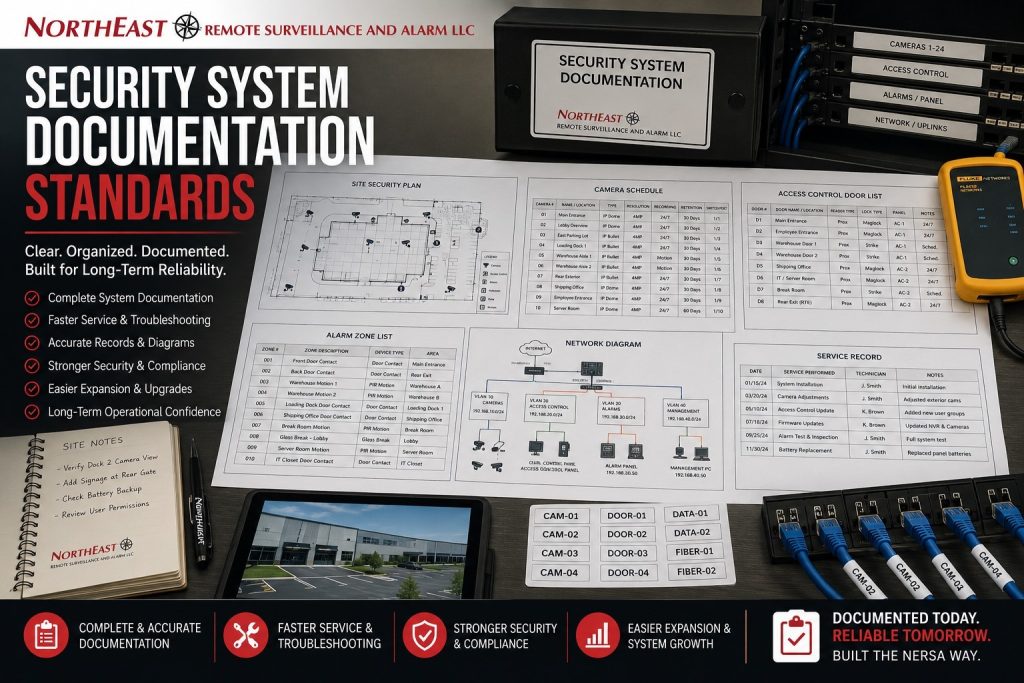
This guide covers the documentation practices that support long-term serviceability, inspection readiness, troubleshooting, system expansion, user management, and operational continuity.
For broader project planning, start with Commercial Security Infrastructure Planning.
Northeast Remote Surveillance and Alarm, LLC uses documentation as part of responsible commercial security system planning for warehouses, manufacturing plants, offices, healthcare facilities, municipal properties, logistics sites, contractor yards, multi-tenant buildings, and other business and professionally managed facilities.
A commercial security system should not be treated as a collection of undocumented devices. Cameras, access control panels, alarm zones, network switches, fiber paths, PoE ports, monitoring accounts, user permissions, and backup power locations should be documented in a way that makes the system easier to service, manage, expand, and review over time.
Why Security System Documentation Standards Matter
Security documentation helps a business understand how its system is built, where equipment is located, what each device does, who has access, how events are reported, and how the system should be serviced.
Documentation can support:
- faster troubleshooting
- cleaner service calls
- easier system expansion
- better user management
- clearer camera naming
- stronger access control administration
- alarm zone clarity
- monitoring account accuracy
- inspection readiness
- IT coordination
- future upgrades
- ownership or facility manager transitions
Without documentation, even a working system can become difficult to maintain. A future technician, property manager, IT provider, or facility team may not know where cables run, which switch ports support cameras, how alarm zones are labeled, or which doors are controlled by which panels.
What Should Be Documented
Commercial security systems may include several connected systems. Each system should be documented according to its role, complexity, and long-term service needs.
Documentation may include:
- camera locations
- camera names
- recorder locations
- video retention settings
- access control doors
- card reader locations
- access control panel locations
- intrusion alarm zones
- alarm keypad locations
- monitoring account information
- communicator details
- intercom locations
- gate control equipment
- PoE switch locations
- switch port assignments
- patch panel labels
- fiber paths
- wireless bridge locations
- UPS backup locations
- network segmentation notes
- user permissions
- service records
- as-built notes
The level of documentation should match the facility. A large warehouse, manufacturing plant, municipal building, healthcare facility, or multi-site business may need more detailed records than a small office with a limited system.
Camera Security System Documentation Standards
Commercial video surveillance systems should be documented so cameras can be located, reviewed, serviced, and understood quickly.
Camera documentation may include:
- descriptive camera name
- asset number
- device location
- camera view description
- mounting location
- indoor or outdoor designation
- recording schedule
- retention setting
- IP address where applicable
- switch port
- recorder channel
- camera type
- lens or view notes
- service notes
Camera names should be practical. A label like “Camera 12” is less useful than “East Loading Dock Door 3” or “Main Lobby Entrance.” Clear names help managers, monitoring operators, and technicians find relevant footage faster.
For broader camera-system planning, use Commercial & Industrial Video Surveillance Systems.
Access Control Security System Documentation Standards
Access control systems need clear documentation because they affect doors, employee access, visitor entry, restricted spaces, schedules, audit trails, and emergency egress coordination.
Records for controlled doors may include:
- controlled door names
- card reader locations
- lock hardware type
- door contact locations
- request-to-exit devices
- access control panel locations
- power supply locations
- credential groups
- schedules
- user permission levels
- mobile credential settings
- audit trail requirements
- fire alarm interface notes
- emergency release requirements
- service notes
Access control documentation should make it clear which doors are controlled, how they are powered, how users are managed, and how the system interacts with life-safety requirements.
Intrusion Alarm Security System Documentation Standards
Intrusion alarm systems should be documented so zones, devices, schedules, users, and monitoring signals are clear.
Alarm documentation may include:
- zone list
- zone descriptions
- door contact locations
- motion detector locations
- glass-break detector locations
- keypad locations
- alarm panel location
- communicator type
- cellular backup information
- monitoring account details
- user code structure
- arming schedules
- notification contacts
- response procedures
- battery information
- service records
A clear zone list helps prevent confusion during alarms, troubleshooting, inspections, monitoring updates, and system changes.
Monitoring and Communication Security System Documentation Standards
Commercial security systems often depend on communication paths. Alarm monitoring, remote video monitoring, cloud access, cellular backup, internet connectivity, and remote support may all require documentation.
Monitoring documentation may include:
- monitoring account information
- signal path
- cellular communicator model
- IP communicator settings
- internet dependency
- backup communication path
- monitoring contacts
- escalation procedures
- emergency contact list
- remote monitoring schedule
- event verification workflow
- talk-down speaker locations
- service provider information
For alarm communication planning, use Cellular Backup for Commercial Alarm Systems.
Low-Voltage and Network Documentation
Low-voltage infrastructure should be documented because it supports cameras, access control, alarms, intercoms, monitoring, wireless bridges, and network-connected security equipment.
Infrastructure documentation may include:
- cable labels
- cable test results
- patch panel layout
- switch locations
- PoE switch assignments
- port maps
- fiber termination points
- wireless bridge locations
- equipment rack layout
- UPS backup locations
- power sources
- network VLAN notes
- firewall coordination notes
- device IP addresses
- service access notes
For network-specific planning, use Network Segmentation for Commercial Security Systems.
PoE Switch and Port Documentation
PoE switching is especially important for IP camera systems because switches provide both network connectivity and power to cameras and other devices.
PoE documentation may include:
- switch location
- switch model
- port assignments
- connected camera names
- uplink information
- PoE power budget
- VLAN assignment
- rack location
- UPS backup status
- spare ports
- service notes
Proper port documentation helps avoid confusion when cameras are moved, replaced, expanded, or serviced.
Fiber and Wireless Bridge Documentation
Large properties may use fiber or wireless bridges to connect remote camera locations, detached buildings, gate areas, parking lots, trailer yards, or multi-building facilities.
Fiber documentation may include:
- fiber path
- termination locations
- strand use
- patch panel labels
- building-to-building route
- equipment rack location
- testing records
- spare capacity
Wireless bridge documentation may include:
- radio location
- mounting height
- line-of-sight notes
- IP addresses
- power source
- connected cameras
- remote switch details
- alignment notes
- service notes
Remote connectivity should not become invisible infrastructure. It should be documented so the system can be serviced later.
UPS Backup and Power Documentation
Backup power should be documented so a business understands which security devices remain powered during short outages and which devices do not.
UPS documentation may include:
- UPS location
- connected equipment
- estimated runtime
- battery replacement date
- load notes
- service schedule
- rack or cabinet location
- power source
- generator coordination where applicable
For backup-power-specific planning, use UPS Backup Power for Commercial Security Systems.
User Permission Documentation
User access should be documented for security and accountability. Not every person should have the same level of access to cameras, recorded video, access control, alarm codes, monitoring platforms, or cloud dashboards.
User documentation may include:
- administrator users
- manager users
- monitoring users
- IT users
- service users
- camera access groups
- access control groups
- export permissions
- alarm user codes
- mobile credential users
- deactivated users
- permission review schedule
A permission review helps reduce the risk of former employees, outdated accounts, or excessive access rights remaining active.
As-Built Security System Documentation Standards
As-built documentation records how the system was actually installed. This may differ from the original design if field conditions required changes.
The final site records may include:
- final camera locations
- final door hardware locations
- cable routes
- equipment rack layout
- panel locations
- switch locations
- device names
- zone lists
- user groups
- network notes
- photos of equipment
- service notes
- warranty details
- support information
As-built documentation is especially important for warehouses, industrial facilities, municipal buildings, schools, healthcare properties, and large commercial sites.
Documentation for Inspections and Compliance Support
Some commercial systems may need documentation for inspections, code coordination, internal audits, insurance review, facility management, or compliance-related planning.
Documentation may support:
- fire/life-safety coordination
- emergency egress review
- access-controlled door review
- alarm system service records
- inspection readiness
- equipment location review
- service history
- monitoring records
- incident investigation
- internal security audits
This resource is not a substitute for legal, code, or compliance advice. Fire alarm, egress, healthcare, municipal, school, and regulated environments should coordinate with qualified professionals and authorities where required.
Documentation for Multi-Site Security Systems
Multi-site businesses need consistent documentation across locations. Without standard naming and records, each site can become difficult to manage.
Multi-site documentation may include:
- location naming standards
- camera naming standards
- user permission standards
- access control group structure
- monitoring procedures
- alarm contact lists
- site-specific equipment lists
- remote access settings
- service records
- escalation contacts
- expansion notes
Standardized documentation makes multi-site systems easier to support as the organization grows.
Documentation During System Expansion
Security systems often grow over time. A business may add cameras, doors, alarm zones, intercoms, wireless bridges, monitoring services, or additional network equipment.
Expansion documentation should update:
- device lists
- camera names
- switch ports
- rack diagrams
- panel locations
- user permissions
- alarm zones
- monitoring accounts
- service records
- as-built notes
- warranty information
A system should not become less organized every time it expands.
Documentation During Service and Maintenance
Service records help businesses understand what changed, when it changed, and why.
Service documentation may include:
- service date
- technician notes
- replaced equipment
- camera adjustments
- firmware updates
- alarm zone changes
- access control changes
- user updates
- monitoring changes
- battery replacements
- trouble conditions
- follow-up recommendations
Good service records help reduce repeated problems and improve long-term reliability.
Common Documentation Problems
Common problems include:
- unlabeled cables
- unclear camera names
- missing alarm zone lists
- unknown switch ports
- undocumented access control panels
- outdated user permissions
- missing monitoring contacts
- undocumented cellular communicators
- no UPS battery records
- missing as-built drawings
- no service history
- unrecorded network changes
- no standard naming convention
- outdated records after expansion
These problems make a system harder to manage and more expensive to service.
When Documentation Should Be Created
Documentation should be created during the design and installation process, not months later when a problem occurs. It should also be updated after system changes.
Documentation should be reviewed:
- during initial system design
- after installation
- following service changes
- after expansions
- when staff responsibilities change
- after network changes
- when monitoring instructions change
- after panel replacements
- following camera replacements
- during annual reviews
- before major upgrades
A documentation process helps keep the system organized for the life of the facility.
Frequently Asked Questions about Security System Documentation Standards
What are security system documentation standards?
Security system documentation standards are practices for recording how cameras, access control, alarms, monitoring equipment, network devices, cabling, power, and user permissions are organized, labeled, managed, and serviced.
Why does documentation matter for commercial security systems?
Documentation matters because it helps with troubleshooting, service, expansion, inspections, user management, monitoring updates, and long-term reliability.
What should be documented in a camera system?
Camera documentation should include camera names, locations, views, recorder channels, switch ports, retention settings, IP addresses where applicable, and service notes.
What should be documented in an access control system?
Access control documentation should include controlled doors, card readers, locks, door contacts, request-to-exit devices, panels, power supplies, schedules, user groups, and life-safety coordination notes.
Should alarm zones be documented?
Alarm zones should be clearly documented so users, monitoring centers, and technicians understand which device or area is reporting an alarm.
Why are cable labels important?
Cable labels help technicians identify devices, switch ports, patch panels, camera paths, access control wiring, alarm wiring, and network connections during service or expansion.
Should user permissions be documented?
User permissions should be documented and reviewed so former employees, outdated accounts, excessive permissions, and unclear access rights do not remain active.
What is as-built documentation?
As-built documentation records how the system was actually installed, including final device locations, wiring paths, panel locations, equipment layout, and service notes.
Can documentation help with inspections?
Documentation can support inspection readiness, life-safety coordination, fire alarm interface review, access-controlled door review, service history, and internal audits.
Can NERSA help with security system documentation?
Northeast Remote Surveillance and Alarm, LLC supports documentation for commercial and industrial security systems, including cameras, access control, alarms, monitoring, infrastructure, user permissions, and service records.
Request a Security Documentation Review
Security system documentation should be reviewed before new equipment is installed, after major service changes, during expansion planning, or when a facility has unclear records. A professional assessment helps identify undocumented equipment, unclear camera names, missing zone lists, poor cable labeling, outdated user permissions, monitoring contact issues, and infrastructure documentation gaps.
Use Request a Security Assessment to begin reviewing documentation standards for a commercial or industrial security system.
Northeast Remote Surveillance and Alarm, LLC provides business and facility security assessment, documentation support, infrastructure planning, installation, monitoring, and service for commercial and industrial facilities across the Lehigh Valley, Pennsylvania, and selected Mid-Atlantic markets.