
UPS backup power for commercial security systems supports selected equipment during interruptions when the connected load and required runtime are planned together.

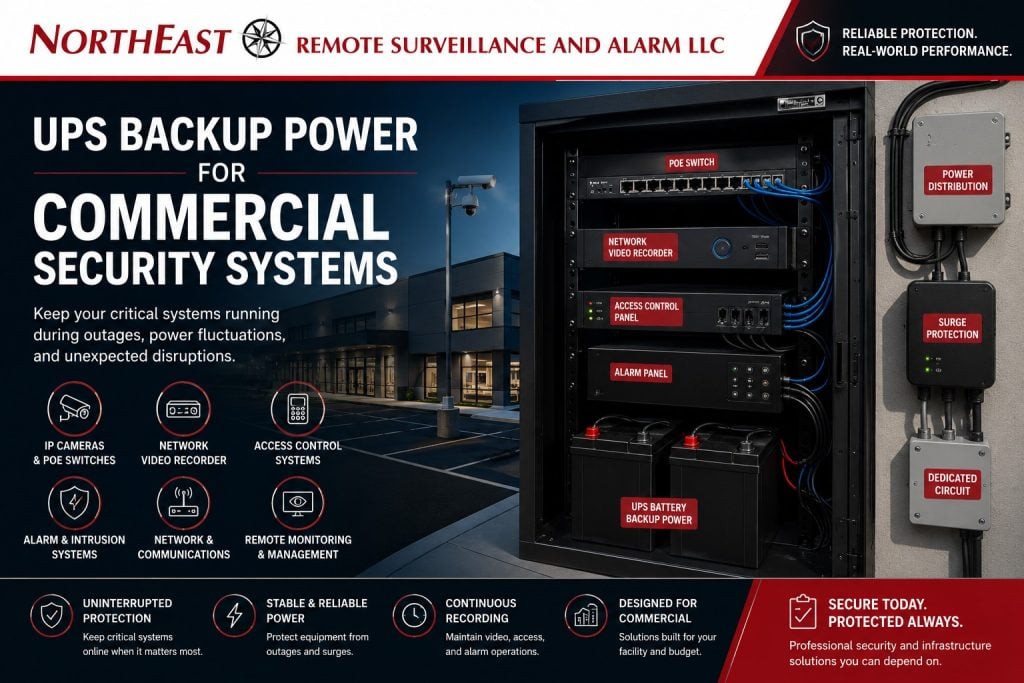
Use commercial security infrastructure planning to identify the complete path that must remain available, including remote cabinets, network equipment, and connected applications.
NERSA plans backup power for commercial and industrial security systems. Applications include warehouses, manufacturing plants, offices, healthcare and municipal facilities, logistics sites, contractor yards, and professionally managed properties.
A security system is only dependable if the equipment behind it stays powered. Even a well-designed camera, access control, alarm, or monitoring system can lose value if a switch, recorder, panel, modem, router, or power supply goes offline during an outage.
Why UPS Backup Power Matters
UPS stands for uninterruptible power supply. A UPS provides temporary battery backup and power conditioning for connected equipment when utility power is interrupted or unstable.
UPS backup power may help support:
- video surveillance recording
- PoE camera switches
- network video recorders
- access control panels
- intrusion alarm equipment
- security network switches
- internet routers and modems
- intercom systems
- remote monitoring equipment
- cellular communicators
- security servers
- low-voltage control equipment
The goal is not to power an entire building. The goal is to keep critical security equipment stable long enough to maintain recording, communication, access-control operation, alarm reporting, and monitoring continuity where appropriate.
Security Equipment That May Need UPS Backup
Commercial security systems often include multiple devices that depend on each other. If one device loses power, the rest of the system may stop working correctly.
UPS planning may be needed for:
- PoE switches powering IP cameras
- NVRs and video servers
- access control panels
- access control power supplies
- intrusion alarm panels
- alarm communicators
- intercom controllers
- network switches
- routers and firewalls
- modems
- cellular backup equipment
- monitoring interface equipment
- rack-mounted security hardware
A camera system may still fail during a power event if the cameras have PoE backup but the recorder, router, or network switch does not.
UPS Backup for Video Surveillance Systems
Video surveillance systems often rely on PoE switches, recorders, servers, routers, and network equipment. If any critical part of that chain loses power, cameras may stop recording or become unavailable for remote viewing.
UPS backup for video surveillance may support:
- continued camera power
- stable recording
- reduced camera reboot cycles
- NVR uptime
- video management system access
- remote viewing continuity
- monitoring access
- event documentation
- reduced equipment stress
For broader camera-system planning, use Commercial & Industrial Video Surveillance Systems as the main video surveillance guide.
UPS design should account for the camera load, PoE switch power draw, recorder power draw, network equipment, and expected runtime.
UPS Backup for PoE Switches
PoE switches are especially important because they provide both network connectivity and power to IP cameras, intercoms, and other devices. If a PoE switch loses power, every connected camera or device may go offline.
UPS planning for PoE switches should consider:
- total PoE power load
- number of connected cameras
- switch wattage
- uplink equipment
- rack location
- ventilation
- runtime expectations
- future camera expansion
- monitoring requirements
- service access
For PoE-specific planning, use PoE Switching for Video Surveillance Systems as the supporting resource.
A PoE switch with a heavy camera load may drain a small UPS quickly. The UPS should be sized around the real connected load, not just the switch model.
UPS Backup for Access Control Systems
Access control systems may include control panels, power supplies, electrified locks, readers, door contacts, request-to-exit devices, and network connections. Backup power must be planned carefully because access control also intersects with life safety and emergency egress.
UPS or battery backup planning may support:
- access control panel operation
- credential reader communication
- audit trail continuity
- door controller uptime
- network communication
- controlled entry operation
- system event reporting
Access-controlled doors must still comply with fire/life-safety, emergency release, egress, and code requirements. Backup power should never be planned in a way that traps occupants or interferes with required life-safety operation.
For access-control-specific planning, use Commercial Access Control Systems as the supporting resource.
UPS Backup for Intrusion Alarms and Communicators
Intrusion alarm systems often include control panels, keypads, detection devices, sirens, communicators, and monitoring connections. Many alarm panels already use battery backup, but the supporting communication path may also need review.
Alarm backup planning may consider:
- panel battery capacity
- alarm communicator power
- cellular communicator power
- internet modem backup
- router backup
- monitoring path reliability
- after-hours reporting
- user notification continuity
- service access
If an alarm panel has battery backup but the network or communication equipment loses power, reporting may be affected unless another communication path is available.
UPS Backup for Remote Video Monitoring
Remote video monitoring depends on cameras, PoE switches, recording equipment, network devices, internet connectivity, analytics, and operator access. If the infrastructure drops offline, live monitoring may be interrupted.
Monitoring-ready backup planning may include:
- camera power
- PoE switch UPS backup
- recorder backup
- router and firewall backup
- modem or cellular backup
- remote cabinet backup
- speaker or talk-down equipment power
- event device power
- lighting coordination where applicable
For monitoring-specific planning, use Remote Video Monitoring as the supporting resource.
Sites using live operator review, event verification, or talk-down should review power continuity more carefully than sites using recording-only cameras.
Runtime Planning for Security UPS Systems
UPS runtime is the amount of time connected equipment can stay powered during an outage. Runtime depends on the UPS capacity and the total load of the connected equipment.
Runtime planning should consider:
- connected equipment load
- camera count
- PoE power draw
- recorder power draw
- network device load
- access control equipment
- monitoring needs
- outage expectations
- generator availability
- service requirements
- future expansion
A UPS should be sized based on realistic operating conditions. Plugging too much equipment into a small UPS can create a false sense of protection.
UPS Backup and Generators
Some commercial and industrial properties use generators for longer outages. In these cases, UPS systems can help bridge the gap between utility power loss and generator startup.
UPS and generator coordination may support:
- cleaner transition during power loss
- reduced reboot cycles
- continued recording during transfer
- network stability
- access control continuity
- alarm communication continuity
- monitoring continuity
The UPS is not a replacement for a generator. A generator is not a replacement for a properly sized UPS. They can support different parts of the power-continuity plan.
UPS Backup for Equipment Racks and Network Closets
Security equipment is often installed in network closets, MDF rooms, IDF rooms, server rooms, security closets, or equipment racks. These areas may contain PoE switches, patch panels, recorders, routers, access control panels, fiber equipment, and monitoring hardware.
UPS planning for equipment rooms should consider:
- rack layout
- ventilation
- service clearance
- power outlets
- cable management
- load distribution
- labeling
- battery replacement access
- heat buildup
- monitoring capability
- documentation
A clean rack and power layout makes the system easier to service, troubleshoot, and expand.
UPS Backup for Remote Cabinets and Outdoor Equipment
Some sites use remote cabinets for parking lots, gates, trailer yards, camera poles, wireless bridges, or detached buildings. These cabinets may contain PoE switches, wireless radios, fiber equipment, power supplies, and network hardware.
Remote cabinet backup planning may include:
- outdoor-rated enclosures
- battery temperature considerations
- surge protection
- grounding coordination
- weather exposure
- remote switch load
- wireless bridge power
- camera power
- access control power
- service access
- runtime expectations
Remote equipment is often more exposed and harder to service, so power planning matters.
Power Conditioning and Equipment Protection
A UPS can also help protect equipment from certain power disturbances. Commercial security equipment may be affected by voltage dips, brief interruptions, power fluctuations, and unstable circuits.
Power planning may include:
- UPS backup
- surge protection
- dedicated circuits
- proper grounding coordination
- rack power distribution
- battery maintenance
- load documentation
- service access
Power protection should be part of the overall security infrastructure plan, especially for systems with high camera counts, remote monitoring, or critical access control.
Battery Maintenance and Replacement
UPS systems require maintenance. Batteries do not last forever, and neglected batteries can fail when they are needed most.
UPS maintenance should consider:
- battery age
- runtime testing
- load testing
- replacement schedule
- equipment load changes
- alert notifications
- environmental conditions
- documentation
- service records
A UPS that has not been tested or maintained may not provide the expected backup during an outage.
Documentation for Backup Power Systems
Backup power should be documented as part of the security system. Documentation helps property managers, facility teams, IT staff, security teams, and service technicians understand what is protected and what is not.
Documentation may include:
- UPS locations
- connected equipment
- estimated runtime
- battery replacement dates
- rack layout
- circuit information
- PoE switch load
- recorder load
- network device load
- service notes
- maintenance records
Good documentation helps prevent confusion during service calls, outages, upgrades, and system expansion.
Common UPS Backup Mistakes
Common mistakes include:
- only backing up the recorder
- forgetting PoE switches
- forgetting routers or modems
- using undersized UPS units
- overloading battery backup
- not reviewing runtime
- ignoring access control requirements
- failing to maintain batteries
- placing UPS units in overheated closets
- failing to document connected equipment
- assuming a generator replaces UPS protection
- ignoring remote cabinets
- using consumer-grade backup for commercial loads
A backup power plan should be based on the actual security system design.
Commercial Properties That Need UPS Backup Planning
UPS backup power may be especially important for:
- warehouses
- logistics centers
- manufacturing plants
- industrial buildings
- office buildings
- medical facilities
- municipal properties
- schools
- multi-tenant buildings
- contractor yards
- fleet facilities
- parking areas
- gate-controlled properties
- remote monitoring sites
- multi-building campuses
These properties often depend on security systems for after-hours visibility, access control, incident documentation, monitoring, and operational continuity.
Frequently Asked Questions
What is UPS backup power for commercial security systems?
UPS backup power uses battery-supported equipment to keep critical security devices running during short power interruptions, voltage drops, or unstable electrical conditions.
What security equipment should be connected to a UPS?
PoE switches, NVRs, video servers, routers, modems, access control panels, intrusion alarm communicators, network switches, intercom equipment, and remote monitoring equipment may need UPS backup depending on the system design.
Does a UPS keep security cameras recording during an outage?
It can, if the cameras, PoE switches, recorder, and necessary network equipment are all connected to properly sized backup power. If only one part of the system is backed up, recording may still fail.
Do PoE switches need UPS backup?
Yes, many commercial camera systems should use UPS backup for PoE switches. If a PoE switch loses power, the cameras connected to it also lose power and network communication.
How long will a UPS run a security system?
Runtime depends on the UPS size and the connected equipment load. A professional assessment should calculate expected load and determine the right backup design.
Is a UPS the same as a generator?
No. A UPS provides short-term battery backup and power conditioning. A generator can provide longer-term power. Many facilities use both for different parts of power continuity.
Does access control need backup power?
Often, yes, but access control backup power must be coordinated with fire/life-safety, emergency egress, code requirements, and door hardware operation.
Can UPS backup support remote video monitoring?
Yes, but the cameras, switches, recorders, network devices, internet equipment, and monitoring-related devices must be included in the backup plan.
Do UPS batteries need maintenance?
Yes. UPS batteries age and should be tested, documented, and replaced on a maintenance schedule.
Can NERSA help with UPS backup planning?
Yes. Northeast Remote Surveillance and Alarm, LLC supports UPS backup planning for commercial security systems, including cameras, PoE switches, recorders, access control, alarm communication, network equipment, and monitoring infrastructure.
Request a Security Power Assessment
UPS backup power should be reviewed before cameras, access control, alarms, monitoring, intercoms, network equipment, or recording systems are installed. A professional assessment helps identify critical devices, power loads, equipment locations, runtime needs, battery requirements, network dependencies, and long-term service planning.
Use Request a Security Assessment to begin planning backup power for a commercial or industrial security system.
Northeast Remote Surveillance and Alarm, LLC provides business and facility security system assessment, infrastructure planning, installation, monitoring, and support for commercial and industrial properties across the Lehigh Valley, Pennsylvania, and selected Mid-Atlantic markets.
Compliance, Codes & Project Standards
NERSA plans commercial and industrial security work with applicable code, documentation, inspection and authority-having-jurisdiction requirements in mind. Requirements vary by system, property and jurisdiction. These resources support project planning; they do not establish legal compliance, certification or AHJ approval.
Related guidance: Regulatory compliance & inspection readiness · NERSA project standards · Documentation, testing & inspection readiness