
Wireless bridges for remote security cameras connect gates, yards, and outbuildings where a direct cable route is impractical.

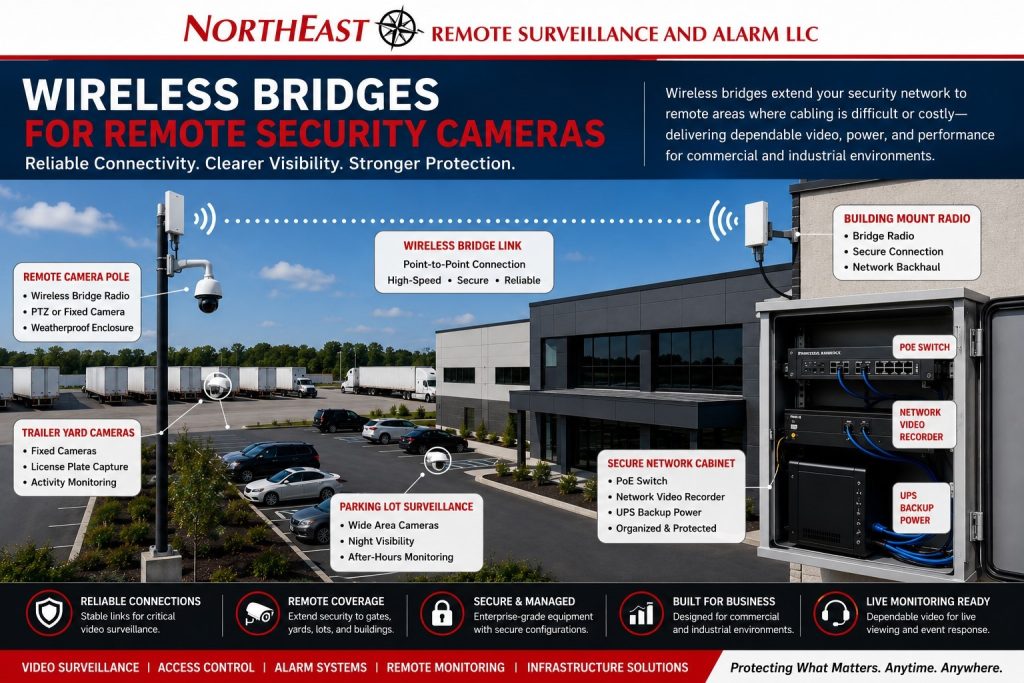
Coordinate the remote link with security network design so its traffic, administration, and recovery requirements fit the site network.
A bridge connects fixed locations; it does not automatically provide general client coverage.
Use commercial wireless network planning for access-point coverage and roaming, or compare fiber infrastructure when a permanent cable route is available.
NERSA designs wireless bridges to connect remote camera locations at commercial and industrial properties. Applications include warehouses, logistics facilities, contractor yards, parking areas, municipal properties, campuses, and construction sites.
A wireless bridge should not be treated as a shortcut or a consumer Wi-Fi connection. Commercial camera bridges must be planned around line of sight, distance, bandwidth, power, mounting height, weather exposure, interference, network security, recording requirements, and long-term serviceability.
What a Wireless Bridge Does for Security Cameras
A wireless bridge creates a point-to-point or point-to-multipoint connection between a remote camera location and the main security network. Instead of running a direct cable from the main building to every remote camera location, a wireless bridge can transmit network traffic between two properly aligned radios.
Wireless bridges may support:
- remote IP cameras
- gate cameras
- parking lot cameras
- trailer yard cameras
- loading dock cameras
- fence line cameras
- detached building cameras
- temporary site cameras
- construction site cameras
- outdoor storage cameras
- remote PoE switch locations
- live monitoring camera views
The purpose is to create a stable network path for video traffic, not to replace proper system design.
When Wireless Bridges Make Sense
Wireless bridges are useful when trenching, conduit, fiber, or copper cabling is not practical. They can help extend surveillance coverage across yards, drive lanes, parking areas, open lots, detached buildings, or outdoor storage locations.
Wireless bridge planning may make sense for:
- large commercial properties
- warehouses with trailer yards
- logistics sites with truck courts
- contractor yards
- industrial campuses
- municipal properties
- construction sites
- parking lots
- gated entrances
- remote storage areas
- multi-building facilities
- temporary camera locations
A wireless bridge should be selected only after the property layout, camera goals, power availability, line of sight, bandwidth needs, and recording requirements are reviewed.
Line of Sight and Mounting Height
Line of sight is one of the most important parts of wireless bridge planning. A bridge usually needs a clear path between the sending and receiving radios. Buildings, trees, signs, vehicles, trailers, equipment, terrain, and future site changes can all affect performance.
Planning should consider:
- radio mounting height
- building corners
- rooflines
- poles
- trees and seasonal foliage
- parked trailers
- truck movement
- equipment storage
- future construction
- weather exposure
- service access
A bridge that works during installation may become unreliable if trailers, trees, or new structures block the path later. The system should be planned around real property conditions.
Distance and Bandwidth Requirements
Wireless bridges must be matched to the distance and video load. A single camera may require less bandwidth than multiple high-resolution cameras, remote monitoring views, or continuous recording.
Bandwidth planning should consider:
- number of cameras
- camera resolution
- frame rate
- compression settings
- motion recording or continuous recording
- live viewing needs
- remote monitoring needs
- recording location
- video management software
- future camera expansion
A bridge should have enough capacity to carry video reliably without dropped frames, delayed viewing, poor playback, or recording gaps.
For broader camera-system planning, use Commercial & Industrial Video Surveillance Systems as the main video surveillance guide.
Power for Remote Camera Locations
A wireless bridge still needs power. Remote camera locations may require power for the bridge radio, cameras, PoE switch, enclosure, heater, lighting, or other equipment.
Power planning may include:
- nearby electrical service
- dedicated circuits
- outdoor-rated power supplies
- UPS backup
- PoE injectors
- remote PoE switches
- weather-rated enclosures
- grounding coordination
- surge protection
- solar or cellular options where appropriate
Without reliable power, the wireless bridge and cameras will not remain dependable.
Wireless Bridges and PoE Camera Infrastructure
Many remote camera designs use a wireless bridge with a small PoE switch, injector, or remote equipment cabinet. The bridge provides network connectivity, while the PoE equipment powers the cameras.
This design may support:
- multiple cameras at one remote pole
- a gate camera and intercom camera
- trailer yard cameras
- parking lot camera clusters
- detached building cameras
- remote monitoring views
- exterior camera expansion
For PoE-specific camera infrastructure, use PoE Switching for Video Surveillance Systems as the supporting resource.
A remote camera cabinet should be organized, protected, labeled, and serviceable. Poorly mounted equipment, exposed connections, weak power, or unlabeled wiring can create long-term service problems.
Wireless Bridges for Trailer Yards and Logistics Sites
Warehouses and logistics properties often have areas that are difficult to cable directly. Trailer yards, truck courts, driver entrances, dock areas, fence lines, and remote parking areas may need camera coverage outside the main building.
Wireless bridge planning may help support:
- trailer yard visibility
- gate camera connections
- truck entrance views
- loading dock coverage
- remote pole-mounted cameras
- driver check-in areas
- parking lot surveillance
- after-hours monitoring
- exterior incident review
These areas often matter because they involve vehicle movement, freight activity, staged trailers, employee parking, vendor access, and after-hours exposure.
Wireless Bridges for Contractor Yards and Outdoor Storage
Contractor yards, equipment yards, fleet lots, and outdoor storage sites may need remote camera connectivity across large exterior spaces. These locations often include gates, equipment rows, fuel areas, material storage, trailers, vehicles, and perimeter exposure.
Wireless bridge systems may help connect cameras covering:
- vehicle gates
- equipment storage
- material yards
- fuel areas
- fence lines
- shop entrances
- parking areas
- remote buildings
- after-hours activity zones
For these properties, camera views should be planned around usable documentation, not just general visibility.
Wireless Bridges for Construction Sites
Construction sites may need temporary or semi-permanent surveillance where permanent cabling is not yet available. Wireless bridges can sometimes support remote camera positions, site entrances, equipment areas, material storage, trailers, or work zones.
Construction site bridge planning should consider:
- changing site layout
- temporary poles
- power availability
- equipment movement
- trailer placement
- weather exposure
- camera relocation
- monitoring needs
- service access
- future removal or reuse
Temporary designs still need professional planning. A weak wireless setup can create missed footage, unstable monitoring, and service issues.
Wireless Bridges for Parking Lots and Gate Cameras
Parking areas and gates often sit far from the main building. Wireless bridges can sometimes provide network connectivity to cameras or intercom devices in those areas.
Remote parking and gate camera planning may include:
- vehicle lane visibility
- gate entrance cameras
- employee lot coverage
- visitor parking review
- delivery entrance monitoring
- license plate visibility planning
- intercom camera support
- pole-mounted cameras
- lighting coordination
- after-hours alerts
If license plate visibility is required, camera placement, angle, lighting, lane design, and vehicle speed should be planned separately from the bridge connection.
Interference and Reliability Concerns
Wireless bridges operate in real environments. Interference, nearby equipment, competing wireless signals, weather, physical obstructions, and poor alignment can all affect performance.
Reliability planning should consider:
- frequency selection
- channel planning
- mounting stability
- weather exposure
- antenna alignment
- nearby wireless systems
- electrical interference
- physical obstructions
- bandwidth load
- service access
- future property changes
A commercial wireless bridge should be installed and configured as part of the security infrastructure, not treated like a basic Wi-Fi extender.
Cybersecurity and Network Segmentation
Remote camera bridges carry security video traffic. They should be planned with network security in mind.
Cybersecurity-aware planning may include:
- secure bridge configuration
- strong passwords
- encrypted management access where supported
- dedicated security network design
- VLAN planning
- firewall coordination
- limited administrative access
- firmware management
- documented device settings
- IT coordination
Security camera networks should improve property protection without creating unnecessary cyber exposure.
Wireless Bridges and Remote Video Monitoring
Remote video monitoring depends on reliable camera connectivity. If a wireless bridge drops, delays, or degrades video, live monitoring and event review may suffer.
Monitoring-ready bridge planning should consider:
- camera reliability
- bandwidth capacity
- bridge stability
- event-based video quality
- night visibility
- speaker or talk-down device connectivity
- lighting coordination
- internet path
- power backup
- escalation procedures
For monitoring-specific planning, use Remote Video Monitoring as the supporting resource.
Wireless bridge design should be especially careful when the cameras support after-hours alerts, live operator review, or talk-down response.
Weather Exposure and Outdoor Equipment Protection
Wireless bridge equipment is often installed outdoors on poles, walls, rooftops, or remote structures. Outdoor installations need weather-aware design.
Planning may include:
- outdoor-rated radios
- proper mounting hardware
- weatherproof cable entries
- drip loops
- surge protection
- grounding coordination
- UV-rated cabling
- weather-rated enclosures
- secure pole or wall mounts
- service clearance
Outdoor security infrastructure should be built for long-term reliability, not temporary convenience.
Documentation and Serviceability
Wireless bridge systems should be documented like the rest of the security infrastructure. Documentation helps future technicians, property managers, IT staff, and security teams understand how the remote camera connection works.
Documentation may include:
- bridge locations
- radio names
- IP addresses
- mounting locations
- camera names
- remote cabinet locations
- power source information
- PoE switch details
- cable labels
- network settings
- alignment notes
- service notes
Good documentation makes future service, troubleshooting, expansion, and ownership changes easier.
Common Wireless Bridge Mistakes
Common mistakes include:
- using consumer-grade Wi-Fi instead of a commercial bridge
- ignoring line of sight
- mounting radios too low
- failing to plan bandwidth
- using weak power sources
- skipping UPS backup
- ignoring interference
- failing to label equipment
- poor weatherproofing
- exposed connections
- no network segmentation
- no documentation
- using wireless where fiber or cabling would be more reliable
Wireless bridges can be powerful tools, but they must be designed correctly.
When Fiber or Cabling May Be Better
A wireless bridge is not always the best answer. In some cases, fiber, conduit, or direct cabling may provide better long-term reliability.
Fiber or cabling may be better when:
- the path is permanent
- trenching is practical
- very high bandwidth is required
- multiple cameras need long-term support
- reliability is mission-critical
- line of sight is poor
- interference is high
- future expansion is likely
- the site already has conduit pathways
A professional assessment should compare wireless bridge design against fiber and cabling options before final equipment selection.
Commercial Properties That May Need Wireless Camera Bridges
Wireless bridges may be useful for:
- warehouses
- logistics centers
- industrial facilities
- contractor yards
- fleet yards
- parking lots
- construction sites
- municipal properties
- schools
- outdoor storage facilities
- gated commercial properties
- multi-building campuses
- loading dock areas
- trailer yards
- remote equipment areas
The design should match the property’s real conditions, not just the desired camera location.
Frequently Asked Questions
What is a wireless bridge for security cameras?
A wireless bridge is a network connection between two points that allows remote IP cameras or remote camera equipment to communicate with the main security network without a direct cable between those locations.
Is a wireless bridge the same as Wi-Fi?
No. A commercial wireless bridge is usually a dedicated point-to-point or point-to-multipoint link designed for network connectivity between locations. It should not be treated like basic Wi-Fi coverage for general devices.
When should a wireless bridge be used for cameras?
A wireless bridge may be useful when cameras are needed at gates, yards, parking lots, detached buildings, construction sites, or remote areas where direct cabling is difficult or impractical.
Do wireless camera bridges need line of sight?
Usually, yes. Many bridge systems require clear line of sight between radios. Buildings, trailers, trees, equipment, and future site changes can affect performance.
Can wireless bridges support multiple cameras?
Yes, depending on the bridge capacity, number of cameras, camera resolution, frame rate, recording settings, bandwidth demand, and future expansion needs.
Are wireless bridges reliable for commercial security cameras?
They can be reliable when properly designed, mounted, powered, configured, and documented. Poorly planned bridges can cause video drops, unstable monitoring, and service problems.
Do wireless bridges need power?
Yes. The bridge radios, cameras, PoE switches, and any remote equipment need reliable power. Some locations may also require UPS backup, weather-rated enclosures, or dedicated power planning.
Can wireless bridges support remote video monitoring?
Yes, but monitoring requires stable video connectivity, enough bandwidth, reliable power, and properly planned camera views. Bridge performance should be reviewed before relying on it for live monitoring.
Is fiber better than a wireless bridge?
Sometimes. Fiber may be better for permanent high-bandwidth connections, multi-building properties, or mission-critical camera coverage. Wireless bridges may be useful where cabling or trenching is not practical.
Can NERSA design wireless bridges for remote security cameras?
Yes. Northeast Remote Surveillance and Alarm, LLC designs wireless bridge, PoE, fiber, cabling, power, and remote camera infrastructure for commercial and industrial video surveillance systems.
Request a Remote Camera Infrastructure Assessment
Wireless bridges for remote security cameras should be planned before cameras, poles, power supplies, remote cabinets, monitoring, or recording equipment are selected. A professional assessment helps identify line of sight, distance, bandwidth needs, power availability, camera locations, mounting options, network design, and long-term service requirements.
Use Request a Security Assessment to begin planning remote camera connectivity for a commercial or industrial property.
NERSA provides security assessments, wireless bridge planning, camera infrastructure, installation, monitoring and support. We serve commercial and industrial facilities in the Lehigh Valley, Pennsylvania and selected Mid-Atlantic markets.
Related Case Study: Shady Brook Farm
See point-to-point and point-to-multipoint wireless bridges used to connect video surveillance at Shady Brook Farm in Yardley, Pennsylvania.
Compliance, Codes & Project Standards
NERSA plans commercial and industrial security work with applicable code, documentation, inspection and authority-having-jurisdiction requirements in mind. Requirements vary by system, property and jurisdiction. These resources support project planning; they do not establish legal compliance, certification or AHJ approval.
Related guidance: Regulatory compliance & inspection readiness · Video surveillance compliance · NERSA project standards