
A visitor-entry system helps staff see who is at a door, speak with them, and decide whether to admit them.

Request a Commercial Security Assessment
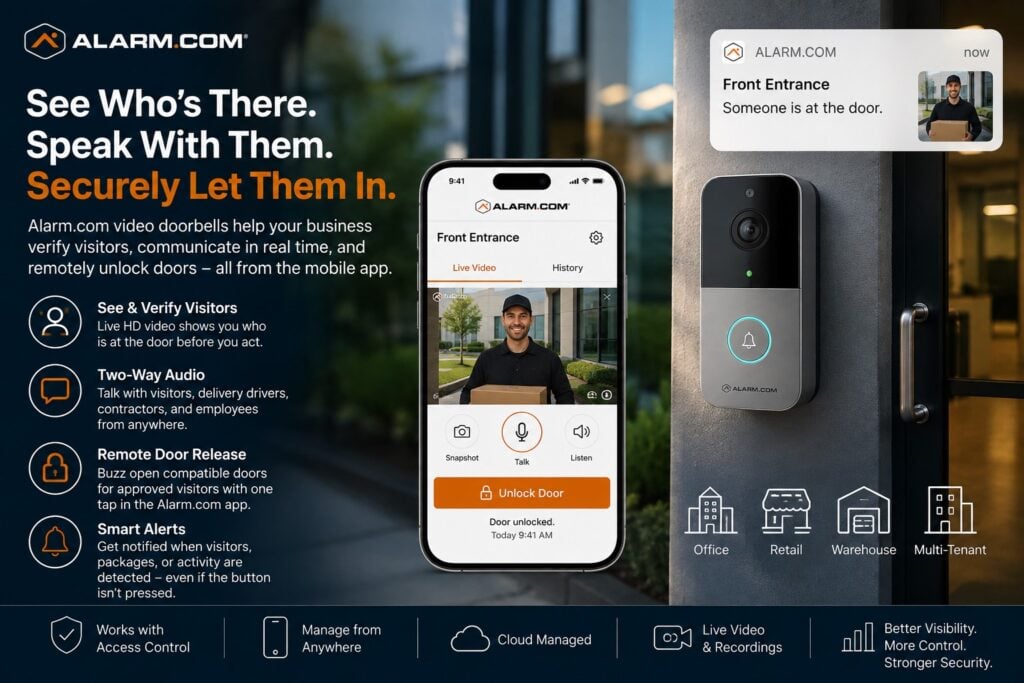
It can reduce trips to entrances that staff can manage remotely.
For the complete Alarm.com commercial platform, visit Alarm.com for Business Security Systems
This is an independent reference to Alarm.com Business Video Doorbell & Visitor Entry. Product information does not establish a NERSA partnership, certification, authorization or brand-specific service capability. Confirm those details with the proposed provider.
Alarm.com for Business can notify authorized users when a visitor or delivery arrives.
Supported video doorbells provide live video and two-way audio.
With compatible access control, an authorized user can also release the door from the video call screen. (Alarm.com)
Commercial Visitor Entry Designed Around the Door
A business video doorbell should be planned around the actual entrance and the people expected to use it.
Important questions may include:
- Is the entrance public or restricted?
- Is there a receptionist?
- Are deliveries common?
- Do contractors arrive after hours?
- Are employees sometimes away from the front desk?
- Does the door already have access control?
- Does management need remote door release?
- Is video verification required before entry?
- Does the property have more than one visitor entrance?
- Is the entrance exposed to weather or difficult lighting?
The objective is not simply to mount a video doorbell beside a door.
The objective is to create a practical visitor-verification workflow.
See Who Is at the Door
Alarm.com video doorbells provide live video so authorized users can visually verify a visitor before deciding how to respond.
This can be useful for:
- Customers
- Vendors
- Deliveries
- Cleaning crews
- Service technicians
- Contractors
- Employees without credentials
- After-hours visitors
Alarm.com describes business uses where front-desk staff can check a visitor remotely. Staff do not have to stand at the entrance.
Seeing the visitor adds context to the entry decision. Staff should not have to rely only on a voice call or a guess about who is outside.
Two-Way Audio
Compatible Alarm.com video doorbells provide two-way audio so authorized users can speak directly with a visitor.
This can allow a manager or receptionist to ask:
- Who are you here to see?
- What company are you with?
- What are you delivering?
- Which employee requested your visit?
- Are you at the correct entrance?
Alarm.com describes two-way communication as part of its video doorbell workflow, allowing users to see and speak with visitors remotely.
This can reduce unnecessary employee trips to secondary doors, loading entrances, or remote entry points.
Remote Door Release
A supported video doorbell can work with compatible Alarm.com access control. This can let approved staff manage visitor entry remotely.
With a compatible setup, approved users can receive a doorbell video call and release the controlled door from the call screen.
- Deliveries
- Vendors
- Approved contractors
- Employees who forgot a credential
- Cleaning personnel
- Service technicians
- Visitors arriving outside normal reception hours
Remote release should be limited to authorized users and should not replace proper door hardware, egress, locking, or access-control design.
For deeper door-management planning, visit Alarm.com Commercial Access Control Systems.
Front Lobby Visitor Entry
A secured lobby can create a balance between customer accessibility and controlled entry.
A video doorbell may allow front-desk or administrative personnel to:
- See arriving visitors
- Speak with them
- Verify their purpose
- Confirm an appointment
- Release the entrance remotely
- Continue working without remaining directly beside the door
Alarm.com specifically identifies secured lobby applications as a business use case for its video doorbell technology.
The final entrance design should still account for the physical door, lock, exit requirements, access control, and visitor procedures.
Delivery Entrance Management
Businesses frequently receive deliveries at side doors, rear entrances, warehouse doors, or other locations away from reception.
Alarm.com describes delivery handling through its app. Staff can see and speak with the driver, confirm the delivery, and release a compatible door when appropriate.
This can be useful where employees would otherwise need to interrupt their work every time a driver arrives.
Potential applications include:
- Office supply deliveries
- Package carriers
- Maintenance vendors
- Food deliveries
- Parts deliveries
- Warehouse service entrances
The video doorbell should be positioned at the actual entrance used by legitimate visitors rather than where it is merely easiest to mount.
Contractors and After-Hours Visitors
Commercial properties often need to admit approved personnel outside ordinary business hours.
Examples may include:
- Cleaning crews
- HVAC technicians
- Electricians
- IT contractors
- Security technicians
- Maintenance vendors
- Property managers
Alarm.com describes after-hours uses for cleaners, technicians, and contractors. Approved staff can check who has arrived, speak with them, and admit them remotely through a compatible setup.
Decide who checks each visitor and approves entry. Also decide when a temporary credential would be more suitable.
Smart Visitor Alerts
Compatible Alarm.com video doorbells can use Video Analytics to identify important activity around an entrance.
Alarm.com currently supports alerts for visitors and other detected activity, including some configurations where the system can notify users when a person is present even if the person does not press the doorbell button. (Alarm.com)
Newer Alarm.com doorbell technology can distinguish among people, packages, vehicles, animals, and familiar faces on supported hardware. (Alarm.com)
The notification strategy should be configured carefully so normal pedestrian or employee activity does not create unnecessary alerts.
Package and Delivery Awareness
Selected Alarm.com video doorbells support package-related alerts.
For businesses that regularly receive packages, this can provide another layer of awareness around unattended deliveries or activity near the entrance. (Alarm.com)
Use package alerts as part of the business’s delivery process. They do not replace secure receiving practices for valuable shipments.
Video Analytics at Visitor Entrances
Video Analytics can help a business focus on the activity that matters around a visitor entrance.
Potential rules may identify:
- A person approaching the door
- A person remaining near the entrance
- Activity in a defined doorway area
- A visitor who does not press the button
- Selected after-hours activity
For complete security-oriented analytics planning, visit Alarm.com Video Analytics & Event Verification.
Night and Low-Light Visitor Verification
Visitor-entry systems may need to operate outside normal daylight hours.
Alarm.com doorbells include infrared night-vision capabilities on supported models so users can maintain visibility at an entrance after dark. (Alarm.com)
Actual performance still depends on:
- Doorway lighting
- Camera angle
- Mounting location
- Reflections
- Weather
- Backlighting
- Distance from the visitor
- Building architecture
A good doorbell cannot overcome every poor mounting condition.
Multiple Visitor Entrances
Some businesses have more than one entrance requiring visitor communication.
A property may have:
- Main lobby entrance
- Employee entrance
- Rear delivery door
- Shipping entrance
- Side service door
Alarm.com supports video doorbell deployments at different entrances, allowing users to distinguish which location is generating the visitor event. (Alarm.com)
Each entrance should have a defined purpose.
Not every exterior door needs a video doorbell.
Video Doorbells and Access Control
The video doorbell provides visitor communication and visual verification.
Access control provides controlled entry.
When compatible systems are integrated, the two can work together so an authorized user can verify a visitor and remotely release the appropriate door.
This should not be confused with general employee access control.
Employee credentials, schedules, door permissions, mobile access, and user administration remain part of the dedicated access-control system.
For complete employee and controlled-door management, visit Alarm.com Commercial Access Control Systems.
Video Doorbells and Commercial Video Surveillance
A video doorbell is also not a replacement for a commercial video-surveillance system.
Doorbell cameras are designed around the immediate visitor-entry environment.
Broader commercial surveillance may need cameras covering:
- Parking lots
- Building approaches
- Loading docks
- Warehouses
- Hallways
- Exterior storage
- Gates
- Perimeters
For broader camera-system planning, visit Alarm.com Commercial Video Surveillance Systems.
Existing Controlled Entrances
Businesses with existing access control may be able to add Alarm.com visitor-entry capabilities without replacing the complete door system.
An evaluation should consider:
- Existing lock
- Access-control controller
- Reader
- Request-to-exit hardware
- Door contact
- Power supply
- Network availability
- Wi-Fi where applicable
- Existing camera coverage
- User administration
- Door-release compatibility
Compatibility should be verified before assuming an existing controlled opening can support remote video doorbell release.
Professional Installation Matters
A reliable commercial visitor-entry system depends on more than the doorbell itself.
The complete entrance may involve:
- Video doorbell
- Network connectivity
- Access-control controller
- Locking hardware
- Door contact
- Request-to-exit equipment
- Power
- Door closer
- Exit hardware
- User permissions
- Notification configuration
- Remote-release rules
Document visitor verification, door release permissions and the fallback procedure when connectivity fails. Confirm compatibility for the complete entrance.
Frequently Asked Questions
Can Alarm.com video doorbells be used for businesses?
Yes.
Alarm.com specifically supports business applications involving visitor verification, deliveries, contractors, remote communication, and compatible remote door release. (Alarm.com)
Can I talk to a visitor remotely?
Yes.
Compatible Alarm.com video doorbells support live video and two-way audio. (Alarm.com)
Can I unlock a commercial door from the video doorbell call?
With compatible Alarm.com access control, authorized users can buzz a door open directly from the video call screen. (Alarm.com)
Can the doorbell detect someone who does not press the button?
Compatible Video Analytics configurations can alert users when a person is detected in a defined area at the entrance. (Alarm.com)
Can an Alarm.com doorbell help manage deliveries?
Yes. Alarm.com specifically promotes remote video verification, communication, and controlled entry for business deliveries.
Can it be used for contractors after hours?
Yes. Businesses can use compatible video doorbell workflows to verify contractors, cleaners, technicians, and other approved personnel remotely.
Is a video doorbell a replacement for access control?
No. A video doorbell helps staff see and speak with visitors. Access control manages credentials, door permissions, schedules, and door operation.
Is a video doorbell a replacement for commercial surveillance cameras?
No. A doorbell camera focuses on an entrance, while a commercial surveillance system provides broader property coverage.
Prepare for a Commercial Security Assessment
For an assessment, provide entrance photos, existing door hardware details, visitor volumes and the staff responsible for answering calls.
Request a Commercial Security Assessment.
Compliance, Codes & Project Standards
NERSA plans commercial and industrial security work with applicable code, documentation, inspection and authority-having-jurisdiction requirements in mind. Requirements vary by system, property and jurisdiction. These resources support project planning; they do not establish legal compliance, certification or AHJ approval.
Related guidance: Regulatory compliance & inspection readiness · Access control & door hardware standards · NFPA 101 & egress planning · ADA access-control planning