
Start with what your business needs to learn about customer movement and occupancy.

Request a Commercial Security Assessment
Then assess whether Alarm.com’s supported analytics can answer those questions.
For the complete Alarm.com commercial platform, visit Alarm.com for Business Security Systems.
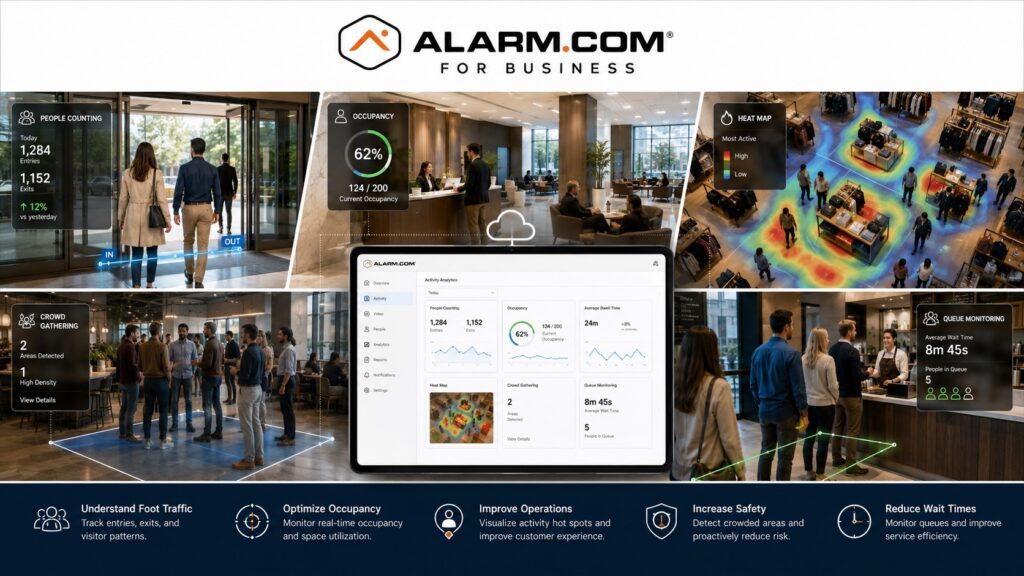
Alarm.com Business Activity Analytics uses compatible cameras to help managers review movement and occupancy.
It can show where people gather, which areas are busiest, and how queues change during the day.
Alarm.com currently positions Business Activity Analytics as an operational-intelligence layer for compatible business video systems, with tools including Occupancy Tracking, People Counting, Heat Mapping, Crowd Gathering, and Queue Monitoring. (Alarm.com)
This is an independent reference to Alarm.com Business Activity Analytics. Product information does not establish a NERSA partnership, certification, authorization or brand-specific service capability. Confirm those details with the proposed provider.
Business Analytics Built Into Commercial Video
Business Activity Analytics uses compatible Alarm.com cameras to analyze movement within selected areas of a property.
Unlike conventional surveillance that primarily answers what happened, Business Activity Analytics can also help management understand patterns such as:
- How many people entered an area
- When customer or employee traffic increased
- Where people spent the most time
- Whether occupancy exceeded a defined level
- Whether groups formed in selected areas
- How long queues became
- How long customers waited in line
Alarm.com describes the platform as a way to use existing commercial video infrastructure for both security and day-to-day operational insight. (Knowledge Base)
The objective is not to collect data simply because the system can.
The objective is to identify measurements that help managers make better decisions.
People Counting
Alarm.com People Counting uses a virtual line in the camera view. The system counts people who cross that line in the chosen direction.
Businesses may use this information to better understand:
- Entrance traffic
- Customer flow
- Employee movement
- Lobby usage
- Traffic between departments
- Movement through selected corridors
- Activity during different operating periods
People-counting data can also be reviewed through reports over time, helping management compare daily, weekly, or monthly traffic patterns. (Knowledge Base)
The camera and rule should be positioned around a clearly defined counting objective.
Occupancy Tracking
Occupancy Tracking estimates how many people are in a set area. It uses counts of people entering and leaving through the monitored points.
Alarm.com states that compatible Business Activity Analytics configurations can provide real-time net occupancy information and alert users when occupancy exceeds a configured threshold. (Alarm.com)
This may be useful for:
- Retail spaces
- Lobbies
- Waiting areas
- Break rooms
- Shared workspaces
- Selected production areas
- Public-facing commercial areas
- Other controlled spaces
Occupancy data should be used as an operational tool rather than as a substitute for appropriate staffing or physical supervision.
Heat Mapping
Heat Mapping provides a visual representation of where people spend time within a defined camera view.
Alarm.com allows users to establish a ground zone and review where activity was concentrated during a selected date and time range.
Heat maps may help businesses evaluate:
- Customer movement
- Display placement
- Lobby usage
- Store layout
- Common walk paths
- Employee workflow
- Frequently used areas
- Underused areas
The usefulness of heat mapping depends heavily on camera placement and the area being analyzed.
A camera placed to identify faces at an entrance may not have the best view for tracking movement across a floor.
Crowd Gathering
Crowd Gathering allows a defined area to be monitored for the number of people present.
Alarm.com describes this feature as counting people within a selected area. It can send an alert when the count exceeds a set limit.
Potential commercial applications may include:
- Lobbies
- Break rooms
- Production areas
- Waiting rooms
- Retail sections
- Shared employee spaces
- Event areas
- Selected warehouse or facility zones
The threshold should be configured around a meaningful operational requirement rather than simply generating more notifications.
Queue Monitoring
Queue Monitoring is intended for businesses where customer wait time and line length matter.
Alarm.com states that compatible Business Activity Analytics configurations can measure average wait time and generate alerts when either queue length or average waiting time exceeds configured limits. (Alarm.com)
Potential applications include:
- Retail checkout lines
- Reception areas
- Service counters
- Customer pickup areas
- Registration areas
- Other defined waiting zones
This can provide managers with useful information about operating conditions without requiring constant manual observation.
Operational Reports
Business Activity Analytics becomes more useful when information can be reviewed over time.
Alarm.com supports reporting around Business Activity Analytics data, including reports related to people counting and other operational trends.
Its broader business-reporting tools can also provide scheduled activity reports and remote operational awareness. (Alarm.com)
Reports may help management evaluate:
- Traffic trends
- Peak periods
- Occupancy patterns
- Customer flow
- Staffing requirements
- Queue performance
- Layout changes
- Operational changes over time
A report is most useful when the underlying analytics rule has a clearly defined purpose.
Camera Placement Matters
Business Activity Analytics depends on the camera’s ability to observe the area appropriately.
Planning should consider:
- Camera height
- Camera angle
- Field of view
- Lighting
- Obstructions
- Entrance geometry
- Movement direction
- Area boundaries
- Intended analytic rule
- Changes to furniture or displays
A good general camera view may not suit people counting or heat mapping. Check the angle and placement for the specific task.
The physical camera design and analytics objective should be planned together.
Compatible Alarm.com Cameras
Business Activity Analytics requires compatible Alarm.com video equipment and supported service configurations.
Alarm.com’s current Business Activity Analytics documentation lists multiple compatible Wi-Fi and PoE camera models, including newer Pro Series options. (Knowledge Base)
Compatibility should be confirmed before assuming an existing camera can provide a particular analytics function.
For broader camera-system planning, visit Alarm.com Commercial Video Surveillance Systems.
Business Activity Analytics Is Different From Security Video Analytics
Business Activity Analytics and security-oriented Video Analytics are related but should not be treated as identical.
Alarm.com’s standard Video Analytics can identify people, vehicles, and animals and generate rule-based alerts around defined areas and times.
Business Activity Analytics focuses more heavily on operational measurements such as occupancy, people counting, heat mapping, crowd gathering, and queue behavior. (Alarm.com)
This distinction matters.
An outdoor security camera may flag a person in a restricted yard after closing. An indoor activity camera may measure customer traffic. These tasks need different rules.
For deeper security-event analytics and verification, visit Alarm.com Video Analytics & Event Verification.
Retail and Customer-Facing Applications
These tools may help managers at customer-facing businesses understand traffic and activity patterns.
Potential applications include:
- Store entrances
- Checkout areas
- Customer service counters
- Product displays
- Waiting areas
- Reception areas
- Common customer pathways
Alarm.com specifically highlights retail applications such as occupancy tracking, customer movement, and traffic-pattern analysis. (Alarm.com)
The analytics should support operational decision-making without unnecessarily expanding surveillance beyond the areas relevant to the business objective.
Office and Workplace Applications
Business Activity Analytics can also be used in office and workplace environments.
Alarm.com identifies applications such as monitoring shared gathering spaces and high-volume hallways to help managers understand traffic patterns and building usage. (Alarm.com)
Potential areas may include:
- Main entrances
- Lobbies
- Hallways
- Break rooms
- Shared workspaces
- Reception areas
The system should be configured around legitimate operational requirements and appropriate business policies.
Industrial and Commercial Facility Applications
Alarm.com also positions Business Activity Analytics for light-industrial environments.
Potential uses may include evaluating movement through selected entrances, shared employee spaces, factory-floor zones, or other areas where occupancy or gathering information provides operational value. (Alarm.com)
Industrial environments can present additional design challenges because of:
- Large open spaces
- Equipment
- Changing layouts
- Workstations
- Production activity
- High ceilings
- Variable lighting
Analytics rules should therefore be tested around the actual operating environment.
Business Activity Analytics and Multi-Location Management
Organizations operating several business locations may want to compare operational patterns across sites.
Business Activity Analytics can show patterns in customer or staff movement. Use the dedicated Alarm.com multi-location tools for wider management across sites.
For centralized management across multiple properties, visit Alarm.com Multi-Location Business Security Management.
Professional Design Matters
Analytics software cannot correct poor camera placement.
Reliable Business Activity Analytics still depends on proper:
- Camera selection
- Mounting
- Angle
- Lighting
- Network connectivity
- Rule configuration
- Area definition
- Reporting
- User permissions
- Ongoing review
Define the camera views, counting zones and operating questions before selecting an analytics configuration. Test results against a manual sample so reports have a known basis.
Frequently Asked Questions
What is Alarm.com Business Activity Analytics?
Alarm.com Business Activity Analytics uses compatible commercial cameras to provide operational measurements such as people counting, occupancy tracking, heat mapping, crowd gathering, and queue monitoring. (Alarm.com)
Can Alarm.com count people?
Yes.
Compatible Business Activity Analytics configurations can count people crossing a virtual tripwire in a defined direction. (Knowledge Base)
Can Alarm.com track occupancy?
Yes. Compatible systems can calculate net occupancy and provide alerts when occupancy exceeds configured thresholds.
What does heat mapping show?
Heat Mapping shows where people spend the most time within a defined area during a selected time period. (Knowledge Base)
Can Alarm.com monitor queues?
Yes. Queue Monitoring can measure line length and average wait time and can generate alerts when configured limits are exceeded.
Can Business Activity Analytics identify security threats?
Its primary purpose is operational analytics. Security-oriented person, vehicle, and activity detection belongs more directly to Alarm.com’s Video Analytics capabilities.
Do all Alarm.com cameras support Business Activity Analytics?
No. These analytics need compatible cameras and a supported service plan. Check both for the specific system before choosing a feature.
Can Business Activity Analytics be used across multiple locations?
It can contribute operational information at multiple business locations, while centralized enterprise administration should be handled through the broader Alarm.com multi-location platform.
Prepare for a Commercial Security Assessment
For an assessment, prepare a floor plan, proposed counting zones, camera details and the operational questions the reports must answer.
Request a Commercial Security Assessment.
Compliance, Codes & Project Standards
NERSA plans commercial and industrial security work with applicable code, documentation, inspection and authority-having-jurisdiction requirements in mind. Requirements vary by system, property and jurisdiction. These resources support project planning; they do not establish legal compliance, certification or AHJ approval.
Related guidance: Regulatory compliance & inspection readiness · NERSA project standards · Documentation, testing & inspection readiness