
Plan Alarm.com management across business locations around site permissions, shared administration, event review, and each property’s operating requirements.

Request a Commercial Security Assessment
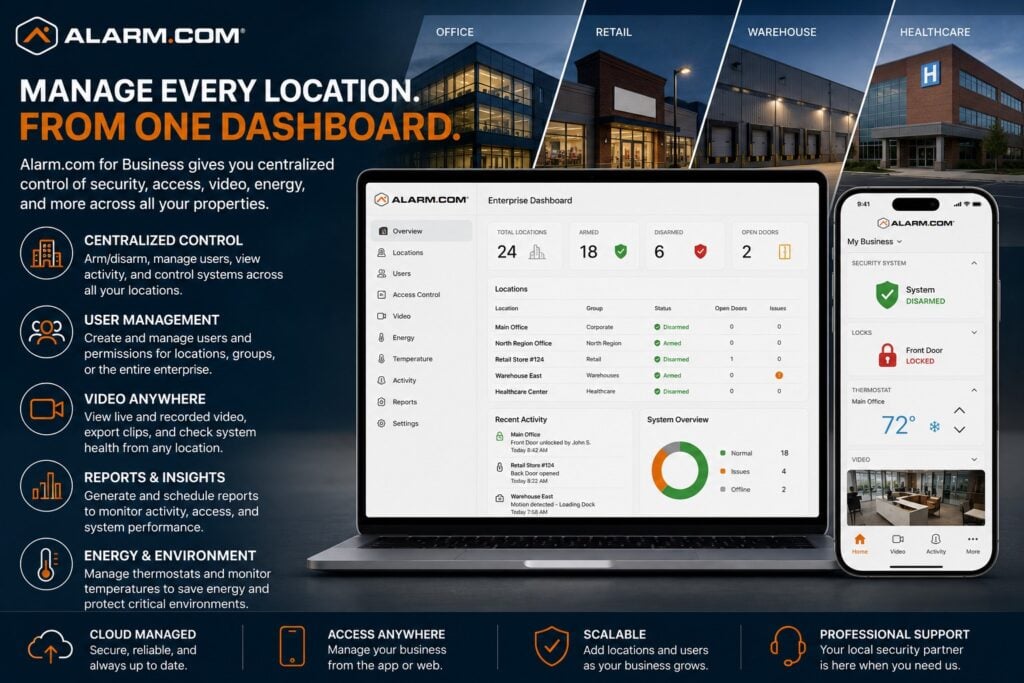
For the complete Alarm.com commercial platform, visit Alarm.com for Business Security Systems
This is an independent reference to Alarm.com Multi-Location Business Security Management. Product information does not establish a NERSA partnership, certification, authorization or brand-specific service capability. Confirm those details with the proposed provider.
Alarm.com for Business uses its Enterprise Dashboard to provide centralized management of compatible intrusion, access control, video, energy, users, schedules, and other system information across multiple properties from one cloud-managed environment.
One Security Management Environment for Multiple Locations
Managing two locations is different from managing twenty, fifty, or hundreds.
As businesses expand, problems can develop when every location has different:
- User codes
- Access permissions
- Door names
- Alarm procedures
- Camera naming
- Administrator accounts
- Notification rules
- Business hours
- Temperature settings
- Reporting practices
Alarm.com’s Enterprise Dashboard is designed to give authorized users a single interface for managing compatible systems across multiple business locations.
Use consistent settings where they fit. Keep the exceptions each property needs.
Organize Locations Around the Business
Alarm.com allows multi-location systems to be organized in a hierarchy that reflects the structure of the organization.
The current platform supports:
Enterprise → Subgroup/Region → Location
This allows an organization to arrange properties according to regions, divisions, operating groups, managers, or other logical structures.
For example, a multi-state company could organize:
Corporate Enterprise
→ Pennsylvania
→ Lehigh Valley
→ Individual location
or:
Corporate Enterprise
→ Northeast Region
→ Distribution Facilities
→ Individual warehouse
The structure should reflect how the organization actually manages people, properties, and responsibilities.
Centralized User Management
One of the largest administrative challenges in a multi-location security system is managing employees consistently.
Alarm.com supports globalized user management across Enterprise groups, allowing authorized administrators to manage compatible user codes and access permissions across multiple locations rather than changing each property separately.
This may help businesses manage:
- New employees
- Departing employees
- Regional managers
- Traveling employees
- Contractors
- Maintenance personnel
- Cleaning crews
- Temporary users
- Corporate administrators
Users can be given access only to the locations they actually require.
Access Permissions Across Multiple Properties
Employees do not always need access to every company location.
A regional manager may need several sites.
A local employee may require only one.
A corporate facilities manager may need broad access while a contractor may require temporary access to selected locations.
Alarm.com Enterprise management can support access permissions across grouped locations and can allow users to be assigned to appropriate properties and schedules.
This makes it easier to develop a consistent access policy while preserving location-specific controls.
For complete door and credential planning, visit Alarm.com Commercial Access Control Systems.
Real-Time Location Status
Multi-location management should make it easier to identify which properties need attention.
Alarm.com’s Enterprise Dashboard provides real-time control and visibility into compatible functions such as:
- Alarm arming status
- Door locks
- Access schedules
- Thermostat set points
- Other location-level system conditions
This allows authorized managers to review security conditions across multiple properties without logging into each site independently.
Multi-Location Intrusion Management
Organizations with many locations may need consistent intrusion-system administration across the entire business.
Multi-location management can help centralize visibility around:
- Armed and disarmed states
- Opening and closing activity
- User administration
- Business-hour expectations
- Selected notifications
- Location status
The intrusion system itself remains a separate security discipline.
For vehicles managed alongside business locations, review the Connected Fleet planning guide for compatibility, user access, reporting, and rollout questions.
Multi-Location Video Management
Alarm.com supports viewing live and recorded video across multiple business locations from its Enterprise environment.
Authorized users can also remotely export incident footage and review video-system health and retention information across locations. (Alarm.com)
This may help regional or corporate personnel review an incident without physically traveling to the property.
Camera placement, recording, analytics, and video-system design remain owned by the dedicated video platform.
For complete camera planning, visit Alarm.com Commercial Video Surveillance Systems.
Business Hours Across Multiple Locations
Different business locations may operate on different schedules.
Alarm.com Enterprise configuration allows businesses to establish business hours and apply templates where locations share the same schedule. (Knowledge Base)
This can help organizations manage:
- Normal opening times
- Closing times
- Weekends
- Holidays
- Regional differences
- Extended-hour locations
- Special operating schedules
Business-hour data can also support notifications and reporting when locations operate outside expected patterns.
Enterprise Notifications
Alarm.com supports Enterprise-level notifications that can apply across multiple locations within a group. (Knowledge Base)
Notifications may be useful for conditions such as:
- Alarm activity
- Unexpected opening
- Unexpected closing
- Selected access events
- Other defined system conditions
The notification strategy should be selective.
Corporate managers should receive the information they actually need without being overwhelmed by routine events from every property.
Activity History and Investigations
When an incident affects a distributed organization, management may need to search across more than one location.
Alarm.com allows authorized Enterprise users to query and filter up to one year of activity history across all locations or selected groups. (Alarm.com)
This can make it easier to investigate questions involving:
- Opening and closing activity
- Employee access
- Repeated system events
- Location-specific incidents
- Activity across multiple sites
The quality of the investigation still depends on consistent naming, accurate user administration, and proper system configuration.
Scheduled Multi-Location Reports
Alarm.com can automatically generate reports and distribute them to appropriate managers.
Current Enterprise reporting can include information such as:
- Open and close times
- Access history
- Temperature information
- Other operational or security activity
Scheduled reporting can help organizations move away from manually reviewing every property every day.
The goal is to surface exceptions and useful trends.
Regional and Corporate Administration
Multi-location security should reflect organizational responsibilities.
An administrator may need access to:
- Every company location
- One geographic region
- One business division
- Several warehouses
- Several retail sites
- Only one property
Alarm.com supports parent groups, subgroups, and location-level organization so permissions can reflect different levels of the business. (Knowledge Base)
This is particularly useful for organizations with corporate, regional, and local management structures.
Adding New Locations
A multi-location platform should make future expansion manageable.
Alarm.com allows additional locations to be added to an existing Enterprise group, provided the account and administrative requirements are met.
Alarm.com’s documentation states that Enterprise groups can contain additional locations as the organization expands. (Knowledge Base)
A growing business should establish consistent standards before rapidly adding locations.
Those standards may include:
- Location naming
- User naming
- Camera naming
- Door naming
- Business hours
- Administrator permissions
- Reports
- Notification rules
Consistency becomes increasingly valuable as the organization grows.
Multi-Location Energy and Temperature Visibility
Alarm.com Enterprise management can also provide centralized information for compatible thermostat and temperature-monitoring services. (Alarm.com)
This can help staff review conditions across several facilities from one place.
Multi-Location Management Is More Than Remote Access
Remote access to several separate systems is not the same as a properly designed multi-location environment.
True multi-location management should establish consistency across:
- Users
- Permissions
- Locations
- Administrators
- Schedules
- Reporting
- Notifications
- Naming conventions
- System responsibilities
The benefit is not simply that a manager can log in remotely.
The benefit is that the organization can manage multiple properties as one coordinated security environment.
Existing Alarm.com Locations
Businesses already operating several independent Alarm.com systems may be able to reorganize them into an Enterprise structure.
Before doing so, the organization should review:
- Existing users
- Duplicate users
- User codes
- Location names
- Administrator accounts
- Business hours
- Notifications
- Access permissions
- Existing reports
- Current service packages
Alarm.com recommends planning location groups, users, access requirements, business hours, reports, and notifications before creating the Enterprise structure. (Knowledge Base)
This planning reduces confusion when systems are consolidated.
Professional Multi-Location Design Matters
A cloud dashboard does not automatically create a well-organized enterprise security system.
Reliable multi-location management depends on consistent:
- Location structure
- User administration
- Access permissions
- Business hours
- Naming
- System configuration
- Administrator roles
- Reporting
- Notifications
- Documentation
Document site groups, administrator responsibilities, user permissions and local operating differences before configuring a multi-location environment.
Frequently Asked Questions
What is Alarm.com Multi-Location Management?
Alarm.com Multi-Location Management uses the Enterprise Dashboard to centrally manage compatible intrusion, access, video, energy, users, and other system functions across multiple business locations.
Can Alarm.com organize locations by region?
Yes. Alarm.com supports an Enterprise → Subgroup/Region → Location hierarchy for organizing business locations.
Can employees be managed across multiple locations?
Yes. Compatible user codes and access permissions can be managed across Enterprise groups and multiple locations.
Can I see cameras at several locations?
Yes. Authorized users can view live and recorded video from cameras across multiple locations and review video health and retention information.
Can Alarm.com generate reports across multiple locations?
Yes. Alarm.com supports activity-history searches and scheduled Enterprise reports across locations or selected groups.
Can different managers have different levels of access?
Yes. Enterprise groups, parent groups, subgroups, and location permissions can be organized around different management responsibilities.
Can additional locations be added later?
Yes. New locations can be added to an existing Enterprise structure when the appropriate account and administrative requirements are met.
Is Multi-Location Management just a video dashboard?
No. Alarm.com’s Enterprise Dashboard can centrally manage compatible intrusion, access, video, energy, users, schedules, and reporting across multiple locations.
Prepare for a Commercial Security Assessment
For an assessment, list locations, existing platforms, administrator roles, common policies and site-specific exceptions.
Request a Commercial Security Assessment.
Compliance, Codes & Project Standards
NERSA plans commercial and industrial security work with applicable code, documentation, inspection and authority-having-jurisdiction requirements in mind. Requirements vary by system, property and jurisdiction. These resources support project planning; they do not establish legal compliance, certification or AHJ approval.
Related guidance: Regulatory compliance & inspection readiness · NERSA project standards · Documentation, testing & inspection readiness