
Useful reports help managers spot unusual activity and review key events.

Request a Commercial Security Assessment
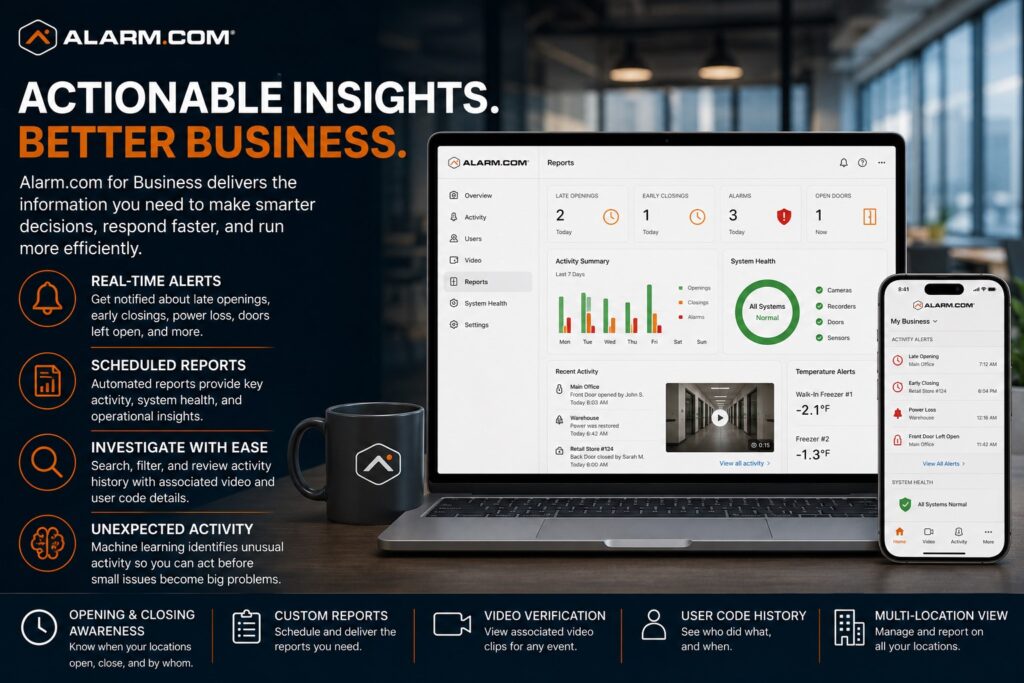
They can bring security-system information together so staff do not have to search each system by hand.
For the complete Alarm.com commercial platform, visit Alarm.com for Business Security Systems.
This is an independent reference to Alarm.com Business Insights & Reporting. Product information does not establish a NERSA partnership, certification, authorization or brand-specific service capability. Confirm those details with the proposed provider.
Alarm.com for Business supports real-time activity alerts, scheduled operational reports, filtered activity searches, associated video review, user-code history, and machine-learning-based Unexpected Activity alerts to help managers stay informed and investigate events more efficiently. (Alarm.com)
Business Insights Designed Around Useful Information
A reporting system should help managers answer questions that matter.
Those questions may include:
- Did the business open late?
- Did a location close earlier than expected?
- Who opened or closed the property?
- Was a door left open?
- Did the power fail?
- Was a temperature threshold exceeded?
- Did unusual activity occur?
- Was there an alarm or system issue?
- What happened before or after an incident?
- Which user was associated with an event?
Alarm.com presents its business reports as a way to support remote review and useful decisions. The tools do more than display raw event logs.
The objective is to help management identify exceptions, trends, and events that deserve attention.
Activity Alerts
Alarm.com supports activity alerts that can notify authorized users when selected business conditions occur.
Alarm.com specifically identifies alerts for:
- Late openings
- Early closings
- Power loss
- Power restoration
- Doors left open
- Freezer temperatures outside a preset range
These alerts can provide managers with information about events that may affect operations even when they are not physically at the property. (Alarm.com)
The strongest alert strategy is selective.
Managers should receive the events they actually need to know about rather than being overwhelmed by routine activity.
Opening and Closing Awareness
Opening and closing records can show whether a location is following its expected hours.
Alarm.com can help identify when a location opens late or closes early and can show which user was responsible. (Alarm.com)
This may be useful for:
- Retail locations
- Offices
- Restaurants
- Healthcare offices
- Warehouses
- Service businesses
- Multi-location operations
The purpose is not simply employee surveillance.
The goal is to help managers check whether key operating steps happened at the expected time.
Operational Reporting
Alarm.com business activity reports can summarize important operational and security information.
Alarm.com specifically identifies reporting around:
- Peak traffic periods
- Alarm activity
- System issues
- Property activity
Reports can be scheduled for automatic email delivery to managers or opened directly through the Alarm.com mobile app or website. (Alarm.com)
Scheduled reporting can reduce the need for managers to manually inspect multiple systems every day.
Scheduled Reports
Different managers may need different information.
A business may want:
- Daily reports
- Weekly reports
- Location-specific reports
- Exception reports
- Activity summaries
- Security-event reports
- Operational trend reports
Alarm.com allows business reports to be scheduled and automatically distributed to appropriate users. (Alarm.com)
The reporting plan should reflect the responsibilities of the person receiving the information.
A store manager may need different reports from a regional manager or the person who manages security for the whole business.
Filtered Activity Searches
When a business needs to investigate an event, reviewing an unfiltered activity log can waste time.
Alarm.com provides filtered activity searches so authorized users can narrow the event history around relevant criteria.
Alarm.com specifically describes these tools as useful for investigations and audits. (Alarm.com)
Search filters may help management focus on:
- Specific locations
- Users
- Time periods
- Door activity
- Alarm events
- System issues
- Other relevant activity
The quality of the investigation still depends on clean user administration and consistent naming.
Associated Video Review
Reports and activity searches become more useful when a manager can move from an event to related video.
Alarm.com states that its investigation tools can allow users to dig deeper into activity by pulling associated video clips and user-code logs. (Alarm.com)
This can provide additional context around:
- Employee entry
- Door activity
- Alarm events
- Opening and closing
- Restricted areas
- After-hours incidents
Video remains a separate security discipline and should be designed around appropriate camera placement and recording requirements.
For broader camera planning, visit Alarm.com Commercial Video Surveillance Systems.
User-Code History
Individual user codes can make business reports and investigations more meaningful.
A shared alarm code or badge makes it harder to know who caused an event. The log may show the activity without identifying the individual.
Individual user administration helps create more useful records around:
- Arming
- Disarming
- Opening
- Closing
- Access activity
- Investigation timelines
Alarm.com specifically supports user-code information as part of its filtered investigation capabilities. (Alarm.com)
Unexpected Activity Alerts
Alarm.com also provides Unexpected Activity alerts.
Alarm.com states that its machine-learning system monitors normal day-to-day operations and can identify activity that appears unusual compared with established patterns. (Alarm.com)
This can help surface situations management might not have created a specific rule for in advance.
Unexpected Activity alerts may help identify:
- Activity outside normal patterns
- Unusual opening or closing behavior
- Unexpected system usage
- Other abnormal operating conditions
Machine-learning alerts should supplement defined business procedures rather than replace them.
System Issue Awareness
A security platform can provide operational value only if the underlying systems are working correctly.
Reports and alerts may help management identify issues such as:
- Alarm problems
- Power conditions
- Door conditions
- Temperature exceptions
- Other defined system events
Alarm.com includes system issues as part of its business operational reporting. (Alarm.com)
This can help management address problems before they remain unnoticed for long periods.
Reports Across Security Systems
Alarm.com for Business brings multiple compatible systems into one cloud-managed platform.
That broader environment can include:
- Intrusion detection
- Access control
- Video surveillance
- Energy management
- Temperature monitoring
- Multi-location administration
Alarm.com specifically positions these systems as working together to provide better insight and control with less on-site infrastructure to maintain. (Alarm.com)
Reporting and insight workflows use information from the connected systems; each system also requires appropriate design.
Business Insights for Multiple Locations
Organizations with several properties may need consolidated reporting and exception awareness across the entire business.
Alarm.com’s broader Enterprise Dashboard is designed to provide at-a-glance management of system status, video feeds, employee access, and temperature monitoring across multiple locations. (Alarm.com)
These reports can help managers review relevant events across locations. Each site does not have to be reviewed entirely on its own.
For broader enterprise administration, visit Alarm.com Multi-Location Business Security Management.
Reporting for Owners and Operations Managers
Different users may rely on Alarm.com reporting for different reasons.
Potential users include:
- Business owners
- Operations managers
- Facility managers
- Loss-prevention personnel
- Regional managers
- Security administrators
- IT personnel
Alarm.com specifically identifies business owners, operations officers, loss-prevention managers, and IT directors among the stakeholders who use its operational-insight tools. (Alarm.com)
The reporting configuration should match each person’s responsibilities.
Reporting Should Focus on Exceptions
The strongest reporting environment does not simply produce more data.
It helps management identify what changed, what failed, what happened outside normal conditions, and what deserves review.
A useful reporting strategy may emphasize:
- Late openings
- Early closings
- Alarm events
- Door exceptions
- Temperature exceptions
- Power conditions
- Unexpected activity
- System issues
- Investigation events
The objective is better decision-making rather than information overload.
Existing Alarm.com Systems
Existing Alarm.com users may be able to improve reports by changing settings. New hardware may not be needed.
An evaluation may consider:
- Existing users
- User codes
- Location naming
- Alert settings
- Report schedules
- Activity filters
- Video associations
- Temperature alerts
- Door notifications
- Administrator permissions
Useful reporting depends on consistent setup across the systems that supply the data.
Professional Configuration Matters
Useful reporting depends on clean system structure.
Reliable Business Insights may require proper:
- User naming
- Location naming
- Door naming
- User-code administration
- Alert configuration
- Report schedules
- Activity filters
- Video associations
- Administrator permissions
- Documentation
Define the events, exceptions, reporting schedule and recipients before configuring reports. Assign someone to review and act on each report.
Frequently Asked Questions
What is Alarm.com Business Insights & Reporting?
Alarm.com Business Insights & Reporting provides activity alerts, operational reports, filtered searches, video-supported investigations, user-code history, and Unexpected Activity alerts for compatible business systems. (Alarm.com)
Can Alarm.com alert me if a business opens late?
Yes.
Alarm.com specifically supports alerts for locations opening late or closing early and can identify the user associated with the event. (Alarm.com)
Can reports be emailed automatically?
Yes.
Alarm.com allows business reports to be scheduled for automatic email delivery to managers. (Alarm.com)
Can I search historical activity?
Yes.
Alarm.com provides filtered activity searches for investigations and audits. (Alarm.com)
Can reports include associated video?
Alarm.com allows users to investigate events further by reviewing associated video clips and user-code logs. (Alarm.com)
What is Unexpected Activity?
Unexpected Activity uses Alarm.com machine learning to identify activity that appears unusual compared with normal day-to-day operations. (Alarm.com)
Can Alarm.com report on system problems?
Yes.
Alarm.com includes alarms, system issues, and other property activity within its operational reporting tools. (Alarm.com)
Is this the same as Business Activity Analytics?
No. Business Activity Analytics covers people counts, occupancy, heat maps, crowds, and queues. Business Insights & Reporting covers alerts, event history, reports, and unusual activity for staff to review.
Prepare for a Commercial Security Assessment
For an assessment, list the reports required, event sources, recipients, review frequency and exceptions that require action.
Request a Commercial Security Assessment.
Compliance, Codes & Project Standards
NERSA plans commercial and industrial security work with applicable code, documentation, inspection and authority-having-jurisdiction requirements in mind. Requirements vary by system, property and jurisdiction. These resources support project planning; they do not establish legal compliance, certification or AHJ approval.
Related guidance: Regulatory compliance & inspection readiness · NERSA project standards · Documentation, testing & inspection readiness