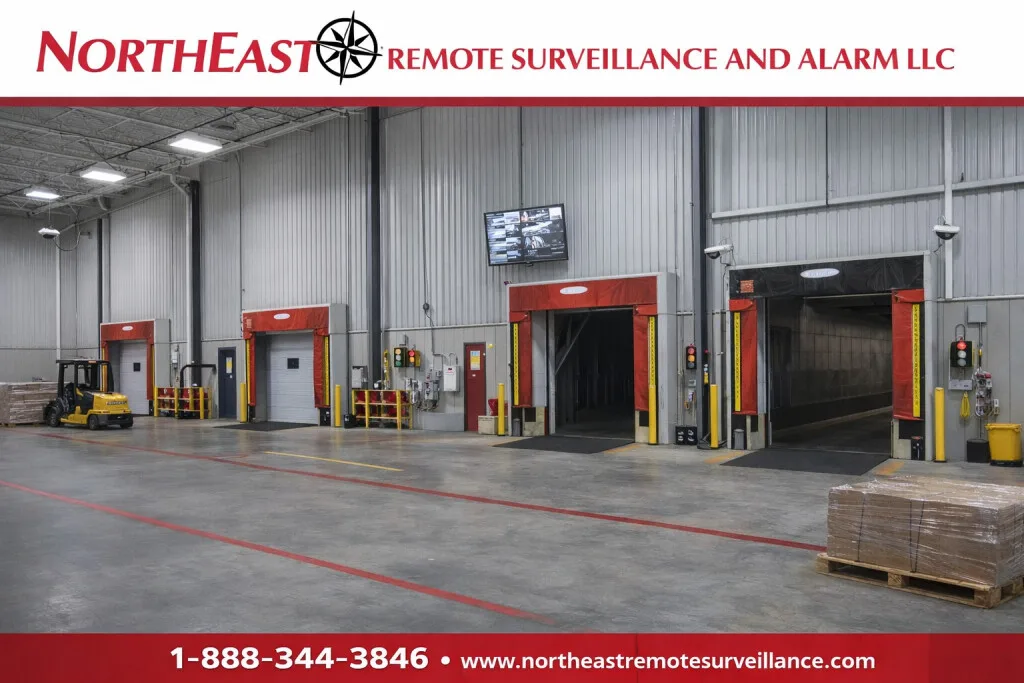
Loading dock surveillance helps warehouses document freight transfers, review vehicle and pedestrian activity, and investigate events at the point where cargo enters or leaves the building.
request a NERSA security assessment
Plan Coverage Around the Dock Workflow
Northeast Remote Surveillance and Alarm, LLC designs, installs, upgrades, and supports commercial video surveillance for warehouses, distribution centers, manufacturers, and logistics facilities. A useful loading dock system begins with the events the customer needs to understand: a trailer arrival, a pallet transfer, a delivery discrepancy, an unauthorized entrance, or an incident near a traffic crossing.
Walk the receiving and shipping process with the people who run it. Identify how a driver checks in, how a trailer is assigned to a door, where freight waits, and how staff record a completed movement. Mark the locations on a floor plan and describe the question each proposed camera must answer. This makes it easier to distinguish general activity coverage from a view intended to show a specific cargo-handling step.
For the broader recording, administration, and system-selection framework, review commercial and industrial video surveillance systems.
Review Five Areas of Dock Activity
Trailer Approach and Docking
Exterior views can document the approach to a dock, the vehicle’s direction, and the sequence of positioning activity. Review the scene with trailers parked as they normally would be; a clear view across an empty truck court may be blocked during a busy shift. Decide whether the objective is an overview, a closer view at a specific door, or identification at a predictable lane position.
The Door and Cargo Transfer Point
At the dock opening, define which part of the transfer needs documentation. A view of the trailer exterior does not automatically show freight inside the trailer, and an overhead interior view may not reveal the side of a pallet hidden by other materials. Use representative loading conditions to determine whether separate views are needed and record any remaining obstructions.
Interior Staging
Identify the spaces where incoming or outgoing freight waits. Discuss whether reviewers need to distinguish a shipment, observe handling, or reconstruct movement between a staging area and a door. Include normal rack heights and temporary storage arrangements in the review. If staff frequently rearrange these spaces, include a process for reporting when a camera’s original view becomes obstructed.
Forklift and Pedestrian Routes
Review intersections, door approaches, and shared routes with the facility’s operations and safety personnel. Video may help reconstruct a recorded event, but a camera installation does not replace traffic procedures, training, guarding, or other required safeguards. Define what the reviewer needs to see without placing cameras, cabinets, or cabling where they interfere with movement or building equipment.
The Yard Connection
Consider how an event at a dock relates to the surrounding yard and gate. Consistent camera names and time settings help an authorized reviewer follow the sequence between views. A broad yard image and a dedicated vehicle-identification view serve different purposes, so the proposal should state what is expected from each rather than promise that one camera will capture every detail.
For property-wide planning beyond the loading doors, explore warehouse security systems.
Use Placement Diagrams as Planning Aids
The illustrations below provide a starting point for discussing dock approaches, interior work areas, and staging; final positions must follow the actual building, obstructions, lighting, and required views.
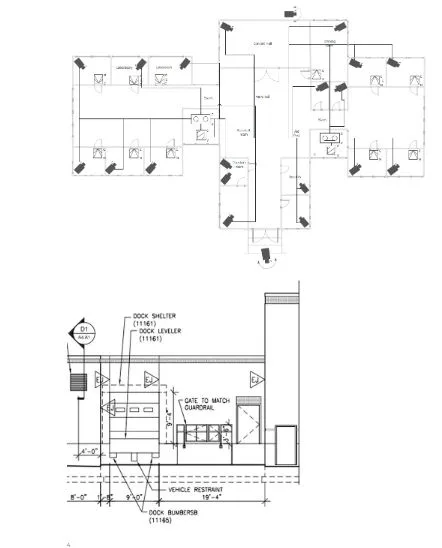
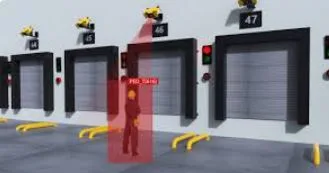
A drawing should identify the location and purpose of each view, the proposed mounting area, and the route back to supporting infrastructure. Keep the drawing understandable to shipping staff as well as the installation team. Number the views consistently with the finished camera names and update the record when a location changes.
Validate Recorded Image Quality
Do not select a camera count, resolution, mounting height, or pixel-density target as a universal answer for every dock. Define the task, subject distance, field of view, movement, and lighting first, then evaluate whether the proposed equipment can provide the required result. A wide overview may be useful for reconstructing activity while still lacking the detail needed to read a particular marking.
Axis recommends checking camera performance under the lighting and movement conditions required by the project, because motion blur and exposure can affect a recorded image even when a stationary view looks acceptable.
For manufacturer guidance on evaluating these conditions, see the Axis image-quality troubleshooting guide.
Demonstrate the agreed task with representative recorded video before accepting a view. Review open and closed doors, occupied staging positions, and relevant day and night conditions. Record any limitation that remains, such as a trailer blocking a neighboring door. The acceptance record should explain what was demonstrated, not simply state that a camera was installed.
Connect Recordings to Incident Review
Ask how long it normally takes to discover a shortage, damage report, or delivery discrepancy. Use that workflow to discuss recording retention and preservation, along with the customer’s applicable policies and contractual requirements. The proposal should identify recording schedules, storage assumptions, user permissions, and any limitations of event-based recording or the selected service plan.
Have an authorized employee practice finding a test event using an approximate time, a dock number, and the relevant adjacent views. Confirm that the employee can preserve and export the permitted footage, and that the export opens in the intended review environment. Establish who may receive recordings and how requests should be handled under the organization’s policies.
Footage can document what a camera recorded, but it may not establish the full handling history of a shipment. Review it alongside the appropriate dispatch records, delivery documentation, and staff reports. Avoid assuming that the absence of a visible event proves nothing happened outside the available views or recording period.
Distinguish Viewing, Alerts, and Monitoring
A local display gives authorized staff a convenient way to view selected cameras, while recording supports later review. Automated notifications and professionally reviewed monitoring events are additional functions that require their own configuration and response arrangements. State which functions the customer is purchasing and who is responsible for acting on the information.
For any proposed alert, define the area, schedule, event condition, recipient, and expected action. Review the effect of routine deliveries and shift activity on that rule. Test the workflow with the people responsible for receiving the event, and document which situations fall outside the selected service. An unattended notification is not the same as an agreed monitored response.
For operator-reviewed exterior events and escalation planning, see remote video monitoring and live talk-down.
Coordinate Installation and Existing-System Reuse
Inventory existing cameras, recording equipment, mounts, cabling, network connections, power, licenses, and administrator access before planning a replacement. Confirm ownership and evaluate whether each component remains suitable for its intended task. A phased upgrade can be useful when the proposal clearly identifies what stays, what changes, and how staff will retrieve recordings during the transition.
Arrange installation around shipping and receiving operations. Identify restricted work periods, access requirements, lift locations, and the people who can approve changes to proposed positions. Document the network and power responsibilities before scheduling the cutover. Keep equipment labels and drawings aligned with the finished system so future service does not depend on someone remembering the installation.
Keep Safety Responsibilities Clear
OSHA’s loading-dock guidance identifies hazards involving forklift operation and dock edges; surveillance should support a facility’s review process without being presented as a substitute for its safety obligations.
For the agency’s workplace guidance, consult OSHA’s powered-industrial-truck loading-dock resource.
Have the appropriate facility personnel review camera placement, monitoring practices, and employee access to recordings. Resolve questions about privacy, retention, safety procedures, and incident handling with the people responsible for those policies. Avoid treating a camera specification or a surveillance recording as a guarantee of legal compliance, accident prevention, or a particular insurance outcome.
Questions to Resolve Before Ordering
How many cameras will the docks need?
The number follows the required views and actual site conditions. Agree on the questions the system must answer, inspect normal obstructions, and evaluate representative views before finalizing the count. A fixed cameras-per-door formula does not describe every warehouse’s needs.
Can the existing system be improved?
Possibly: begin by checking recording access, image usefulness, equipment condition, compatibility, and supporting infrastructure. Some problems call for repositioning or configuration changes, while others require additional coverage or replacement. The assessment should explain the reason for each recommendation.
Will cameras eliminate loss or settle every dispute?
No system can promise those results. Suitable recordings can support an investigation, but the outcome depends on what was visible, what was recorded and retained, and the other available information. Coverage limitations and response responsibilities should remain explicit.
Request a Loading Dock Surveillance Assessment
Prepare the number of active dock doors, operating hours, a property sketch if available, existing system details, and examples of the events your team needs to review.
To discuss coverage, recording, and upgrade priorities for your facility, request a NERSA security assessment or call 1-888-344-3846.
Compliance, Codes & Project Standards
NERSA plans commercial and industrial security work with applicable code, documentation, inspection and authority-having-jurisdiction requirements in mind. Requirements vary by system, property and jurisdiction. These resources support project planning; they do not establish legal compliance, certification or AHJ approval.
Related guidance: Regulatory compliance & inspection readiness · NERSA project standards · Documentation, testing & inspection readiness