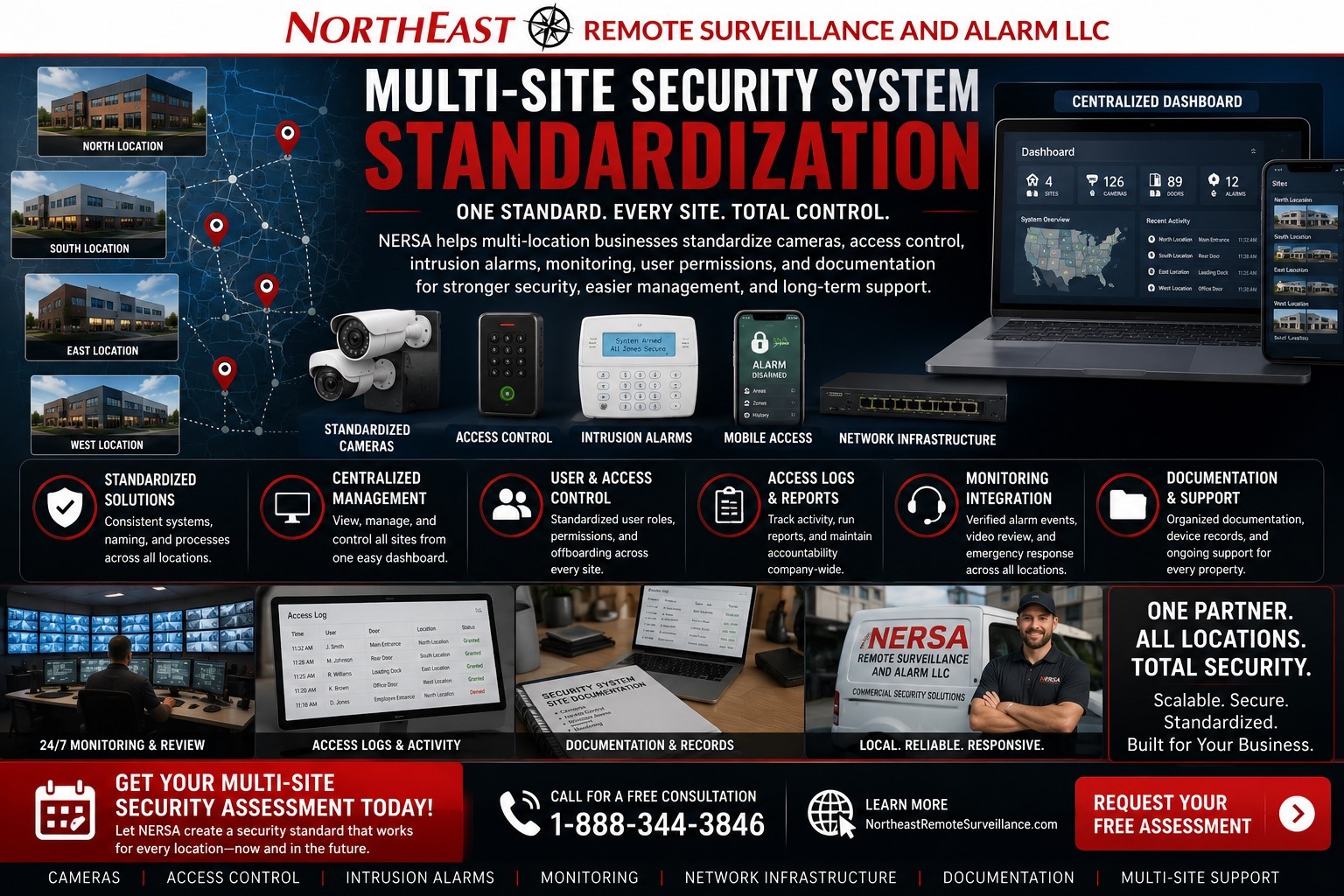
A multi-site business should not have a different security process at every location. Northeast Remote Surveillance and Alarm, LLC helps commercial and industrial organizations standardize cameras, access control, intrusion alarms, monitoring accounts, user permissions, remote review, documentation, and service support across multiple properties. This page supports our broader Commercial Security System Upgrades, Retrofits & Takeovers service for businesses that need one cleaner security standard across every location.
Multi-Site Security Standardization for Growing Businesses
Many businesses grow one location at a time.
That often means one site has newer cameras, another has an old DVR, another uses physical keys, another has access control, another has an outdated alarm panel, and another has remote viewing that only one manager understands.
Over time, the security system becomes difficult to manage.
A multi-site security standardization project helps bring those systems into one organized structure. The goal is not to make every building identical. The goal is to create a repeatable security standard that can be adapted to each location while keeping management, users, documentation, monitoring, and service support consistent.
The Problem With Disconnected Security Systems
When every location has a different security setup, management becomes harder than it needs to be.
Common problems include:
- Different camera systems at each site
- Different remote viewing apps
- Different access control platforms
- Different alarm panels
- Different user permissions
- Different monitoring contacts
- Different camera names
- Different alarm zone names
- Different access schedules
- Different documentation quality
- Different service providers
- Different support procedures
- Different administrator accounts
- Old users still active at some locations
- Managers who only understand one site
This creates confusion when ownership, operations, HR, IT, facilities, or security management needs to review activity across multiple locations.
What Multi-Site Security Standardization Means
Multi-site security standardization means organizing multiple locations under a consistent security framework.
That may include standardizing:
- Camera naming
- Camera groups
- Remote viewing permissions
- Access control users
- Access levels
- Door schedules
- Intrusion alarm users
- Alarm zone names
- Monitoring contacts
- Emergency call lists
- Communicator paths
- Video review procedures
- User onboarding
- User offboarding
- Documentation
- Service records
- Future upgrade planning
The system still has to match each building. A warehouse, office, healthcare office, school, retail location, contractor shop, and industrial facility will not all have the same layout. The standard gives the business one clean structure while still allowing each site to be designed correctly.
When a Business Needs Security Standardization
A business should consider multi-site security system standardization when security has grown without a central plan.
Common signs include:
- Each location has different cameras.
- Remote viewing is inconsistent.
- Some sites use access control and others still rely on keys.
- Managers do not know who has access.
- Former employees may still have credentials.
- Alarm codes are not cleaned up consistently.
- Monitoring contacts are different or outdated.
- Camera names are confusing.
- Alarm zones are unclear.
- Documentation is missing.
- IT does not know which equipment supports security.
- New locations are being added.
- The business wants centralized visibility.
- Service calls take too long because every site is different.
- Ownership wants one security standard across all locations.
If the company cannot quickly answer who has access, what cameras cover each site, how alarms report, and who can review video, the system should be standardized.
Camera Standardization
Camera standardization helps managers review video across multiple sites without confusion.
A clean multi-site camera standard may include:
- Standard camera naming
- Standard site naming
- Standard camera groups
- Standard remote viewing access
- Standard playback permissions
- Standard clip export permissions
- Standard retention targets
- Standard camera health review
- Standard expansion rules
- Standard documentation by site
Instead of camera names like “Camera 1,” “CH04,” or “Back Cam,” a standardized system uses practical names like “Allentown Warehouse — Loading Dock 1,” “Bethlehem Office — Main Entrance,” or “Reading Distribution Center — Parking Lot East.”
Clear camera names make incident review faster.
For broader camera planning, see Commercial Video Surveillance Systems.
Access Control Standardization
Access control standardization helps a business manage who can enter each location and when.
A multi-site access control standard may include:
- Standard user groups
- Standard access levels
- Standard door names
- Standard door schedules
- Standard manager permissions
- Standard vendor access rules
- Standard cleaning crew access
- Standard after-hours access
- Standard employee onboarding
- Standard employee offboarding
- Standard multi-site user permissions
- Standard access log review
Not every user needs access to every site. A regional manager may need multiple locations. A site manager may only need one building. A vendor may need temporary or restricted access. A former employee should be removed everywhere, not just at one site.
For related access planning, see Commercial & Industrial Access Control Systems.
Intrusion Alarm Standardization
Intrusion alarm systems should also be standardized across business locations.
A multi-site intrusion alarm standard may include:
- Standard alarm user code structure
- Standard keypad naming
- Standard zone descriptions
- Standard partition or area naming
- Standard arming and disarming procedures
- Standard opening and closing report review
- Standard monitoring contacts
- Standard communicator review
- Standard signal testing
- Standard documentation by location
This helps reduce confusion for managers, employees, cleaning crews, vendors, and monitoring contacts.
For related alarm planning, see Commercial Burglar Alarm and Intrusion Detection Systems.
Monitoring Account Standardization
Monitoring information must be accurate at every location.
A multi-site business should not have outdated emergency contacts, old call lists, unclear zone descriptions, or different monitoring procedures at every site.
Monitoring standardization may include:
- Site name review
- Site address review
- Account information cleanup
- Emergency contact list review
- Call list order review
- Zone description cleanup
- Communicator review
- Signal testing
- Opening and closing report review where applicable
- Monitoring center receipt confirmation
- Documentation by site
For related planning, see Security System Monitoring Upgrades.
User Permission Standardization
User permissions are one of the biggest risks in a multi-site security system.
Many businesses have old camera users, former employees, old alarm codes, vendor accounts, shared passwords, duplicate credentials, and managers with more access than they need.
NERSA helps organize user permissions across:
- Camera systems
- Access control platforms
- Intrusion alarms
- Remote viewing apps
- Monitoring contacts
- Multi-site dashboards
- Mobile credential platforms
- Service access roles
A standardized user structure helps the business define who can view video, who can export clips, who can manage access control, who can arm and disarm alarms, who can receive monitoring calls, and who can administer the system.
Onboarding and Offboarding
Employee changes are where many multi-site security systems fall apart.
A strong standard should include a clear process for adding and removing users.
The process should define:
- Who approves access
- Which sites the user can access
- Which doors the user can use
- Which cameras the user can view
- Whether the user can export video
- Whether the user has alarm codes
- Whether the user is on a monitoring call list
- How access is removed when the user leaves
- How temporary users are handled
- How vendor access is removed
Removing a former employee from one system is not enough if they still have access to cameras, doors, alarms, or remote apps at another location.
Remote Viewing and Centralized Dashboards
Multi-site businesses often need centralized visibility.
Authorized users may need to review cameras, alarm activity, access events, and system status without driving to each location. This is especially important for businesses with warehouses, offices, retail sites, industrial properties, healthcare offices, schools, logistics facilities, and contractor yards.
Centralized review may support:
- Live camera viewing
- Recorded video search
- Access log review
- Alarm event review
- Site health review
- Manager oversight
- After-hours review
- Multi-site incident review
- User permission control
- Reporting
Remote review should be useful, but it should also be controlled. Not every manager needs access to every location.
Site Manager vs. Ownership Access
A good multi-site standard separates site-level access from company-level access.
Site managers may only need access to their own location. Ownership, operations leadership, security management, or facilities management may need broader visibility across multiple locations.
The permission model should define:
- Site manager access
- Regional manager access
- Ownership access
- Operations access
- HR access where appropriate
- Facilities access
- IT coordination
- Security administrator rights
- Vendor support access
- Temporary user access
This prevents unnecessary exposure and reduces accidental system changes.
Documentation Standardization
Documentation is what makes a multi-site security system supportable.
Without documentation, every service call becomes a guessing game.
A standardized documentation package may include:
- Site name and address
- Camera list
- Camera names and views
- Recorder or VMS information
- Controlled door list
- Reader locations
- Access levels
- Door schedules
- Alarm panel information
- Keypad locations
- Alarm zone list
- Communicator information
- Monitoring contacts
- Network equipment notes
- Power supply notes
- User role structure
- Service history
- Future upgrade recommendations
For documentation cleanup planning, see Commercial Security System Documentation Cleanup.
Network and Infrastructure Standardization
Modern security systems depend on stable infrastructure.
A multi-site standard should also review the low-voltage and network foundation behind the cameras, access control, alarms, and remote access.
Infrastructure standardization may include:
- PoE switch standards
- Network equipment locations
- Cable labeling
- Equipment cabinet organization
- UPS backup planning
- Internet reliability review
- Remote access requirements
- Security device network coordination
- Wireless bridge documentation where applicable
- Future expansion capacity
For related planning, see Commercial Low Voltage and Network Infrastructure Services.
Standardization Before Expansion
Multi-site standardization is especially valuable before a company adds more locations.
Without a standard, every new site becomes a one-off project. That creates more apps, more users, more passwords, more naming problems, more documentation gaps, and more service issues.
With a standard, a new location can follow a known structure:
- Standard camera names
- Standard access levels
- Standard alarm zone naming
- Standard monitoring contacts
- Standard user permissions
- Standard documentation
- Standard service expectations
- Standard future expansion path
This makes growth cleaner and easier to manage.
Standardization vs. Replacement
Standardization does not always mean replacing every system.
Some existing equipment may be serviceable. Some systems may only need cleanup. Some sites may need full upgrades. Others may need documentation, user cleanup, or monitoring review.
NERSA evaluates each location to determine whether the right path is:
- Takeover
- Cleanup
- Retrofit
- Upgrade
- Replacement
- Phased standardization
The goal is to improve control and supportability without wasting budget on unnecessary replacement.
Before and After
| Before Standardization | After Standardization |
|---|---|
| Every location had a different security setup | Locations follow one repeatable security standard |
| Camera names were inconsistent | Cameras are named by site and location |
| Remote viewing was fragmented | Authorized users can review sites more consistently |
| Access control permissions varied | User groups, schedules, and access levels are organized |
| Alarm zones were unclear | Alarm zones are documented by site |
| Monitoring contacts were outdated | Monitoring records are reviewed and standardized |
| Former users may still have access | User cleanup process is clearer |
| Documentation was incomplete | Each location has better support records |
| New sites required one-off planning | Future sites can follow a repeatable template |
Commercial Facilities That Benefit From Multi-Site Standardization
Multi-site security standardization is useful for businesses with multiple:
- Warehouses
- Distribution centers
- Manufacturing facilities
- Office buildings
- Healthcare offices
- Schools and education facilities
- Retail stores
- Contractor shops
- Auto repair shops
- Laundromats
- Industrial parks
- Multi-tenant properties
- Logistics facilities
- Truck yards
- Professional offices
- Municipal or institutional sites
Each site can be different. The management structure should still be consistent.
What This Page Is and Is Not
This page is about multi-site security system standardization for commercial and industrial organizations.
It is not a residential security page. It is not a single-camera product page. It is not only an access control page. It is not only an alarm page. It is not a fire alarm design page.
This page focuses on standardizing cameras, access control, intrusion alarms, monitoring, user permissions, remote review, documentation, network support, and service structure across multiple business locations.
Why Businesses Choose NERSA for Multi-Site Standardization
Northeast Remote Surveillance and Alarm, LLC focuses on commercial, industrial, institutional, and non-residential security systems.
Multi-site standardization requires more than installing equipment. It requires understanding cameras, access control, intrusion alarms, monitoring paths, user permissions, documentation, remote review, network infrastructure, and long-term service.
NERSA helps businesses turn disconnected locations into a cleaner, more manageable security program.
When to Request a Multi-Site Security Standardization Review
A business should request a standardization review if:
- Multiple locations use different security systems.
- Remote viewing is inconsistent.
- Camera names are confusing.
- Access control users are not organized.
- Former employees may still have access.
- Alarm zones are unclear.
- Monitoring contacts are outdated.
- Documentation is missing.
- New locations are being added.
- Managers need better centralized review.
- Service support is taking too long.
- Ownership wants one standard across all locations.
Multi-Site Security Standardization Checklist
Before standardizing multi-site security, evaluate:
- Number of locations
- Camera systems at each site
- Camera names
- Recorder or VMS platforms
- Remote viewing users
- Access-controlled doors
- Access levels
- Door schedules
- Credential holders
- Former users
- Alarm panels
- Alarm zones
- User codes
- Monitoring contacts
- Communicator paths
- Network equipment
- PoE capacity
- UPS backup
- Documentation
- Service history
- Future expansion plans
Request a Multi-Site Security Standardization Assessment
If your business operates multiple warehouses, offices, healthcare offices, schools, retail sites, industrial buildings, logistics facilities, contractor yards, or commercial properties with inconsistent security systems, Northeast Remote Surveillance and Alarm, LLC can help.
Call 1-888-344-3846 or use Request a Security Assessment to schedule a multi-site security system standardization review.
Frequently Asked Questions About Multi-Site Security System Standardization
What is multi-site security system standardization?
Multi-site security system standardization is the process of organizing cameras, access control, intrusion alarms, monitoring, user permissions, remote review, documentation, and support procedures across multiple business locations.
Does every location need the same equipment?
No. Each location should be designed around its own layout and risk profile. Standardization means the naming, permissions, documentation, monitoring records, and support structure are consistent.
Can camera systems be standardized across multiple sites?
Yes. Camera names, camera groups, remote viewing permissions, retention goals, export rules, and review workflows can be standardized across multiple locations.
Can access control be standardized across multiple locations?
Yes. User groups, access levels, door schedules, credential rules, vendor access, after-hours access, and offboarding procedures can be standardized.
Can alarm systems be standardized across multiple sites?
Yes. Alarm zone naming, user codes, monitoring contacts, communicator review, signal testing, and opening/closing procedures can be organized into a consistent structure.
Can former employees be removed from all locations?
Yes, where system access allows. A standardized offboarding process helps remove former employees from camera systems, access control, alarm codes, mobile apps, and monitoring contacts.
Can site managers only see their own location?
Yes. A properly configured system can limit site managers to their own location while giving ownership or operations broader multi-site visibility.
Is standardization useful before adding new locations?
Yes. A multi-site standard makes new locations easier to deploy because camera naming, access levels, user roles, monitoring records, and documentation expectations are already defined.
Can NERSA standardize older systems?
Yes. NERSA can review older cameras, access control systems, alarm panels, monitoring accounts, documentation, and network infrastructure before recommending the right cleanup, retrofit, upgrade, or replacement path.
How do we start a multi-site security standardization project?
Call 1-888-344-3846 or use Request a Security Assessment. NERSA can review your locations, equipment, users, permissions, monitoring records, documentation, and future growth plans before recommending a standardization path.