
Commercial security systems become harder to manage when the documentation is missing, outdated, scattered, or wrong.

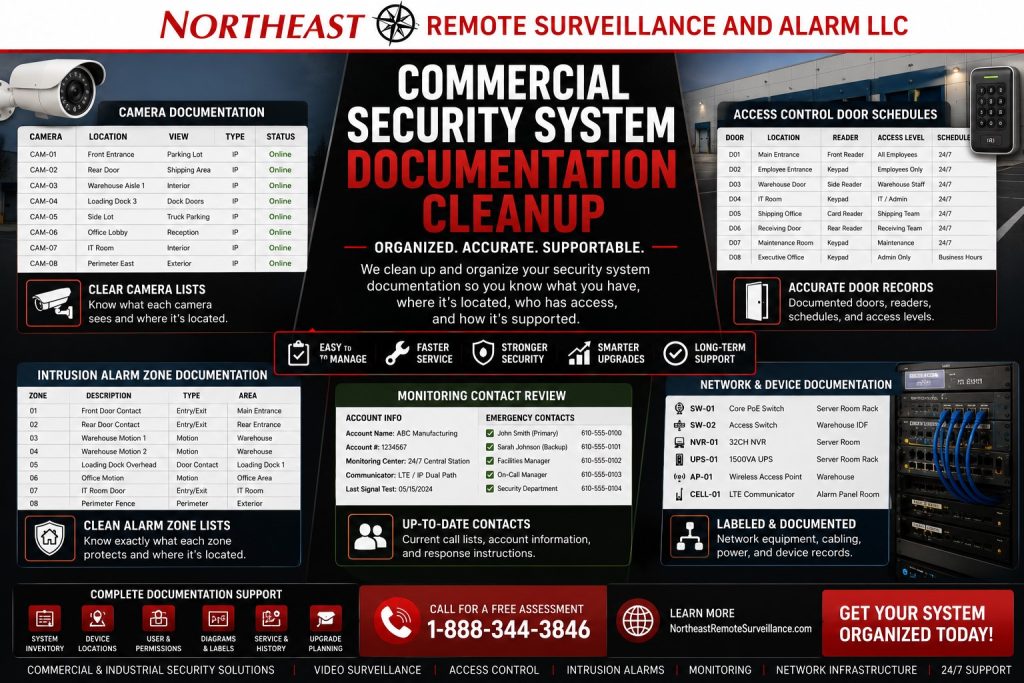
Northeast Remote Surveillance and Alarm, LLC helps commercial and industrial facilities clean up security system documentation for cameras, access control, intrusion alarms, monitoring accounts, user permissions, communicators, network equipment, device labels, and long-term support.
Organize accounts, equipment information, and system records before a provider change or expansion; Commercial Security System Upgrades, Retrofits & Takeovers explains how that preparation fits the work ahead.
Security System Documentation Cleanup for Commercial Buildings
Many businesses have security equipment installed, but they do not have clean records for how the system is built, who has access, what each device does, or how the system should be serviced.
That creates problems when something goes wrong.
When a camera goes offline, staff may not know where its cable connects. An alarm may trigger with a zone name that does not match the actual door. Former employees may still have app access. The monitoring center may have outdated contacts. A controlled door may carry the wrong label. Without device records, a technician may spend unnecessary time tracing connections before troubleshooting can begin.
Documentation cleanup brings order back to the system.
The goal is to make the security system easier to understand, easier to manage, easier to support, and easier to upgrade.
When Security Documentation Needs Cleanup
A commercial facility should consider documentation cleanup when the system is difficult to understand or service.
Common signs include:
- Camera names are unclear.
- Cameras use generic names such as Camera 1, Camera 2, or Channel 3.
- Records do not identify access-controlled doors.
- Alarm zones do not match the building layout.
- Monitoring contact lists are outdated.
- Former employees may still have access.
- User roles and permissions are unclear.
- Remote viewing users are unknown.
- Alarm codes were never cleaned up.
- Records omit device locations.
- Network equipment is unlabeled.
- Cabling paths are unknown.
- Several providers added equipment over time.
- The business changed ownership, managers, tenants, or layout.
- Service calls take too long because the system is disorganized.
- The company is preparing for a security upgrade, retrofit, or takeover.
If staff cannot explain the system clearly, document it before adding more equipment.
What Security System Documentation Cleanup Includes
Northeast Remote Surveillance and Alarm, LLC reviews the existing system and organizes the information into a cleaner support structure.
Documentation cleanup may include:
- Camera list cleanup
- Camera naming by location
- Recorder or VMS documentation
- Access-controlled door list
- Reader and controller documentation
- Door schedule review
- User permission review
- Intrusion alarm zone list cleanup
- Keypad and panel location documentation
- Alarm communicator documentation
- Monitoring account review
- Emergency contact list review
- Network equipment labeling
- Cable and pathway notes
- Power supply and backup power notes
- Device labeling recommendations
- Remote viewing user review
- Service history organization
- Future upgrade notes
The exact scope depends on the system type, building size, available access, and how much existing documentation is already available.
Why Documentation Matters
Security documentation is not just paperwork.
Good documentation helps the business manage the system, train authorized users, support service calls, review incidents, remove old users, plan upgrades, and avoid repeating the same troubleshooting work every time there is a problem.
Clean documentation helps answer basic questions:
- Where are the cameras?
- What does each camera view?
- Where is the recorder?
- Who can view video?
- Which doors have access control?
- Which users have credentials?
- What doors can each user access?
- Which alarm zones protect which areas?
- Where is the alarm panel?
- How does the system report to monitoring?
- Who does the monitoring center call?
- Which network switches support the security system?
- What equipment is still serviceable?
- What should be upgraded next?
Clear records make the system easier to support, even when staff or service providers change.
Camera Documentation Cleanup
Commercial camera systems often become disorganized over time.
A building may start with a few cameras, then add parking lot cameras, loading dock cameras, warehouse cameras, office cameras, remote viewing, and new recording equipment. Without clear records, camera review becomes slow and confusing.
NERSA helps clean up camera documentation such as:
- Camera names
- Camera locations
- Camera views
- Recorder location
- NVR, DVR, or VMS information
- Channel assignments
- IP camera records where appropriate
- Camera groups
- Remote viewing users
- Playback and export permissions
- Recording retention notes
- Offline or weak camera notes
- Future camera recommendations
Good camera names matter. “Rear Door Exterior” is more useful than “Camera 7.” “Loading Dock 3” is more useful than “CH11.” Clean camera naming helps management find the right footage faster.
Access Control Documentation Cleanup
Access control documentation is critical because it affects who can enter the building.
Many businesses have access control systems with old users, unclear schedules, unknown administrator accounts, undocumented doors, and credentials that were never removed.
NERSA helps review and document:
- Controlled doors
- Reader locations
- Door controllers
- Door hardware notes
- Electric strikes or electrified locks
- Request-to-exit devices
- Door contacts
- Access levels
- Door schedules
- Active users
- Former users
- Vendor access
- Temporary users
- Administrative permissions
- Multi-site permissions
- Access logs and reporting notes
Organize access control around current business operations. Review old staff lists and outdated door schedules.
Intrusion Alarm Documentation Cleanup
Intrusion alarm systems need clear zone documentation.
A zone list that says “Zone 4” or “Back Area” is not enough when an alarm occurs. The business needs to know which door, motion detector, overhead door, office, warehouse, storage room, or restricted area is tied to each alarm zone.
NERSA helps clean up documentation for:
- Alarm panel location
- Keypad locations
- Door contacts
- Overhead door contacts
- Motion detectors
- Glassbreak detectors where applicable
- Sirens and sounders
- Alarm zones
- Partitions or areas
- User codes
- Communicator information
- Monitoring path
- Backup battery notes
- Trouble conditions
- Signal testing notes
- Opening and closing procedures where applicable
Better alarm documentation helps during service calls, alarm events, monitoring response, and future upgrades.
Monitoring Account Documentation Cleanup
Monitoring records must stay current.
A monitoring center may have old contacts, wrong phone numbers, outdated call lists, unclear zone descriptions, or response instructions that no longer match the business. That can create confusion during an alarm event.
Monitoring documentation cleanup may include:
- Site name
- Site address
- Monitoring account information
- Emergency contact list
- Call list order
- Authorized users
- Alarm response instructions
- Zone descriptions
- Signal types
- Opening and closing report notes where applicable
- Communicator type
- Signal testing records
- Monitoring center receipt confirmation
The business should know where signals go, who receives them, and whether the monitoring account information is accurate.
For related monitoring planning, see Security System Monitoring Upgrades.
User Permission Cleanup
User permission cleanup is one of the highest-value parts of security documentation.
Many systems have former employees, old vendors, duplicate users, shared logins, outdated credentials, and administrator access that was never reviewed.
NERSA helps organize users across:
- Camera systems
- Remote viewing apps
- Access control platforms
- Alarm panels
- Monitoring accounts
- Mobile credential platforms
- Multi-site security dashboards
- Service access roles
The goal is to give authorized users the access they need and remove outdated access where appropriate.
Security documentation should identify user roles clearly. Match permissions to each person’s role. Employees may not need administrator access, and managers may not need clip export rights. Review vendor access when service ends.
Network and Infrastructure Documentation Cleanup
Modern security systems rely on network and low-voltage infrastructure.
If the network switches, PoE equipment, cable paths, power supplies, racks, cabinets, UPS units, and device connections are not documented, the system becomes harder to troubleshoot and expand.
NERSA helps review and document:
- Security network equipment
- PoE switches
- NVR or server locations
- Cable pathways
- Patch panel notes
- Equipment cabinet locations
- UPS backup
- Power supply locations
- Wireless bridge equipment where applicable
- Internet connection notes
- Device labeling
- Future expansion capacity
Good infrastructure documentation reduces service time and helps prevent accidental disconnection of critical security equipment.
Device Labeling
Labels on installed devices make documentation more useful in the field.
NERSA can help identify where labeling is missing or confusing. Device labels may be useful for cameras, access control panels, power supplies, alarm expanders, network switches, UPS units, communicators, and equipment cabinets.
Clean labels help technicians and facility managers identify equipment faster.
Labeling may include:
- Camera IDs
- Door controller IDs
- Access control panel labels
- Alarm zone references
- Power supply labels
- Network switch labels
- Cable labels
- Rack and cabinet labels
- Communicator labels
- UPS labels
A clean label can save time during service, troubleshooting, and future upgrades.
Documentation Before a Takeover
Security documentation cleanup is often needed before a system takeover.
If the business is changing providers, the new provider needs to understand what equipment is installed, what still works, who has access, and what should be corrected first.
Before a takeover, NERSA may document:
- Existing equipment
- Current provider status
- Admin access where available
- Camera system condition
- Access control condition
- Alarm panel condition
- Monitoring account condition
- User permission concerns
- Known trouble issues
- Upgrade recommendations
For related takeover planning, see Commercial Security System Takeovers.
Documentation Before a Retrofit
Documentation cleanup also helps before a retrofit.
A retrofit should not begin with guessing. Review the existing system so the business knows which parts to reuse, replace or upgrade.
Before a retrofit, NERSA may document:
- Existing cameras
- Recorder condition
- Existing cabling
- Access-controlled doors
- Alarm zones
- Door hardware
- Network equipment
- Power supplies
- Communicators
- User permissions
- Future expansion needs
Documentation Before a Security Upgrade
Before upgrading cameras, access control, alarms, or monitoring, it helps to know what is already installed.
Documentation cleanup can identify:
- Weak camera views
- Missing access control records
- Outdated alarm zones
- Old monitoring contacts
- Network limitations
- Power issues
- Poor labeling
- Old users
- Missing system records
- Priority upgrade areas
This helps the business spend money where it matters instead of replacing equipment blindly.
Multi-Site Documentation Cleanup
Businesses with multiple locations need consistent documentation.
If every site uses different camera names, access groups, alarm zone labels, user roles, and monitoring records, the security program becomes harder to manage.
Multi-site documentation cleanup may include:
- Standard camera naming
- Standard door naming
- Standard access levels
- Standard alarm zone naming
- Standard monitoring contact formats
- Site-by-site equipment lists
- User role standardization
- Remote viewing permissions
- Service notes by location
- Future upgrade planning
For related multi-site planning, see Multi-Site Security Planning and Standardization.
Secure Handling of Sensitive Information
Handle security documentation carefully.
Some information should be recorded for support and ownership, but not exposed publicly or shared casually. Use approved secure methods to manage user credentials, administrator access, IP addressing, monitoring account details, camera access and alarm codes.
NERSA helps businesses organize the system without treating sensitive access information carelessly.
The business should maintain clear ownership of its system records and ensure that only authorized personnel have access to sensitive security information.
Before and After
| Before Documentation Cleanup | After Documentation Cleanup |
|---|---|
| Camera names were unclear | Cameras named by location and purpose |
| Access-controlled doors were not documented | Door list, reader locations, and schedules organized |
| Alarm zones were confusing | Zone list cleaned up around real building areas |
| Monitoring contacts were outdated | Contact list and account information reviewed |
| Former users may still have access | User permissions reviewed and cleaned up |
| Network equipment was unlabeled | Security infrastructure better identified |
| Service calls took too long | Technicians have clearer system records |
| Upgrades were based on guessing | Future upgrades can be planned from better information |
Commercial Facilities That Benefit From Documentation Cleanup
Security documentation cleanup is useful for:
- Warehouses
- Distribution centers
- Manufacturing facilities
- Office buildings
- Healthcare offices
- Schools and education facilities
- Retail stores
- Contractor shops
- Auto repair shops
- Laundromats
- Industrial parks
- Multi-tenant buildings
- Logistics facilities
- Truck yards
- Professional offices
- Municipal and institutional properties
- Multi-site businesses
Any commercial facility with cameras, alarms, access control, monitoring, or remote viewing should have documentation that matches the system as it exists today.
Why Businesses Choose NERSA for Documentation Cleanup
Northeast Remote Surveillance and Alarm, LLC focuses on commercial, industrial, institutional, and business and facility security systems.
Documentation cleanup requires understanding how cameras, access control, intrusion alarms, monitoring, communicators, low-voltage cabling, network equipment, user permissions, and service records work together. NERSA helps businesses organize existing systems so staff and technicians can support, upgrade and manage them more confidently.
The goal is simple: make the system understandable, usable, and supportable.
When to Request Security System Documentation Cleanup
A business should request documentation cleanup if:
- The system is hard to explain.
- Camera names are unclear.
- Alarm zones are confusing.
- Access control users are disorganized.
- Monitoring contacts are outdated.
- Former users may still have access.
- Service history is missing.
- Network equipment is unlabeled.
- Equipment was installed by multiple providers.
- The business is preparing for a takeover.
- The business is preparing for a retrofit.
- The business is planning upgrades.
- Multiple locations need a consistent security standard.
Commercial Security Documentation Cleanup Checklist
Before cleaning up security documentation, evaluate:
- Camera list
- Camera names
- Camera locations
- Recorder location
- Remote viewing users
- Access-controlled doors
- Reader locations
- Access levels
- Door schedules
- Credential holders
- Alarm panel location
- Alarm keypad locations
- Alarm zones
- Door contacts
- Motion detectors
- Communicator type
- Monitoring account information
- Emergency contact list
- Network switches
- PoE equipment
- Cable labels
- Power supplies
- UPS backup
- User permissions
- Former users
- Service notes
- Future upgrade needs
Request a Commercial Security Documentation Review
If your commercial building, warehouse, office, healthcare facility, school, industrial property, logistics facility, retail site, contractor yard, or multi-tenant property has a security system that is poorly documented, Northeast Remote Surveillance and Alarm, LLC can help.
Frequently Asked Questions About Commercial Security System Documentation Cleanup
What is commercial security system documentation cleanup?
Documentation cleanup organizes security records so the system is easier to manage and service. It covers cameras, access control, intrusion alarms and monitoring accounts, along with users, device locations, network equipment, labels and support notes.
Why does security documentation matter?
Documentation helps the business understand what equipment is installed, who has access, where devices are located, how alarms report, which cameras cover which areas, and what should be upgraded next.
Can NERSA clean up camera names?
Yes. NERSA can help organize camera names by location and purpose so managers can find video faster during incident review.
Can NERSA document access-controlled doors?
Yes. NERSA can help identify controlled doors, readers, controllers, door hardware, schedules, users, access levels, and permission groups.
Can NERSA clean up alarm zone documentation?
Yes. NERSA can help review alarm zones, door contacts, motion detectors, keypads, alarm panels, communicators, and zone descriptions so the system is easier to understand and support.
Can documentation cleanup help with monitoring?
Yes. Monitoring documentation cleanup can include emergency contacts, call list order, account information, zone descriptions, communicator type, signal testing notes, and monitoring center confirmation.
Can NERSA help remove old users?
Yes. Where system access allows, NERSA can help review users, former employees, vendor access, remote viewing users, access control users, alarm users, and administrator roles.
Is documentation cleanup useful before an upgrade?
Yes. Documentation cleanup is often one of the best first steps before upgrading cameras, access control, alarms, monitoring, or network infrastructure because it shows what is already installed and what needs attention.
Is sensitive security information handled carefully?
Yes. Security documentation may include sensitive information and should only be available to authorized personnel. Credentials, codes, and administrator access should be handled through secure approved methods.
How do we start a documentation cleanup project?
Call 1-888-344-3846 or use Request a Security Assessment.
NERSA can review the existing system, organize key records, identify documentation gaps, and recommend the next steps.
Compliance, Codes & Project Standards
NERSA plans commercial and industrial security work with applicable code, documentation, inspection and authority-having-jurisdiction requirements in mind. Requirements vary by system, property and jurisdiction. These resources support project planning; they do not establish legal compliance, certification or AHJ approval.
Related guidance: Regulatory compliance & inspection readiness · NERSA project standards · Documentation, testing & inspection readiness