
Plan security monitoring upgrades around signal paths, compatible equipment, event delivery, account settings, response procedures, and acceptance tests.

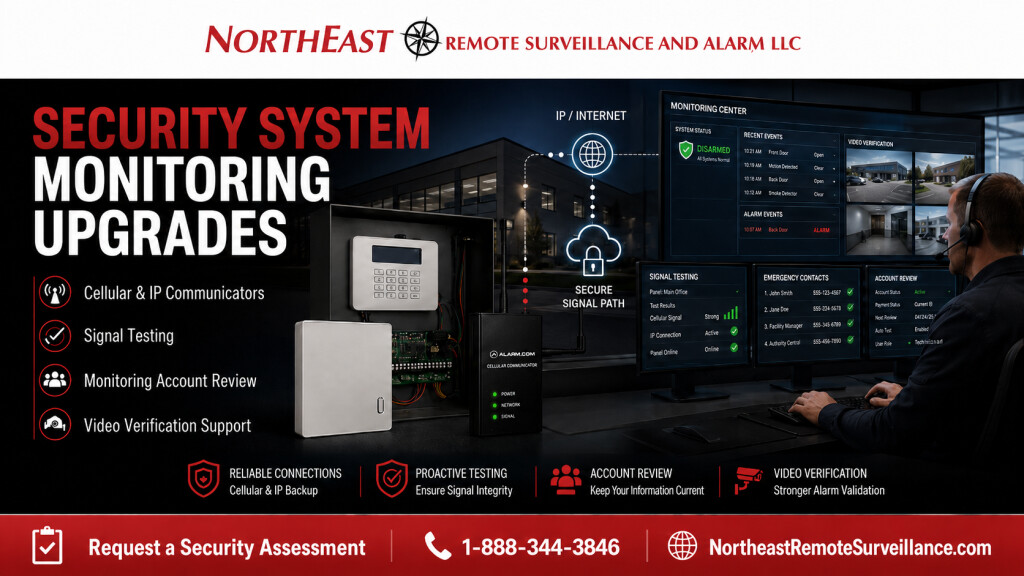
Northeast Remote Surveillance and Alarm, LLC helps commercial and industrial facilities upgrade outdated security system monitoring, alarm communicators, contact lists, signal reporting, monitoring paths, remote access, and video verification support.
For related guidance, see our Commercial Security System Upgrades, Retrofits & Takeovers service for businesses that need cleaner alarm reporting, better monitoring documentation, and a more dependable long-term support path.
Commercial Security Monitoring Upgrades
Many businesses already have alarm systems, cameras, access control, or remote viewing in place, but the monitoring side of the system has not been reviewed in years.
That creates risk.
The keypad, cameras and door contacts may still work. Yet alarm reporting may be unreliable or monitoring contacts outdated. Former employees may still have codes. Review the communicator and whether video can help verify alarms.
A monitoring upgrade helps bring the system back under control.
When a Security Monitoring Upgrade Is Needed
A commercial facility should consider a monitoring upgrade when the current monitoring setup is outdated, unclear, or difficult to trust.
Common signs include:
- The alarm system still uses old phone-line communication.
- The keypad shows communication trouble.
- The monitoring center has outdated emergency contacts.
- Former employees may still have alarm codes.
- Zone descriptions are unclear or wrong.
- Alarm signals have not been tested recently.
- The current provider is unresponsive.
- Opening and closing reports are not organized.
- Video review is not connected to alarm activity.
- The business changed ownership, managers, tenants, or hours.
- The alarm communicator is obsolete or unsupported.
- The company wants cellular or IP alarm communication.
- The business wants better monitoring documentation.
Monitoring should not be assumed. It should be tested, documented, and supported.
What a Monitoring Upgrade Can Include
A security system monitoring upgrade may include:
- Alarm communicator review
- Cellular communicator upgrade
- IP communicator upgrade
- Dual-path communication review where appropriate
- Monitoring account review
- Emergency contact list cleanup
- Call list order review
- Alarm signal testing
- Trouble signal testing
- Zone description cleanup
- User code review
- Opening and closing report review
- Video verification support where appropriate
- Alarm panel communication review
- Documentation and service handoff
- Long-term support planning
The goal is to make sure the system can report properly when something happens.
Alarm Communicator Upgrades
The communicator is one of the most important parts of a monitored alarm system.
An alarm panel may still work locally, but if the communicator is outdated or unreliable, the monitoring center may not receive the signals properly.
A communicator upgrade may help replace older phone-line reporting with modern cellular, IP, or approved communication paths.
NERSA reviews:
- Existing communicator type
- Alarm panel compatibility
- Cellular signal strength
- IP/network availability
- Backup power
- Monitoring provider requirements
- Signal reporting
- Trouble conditions
- Account programming
- Documentation
For older phone-line systems, see Legacy Phone Line Security System Upgrades.
Intrusion Alarm Monitoring Upgrades
Commercial intrusion alarm monitoring upgrades focus on how burglar alarm and intrusion signals are reported.
This may include review of:
- Alarm panel
- Keypads
- User codes
- Door contacts
- Motion detectors
- Overhead door contacts
- Alarm zones
- Partitions or areas
- Sirens
- Communicator
- Monitoring account
- Contact list
- Signal testing
- Trouble conditions
For related intrusion alarm planning, see Commercial Burglar Alarm and Intrusion Detection Systems.
Monitoring Account Review
Monitoring account information must be accurate.
A business may change managers, employees, tenants, phone numbers, hours, emergency contacts, or response procedures without updating the monitoring account. That can create confusion when an alarm occurs.
NERSA helps review:
- Site name
- Site address
- Account information
- Emergency contacts
- Call list order
- Authorized users
- Zone descriptions
- Alarm response instructions
- Opening and closing schedules where applicable
- Signal test records
- Monitoring center receipt confirmation
A monitoring upgrade should leave the business with a clearer, cleaner monitoring record.
Signal Testing and Verification
A monitoring upgrade is not complete until signals are tested.
The system should be tested with the monitoring center to confirm that the correct signals are received from the correct account.
Testing may include:
- Alarm signal testing
- Trouble signal testing
- Restoral signal testing
- Communication path testing
- Zone description confirmation
- Account identification confirmation
- Opening and closing report testing where applicable
- Monitoring center receipt confirmation
A system that powers on is not the same as a system that reports properly.
Video Verification and Camera Support
Monitoring upgrades can become stronger when cameras support alarm review.
If the business has cameras near entrances, rear doors, loading docks, warehouses, yards, or high-value areas, video can help authorized users review what happened around an alarm event.
Video support may help with:
- Alarm verification
- After-hours review
- Door alarm review
- Motion alarm review
- Loading dock activity
- Warehouse activity
- Parking lot incidents
- Exterior approach review
- False alarm reduction where appropriate
Access Control and Monitoring Review
Access control can also affect monitoring.
If employees use controlled doors before arming or disarming alarm areas, the access control system and alarm monitoring process should be reviewed together.
Important review points include:
- Employee entry doors
- Alarm keypad locations
- Access-controlled doors
- User permissions
- After-hours access
- Opening and closing procedures
- Former employee removal
- Door event review
- Access logs
- Alarm response procedures
User Code and Permission Cleanup
Old users are one of the biggest problems in monitored security systems.
Many businesses have former employees, cleaning crews, vendors, managers, or prior tenants with old alarm codes, app access, or monitoring permissions.
NERSA helps review:
- Alarm user codes
- Remote app users
- Monitoring contacts
- Access control users
- Camera viewing users
- Vendor access
- Manager permissions
- Former employee access
- Temporary users
- Administrative rights
A monitoring upgrade should not leave old users tied to the system.
Opening and Closing Reports
Some commercial alarm systems can report opening and closing activity.
This can help management understand when the system was armed, disarmed, opened, or closed. It may be useful for businesses with after-hours access, cleaning crews, shift workers, managers, warehouses, retail locations, or multi-site operations.
Opening and closing review may include:
- Authorized users
- Expected business hours
- Late openings
- Early closings
- After-hours disarms
- Manager notifications
- Site reporting
- Documentation
Not every business needs opening and closing reports, but they can be valuable when accountability matters.
Monitoring Upgrades for Multi-Site Businesses
Businesses with multiple locations need consistent monitoring standards.
A multi-site monitoring upgrade may include:
- Standardized account information
- Consistent emergency contact lists
- Site-specific call lists
- Alarm zone naming standards
- User code cleanup
- Communicator review
- Signal testing at each location
- Video review support
- Centralized reporting
- Documentation by site
For related multi-site planning, see Multi-Site Security Planning and Standardization.
Monitoring Upgrade vs. Alarm Replacement
A monitoring upgrade is not always the same as replacing the alarm system.
A monitoring upgrade focuses on the reporting path, account information, signal testing, communicator, users, and documentation. A full alarm replacement may be needed if the panel is obsolete, locked, unsupported, unreliable, or unable to support the building’s current needs.
A monitoring upgrade may be enough when:
- The alarm panel is still serviceable.
- The sensors are still usable.
- The main issue is communication or monitoring setup.
- Contact lists are outdated.
- Signal testing needs to be verified.
- The communicator needs replacement.
- Documentation needs cleanup.
A replacement may be required when the system cannot be supported safely or reliably.
Before and After
| Before Monitoring Upgrade | After Monitoring Upgrade |
|---|---|
| Monitoring path was unclear | Communication path reviewed and documented |
| Old phone-line communication | Cellular, IP, or approved modern communicator path |
| Emergency contacts were outdated | Contact list reviewed and updated |
| Alarm signals were assumed | Signals tested with the monitoring center |
| Zone descriptions were unclear | Zone information reviewed and cleaned up |
| Former users may still have access | User codes and permissions reviewed |
| Video was disconnected from alarm review | Cameras can support alarm event review where appropriate |
| System support was reactive | Cleaner long-term monitoring support plan |
Commercial Facilities That Need Monitoring Upgrades
Security system monitoring upgrades are common for:
- Warehouses
- Distribution centers
- Manufacturing facilities
- Office buildings
- Healthcare offices
- Schools and education facilities
- Retail stores
- Contractor shops
- Auto repair shops
- Laundromats
- Industrial parks
- Multi-tenant buildings
- Logistics facilities
- Truck yards
- Professional offices
- Municipal and institutional properties
Each upgrade should be planned around the building, alarm system, users, hours, monitoring requirements, and long-term support needs.
Related Planning
Monitoring upgrades depend on ownership, authorized access, panel compatibility, and available support.
Why Businesses Choose NERSA for Monitoring Upgrades
Northeast Remote Surveillance and Alarm, LLC focuses on commercial, industrial, institutional, and business and facility security systems.
Monitoring upgrades require more than changing a phone number. They require panel review, communicator review, monitoring center coordination, signal testing, contact list cleanup, user management, documentation, and practical service planning.
NERSA helps businesses regain confidence in how their security systems report.
When to Request a Security System Monitoring Upgrade
A business should request a monitoring upgrade if:
- The alarm system still uses phone lines.
- The communicator is outdated.
- Alarm signals have not been tested recently.
- The monitoring center has old contacts.
- Former employees may still have codes.
- The keypad shows communication trouble.
- The current provider is unresponsive.
- The business changed ownership or management.
- Alarm zones are unclear.
- Video does not support alarm review.
- Multiple locations need standard monitoring procedures.
- The business wants a cleaner support path.
Security System Monitoring Upgrade Checklist
Before upgrading security monitoring, evaluate:
- Alarm panel
- Keypads
- Alarm communicator
- Monitoring provider
- Account information
- Emergency contact list
- Call list order
- User codes
- Alarm zones
- Zone descriptions
- Door contacts
- Motion detectors
- Trouble conditions
- Backup battery
- Communication path
- Cellular signal strength
- IP/network availability
- Opening and closing reports
- Camera support for alarm review
- Documentation
- Future upgrade needs
Request a Security Monitoring Upgrade Review
If your commercial building, warehouse, office, healthcare facility, school, industrial property, logistics facility, retail site, contractor yard, or multi-tenant property needs a better alarm monitoring path, Northeast Remote Surveillance and Alarm, LLC can help.
Frequently Asked Questions About Security System Monitoring Upgrades
What is a security system monitoring upgrade?
A security system monitoring upgrade improves how a commercial alarm or security system reports signals to the monitoring center. It may include communicator upgrades, account review, signal testing, contact list cleanup, user code review, video verification support, and documentation.
Does monitoring upgrade mean replacing the whole alarm system?
Not always. If the existing alarm panel and devices are serviceable, the monitoring path may be upgraded without replacing the entire system. If the panel is obsolete, locked, unsupported, or unreliable, replacement may be recommended.
Can an alarm communicator be upgraded from phone line to cellular?
Yes. Many commercial intrusion alarm systems can be upgraded from old phone-line communication to cellular or IP communication when compatible with the panel and monitoring provider.
Should alarm signals be tested after a monitoring upgrade?
Yes. Alarm, trouble, restoral, and other applicable signals should be tested with the monitoring center to confirm that the correct signals are received from the correct account.
Can monitoring contacts be updated?
Yes. Monitoring account review can include emergency contacts, call list order, authorized users, site information, response instructions, and zone descriptions.
Can monitoring upgrades help remove former employees?
Yes. User code and permission cleanup is an important part of monitoring upgrades. Former employees, vendors, cleaning crews, and old managers should be reviewed and removed where appropriate.
Can cameras support alarm monitoring?
Yes. Cameras can support alarm review by helping authorized users or monitoring personnel understand what happened around doors, warehouses, parking lots, loading docks, yards, and high-risk areas.
Can NERSA standardize monitoring across multiple locations?
Yes. NERSA can help multi-site businesses standardize account information, contact lists, signal testing, user codes, zone names, communicator paths, and monitoring documentation.
Is this the same as fire alarm monitoring?
No. This guide covers commercial security system and intrusion alarm monitoring upgrades. Fire alarm monitoring and fire alarm communicator upgrades involve separate life-safety requirements and AHJ-aware planning.
How do we start a monitoring upgrade?
Call 1-888-344-3846 or use Request a Security Assessment.
NERSA can review the alarm panel, communicator, monitoring account, signal reporting, contacts, users, and documentation before recommending the right upgrade path.
Compliance, Codes & Project Standards
NERSA plans commercial and industrial security work with applicable code, documentation, inspection and authority-having-jurisdiction requirements in mind. Requirements vary by system, property and jurisdiction. These resources support project planning; they do not establish legal compliance, certification or AHJ approval.
Related guidance: Regulatory compliance & inspection readiness · NERSA project standards · Documentation, testing & inspection readiness