
Commercial access control helps staff manage who can use each door and when.

Request a Commercial Security Assessment
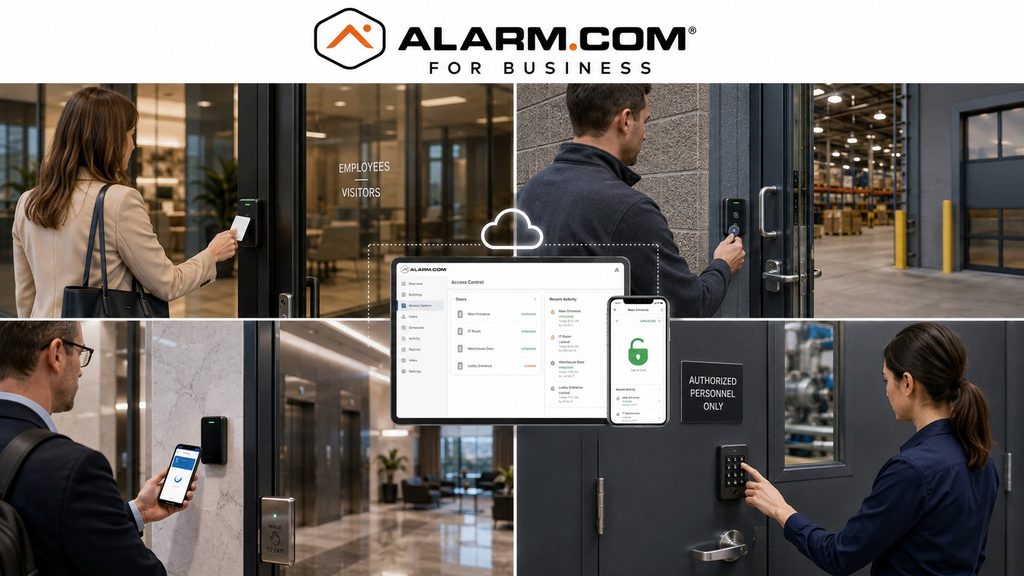
Set clear rules for employees, contractors, vendors, and restricted areas.
Keep daily management practical.
This page addresses Alarm.com-compatible options; for platform-neutral planning, visit commercial access-control installation.
For the complete Alarm.com commercial platform, visit Alarm.com for Business Security Systems.
This is an independent reference to Alarm.com Commercial Access Control Systems. Product information does not establish a NERSA partnership, certification, authorization or brand-specific service capability. Confirm those details with the proposed provider.
Alarm.com’s cloud-based access-control platform supports mobile credentials, user and card management, remote door control, schedules, alerts, automation, access history, and integration with compatible intrusion and video systems. (Alarm.com)
Confirm Door Hardware and Installation Responsibilities
The work plan should name who handles the hardware and any door adjustments. Check the hinges, latch, and closer. The door must close, latch, and work reliably with the access-control system.
Before handover, test credentials, approved entry, closing, latching, and required exit operation. Confirm who will carry out the tests and record the results.
Commercial Access Control Designed Around the Property
A good access-control system begins with the building and its users, not with the reader mounted beside the door.
Planning should consider:
- Employee entrances
- Main entrances
- Restricted rooms
- Warehouse doors
- Office-to-production transitions
- Shipping and receiving areas
- IT and network rooms
- Tool and inventory storage
- Management offices
- Rear and side entrances
- Shared tenant doors
- Selected gates
- Multiple operating schedules
- Existing door hardware
- Future expansion
The objective is to control the openings that matter while keeping daily operation practical for authorized users.
Alarm.com itself emphasizes that commercial access control should scale from a single controlled door to large multi-location environments with hundreds of doors. (Alarm.com)
Individual User and Credential Management
Electronic access control provides greater flexibility than relying entirely on mechanical keys.
Compatible systems can manage each user’s credentials separately. This lets the business set which areas a person may enter and at what times.
Credentials may include:
- Access cards
- Mobile credentials
- Other compatible credential technologies
Alarm.com allows authorized administrators to add and remove users and cards through its app or website, including bulk user administration and scheduled credential deactivation. (Alarm.com)
This can be particularly useful when managing:
- New employees
- Departing employees
- Contractors
- Temporary personnel
- Vendors
- Cleaning crews
- Department changes
- Short-term access
Individual credentials provide better accountability than shared keys or codes.
Alarm.com Mobile Credentials
Compatible systems may let staff use a smartphone to unlock approved doors. This offers an option alongside cards and key fobs.
Alarm.com describes mobile credentials as a way for employees to gain access using their smartphone, reducing the need to issue and replace separate physical credentials. (Alarm.com)
Mobile access can be useful for organizations that want to simplify credential distribution, but the correct credential strategy should still consider:
- Employee roles
- Device policies
- Temporary personnel
- Backup access procedures
- Management preferences
- Operating environment
Not every business needs to eliminate physical credentials.
A mixed credential strategy may be more appropriate for some properties.
Remote Door Control
Authorized users may need to manage a commercial door without physically traveling to the building.
Compatible Alarm.com systems can allow authorized administrators to:
- Lock doors
- Unlock doors
- Temporarily buzz doors open
- Review door status
- Manage remote-control permissions
Alarm.com provides these controls through its mobile app and website. (Alarm.com)
Remote door control can be useful for visitors, deliveries, contractors, managers, and unexpected operating situations.
Limit remote door release to approved users. Set permissions so only the right staff can unlock each controlled door.
Access Schedules and Permissions
Not every employee needs access to every door at every hour.
Access permissions can be organized around:
- User
- Department
- Door
- Schedule
- Shift
- Day
- Temporary assignment
- Location
- Responsibility
For example, a warehouse employee may need access to employee entrances and warehouse areas but not administrative records rooms.
A cleaning contractor may need access only during a defined evening period.
Alarm.com supports access plans, schedules, automation rules, and real-time user management through its access-control platform. (Alarm.com)
Complete Door Hardware Planning
Cloud software is only one part of commercial access control.
Every controlled opening also depends on properly selected and installed physical hardware.
Planning may need to consider:
- Door construction
- Frame condition
- Existing lock
- Electric strike
- Electrified lock
- Magnetic lock where appropriate
- Reader
- Door contact
- Request-to-exit equipment
- Exit hardware
- Door closer
- Power supply
- Battery backup
- Cabling
- Emergency egress
- Applicable fire-alarm interaction
Software cannot fix a damaged door, the wrong lock, a faulty closer, or badly fitted hardware.
Evaluate the complete controlled opening, including hardware and power dependencies.
Access History and Accountability
Access records can show which credential was used, at which door, and when. Clear user records make that information more useful.
Alarm.com provides access-history tools and reporting that can help administrators review user activity and unexpected events.
Its current commercial platform also supports activity alerts when users enter at unexpected times. (Alarm.com)
Access history may help with:
- Restricted-area review
- After-hours activity
- Employee investigations
- Contractor accountability
- Operational questions
- Door-event review
Access records are most useful when individual credentials are used and old users are removed promptly.
Automation Rules and Alarm Coordination
Access control can also coordinate with compatible Alarm.com intrusion systems.
Alarm.com supports automation rules such as disarming the intrusion system when the first authorized employee badges into the building and allowing compatible credential activity to participate in arming workflows. (Alarm.com)
These capabilities can help reduce:
- Accidental alarms
- Missed arming
- Confusing opening procedures
- Unnecessary management intervention
Automation should be designed around actual operating procedures rather than applied simply because the feature exists.
For deeper intrusion-system planning, visit Alarm.com Commercial Intrusion Detection Systems.
Alarm.com Access Control and Video
Compatible Alarm.com video can add visual context to access events.
Alarm.com allows users to move from an access-history event to associated video and can support remote visitor entry through compatible video-doorbell workflows. (Alarm.com)
This can make it easier to review:
- Credential use
- Door activity
- Unauthorized entry
- Doors held open
- After-hours access
- Contractor activity
Video remains a separate security discipline and should be designed around appropriate camera placement and image requirements.
For broader video capabilities, visit Alarm.com Commercial Video Surveillance Systems.
Existing Access Control System Upgrades
Moving to Alarm.com does not automatically mean every existing door component must be replaced.
An existing access-control system should first be evaluated for:
- Readers
- Controllers
- Locks
- Electric strikes
- Door contacts
- Request-to-exit equipment
- Power supplies
- Wiring
- Network infrastructure
- Existing cards
- Administrator access
- Software
- Documentation
- Expansion capacity
Alarm.com describes its commercial access-control platform as retrofit-friendly, which can make selective modernization possible where existing equipment and conditions are appropriate. (Knowledge Base)
The right work may be a settings change, a controller upgrade, or new credentials. Some sites need selected hardware replaced, more doors added, or a full replacement.
For broader modernization planning, visit Commercial Security System Upgrades, Retrofits & Takeovers.
Access Control for Multiple Doors
A commercial system should be designed with future growth in mind.
A business may begin with:
- One employee entrance
- Several exterior doors
- A restricted room
- One warehouse
- One office suite
and later add:
- More employees
- Additional controlled doors
- Another building
- Additional departments
- Additional locations
Alarm.com’s access-control platform is designed to support deployments ranging from individual doors to large multi-location operations. (Alarm.com)
The system should therefore provide reasonable capacity without unnecessarily overbuilding the initial project.
Professional Access Control Installation Matters
Access control involves much more than mounting a reader.
A reliable commercial installation depends on proper:
- Door assessment
- Lock selection
- Reader placement
- Controller installation
- Cabling
- Power
- Egress
- Credential programming
- Schedule configuration
- User administration
- Documentation
Evaluate the door, locking hardware, power, wiring and exit operation before choosing the access-control platform.
Frequently Asked Questions
What is Alarm.com commercial access control?
Alarm.com commercial access control is a cloud-managed platform for compatible controlled doors, users, credentials, schedules, remote door control, automation, access history, and integrations with other Alarm.com business-security services. (Alarm.com)
Can Alarm.com use mobile credentials?
Yes.
Compatible systems can allow employees to use smartphones as access credentials. (Alarm.com)
Can managers add or remove users remotely?
Yes.
Alarm.com supports authorized user and card administration through its app and website, including bulk user management. (Alarm.com)
Can a manager unlock a door remotely?
Compatible Alarm.com systems support remote locking, unlocking, and temporary door release through authorized mobile and web controls. (Knowledge Base)
Can access control work with the intrusion alarm?
Yes.
Compatible Alarm.com access-control and intrusion systems can use coordinated schedules and automation rules. (Alarm.com)
Can Alarm.com access events be associated with video?
Yes.
Compatible Alarm.com systems can connect access-history events with associated video for faster review. (Alarm.com)
Can existing door hardware be reused?
Sometimes. Check existing locks, readers, controllers, wiring, power supplies, and door hardware before reusing them. They must be in suitable condition and work with the planned system.
Can Alarm.com handle more than one controlled door?
Yes.
Alarm.com positions its commercial access platform for deployments ranging from a single controlled door to large multi-door and multi-location operations. (Alarm.com)
Prepare for a Commercial Security Assessment
For an assessment, list controlled doors, existing hardware, credential needs, user roles and required entry schedules.
Request a Commercial Security Assessment.
Compliance, Codes & Project Standards
NERSA plans commercial and industrial security work with applicable code, documentation, inspection and authority-having-jurisdiction requirements in mind. Requirements vary by system, property and jurisdiction. These resources support project planning; they do not establish legal compliance, certification or AHJ approval.
Related guidance: Regulatory compliance & inspection readiness · Access control & door hardware standards · NFPA 101 & egress planning · ADA access-control planning