
Commercial energy management helps businesses manage heating and cooling around their working hours and staff needs.

Request a Commercial Security Assessment
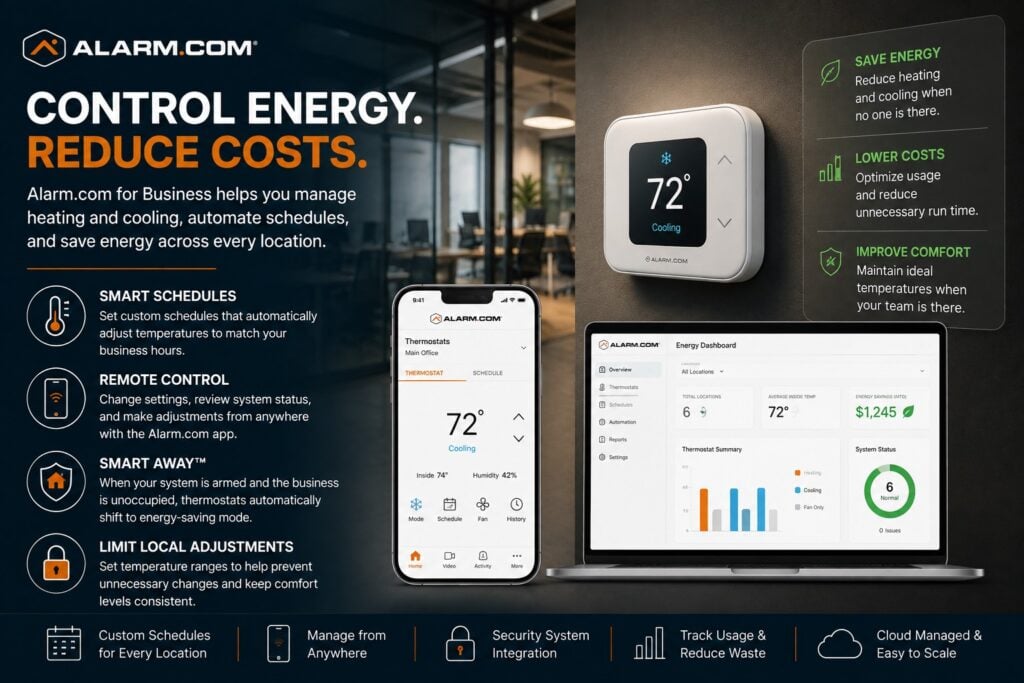
For the complete Alarm.com commercial platform, visit Alarm.com for Business Security Systems.
This is an independent reference to Alarm.com Commercial Energy Management. Product information does not establish a NERSA partnership, certification, authorization or brand-specific service capability. Confirm those details with the proposed provider.
Alarm.com for Business lets staff manage compatible thermostats from one place.
They can set schedules, adjust temperatures remotely, and limit local changes.
Supported automation can help reduce unnecessary heating and cooling while keeping occupied spaces comfortable.
Alarm.com also allows thermostat behavior to respond to compatible security-system activity, such as placing the HVAC system into an energy-saving mode when the property is armed. (Alarm.com)
Commercial Energy Management Designed Around the Business
Start by identifying when people use each part of the property.
Important considerations may include:
- Normal business hours
- Employee arrival times
- Closing procedures
- Weekend operations
- Multiple shifts
- Separate HVAC zones
- Seasonal schedules
- Employee thermostat access
- Unoccupied periods
- Multiple business locations
- Existing thermostats
- Existing security systems
- Management responsibilities
An office schedule may not suit a warehouse, restaurant or medical practice. Review each space and its shifts before choosing the settings.
Reduce unnecessary heating and cooling while keeping working conditions suitable for the business.
Alarm.com Smart Thermostat Control
Approved users can control compatible smart thermostats through the Alarm.com app or website.
Depending on the installation, authorized managers can review or adjust:
- Current temperature
- Heating and cooling mode
- Temperature set points
- Operating schedules
- Energy-saving modes
- Approved adjustment ranges
Alarm.com specifically supports remote thermostat administration and scheduling for business applications. (Alarm.com)
Remote control helps managers adjust settings when they are away from the property.
Commercial Thermostat Scheduling
Begin with a thermostat schedule that reflects business hours.
A property generally does not need the same heating or cooling conditions every hour of every day.
Schedules can account for:
- Opening time
- Closing time
- Weekdays
- Weekends
- Employee shifts
- Cleaning periods
- Holidays
- Extended operating hours
- Seasonal changes
Alarm.com thermostat schedules can automatically adjust temperatures based on defined business operating periods.
A suitable schedule reduces repeated manual adjustments by staff.
Smart Away Energy Savings
Alarm.com can coordinate compatible thermostat operation with the status of the business security system.
Compatible rules can switch the thermostat to an energy-saving setting when the alarm is armed and the property is treated as unoccupied.
Alarm.com refers to this as Smart Away functionality and specifically positions it as a way to avoid heating or cooling an unoccupied business unnecessarily.
For example, a business can use this closing routine:
- Employees work under normal occupied settings during business hours.
- The final employee arms the intrusion system at closing.
- The thermostat automatically transitions to an energy-saving range.
- Normal conditions resume according to the approved morning schedule or compatible automation.
Match those settings to the building and its closing routine.
Energy Automation Based on Business Activity
Alarm.com energy management can also coordinate with compatible security activity.
Alarm.com describes thermostat rules that use information from alarm and access-control systems. For example, settings may change when the alarm is armed or normal work begins. This can respond to building use as well as the clock.
Keep the automation rules practical.
Managers should understand what triggers each rule and how to change it when operating hours change.
For related rules and schedules, review the Alarm.com business automation overview.
Local Thermostat Lockout
Commercial businesses sometimes struggle with frequent employee thermostat adjustments.
One employee may increase the heat while another lowers the air conditioning shortly afterward.
Alarm.com supports local thermostat control restrictions so management can define acceptable temperature ranges and limit unauthorized changes at the thermostat itself. (Alarm.com)
This may be useful in:
- Offices
- Retail locations
- Restaurants
- Shared workplaces
- Multi-tenant environments
- Employee break areas
- Commercial facilities with multiple managers
Choose an adjustment range that suits the people and work in that space.
Remote Temperature Adjustment
Business operating conditions do not always follow the original schedule.
For example, weather changes, early openings and late closings may call for a temporary adjustment.
Approved users can adjust compatible thermostats in the app or on the website. They do not have to visit the building just to change a setting.
Owners and facility managers can use remote control to manage several properties without visiting each thermostat.
Multiple HVAC Zones
Some commercial properties contain several thermostats or independently conditioned areas.
Examples may include:
- Offices and warehouses
- Separate tenant spaces
- Front-of-house and back-of-house areas
- Administrative and production spaces
- Multiple floors
- Separate departments
- Multiple buildings
Each zone may require a different schedule or approved temperature range.
Record which space each thermostat serves and who may change its settings.
As the system grows, clear thermostat names help managers choose the correct space.
Multi-Location Energy Management
Organizations operating multiple facilities may need to manage energy consistently across an entire group of properties.
Alarm.com’s Enterprise Dashboard can bring thermostat settings and other energy information from several sites into one place.
This can help organizations establish more consistent:
- Temperature policies
- Schedules
- Approved adjustment ranges
- Administrator permissions
- Energy-saving procedures
When managing several properties, define both local and organization-wide responsibilities.
Use Alarm.com Multi-Location Business Security Management to plan shared access and oversight across properties.
Existing HVAC and Thermostat Systems
Adding Alarm.com energy management does not automatically mean the HVAC equipment itself must be replaced.
First, check whether the existing heating and cooling equipment supports the proposed thermostat and controls.
Planning may consider:
- HVAC equipment type
- Existing thermostat
- Wiring
- Number of stages
- Heat-pump configuration
- Power requirements
- Existing zones
- Thermostat location
- Network or communication requirements
- Current scheduling practices
Alarm.com provides the control and management layer, but the underlying HVAC system must still be compatible and functioning correctly.
Energy Management for Offices
Office properties may benefit from energy schedules that reflect employee arrival, normal operating hours, evenings, weekends, and holidays.
Compatible thermostats can switch between occupied and energy-saving settings. The building does not have to keep the same comfort setting all day and night.
Local thermostat restrictions may also help prevent frequent employee adjustments from undermining the approved schedule.
Energy Management for Retail and Customer-Facing Businesses
Retail and customer-facing properties may have operating schedules that vary by day of the week.
Energy planning may need to consider:
- Customer hours
- Employee preparation time
- Closing procedures
- Weekend schedules
- Seasonal operating changes
The HVAC system should reach appropriate conditions before customers arrive without operating unnecessarily long after the property closes.
Energy Management for Warehouses and Mixed-Use Facilities
Warehouse and industrial buildings may need different temperatures in different spaces.
An office section may require normal employee comfort while a warehouse area may have different heating or cooling requirements.
Set schedules and temperatures for each space based on how people use it.
The same principle applies to mixed office, warehouse, production, and commercial spaces.
Energy Management and Intrusion Detection
Compatible alarm status can help trigger energy-saving rules. For example, a rule may change the thermostat when the business is armed and treated as empty.
Intrusion detection remains a separate security function.
Energy Management and Access Control
Compatible access-control activity may also contribute to business automation workflows where employee arrival or facility use helps determine when normal occupied conditions should begin.
Alarm.com specifically describes its commercial energy tools as capable of using security and access activity to make thermostat operation more responsive. (Alarm.com)
Employee credentials, permissions, door schedules, and controlled-entry management remain part of the dedicated access-control system.
Energy Management Is Different From Temperature Monitoring
Commercial energy management and critical-temperature monitoring are related but serve different purposes.
Energy management controls heating and cooling. It covers thermostat schedules, set points, energy-saving modes, and limits on staff adjustments.
Temperature monitoring watches spaces or assets that need to stay within a set range. Examples include fridges, freezers, server rooms, and medical supplies. An out-of-range reading may need an alert.
Alarm.com supports both capabilities but treats critical-temperature monitoring as a distinct business function. (Alarm.com)
For temperature-sensitive assets and out-of-range alerts, review Alarm.com Commercial Temperature Monitoring.
Professional Configuration Matters
A smart thermostat alone does not create a good commercial energy-management system.
Reliable operation depends on proper:
- HVAC compatibility
- Thermostat installation
- Schedule design
- Zone identification
- Automation rules
- Temperature ranges
- User permissions
- Local adjustment limits
- Security-system integration
- Documentation
Document occupancy schedules, permitted temperature ranges and who may override them. Confirm equipment compatibility and responsibility for HVAC work.
Frequently Asked Questions
What is Alarm.com commercial energy management?
Compatible Alarm.com thermostats can use schedules, remote controls, and automatic rules. Shared controls can also help businesses manage heating and cooling across sites.
Can Alarm.com automatically reduce heating or cooling after closing?
Yes. Compatible Alarm.com configurations can use Smart Away behavior to adjust thermostat settings when the security system is armed and the property is considered unoccupied.
Can managers change the thermostat remotely?
Yes. Authorized users can manage compatible thermostat settings remotely through Alarm.com’s app or web interface.
Can employees be prevented from changing the thermostat too far?
Yes. Alarm.com supports local thermostat restrictions that allow management to define acceptable temperature ranges.
Can Alarm.com use different thermostat schedules?
Yes. Compatible thermostats can use schedules designed around business hours, days of the week, and operating requirements.
Can Alarm.com manage thermostats at multiple locations?
Yes. Alarm.com’s Enterprise Dashboard supports centralized thermostat management across multiple business locations.
Is energy management the same as refrigeration temperature monitoring?
No. HVAC energy management controls building comfort and energy use, while critical-temperature monitoring protects temperature-sensitive assets and environments.
Does Alarm.com replace the HVAC system?
No. Alarm.com provides compatible thermostat and management technology; the property’s underlying heating and cooling equipment remains a separate mechanical system.
Prepare for a Commercial Security Assessment
For an assessment, document temperature-control problems, existing equipment, occupancy schedules and who manages settings.
Request a Commercial Security Assessment.
Compliance, Codes & Project Standards
NERSA plans commercial and industrial security work with applicable code, documentation, inspection and authority-having-jurisdiction requirements in mind. Requirements vary by system, property and jurisdiction. These resources support project planning; they do not establish legal compliance, certification or AHJ approval.
Related guidance: Regulatory compliance & inspection readiness · NERSA project standards · Documentation, testing & inspection readiness