
Remote video monitoring and live talk-down costs depend on the property, camera coverage, alert type, monitoring schedule, audio equipment, response process, and how much activity the system is expected to verify.

This guide helps commercial and industrial buyers understand what drives the cost of monitored video, live audio intervention, alarm verification, and after-hours response support.
For the broader pricing structure, start with Commercial & Industrial Security System Costs, Comparisons & Buyer Guides.
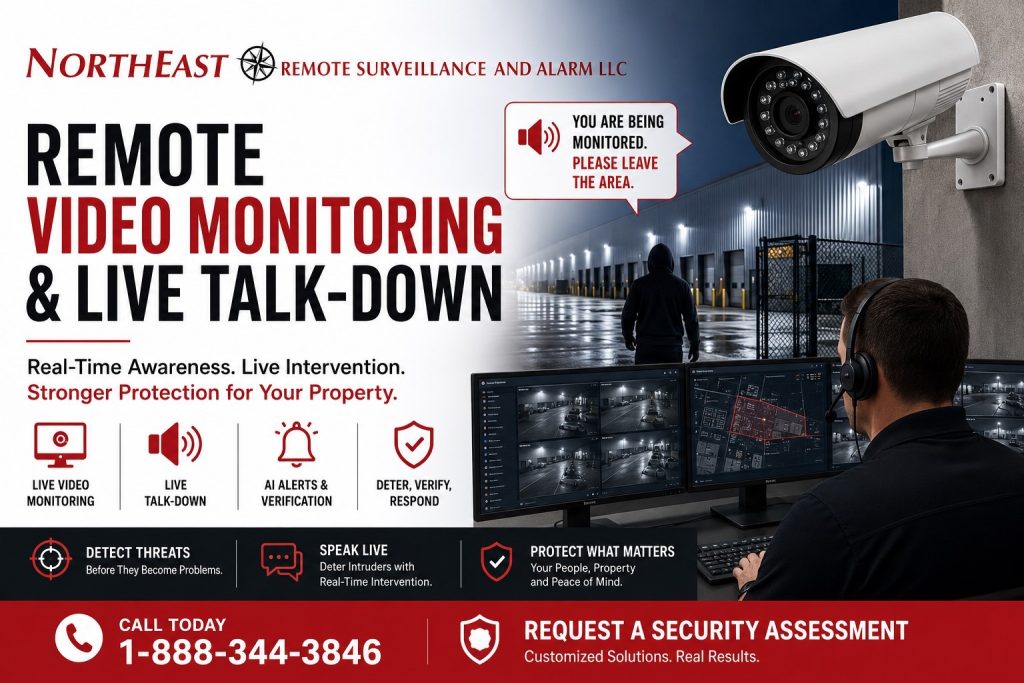
Remote video monitoring and live talk-down system for commercial and industrial properties showing security cameras, AI alerts, speaker warning, monitoring operator, and Northeast Remote Surveillance and Alarm, LLC branding.
Remote Video Monitoring and Live Talk-Down Cost Planning
Remote video monitoring is different from basic remote viewing. Basic remote viewing allows an owner or manager to log in and look at cameras. Remote video monitoring is designed around alerts, verification, escalation, and response.
Live talk-down adds another layer. Instead of only recording activity, a trained monitoring operator may be able to view an event, issue a live audio warning, notify a contact, or escalate based on the site’s response procedure.
Cost depends on how the system is designed, how alerts are generated, how often the property needs monitoring, and whether the site has the right cameras, analytics, speakers, network support, and response rules in place.
What Changes Remote Video Monitoring Cost
Remote video monitoring cost is not based only on the number of cameras. The price changes based on the amount of usable coverage, the quality of event detection, the schedule being monitored, the risk level of the site, and the number of events that may require review.
Major cost drivers include:
- camera count and camera placement
- AI analytics or rule-based detection
- monitoring schedule
- after-hours activity level
- speaker and audio talk-down equipment
- network reliability
- lighting conditions
- false-alert reduction
- site contact procedures
- recording and evidence needs
- multi-site management
- response escalation requirements
A low-activity office building after hours will not price the same as a logistics yard, contractor yard, warehouse exterior, truck court, parking lot, or industrial property with frequent movement after business hours.
Monitoring Schedule and Hours of Coverage
The monitoring schedule has a major impact on cost. Some businesses only need monitoring after closing. Others need overnight monitoring, weekend coverage, holiday coverage, or event-based monitoring for specific areas.
A property that needs monitoring from 6:00 p.m. to 6:00 a.m. has a different cost profile than a site that only needs monitoring for specific perimeter events after midnight. Properties with extended shifts, delivery windows, cleaning crews, vendor access, or late truck movement require more careful rule planning.
The monitoring schedule should match the real operating pattern of the property. Otherwise, the system may create unnecessary alerts, missed events, or monitoring activity that does not match the site’s risk.
Camera Coverage and Event Detection
Remote monitoring works best when cameras are installed for verification, not just general recording. A camera that is useful for broad awareness may not be good enough for monitored response if the view is too wide, too dark, too high, blocked by vehicles, or pointed at an area with constant movement.
For broader camera planning, use Commercial and Industrial Video Surveillance Systems.
Event detection may be created through AI analytics, virtual lines, intrusion zones, object classification, people detection, vehicle detection, loitering alerts, or other video rules. Better detection usually reduces unnecessary alerts and helps monitoring operators focus on activity that matters.
Poor camera placement can increase cost because the monitoring process becomes harder to manage. Usable views, lighting, clean fields of view, and proper analytics setup are all part of controlling the long-term cost of monitored video.
Live Talk-Down Equipment and Audio Coverage
Live talk-down requires more than a camera. The site may need outdoor-rated speakers, amplifier equipment, audio integration, network support, proper speaker placement, and a clear message strategy.
Speaker placement matters. The warning needs to be heard in the right area without creating unnecessary disturbance in unrelated areas. A loading dock, fenced yard, truck gate, parking area, rear entrance, or exterior storage area may each require different audio coverage.
Live talk-down should also be used with a defined response process. The business should know when an operator should issue a warning, when to notify a manager, when to contact a guard, and when to escalate to law enforcement or another response contact.
AI Video Analytics and False-Alert Reduction
AI video analytics can help reduce monitoring cost by filtering out irrelevant motion and helping identify people, vehicles, and restricted-area activity. This matters because remote monitoring is only effective when alerts are meaningful.
For AI event planning, use AI Video Surveillance Systems.
False alerts can be caused by poor camera angles, headlights, shadows, rain, snow, moving trees, animals, reflective surfaces, loose materials, or normal after-hours activity. If the system is not tuned properly, the monitoring process can become noisy and less useful.
A stronger design focuses on usable detection. That may include changing camera views, adjusting detection zones, improving lighting, using better analytics, separating normal activity areas from restricted areas, and defining which events should actually be monitored.
Property Types That Often Need Remote Video Monitoring
Remote video monitoring and live talk-down are most useful for properties with exterior exposure, after-hours risk, or limited on-site staffing.
Common commercial and industrial applications include:
- warehouses
- logistics facilities
- truck yards
- contractor yards
- manufacturing sites
- parking lots
- equipment yards
- material storage areas
- loading docks
- rear service areas
- gated entrances
- multi-building properties
- commercial buildings with after-hours access
These sites often have areas where activity can happen after staff leave. Remote monitoring helps turn video surveillance into a more active response tool instead of only a record of what happened later.
Monitoring, Verification, and Response Procedures
The monitoring process should be designed before the service goes live. A monitored video system needs clear rules for what counts as an event, who should be contacted, when an audio warning should be used, and how escalation should work.
A strong response procedure may include:
- verified video review
- live audio warning
- manager notification
- site contact notification
- guard dispatch coordination
- law-enforcement escalation when appropriate
- incident documentation
- event reporting
Without a clear response procedure, monitored video can become inconsistent. The system should be built so operators, managers, and responders understand what should happen when activity is detected.
One-Time Installation Costs vs Ongoing Monitoring Costs
Remote video monitoring usually involves both installation costs and ongoing service costs.
One-time costs may include cameras, speakers, mounting, cabling, network equipment, recorder or cloud setup, analytics configuration, audio integration, signage, testing, and commissioning.
Ongoing costs may include monitoring service, event review, analytics licensing, cloud services, software licensing, maintenance, system health checks, reporting, and support.
The right budget should consider both. A cheaper installation can become more expensive over time if it creates too many false alerts, lacks usable camera views, or requires frequent troubleshooting.
Why the Lowest Monitoring Price Can Be Misleading
The lowest monthly monitoring price is not always the best value. A monitored video system must be designed to produce usable events, clear verification, practical response, and reliable documentation.
A weak system may have lower upfront cost but create problems later. Poor alerts, bad camera views, weak lighting, unreliable network connections, missing audio coverage, and unclear response rules can all reduce the value of monitoring.
A better buying decision starts with the property. What areas need protection? What activity should trigger an alert? Who should respond? When should talk-down be used? What evidence needs to be retained? How should the system support the business over time?
Compliance, Privacy, and Operational Considerations
Remote monitoring and live talk-down should be planned with privacy, workplace expectations, audio use, signage, access to recordings, and operational procedures in mind. Monitoring should focus on legitimate commercial security needs, exterior risk areas, restricted zones, and after-hours exposure.
Audio talk-down should be used carefully and professionally. The purpose is to deter unauthorized activity, support verification, and help the business respond to events without creating unnecessary disruption.
NERSA does not treat remote monitoring as a replacement for policies, staffing, supervision, fire alarm systems, emergency planning, or law-enforcement response. Monitoring should support the security process with better visibility, faster verification, and clearer documentation.
When Remote Video Monitoring Is Worth the Cost
Remote video monitoring is usually worth evaluating when a property has repeated after-hours activity, outdoor assets, vehicle areas, loading zones, storage yards, vandalism risk, trespassing concerns, theft exposure, or limited staff coverage.
It can also be useful when a business wants to reduce unnecessary guard expense, improve alarm verification, support incident review, or create a more active response process around existing cameras.
The strongest candidates are properties where cameras can see the right areas, alerts can be filtered properly, and the business has a clear plan for what should happen when an event occurs.
Why Businesses Choose Northeast Remote Surveillance and Alarm, LLC
Northeast Remote Surveillance and Alarm, LLC focuses on commercial and industrial security applications. Remote video monitoring is not treated as a generic add-on. It must be designed around the property, the risk, the camera views, the alert rules, and the response process.
NERSA helps businesses evaluate whether their existing cameras can support monitoring or whether the system needs better views, stronger analytics, improved lighting, added speakers, cleaner network support, or a different response plan.
The goal is to create a monitored video system that supports real commercial operations, reduces unnecessary alerts, improves verification, and helps the business respond with better information.
Request a Remote Video Monitoring and Live Talk-Down Assessment
If your business is comparing remote video monitoring, live talk-down, alarm verification, AI alerts, after-hours monitoring, or monitored exterior camera coverage, Northeast Remote Surveillance and Alarm, LLC can help.
A site-specific assessment can review camera placement, exterior exposure, lighting, speaker needs, network conditions, analytics options, monitoring schedules, response contacts, and long-term support requirements.
Call 1-888-344-3846 or Request a Security Assessment.
Frequently Asked Questions About Remote Video Monitoring and Live Talk-Down Costs
What is remote video monitoring?
Remote video monitoring is a service where cameras, analytics, or alert rules are used to notify a monitoring operator or response process when activity occurs. It is different from basic remote viewing because it is built around verification, escalation, and response.
What is live talk-down?
Live talk-down allows a monitoring operator to issue an audio warning through speakers at the property when suspicious or unauthorized activity is verified. It can help deter trespassing, loitering, theft, vandalism, or after-hours activity.
What affects the cost of remote video monitoring?
Cost is affected by camera coverage, alert volume, analytics, monitoring schedule, property risk level, speaker requirements, lighting, network reliability, response procedures, reporting needs, and whether the system is monitoring one site or multiple locations.
Does live talk-down require special equipment?
Yes. Live talk-down may require speakers, audio equipment, network support, proper camera views, monitoring integration, and a defined response procedure. Camera coverage and audio coverage should be planned together.
Can existing cameras be used for remote video monitoring?
Sometimes. Existing cameras may be usable if they provide clear views, reliable recording, proper network access, useful nighttime visibility, and support for the required monitoring workflow. If the existing system has poor views, weak lighting, unreliable recording, or limited integration, upgrades may be needed.
Is remote video monitoring only for large properties?
No. Remote video monitoring can be useful for smaller commercial properties when there is after-hours risk, exterior exposure, parking lot activity, storage risk, or limited staff coverage. The system should be sized to the property and the actual monitoring need.
Can remote video monitoring reduce false alarms?
Yes. When designed correctly, monitored video and AI analytics can help verify activity before escalation. The system can reduce unnecessary response by filtering irrelevant motion and focusing on meaningful events.
Is remote video monitoring a replacement for security guards?
Not always. Remote video monitoring can support or reduce certain guard functions, especially for verification and deterrence, but it does not physically intervene. Some properties may still need guards, patrols, or other response procedures depending on risk.
What is the best way to budget for monitored video?
The best way to budget is to evaluate the property first. Camera views, lighting, alert rules, monitoring schedule, speaker placement, network reliability, and response procedures all affect the final cost.