
Remote video monitoring combines selected camera views, alerts, and response procedures.

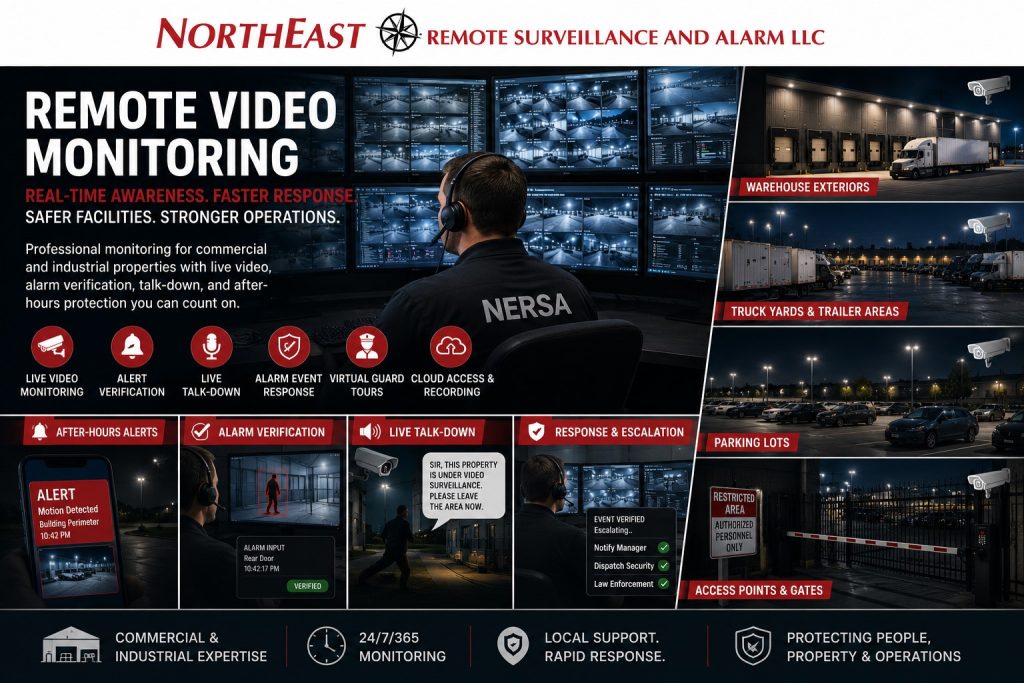
The service may involve operators reviewing events, scheduled video checks, or live audio warnings.
This guide explains those options alongside video alarm verification, remote access, system health checks, and self-monitoring.
For camera layout and recording decisions, see commercial and industrial video surveillance systems.
Remote Video Monitoring for Commercial and Industrial Properties
Remote video monitoring is not one single service. In the security industry, the term can refer to several different monitoring models depending on the property, camera system, alarm system, staffing level, risk exposure, response process, and monitoring provider.
Some businesses need active after-hours review of outdoor areas. Some need video verification tied to alarm events. Some need scheduled virtual guard tours. Some need live talk-down. Others need cloud video access, system health monitoring, or a managed response plan that combines cameras, alarms, access control, and operator procedures.
Northeast Remote Surveillance and Alarm, LLC helps commercial and industrial clients plan monitoring around real facility conditions, including:
- Parking lots
- Loading docks
- Truck yards
- Trailer rows
- Employee entrances
- Gate lanes
- Fence lines
- Exterior storage areas
- Warehouses
- Contractor yards
- Industrial parks
- Manufacturing facilities
- Multi-building properties
- After-hours access points
- Alarm event zones
- Remote sites and low-staffed properties
The goal is not simply to watch cameras. The goal is to create a practical monitoring workflow that supports verification, documentation, response, deterrence, accountability, and better decision-making when activity occurs.
What Remote Video Monitoring Can Include
Remote video monitoring may include several different service types. The correct approach depends on whether the property needs active operator review, automated alert review, alarm verification, live talk-down, scheduled patrols, remote access, or system supervision.
Common remote monitoring types include:
- Live video monitoring
- Event-based video monitoring
- Video alarm verification
- Live talk-down monitoring
- Virtual guard tours
- Remote guarding
- Alarm monitoring coordination
- Cloud video monitoring
- Self-monitoring by the business
- Managed video review
- Remote system health monitoring
- Environmental or equipment alert monitoring
- Access-control event review
- Gate and intercom monitoring
Each type serves a different purpose. A property with repeated trespassing may need live talk-down. A warehouse with alarm events may need video verification. A truck yard may need event-based exterior monitoring and LPR review. A multi-site business may need cloud video access and system health monitoring across several locations.
Live Video Monitoring
Live video monitoring uses trained operators or security staff to view camera activity remotely. It may be used during scheduled hours, after closing, during high-risk periods, or when camera analytics generate an event.
This type of monitoring is often used for:
- Exterior building activity
- Parking lots
- Truck courts
- Loading docks
- Fence lines
- Gate areas
- Contractor yards
- Trailer storage areas
- Unoccupied facilities
- High-value exterior assets
Live monitoring works best when camera views are designed for monitoring, not just recording. Operators need clear views, defined zones, proper lighting, useful alerts, and a response plan that explains when to observe, speak down, notify a manager, dispatch security, or escalate the event.
Event-Based Video Monitoring
Event-based video monitoring focuses on reviewing activity when something triggers an alert. The alert may come from camera analytics, motion rules, perimeter zones, alarm inputs, access-control events, gate activity, or other defined conditions.
This approach is often more practical than having an operator stare at every camera continuously. The system identifies activity, sends an event, and the monitoring workflow determines whether that event should be reviewed, ignored, documented, or escalated.
Event-based monitoring may be used for:
- After-hours parking lot activity
- Movement near dock doors
- Fence-line activity
- Gate lane activity
- Loitering near building entrances
- Activity near trailers
- Unauthorized yard movement
- Exterior storage zones
- Repeated nuisance activity
The quality of event-based monitoring depends on camera placement, analytic setup, lighting, network reliability, and clearly defined response procedures.
Video Alarm Verification
Video alarm verification combines alarm activity with video review. When an alarm event occurs, video can help determine whether the activity appears to be real, accidental, environmental, employee-related, or caused by another condition.
Video verification can support better decision-making because responders may have more context than a basic alarm signal alone. It can help confirm whether there is visible activity, which area was involved, whether a person or vehicle is present, and whether escalation is appropriate.
Video alarm verification may involve:
- Intrusion alarm events
- Door contacts
- Motion detection
- Perimeter detection
- Gate alerts
- Outdoor detection
- Access-control exceptions
- Camera analytic events
- Alarm zones tied to camera views
For intrusion detection and alarm-response planning, use Commercial Alarm Systems.
Live Talk-Down Monitoring
Live talk-down monitoring allows an operator to speak through on-site speakers when activity is detected. This can be useful for deterring trespassing, loitering, dumping, vandalism, fence-line activity, unauthorized yard movement, and after-hours exterior activity.
A talk-down response may warn the person that the property is under video monitoring, request that they leave, or state that the activity is being reviewed. Talk-down should be planned carefully so messages are clear, professional, appropriate to the property, and tied to a documented response procedure.
Live talk-down is often used for:
- Parking lots
- Truck yards
- Contractor yards
- Equipment storage areas
- Industrial yards
- Building exteriors
- Fence lines
- Loading areas
- Vacant or lightly staffed properties
- Repeat trespassing areas
Talk-down works best when cameras, speakers, analytics, lighting, signage, and response procedures are planned together.
Virtual Guard Tours
Virtual guard tours use remote cameras to review specific areas on a schedule. Instead of a physical guard walking the property, a monitoring operator or security team checks selected camera views at planned times.
Virtual tours may be used to review:
- Exterior doors
- Parking lots
- Gates
- Loading docks
- Trailer areas
- Fence lines
- Equipment yards
- Utility areas
- Common areas
- High-risk zones
Virtual guard tours are not the same as continuous live monitoring. They are scheduled reviews designed to confirm site conditions, document visible issues, and provide an added layer of oversight during selected times.
Remote Guarding
Remote guarding is a broader monitoring approach that combines cameras, analytics, operators, audio, alarms, access control, gates, intercoms, and response procedures to support a property remotely.
Remote guarding may include:
- Live video review
- Event-based alerts
- Talk-down audio
- Gate monitoring
- Intercom support
- Alarm verification
- Virtual patrols
- Incident documentation
- Escalation to managers or responders
- Camera health awareness
- Multi-site monitoring workflows
Remote guarding is often used for larger commercial, industrial, warehouse, logistics, contractor-yard, and multi-site environments where after-hours risk is higher and property managers need more than passive recording.
Alarm Monitoring Coordination
Remote video monitoring often works alongside alarm monitoring. The alarm system may detect activity, while cameras help verify what is happening. In other cases, camera analytics may create an event that follows an alarm-style response procedure.
Alarm monitoring coordination may include:
- Intrusion alarm signals
- Video clips tied to alarm events
- Camera views linked to alarm zones
- Video verification before escalation
- Manager notification procedures
- Monitoring center instructions
- Dispatch decision support
- False alarm reduction
- Event documentation
The best approach depends on the property’s operating hours, response expectations, alarm layout, camera views, and monitoring provider workflow.
Cloud Video Monitoring and Remote Access
Cloud video monitoring and remote access allow authorized users to view cameras, recorded video, alerts, and system activity from approved devices. This may be useful for business owners, operations managers, facility managers, regional managers, school administrators, security directors, or multi-site organizations.
Cloud or remote video access may support:
- Multi-site camera review
- Remote incident investigation
- After-hours visibility
- Manager access to selected cameras
- Clip sharing
- Alert review
- User permissions
- Mobile access
- Cloud storage or hybrid recording
- Centralized video management
Cloud access is not the same as active operator monitoring. A business may have remote access to cameras without having a monitoring center watching events. The system design should make that distinction clear.
Self-Monitoring by the Business
Self-monitoring means the business receives notifications, camera alerts, app notifications, or remote access and reviews activity internally. This may work for lower-risk properties, small facilities, or businesses that have staff available to review alerts.
Self-monitoring may include:
- Mobile app alerts
- Camera motion notifications
- Door activity notifications
- Remote camera access
- Video clip review
- Internal manager response
- Email or push notifications
Self-monitoring can be useful, but it has limits. Alerts may be missed if the manager is unavailable, sleeping, driving, in a meeting, or receiving too many notifications. Businesses should be honest about whether they can respond consistently before relying on self-monitoring as the primary security strategy.
Managed Video Review
Managed video review involves using video to support investigations, incident timelines, clip retrieval, evidence review, or operational questions. This is not always live monitoring. It may involve reviewing recorded video after an incident occurs.
Managed review may help with:
- Theft investigations
- Vehicle incidents
- Workplace incidents
- Delivery disputes
- Access events
- After-hours activity
- Customer or visitor incidents
- Employee accountability
- Alarm event review
- Insurance documentation
Managed video review depends on proper camera placement, recording retention, time synchronization, user permissions, and a system that allows video to be located efficiently.
Remote System Health Monitoring
Remote system health monitoring focuses on whether the security system is online and functioning. It may help identify camera outages, recorder problems, hard drive issues, network failures, offline devices, communication loss, power problems, or system errors.
Health monitoring may review:
- Camera online status
- Recorder status
- Storage status
- Network connectivity
- Device communication
- Alarm communication paths
- Access control panel status
- Power or UPS conditions
- System errors
- Firmware or maintenance needs
System health monitoring is important because a camera system is only useful if it is recording when the event happens. Businesses should not discover a camera failure only after they need video.
Environmental and Equipment Alert Monitoring
Some commercial and industrial properties also monitor environmental or equipment-related conditions. These alerts may not be traditional security events, but they can still affect operations, safety, loss prevention, and response.
Examples may include:
- Temperature alerts
- Water detection
- Power failure
- Freezer or cooler alarms
- Server room conditions
- Equipment room alerts
- Sump or leak detection
- Generator or UPS conditions
- Communication failures
- Critical equipment alarms
Environmental monitoring should be planned separately from intrusion detection and video monitoring, but it can be part of a broader commercial security and facility monitoring strategy.
Access Control Event Monitoring
Access-control event monitoring involves reviewing activity tied to doors, gates, credentials, schedules, forced-door events, held-door events, denied access, and user activity.
This may be useful for:
- Employee entrances
- Restricted rooms
- Server rooms
- Gate entrances
- Warehouse doors
- Office-to-warehouse transitions
- Medical or administrative areas
- Contractor entrances
- Multi-tenant facilities
Access-control events become more useful when paired with nearby camera views. If a door is forced open, held open, or accessed after hours, video can help show what occurred.
Gate, Intercom, and Visitor Monitoring
Some properties need remote support for gates, intercoms, visitor entrances, delivery lanes, and controlled access points. This may involve video intercoms, remote gate release, visitor screening, delivery communication, or manager-approved entry.
Gate and intercom monitoring may support:
- Truck entrances
- Visitor gates
- Contractor entrances
- Delivery lanes
- Commercial parking gates
- Industrial yards
- Multi-tenant properties
- Remote buildings
- Unstaffed entrances
This type of monitoring should be planned carefully so there is a clear process for who may enter, how identity is confirmed, when entry is allowed, and how events are documented.
Where Remote Video Monitoring Works Best
Remote video monitoring is most useful when a property has defined risk areas and clear response expectations.
Common applications include:
- Warehouses
- Distribution centers
- Truck yards
- Trailer storage areas
- Contractor yards
- Industrial parks
- Manufacturing facilities
- Parking lots
- Equipment yards
- Schools
- Municipal facilities
- Healthcare sites
- Office campuses
- Multi-site businesses
- Vacant or lightly staffed properties
- Properties with repeated after-hours activity
For exterior yards, trailer areas, and fleet properties, continue to Truck Yard and Trailer Security Systems.
What a Remote Video Monitoring Assessment Should Review
A remote monitoring assessment should review more than cameras. It should evaluate how the property operates, what activity needs to be reviewed, when monitoring should occur, how alerts are generated, who responds, and what the system should do when an event happens.
A practical assessment should review:
- Property layout
- Operating hours
- After-hours risk
- Camera views
- Alarm zones
- Access-control events
- Gate activity
- Lighting conditions
- Network reliability
- Audio speaker placement
- Monitoring schedules
- Alert rules
- Analytics setup
- False alert risks
- Response procedures
- Notification contacts
- Escalation instructions
- Incident documentation needs
- Recording retention
- System health monitoring
- Long-term service support
The monitoring plan should match the property, not a generic package.
Compliance, Privacy, and Operational Awareness
Remote monitoring should be planned with awareness of privacy, workplace expectations, emergency access, signage, audio use, life-safety systems, access control, fire alarm coordination, and documentation requirements.
Security systems do not replace safety programs, employee policies, emergency procedures, fire alarm systems, or workplace training. They can, however, support incident review, alarm response, access accountability, safer operations, and better documentation.
Audio talk-down, employee-area monitoring, visitor monitoring, gate release, and video access permissions should be planned carefully so the system supports security without creating unnecessary operational, privacy, or policy problems.
Why Businesses Choose Northeast Remote Surveillance and Alarm, LLC
Northeast Remote Surveillance and Alarm, LLC designs remote video monitoring around commercial and industrial operating conditions.
NERSA does not treat remote monitoring as a one-size-fits-all service. A warehouse, truck yard, office campus, manufacturing facility, school, healthcare site, municipal building, contractor yard, and industrial park may each need a different monitoring model.
NERSA helps businesses review:
- Camera placement
- Alert logic
- Monitoring type
- Talk-down needs
- Alarm verification
- Access-control events
- Gate activity
- Lighting conditions
- Network reliability
- System health
- Response procedures
- Escalation contacts
- Incident documentation
- Long-term service needs
The objective is a remote monitoring system that supports real visibility, practical response, and better security decisions.
Frequently Asked Questions About Remote Video Monitoring
What is remote video monitoring?
Remote video monitoring uses cameras, alerts, operators, analytics, audio, alarms, remote access, or monitoring workflows to review activity at a property from another location. It may include live monitoring, event-based monitoring, video verification, talk-down, virtual guard tours, remote guarding, cloud access, or system health monitoring.
Is remote video monitoring the same as alarm monitoring?
No. Alarm monitoring usually focuses on alarm signals from intrusion, fire, or other monitored systems. Remote video monitoring uses camera views and video events to support review, verification, documentation, and response.
What is video alarm verification?
Video alarm verification uses camera footage or live video views to help confirm what may have caused an alarm event. It can help determine whether visible activity appears to be occurring and whether the event should be escalated.
What is live talk-down monitoring?
Live talk-down monitoring allows an operator to speak through on-site speakers when suspicious or unauthorized activity is detected. It is often used for parking lots, truck yards, contractor yards, loading areas, exterior storage zones, and after-hours property protection.
What is event-based video monitoring?
Event-based video monitoring reviews activity when an alert is triggered by motion, analytics, alarms, access-control events, gate activity, or defined rules. It is different from continuous viewing because the system brings events to attention for review.
What is a virtual guard tour?
A virtual guard tour is a scheduled remote review of selected camera views. It allows a monitoring operator or security team to check gates, doors, parking lots, docks, fence lines, and other areas at planned times.
What is remote guarding?
Remote guarding is a broader security approach that may combine cameras, analytics, operators, live talk-down, alarms, access control, gates, intercoms, incident documentation, and escalation procedures.
Can a business monitor its own cameras?
Yes. Some businesses use self-monitoring through mobile apps, cloud video access, email alerts, or push notifications. Self-monitoring can work for some properties, but it depends on whether someone is consistently available to review and respond to alerts.
Does remote video monitoring require special cameras?
Not always, but monitoring works best when cameras are designed for the monitoring purpose. Camera placement, lighting, image quality, analytics, network reliability, audio, and field of view all affect whether monitoring is useful.
Can remote monitoring reduce false alarms?
Remote monitoring and video verification can help provide more context around alarm events. When cameras are tied to alarm zones or analytic events, the business or monitoring provider may be able to review what appears to be happening before deciding how to respond.
What properties benefit most from remote video monitoring?
Properties with after-hours exposure, outdoor equipment, parking lot activity, truck traffic, trailer storage, gate activity, loading docks, exterior storage, or repeated nuisance activity often benefit from remote video monitoring.
How does NERSA design remote monitoring systems?
NERSA reviews the property layout, camera views, alarm zones, access-control events, operating hours, lighting, network conditions, monitoring goals, response procedures, and escalation contacts before recommending a monitoring model.
Request a Remote Video Monitoring Assessment
NERSA can help you compare live video monitoring, alarm verification, event-based review, talk-down audio, and virtual guard tours. We can also review remote guarding, alarm coordination, and system-health monitoring. Start with the activity you need monitored and the response you expect.
Call 1-888-344-3846 or use Request a Security Assessment to review your property, camera views, alert rules, alarm events, exterior exposure, access points, monitoring schedule, response procedures, infrastructure conditions, and long-term security goals.
Compliance, Codes & Project Standards
NERSA plans commercial and industrial security work with applicable code, documentation, inspection and authority-having-jurisdiction requirements in mind. Requirements vary by system, property and jurisdiction. These resources support project planning; they do not establish legal compliance, certification or AHJ approval.
Related guidance: Regulatory compliance & inspection readiness · NERSA project standards · Documentation, testing & inspection readiness