
Panic, duress, and emergency alert systems give authorized employees a faster way to signal for help during threatening, unsafe, or urgent situations inside a commercial facility.

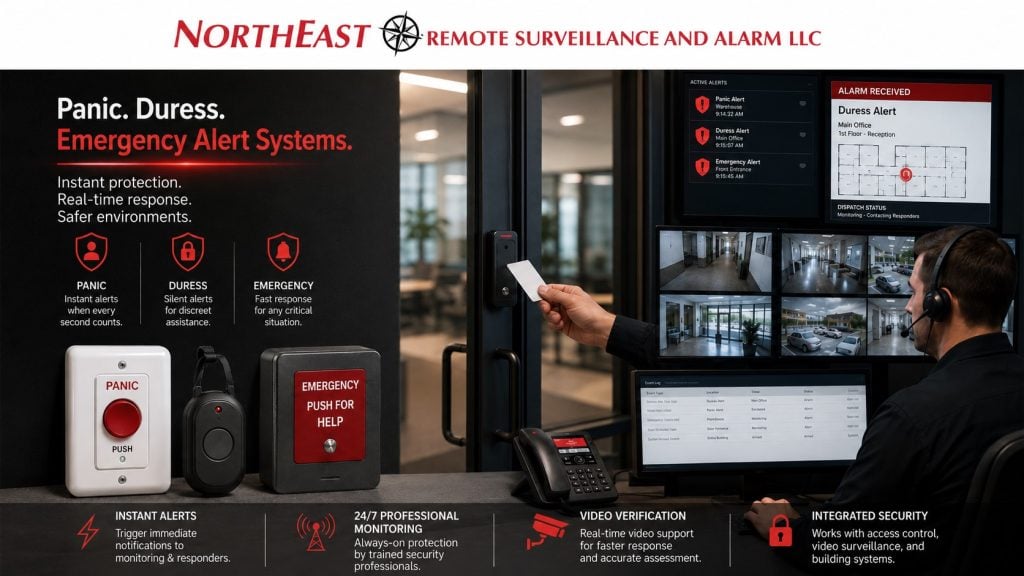
Northeast Remote Surveillance and Alarm, LLC designs commercial and industrial emergency alert systems for offices, schools, healthcare facilities, warehouses, retail sites, municipal buildings, industrial properties, and multi-tenant facilities.
For related guidance, see our Commercial Burglar Alarm and Intrusion Detection Systems planning for businesses that need more than standard door contacts and motion detection.
Commercial Panic and Duress Alert Systems
Not every emergency starts with a break-in.
Some emergencies begin at a front desk, reception window, pharmacy counter, school office, medical office, warehouse shipping desk, retail checkout, employee entrance, HR office, manager’s office, guard station, or isolated work area.
A panic or duress alert system helps staff signal that something is wrong when calling out loud, walking away, or using a phone may not be practical.
These systems may include:
- Fixed panic buttons
- Under-desk duress buttons
- Wireless panic buttons
- Wearable duress pendants
- Emergency alert stations
- Hold-up alarm buttons
- Reception-area panic alerts
- Staff-only emergency buttons
- Silent alarm signaling
- Local notification options
- Central station monitoring where appropriate
- Video review support
- Access control and lockdown coordination where applicable
The correct design depends on the facility, risk areas, staff workflow, monitoring needs, and response plan.
When a Business Needs Panic or Duress Alerts
A commercial facility should consider panic, duress, or emergency alert systems when employees may face urgent situations where fast notification matters.
Common use cases include:
- Front desk threat or confrontation
- Reception-area emergency
- Retail robbery or hold-up concern
- Medical office disturbance
- School office emergency
- Workplace violence concern
- Domestic dispute entering the workplace
- Employee threat or termination risk
- Isolated worker concern
- Cash handling area
- Warehouse shipping office
- Guard station or gatehouse
- HR or management office
- Pharmacy, clinic, or healthcare reception area
- Public-facing service counter
- Multi-tenant building lobby
- After-hours staff exposure
A panic alert system should be planned around real workflows, not installed randomly.
Panic Button Systems
A panic button is a fixed or portable device used to send an emergency signal.
Depending on the system design, the button may alert a monitoring center, notify internal staff, trigger a local alarm, send a silent duress signal, or support a larger emergency response workflow.
Panic buttons are commonly used in:
- Reception desks
- Office manager areas
- Retail counters
- Cash handling points
- School offices
- Healthcare front desks
- Guard stations
- Employee entrances
- Shipping and receiving offices
- Warehouse offices
- Service counters
- Municipal offices
The button location matters. It should be reachable during an emergency without being obvious, easy to accidentally press, or difficult for staff to use.
Duress Alarm Systems
A duress alarm is often used when an employee needs to signal for help discreetly.
Duress systems may be silent or low-profile depending on the response plan. They are often used where a visible or audible alarm could escalate the situation or put staff at greater risk.
Duress alerts may support:
- Reception staff
- Healthcare staff
- School administrative staff
- Retail staff
- Property managers
- Security officers
- Cash office employees
- Isolated workers
- After-hours employees
- HR or management staff
A duress alarm should be paired with clear procedures so staff know when to use it, what it triggers, and who receives the alert.
Emergency Alert Stations
Some facilities need clearly marked emergency alert stations instead of hidden panic buttons.
Emergency alert stations may be appropriate in areas where staff need a visible call-for-help device, such as:
- Industrial work areas
- Warehouse offices
- Guard shacks
- Maintenance areas
- Parking structures
- School administrative areas
- Public-facing facilities
- Controlled entry points
- Large commercial buildings
- Shared tenant areas
These systems can be designed around the building’s response procedures and monitoring plan.
Fixed vs. Wireless Panic Buttons
Panic and duress systems may be hardwired, wireless, or a combination of both.
Hardwired buttons may be preferred where permanent wiring is practical and reliability is critical. Wireless buttons may be useful where desks move, cable paths are difficult, or staff need portable activation.
Selection depends on:
- Building construction
- Distance from panel or receiver
- Wireless signal strength
- Battery supervision
- Device location
- Staff workflow
- Monitoring requirements
- Response procedures
- Long-term maintenance
- Risk of accidental activation
NERSA reviews the facility before recommending fixed, wireless, or hybrid panic alert devices.
Monitored Panic Alerts
Many panic and duress systems are connected to a monitored commercial alarm system.
A monitored alert can transmit to a central station or designated response path depending on system design, account setup, signal type, and monitoring instructions.
Monitoring planning may include:
- Signal type selection
- Zone description cleanup
- Account information review
- Emergency contact list review
- Call list order
- Response instructions
- Silent vs. audible alarm behavior
- Signal testing
- Documentation
- Staff procedures
For related monitoring planning, see Security System Monitoring Upgrades.
Silent vs. Audible Panic Alerts
Some panic alerts are silent. Others may create local notification.
The correct approach depends on the situation and facility plan.
Silent panic alerts may be useful when staff need help without escalating the situation. Audible alerts may be useful when the goal is to notify nearby staff, deter a threat, or trigger a building response.
NERSA helps evaluate:
- Who needs to know
- Where the alert should go
- Whether the alert should be silent
- Whether a local signal is appropriate
- Whether video review should support the event
- Whether access control or door control should be involved
- How the event should be documented
- How staff should be trained
The system design should match the response plan.
Panic Alerts and Video Verification
Panic and duress alerts become stronger when paired with useful camera coverage.
When a panic event occurs, cameras can help authorized users or monitoring personnel review what happened near the alert location.
Useful camera views may include:
- Front desk
- Main entrance
- Reception area
- Public lobby
- Retail checkout
- School office
- Healthcare reception
- Guard station
- Parking area
- Employee entrance
- Shipping office
- Warehouse office
- Service counter
- Exterior approaches
For related video planning, see Commercial Video Surveillance Systems.
Panic Alerts and Access Control
Some facilities need panic or emergency alerts to work alongside access control.
Depending on the design, a panic event may need to support door status review, controlled entry response, lockdown planning, or staff notification.
These workflows must be planned carefully and should not create unsafe egress conditions.
For staff-assistance workflows in medical environments, review Lehigh Valley healthcare panic and duress systems.
Access control coordination may include:
- Controlled entry doors
- Staff-only doors
- Visitor entry doors
- Reception doors
- Lockdown planning where appropriate
- Door status review
- Access logs
- Emergency egress review
- User permissions
- Response procedures
For related access control planning, see Commercial & Industrial Access Control Systems.
Panic Alerts and Intrusion Alarm Systems
Panic, duress, and emergency alert devices are often connected to a commercial intrusion alarm system.
The alarm system may already include a panel, keypad, communicator, monitoring account, user codes, sirens, door contacts, and motion detectors. Panic devices can be added as dedicated zones or emergency inputs depending on the system and monitoring design.
Important planning points include:
- Panic zone naming
- Signal reporting
- Monitoring instructions
- Silent or audible behavior
- Device supervision
- Wireless battery monitoring
- Staff training
- False activation procedure
- Signal testing
- Documentation
For related alarm planning, see Commercial Burglar Alarm and Intrusion Detection Systems.
Workplace Violence and Staff Safety Planning
Panic and duress systems are part of a larger staff safety plan.
They do not replace training, policies, procedures, law enforcement coordination, HR processes, facility rules, or emergency planning. They are a security technology layer that supports faster notification when staff need help.
A stronger plan may include:
- Staff procedures
- Manager response plan
- Monitoring instructions
- Camera review
- Access control review
- Emergency contacts
- After-hours procedures
- Documentation
- User training
- Periodic testing
The technology should support the facility’s safety process.
School Panic and Duress Alerts
Schools and education facilities may use panic or emergency alert systems to support administrative offices, controlled entry areas, reception points, and staff-only locations.
School planning may include:
- Main office panic buttons
- Reception desk alerts
- Visitor entry support
- Administrative area alerts
- Staff-only emergency buttons
- Video review of entry areas
- Access control coordination
- Emergency procedure support
- Staff training and documentation
The system should be planned with school leadership, internal procedures, and applicable requirements in mind.
Healthcare Office Panic Alerts
Healthcare offices often have public-facing reception areas, staff-only corridors, patient interaction areas, records areas, and after-hours access needs.
Panic or duress buttons may support:
- Front desk staff
- Medical office reception
- Clinic check-in areas
- Administrative offices
- Staff-only work areas
- Pharmacy or supply areas
- After-hours staff
- Shared healthcare office suites
Camera placement and privacy awareness matter in healthcare settings. Panic alert support should be planned around approved areas and internal procedures.
Retail and Cash Handling Panic Alerts
Retail stores, convenience stores, service counters, and cash handling areas may need discreet panic or hold-up alarm support.
Planning may include:
- Register-area panic buttons
- Manager office duress buttons
- Cash room alerts
- Back door alerts
- Video review of transaction areas
- Monitoring instructions
- Silent alarm behavior
- Staff training
- False activation procedure
The system should be designed to support staff without creating unnecessary exposure.
Warehouse and Industrial Panic Alerts
Warehouses and industrial facilities may need panic or emergency alert support in areas where staff may be isolated, far from offices, or exposed to after-hours risk.
Potential locations include:
- Shipping offices
- Receiving desks
- Warehouse offices
- Guard shacks
- Gatehouses
- Maintenance shops
- Employee entrances
- Loading docks
- Remote work areas
- Night shift locations
Wireless coverage, building size, device supervision, and response procedures must be reviewed carefully in large facilities.
Multi-Site Panic Alert Standardization
Businesses with multiple locations should standardize panic and duress alert procedures.
A multi-site plan may include:
- Standard panic zone names
- Standard monitoring instructions
- Standard emergency contacts
- Standard staff training
- Standard button placement rules
- Standard documentation
- Site-specific response notes
- User permission review
- Video support by location
- Regular testing schedule
For related multi-site planning, see Multi-Site Security System Standardization.
Documentation and Testing
Panic and duress systems must be documented and tested.
Documentation may include:
- Device locations
- Zone names
- Monitoring instructions
- Contact list
- Signal type
- Silent or audible behavior
- Staff procedures
- Testing history
- Battery supervision notes
- Service records
- False activation procedures
A panic device that is installed but not tested, documented, or explained to staff is not enough.
For related documentation planning, see Commercial Security System Documentation Cleanup.
Before and After
| Before Panic Alert Upgrade | After Panic Alert Upgrade |
|---|---|
| Staff had limited emergency signaling options | Panic or duress buttons support faster notification |
| Emergency response depended only on phones or verbal communication | Dedicated alert devices support urgent situations |
| Alarm system did not include staff distress signals | Panic zones can be added to the security plan |
| Monitoring instructions were unclear | Alert reporting and response instructions can be documented |
| Cameras were disconnected from alert locations | Video can support event review where appropriate |
| Access control was not considered | Door status and controlled entry can be reviewed where needed |
| Staff did not know the alert process | Training and procedures can be organized |
| Emergency alert records were missing | Device locations, zones, and testing can be documented |
Commercial Facilities That Benefit From Panic and Duress Systems
Panic, duress, and emergency alert systems are useful for many commercial and institutional environments, including:
- Offices
- Schools
- Healthcare offices
- Retail stores
- Banks and financial offices
- Warehouses
- Distribution centers
- Manufacturing facilities
- Industrial buildings
- Municipal buildings
- Multi-tenant buildings
- Contractor shops
- Auto repair shops
- Laundromats
- Logistics facilities
- Guard shacks
- Truck yards
- Public-facing service counters
- Professional offices
Each system should be designed around the facility’s risk areas, staff workflow, monitoring requirements, and response procedures.
Related Planning
Emergency alert technology supports the organization’s response plan, staff training, and defined procedures. It does not replace emergency services.
Why Businesses Choose NERSA for Panic and Duress Systems
Northeast Remote Surveillance and Alarm, LLC focuses on commercial, industrial, institutional, and business and facility security systems.
Panic and duress systems require more than installing a button. They require alarm panel review, monitoring instructions, signal testing, device placement, staff workflow review, video support, access control coordination, documentation, and long-term service planning.
NERSA designs emergency alert systems around how the facility actually operates.
When to Request a Panic or Duress System Review
A business should request a panic, duress, or emergency alert system review if:
- Staff work in public-facing areas.
- Employees handle cash or sensitive interactions.
- Front desk staff may face confrontations.
- Staff work alone or after hours.
- The facility has reception, check-in, or visitor entry risk.
- The alarm system does not include panic zones.
- Monitoring instructions are unclear.
- Existing panic buttons have not been tested.
- The business wants video support for emergency events.
- Access control and emergency procedures need coordination.
- Documentation is missing or outdated.
- Multiple sites need a standard emergency alert process.
Panic, Duress, and Emergency Alert System Checklist
Before installing or upgrading panic and duress systems, evaluate:
- Staff risk areas
- Reception desks
- Cash handling areas
- Public-facing counters
- Isolated work areas
- After-hours staff locations
- Existing alarm panel
- Existing communicator
- Monitoring account
- Contact list
- Silent vs. audible behavior
- Fixed vs. wireless buttons
- Wireless signal strength
- Device supervision
- Battery maintenance
- Camera coverage
- Access control coordination
- Zone names
- Response instructions
- Staff training
- Testing procedures
- Documentation
Request a Panic, Duress, or Emergency Alert System Assessment
Northeast Remote Surveillance and Alarm, LLC can help businesses plan a better way for staff to signal urgent help. We serve offices, schools, healthcare offices, retail stores, warehouses and industrial or logistics sites. Support also covers municipal buildings and multi-site businesses.
Frequently Asked Questions About Panic, Duress, and Emergency Alert Systems
What is a panic button system?
A panic button system gives authorized staff a dedicated device to send an emergency alert during threatening or urgent situations. It may be fixed under a desk, mounted in a work area, or wireless depending on the facility.
What is a duress alarm?
A duress alarm is an alert used when staff need to signal for help discreetly. It may be silent or low-profile depending on the system design and response plan.
Can panic buttons be monitored?
Yes. Panic buttons can be connected to a monitored commercial alarm system where appropriate. Monitoring setup should include clear signal descriptions, contact lists, and response instructions.
Can panic alerts be silent?
Yes. Some panic and duress systems are designed to send silent alerts. The correct behavior depends on the facility, risk, monitoring plan, and response procedure.
Can panic buttons work with security cameras?
Yes. Cameras can support panic alert review by showing what happened near the alert location, such as a reception desk, entrance, lobby, counter, guard station, or employee area.
Can panic buttons work with access control?
Yes. Panic and duress systems can be planned alongside access control, visitor entry, door status review, and lockdown procedures where appropriate. Egress and safety must always be considered.
Can wireless panic buttons be used in commercial buildings?
Yes. Wireless panic buttons may be useful where cable paths are difficult or portable staff activation is needed. Wireless coverage, battery supervision, and testing should be reviewed.
Where should panic buttons be installed?
Common locations include reception desks, cash handling points, school offices, healthcare front desks, guard stations, HR offices, manager offices, shipping offices, and isolated work areas. Placement should match the facility’s risk and staff workflow.
Do panic buttons replace emergency procedures?
No. Panic buttons support emergency procedures, but they do not replace staff training, workplace safety policy, law enforcement coordination, HR procedures, or emergency planning.
How do we start a panic or duress system project?
Call 1-888-344-3846 or use Request a Security Assessment.
NERSA can review the facility, risk areas, alarm panel, monitoring path, camera coverage, access control needs, and response procedures before recommending a system.