
Industrial AI video analytics helps identify selected people, vehicles, and activity in defined camera views for event review and response.

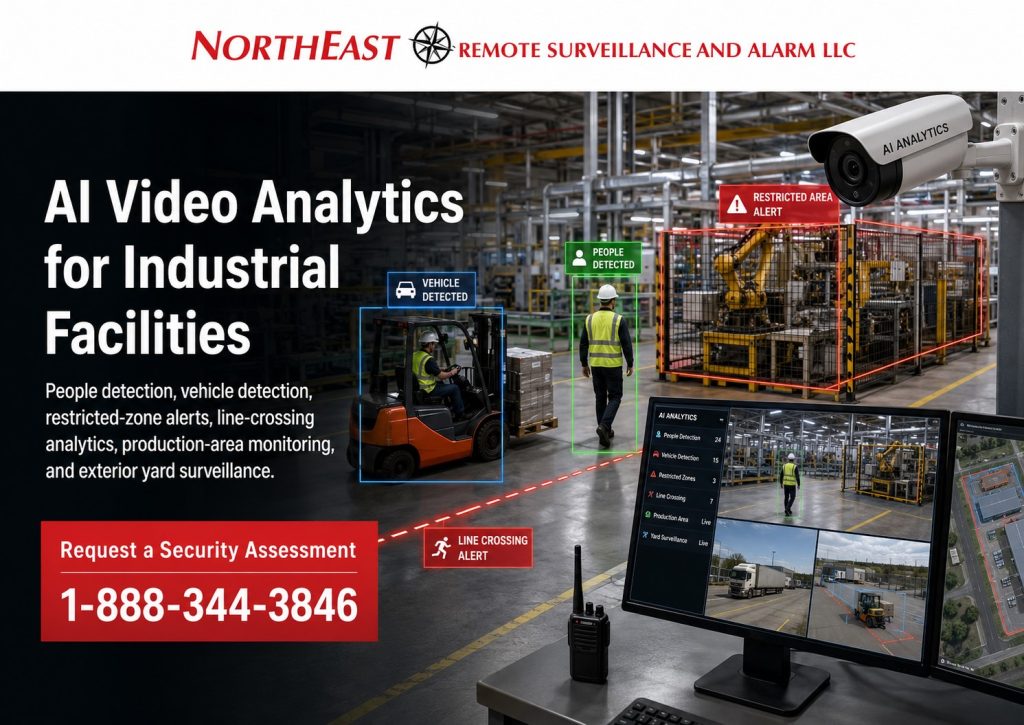
Northeast Remote Surveillance and Alarm, LLC (NERSA) installs AI video systems for industrial sites. These tools can help when standard motion detection flags too much irrelevant activity. Supported features can focus on people, vehicles, selected zones, or movement patterns.
Supported analytics can help staff focus on relevant activity. The system can filter selected events instead of treating all movement alike.
NERSA supports small commercial and industrial sites as well as larger facilities. Systems can also serve several buildings, industrial campuses, or enterprise operations.
For complete video-system planning involving camera coverage, recording, retention, image quality and overall surveillance design, visit Commercial & Enterprise Video Surveillance Systems.
How AI Video Analytics Improves Industrial Surveillance
Traditional video surveillance records what cameras see.
AI analytics can classify or filter selected activity in the camera view.
Depending on the platform and configuration, supported analytics may identify:
- People
- Vehicles
- Activity inside defined zones
- Virtual line crossing
- Direction of travel
- Loitering or dwell conditions
- Other supported object or activity classifications
The goal is not to create more alerts.
The goal is to make industrial video surveillance easier to use by helping authorized personnel identify activity that matters.
For a separate look at movement and occupancy reporting, compare Alarm.com business activity analytics.
This can help at sites with large outdoor areas, several entrances, or equipment yards. It can also help at loading areas where normal activity changes during the day.
Person Detection
Person classification can help distinguish human activity from unrelated environmental motion.
Potential industrial applications may include:
- Restricted exterior areas
- Rear building approaches
- Employee entrance approaches
- Service-door areas
- Equipment sections
- Fenced zones
- After-hours areas
- Selected storage locations
A useful person-detection rule should be connected to a specific security requirement.
Detecting every person visible anywhere within a camera image may create unnecessary events.
A stronger configuration focuses on locations where human presence has meaning.
A person at the staff entrance at 8:00 AM may be expected. A person in a restricted equipment area after closing may need attention. Set the rules to reflect how each area is used.
Vehicle Detection
Industrial facilities may experience significant vehicle activity from:
- Employees
- Delivery trucks
- Contractors
- Service vehicles
- Fleet vehicles
- Visitors
- Shipping operations
- After-hours traffic
Vehicle analytics can help classify selected activity within camera views around:
- Vehicle entrances
- Restricted lots
- Rear service roads
- Loading approaches
- Equipment yards
- Parking areas
- Selected exterior lanes
Camera positioning matters.
The vehicle must be clear enough in the image for the selected AI tool to identify it.
A wide view can show what is happening across a property. It may not show enough detail to classify distant objects.
Defined Detection Zones
Defined analytics zones allow a rule to focus on a selected part of the camera image.
This is useful in industrial environments where normal activity may exist directly beside a restricted or sensitive area.
For example, one camera may view:
- A normal employee travel path
- A restricted storage section
- An equipment area
Instead of treating all three areas identically, the analytic can focus only on the zone where selected activity matters.
Defined zones may be useful around:
- Equipment areas
- Restricted exterior sections
- Storage locations
- Rear approaches
- Sensitive operational areas
- Selected entrances
- Fenced areas
- After-hours zones
The zone should represent a real security requirement rather than simply filling the camera image with detection rules.
Line Crossing and Directional Analytics
Virtual line-crossing analytics can identify when a supported person or vehicle crosses a configured boundary.
Potential applications may include transitions between:
- Public and restricted property
- Parking and secured areas
- Open property and fenced sections
- Normal travel paths and equipment zones
- Exterior approaches and controlled areas
The virtual line should correspond with an actual operational boundary.
Some supported systems can also evaluate direction of travel.
Direction rules can help where travel one way is normal and the other way is unusual. Examples may include a vehicle lane or a restricted approach.
These rules should be used only where the property’s normal movement patterns make the distinction meaningful.
Loitering and Dwell Detection
Some systems can flag a detected object that stays in a set area longer than allowed by the rule.
Potential applications may include:
- Rear service areas
- Restricted entrances
- Equipment yards
- Selected exterior doors
- After-hours property areas
Dwell-time analytics require careful configuration.
Industrial properties often contain legitimate waiting, loading, maintenance and contractor activity.
If the rule is too aggressive, ordinary activity can generate unnecessary events.
The system should be configured around what is actually unusual for that specific area.
Reducing Irrelevant Motion Events
Traditional motion detection may respond to many conditions that have little security value.
These can include:
- Rain
- Snow
- Moving vegetation
- Shadows
- Reflections
- Headlights
- Insects
- Other environmental changes
Supported AI tools can focus events on people, vehicles, or other chosen object types. This can reduce some alerts from unrelated movement.
Performance still depends on:
- Camera position
- Field of view
- Mounting height
- Lighting
- Object size
- Environmental conditions
- Background movement
- Analytics configuration
AI cannot compensate for a poorly designed camera view.
The camera image must support the analytic.
Camera Placement for Industrial AI Analytics
The important question is not simply:
Can the camera see the area?
The better question is:
Can the camera see the activity clearly enough for the intended analytic to be useful?
Planning may consider:
- Distance to the target area
- Mounting height
- Viewing angle
- Field of view
- Object size in the image
- Lighting
- Obstructions
- Background activity
- Environmental exposure
Industrial properties often need both wide situational views and more focused analytical views.
Do not assume one camera can cover a large area and also classify distant objects in detail. The view must suit each task.
Focused detection areas may require dedicated camera positioning.
Industrial Applications
AI analytics can support a range of industrial security applications.
Entrances and Approaches
Person or vehicle detection can help staff review activity at entrances. Useful views may include staff doors, rear doors, service doors, and contractor approaches.
Access authorization itself remains an access-control function. The video system provides visual detection and event information.
Loading and Service Areas
Supported tools may flag people or vehicles in loading and service areas. These events may need more attention outside normal work hours.
Equipment and Storage Areas
Set detection zones around outdoor equipment, machinery, materials, or storage areas that need review.
Fenced and Restricted Areas
Person detection, line crossing, or zone rules may help monitor a restricted area. Use them where movement into or across that area needs review.
The analytic should always reflect the way the specific property operates.
After-Hours AI Detection
Industrial facilities often become quieter after normal operations end.
That can make selected events more meaningful.
After-hours analytics may help identify conditions such as:
- Person detected in a restricted exterior area
- Vehicle entering a selected lot
- Person crossing a rear-property boundary
- Movement near an equipment section
- Activity within a fenced zone
The value comes from comparing the detected event with the property’s normal closed-hours pattern.
AI detection does not automatically mean active response.
When the requirement includes live operator review, audio talk-down, dispatch or active intervention, visit the appropriate remote video monitoring service.
AI-Assisted Video Search and Incident Review
Analytics can also make recorded video easier to search.
Depending on the selected platform, authorized users may be able to filter footage using:
- Person events
- Vehicle events
- Analytics rules
- Detection zones
- Selected cameras
- Time periods
This can reduce the amount of recorded video that must be reviewed manually.
AI-assisted search may help investigate:
- Activity near restricted areas
- Vehicle movement during a defined period
- Events around service entrances
- Activity in storage areas
- Movement within configured detection zones
AI should be treated as an event-classification and search tool.
Recorded video should still be reviewed when decisions depend on understanding what actually occurred.
Analytics Should Match Industrial Operations
Industrial environments can contain complex and changing activity.
A useful AI design begins with understanding:
- What activity is normal
- What activity is unusual
- When the property is occupied
- Which areas are restricted
- Which vehicle movements are expected
- Which people normally use each area
- Which events deserve review
One facility may need person detection around an equipment yard.
Another may benefit from vehicle detection at a rear entrance.
Another may gain the greatest value from AI-assisted search rather than real-time event notifications.
There is no advantage in enabling every available analytic simply because the platform supports it.
A smaller number of carefully designed rules can be more useful than dozens of overlapping detections.
AI Video Analytics and Workplace Safety
Industrial AI analytics can also be used for certain workplace-safety applications, but those requirements involve different design considerations.
Safety-focused analytics may include PPE detection, forklift and pedestrian conflict visibility, possible man-down conditions and defined workplace hazard zones.
For those applications, visit AI Video Analytics & Workplace Safety.
AI Analytics, Monitoring and Access Control
AI video analytics can support other security systems without replacing them.
AI video analytics identifies and filters selected activity within camera images.
Remote video monitoring adds an active observation or response workflow.
Access control manages which users are authorized to enter controlled doors or gates.
Intrusion detection uses configured sensors and alarm devices to detect defined alarm conditions.
A commercial or industrial property may use several of these technologies together, but each serves a different purpose.
The appropriate combination depends on how the property operates and what conditions need to be detected, verified or controlled.
Small Business Through Enterprise Industrial Analytics
Industrial AI video analytics can scale to very different environments.
A small commercial or industrial property may need person detection around one rear entrance or equipment area.
A warehouse may require vehicle and zone analytics around loading and exterior storage areas.
A manufacturing facility may use multiple analytics across entrances, yards and restricted sections.
A multi-building campus may require different rules at each facility.
An enterprise organization may standardize selected detection methods across many locations while maintaining site-specific configurations.
The scale changes, but the design principle remains consistent:
Identify the activity that matters, determine where it occurs, and engineer the camera and analytic around that requirement.
NERSA supports small-business applications through multi-camera, multi-building, industrial campus and enterprise environments.
Frequently Asked Questions
What are AI video analytics?
AI video analytics use supported camera or video-platform software to classify or filter defined objects and activity within surveillance video.
Can AI analytics detect people?
Yes. Many commercial platforms can classify people when the camera view, object size and scene conditions are suitable.
Can AI analytics detect vehicles?
Yes. Supported systems can classify vehicle activity within configured camera views and detection zones.
Can AI analytics reduce false motion events?
They can help reduce irrelevant events by prioritizing supported object classes rather than responding to every type of motion.
What is a detection zone?
A detection zone is a defined portion of the camera image where the analytic evaluates selected activity.
What is line-crossing detection?
Line-crossing analytics can identify when a supported object crosses a configured virtual boundary according to the selected rule.
Can AI analytics detect loitering?
Some systems support dwell or loitering analytics. Their usefulness depends on the platform, camera view, normal activity and configuration.
Are AI analytics useful after hours?
Yes. Person or vehicle activity may have greater significance when normal industrial operations have stopped or staffing is reduced.
Can AI analytics make recorded video easier to search?
Yes. Supported platforms may allow authorized users to filter footage according to object classifications, analytic events, cameras, zones and time periods.
Should every industrial camera use AI analytics?
No. Analytics should be applied where they provide a meaningful detection or review function.
Request an AI Video Analytics Assessment
NERSA can review an industrial site that needs better person or vehicle detection. We can also assess unwanted motion alerts and video-search needs. The review includes camera views, lighting, work patterns, and the events you need to detect.
Design the system around the activity your team needs to identify and review. That applies to one area at a small business or several buildings in a larger organization.
Request a Security Assessment.
Small Business – Enterprise Scalable Solutions
Commercial & Industrial Systems Only • AI Video Analytics • Person & Vehicle Detection • Defined Zones • AI-Assisted Search
Compliance, Codes & Project Standards
NERSA plans commercial and industrial security work with applicable code, documentation, inspection and authority-having-jurisdiction requirements in mind. Requirements vary by system, property and jurisdiction. These resources support project planning; they do not establish legal compliance, certification or AHJ approval.
Related guidance: Regulatory compliance & inspection readiness · NERSA project standards · Documentation, testing & inspection readiness