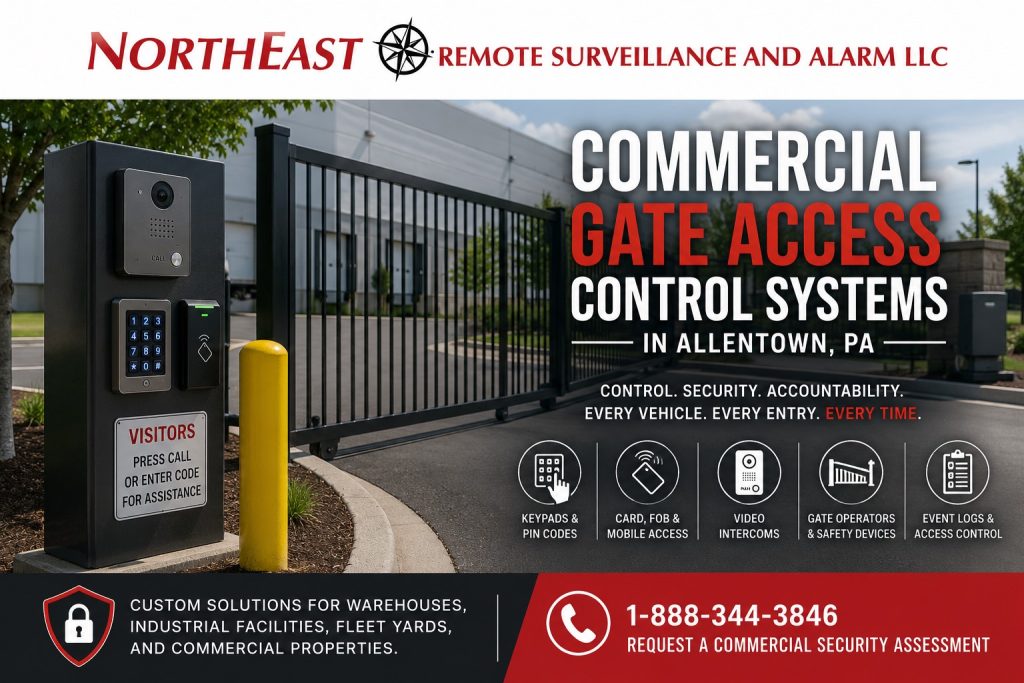
Commercial Gate Access Control Systems in Allentown, PA

Commercial gate access control systems help Allentown businesses manage vehicle entry before employees, visitors, vendors, contractors, delivery drivers, and fleet vehicles reach the building or secured yard.

Northeast Remote Surveillance and Alarm, LLC designs, installs, upgrades, expands, and supports gate access control for fenced commercial properties, warehouses, manufacturing facilities, contractor yards, fleet lots, industrial sites, employee parking areas, service entrances, delivery gates, and other non-residential properties throughout Allentown and the surrounding Lehigh Valley.

A dependable gate system requires more than an operator and keypad. The physical gate, vehicle approach, traffic flow, operator, credentials, intercom, vehicle detection, obstruction protection, cameras, power, communication, manual release, after-hours procedures, and administrator responsibilities must operate as one coordinated system.

For broader planning involving commercial access-control platforms, employee credentials, readers, controllers, user permissions, and controlled building doors, visit Commercial Access Control Systems in Allentown, PA.

Commercial and Industrial Properties Only • Sliding Gates • Swing Gates • Barrier Arms • Keypads • Cards, Fobs and Mobile Credentials • Intercom Entry • New Systems, Upgrades and Takeovers

Request a Commercial Security Assessment or call 1-888-344-3846 to discuss gate access control for your Allentown property.

Commercial gate access control system in Allentown, PA with sliding gate, credential reader, video intercom, vehicle detection and camera verification.

Control Vehicle Entry at the Property Edge

Building-door access control determines who may enter selected doors. Gate access control manages vehicles and perimeter entry before the person or vehicle reaches those doors.

A commercial gate system may help an organization:

  • Reduce uncontrolled vehicle entry
  • Replace shared gate codes with individual credentials
  • Limit employees to approved entry schedules
  • Issue temporary vendor or contractor access
  • Route visitor and delivery calls to authorized personnel
  • Release the gate remotely after verification
  • Record credentialed and denied access events
  • Review selected gate activity
  • Restrict after-hours perimeter access
  • Manage several entrances or properties from one platform
  • Create a clearer process for emergency and manual access
  • Improve control of yards, fleets, trailers, equipment, and exterior commercial areas

The goal is not merely to make the gate move. The system should authorize the correct users, support orderly traffic, reduce unnecessary exposure, respond safely to vehicles and obstructions, and return the entrance to its normal secure condition after each use.

Commercial Properties That May Need Gate Access Control

Gate access control may be appropriate for:

  • Fenced commercial properties
  • Warehouses and distribution centers
  • Manufacturing facilities
  • Contractor yards
  • Fleet parking lots
  • Equipment-storage properties
  • Truck and trailer yards
  • Employee parking areas
  • Service-business lots
  • Multi-tenant industrial properties
  • Utility and infrastructure sites
  • Municipal facilities
  • Restricted commercial campuses
  • After-hours service entrances
  • Delivery and shipping entrances
  • Exterior storage areas

Not every property requires the same gate, operator, credential method, or visitor workflow. The design should reflect the vehicles, traffic volume, operating hours, property layout, security objective, and people responsible for managing entry.

Commercial Gate Types and Applications

The physical gate determines how the opening moves, how vehicles approach it, where equipment can be installed, and which operating conditions must be evaluated.

Sliding Gates

A sliding gate moves horizontally across the vehicle opening.

Sliding gates may be considered when:

  • The property has sufficient clear space beside the opening
  • Inward or outward swing space is limited
  • The entrance serves a fenced industrial or commercial yard
  • The opening is wider than a typical passenger-vehicle entrance
  • The property needs a full gate panel rather than a traffic-control arm
  • Vehicle circulation would interfere with a swinging panel

Sliding-gate planning should consider:

  • Gate width and weight
  • Rolling or cantilever configuration
  • Travel path
  • Fence-line condition
  • Ground conditions
  • Snow, debris, vegetation, and exterior exposure
  • Vehicle-detection locations
  • Obstruction-protection devices
  • Operator position
  • Manual-release access
  • Service access
  • Pedestrian separation

The travel path must remain clear. A sliding operator cannot correct a damaged, dragging, binding, or poorly supported gate.

Swing Gates

A swing gate rotates inward or outward around a hinge point.

Swing gates may be appropriate when:

  • Adequate swing area is available
  • The gate and hinges are in suitable condition
  • The opening serves lower or moderate traffic
  • The property layout allows a predictable vehicle stopping point
  • The gate panel will not interfere with public roads, sidewalks, parked vehicles, or pedestrian movement

Planning should account for:

  • Opening direction
  • Available swing area
  • Gate size and wind exposure
  • Hinge and post condition
  • Vehicle approach
  • Turning movement
  • Reader and intercom placement
  • Entrapment and obstruction areas
  • Pedestrian routes
  • Manual release
  • Emergency access
  • Gate timing

A swing gate should not open into a location where vehicles must reverse unexpectedly or wait in an unsafe position.

Barrier Arms

A barrier arm raises and lowers to control vehicle flow.

Barrier arms may be useful for:

  • Employee parking entrances
  • Staff-only vehicle areas
  • Controlled commercial parking
  • Guarded entrances
  • High-cycle vehicle lanes
  • Facilities that need traffic control without moving a large gate panel

A barrier arm controls the lane but normally does not provide the same physical perimeter closure as a full sliding or swing gate. People may still be able to walk around it, and a vehicle may be able to leave the paved lane.

Barrier-arm planning should consider:

  • Lane width
  • Vehicle height and type
  • Traffic speed
  • Operating cycles
  • Arm length
  • Vehicle stacking
  • Pedestrian exposure
  • Detection devices
  • Visibility
  • Night lighting
  • Breakaway or damage considerations
  • Reopen behavior
  • Emergency and manual operation

The selected gate type should match the property’s actual security and traffic-control objective.

Selecting a Gate Operator

The gate operator must be matched to the physical gate and operating environment.

Operator planning may include:

  • Gate type
  • Gate size and weight
  • Expected daily cycles
  • Peak traffic periods
  • Opening and closing speed
  • Exterior temperature and weather
  • Wind exposure
  • Available electrical power
  • Communication pathways
  • Vehicle-detection requirements
  • Required safety devices
  • Manual-release method
  • Emergency-service access
  • Controller and credential integration
  • Long-term serviceability
  • Manufacturer support
  • Future expansion

A lightly used service gate may require a different operator from an employee entrance processing repeated shift changes.

The existing gate should also be inspected before a new operator is installed. Damaged rollers, worn hinges, weak posts, poor alignment, dragging panels, damaged tracks, or structural problems should be corrected by the appropriate gate or fence professional rather than concealed by a larger operator.

Plan the Vehicle Approach Before Installing Electronics

A gate can operate correctly and still create an inefficient or unsafe entrance when the vehicle approach is poorly planned.

The site review should consider:

  • Distance from the public roadway
  • Space for vehicles waiting to enter
  • Passenger vehicles versus trucks
  • Turning radius
  • Inbound and outbound lanes
  • Driver reach to a keypad or reader
  • Reader and intercom mounting height
  • Visitor stopping position
  • Delivery-driver access
  • Vehicles blocking sidewalks or traffic
  • Tailgating exposure
  • Pedestrian crossings
  • Gate-open time
  • Vehicles reversing near the opening
  • Snow accumulation and drainage
  • Night visibility
  • Camera views
  • Guardhouse or reception procedures

A credential reader should be positioned where an authorized driver can use it without opening the door, leaning excessively, blocking another lane, or placing the vehicle too close to the moving gate.

Truck entrances may require a different equipment position from passenger-vehicle entrances. One reader location may not serve every vehicle type effectively.

Employee, Vendor, Visitor, and Delivery Workflows

Commercial gates often serve several user groups with different responsibilities and access requirements.

Potential user groups include:

  • Employees
  • Supervisors
  • Fleet drivers
  • Warehouse personnel
  • Contractors
  • Vendors
  • Service technicians
  • Cleaning personnel
  • Delivery drivers
  • Temporary workers
  • Tenants
  • Property managers
  • Emergency personnel
  • After-hours management

The system should define how each group enters.

An employee may use an individual card, fob, mobile credential, or PIN during an approved schedule. A contractor may receive temporary access limited to one date and service entrance. A delivery driver may call through an intercom and wait for staff authorization. A manager may be permitted to release the gate remotely after verifying the visitor.

The property should establish:

  • Who approves each type of user
  • Which entrance each user may use
  • What schedule applies
  • Whether access expires automatically
  • Who answers visitor and delivery calls
  • Who may release the gate remotely
  • How denied or unanswered calls are handled
  • What happens outside normal business hours
  • How lost credentials are reported
  • How former users are removed
  • How emergency access is provided
  • Who reviews abnormal gate activity

Gate equipment is most effective when it supports a clear operating procedure.

Keypads, Cards, Fobs, and Mobile Credentials

Commercial gates may use one credential method or a combination of methods.

Individual PIN Codes

A keypad may be appropriate when users need credentialed entry without carrying a separate card or fob.

Individual PINs provide better accountability than one shared code used by every employee, contractor, and vendor.

PIN management should address:

  • Individual versus shared codes
  • Code length and complexity
  • Start and expiration dates
  • Employee offboarding
  • Contractor and vendor access
  • Temporary delivery access
  • Repeated denied attempts
  • Who may create or change codes
  • Whether codes can be used outside approved schedules
  • How compromised codes are replaced

A shared code can be passed to former employees, unauthorized drivers, vendors, and other people without management knowing who is using it.

Cards and Key Fobs

Cards and fobs may be assigned to identifiable employees, contractors, fleet drivers, or tenants.

Permissions can be limited by:

  • Gate
  • Property
  • Day
  • Time
  • Employee role
  • Department
  • Vehicle area
  • Contractor assignment
  • Temporary project
  • Expiration date

A lost credential can be deactivated without changing every user’s access.

Mobile Credentials

Mobile credentials may be appropriate for managers, multi-site personnel, approved employees, or contractors carrying compatible smartphones.

Mobile deployment should consider:

  • Reader compatibility
  • Phone and operating-system support
  • Credential enrollment
  • Lost-phone procedures
  • Replacement devices
  • Dead phone batteries
  • Application permissions
  • Remote revocation
  • Backup-entry methods
  • Licensing
  • Employee-owned versus company-owned phones

The selected entry method should fit the people using the gate and the organization’s ability to administer it.

Intercom and Video Intercom Gate Entry

Visitors, vendors, delivery drivers, and service personnel may not have permanent credentials.

An intercom or video intercom allows a person at the gate to request entry before the gate is released.

Planning may include:

  • Call-button position
  • Audio quality
  • Camera view
  • Driver reach
  • Night lighting
  • Daytime call routing
  • After-hours call routing
  • Primary and backup recipients
  • Mobile or desk-station answering
  • Call timeouts
  • Unanswered-call procedures
  • Remote gate release
  • Event records
  • Network or cellular communication
  • Visitor instructions
  • Directory management

A video intercom may help authorized staff view the driver or vehicle before releasing the gate. The camera should be positioned so the person is visible from the expected stopping location.

Remote release should be assigned only to authorized personnel who understand the property’s entry procedure.

Vehicle Detection and Gate Operation

Vehicle-detection and obstruction-protection devices perform different functions. They should be selected and positioned around the gate type, traffic direction, vehicle size, and required operating sequence.

Entry and Presence Detection

Detection devices may help identify a vehicle approaching or occupying a selected area.

Depending on the design, detection may be used to:

  • Initiate a gate function
  • Confirm vehicle presence
  • Prevent a gate from closing onto a vehicle
  • Support traffic sequencing
  • Maintain the gate in an open condition while a vehicle passes
  • Coordinate a two-gate or lane sequence

The system should be tested using the actual types of vehicles expected at the site.

Automatic Exit

An exit-detection device may allow authorized vehicles to leave without presenting a credential.

Automatic exit may be appropriate where:

  • The property wants controlled entry but free vehicle exit
  • Vehicles need to leave without driver interaction
  • The exit lane is separated from incoming traffic
  • The operating procedure permits automatic release

Automatic exit should not be configured in a way that allows vehicles outside the perimeter to trigger the gate unintentionally.

Obstruction Protection

Photoelectric devices, monitored edges, detection loops, and other approved devices may be used to identify vehicles or obstructions in relevant areas.

Planning should consider:

  • Gate movement path
  • Closing and opening zones
  • Vehicle stopping points
  • Pedestrian exposure
  • Gate speed
  • Reopen behavior
  • False detection
  • Device alignment
  • Exterior weather
  • Damage exposure
  • Testing and maintenance access

The access-control system, gate operator, detection devices, and obstruction-protection devices should be tested as one operating sequence.

Camera Verification at the Gate

Camera coverage can help authorized personnel verify entry activity and review incidents at the controlled entrance.

Useful views may include:

  • Overall gate opening
  • Vehicle approach
  • Driver or intercom position
  • Credential-reader location
  • Gate panel or barrier arm
  • Inbound lane
  • Outbound lane
  • Remote-release activity
  • Tailgating
  • Forced entry
  • Gate damage
  • After-hours movement

Camera positioning should account for:

  • Day and night conditions
  • Headlights
  • Sun angle
  • Gate movement
  • Fencing
  • Vegetation
  • Queued vehicles
  • Reader or intercom placement
  • Available mounting locations
  • Required image detail

The gate page should verify activity at the controlled entrance. Broader parking-lot, yard, perimeter, and building-camera planning belongs within Commercial Security Camera Systems in Allentown, PA.

Power, Communication, and Exterior Infrastructure

Commercial gates are frequently located away from the main building. The system may therefore require dedicated planning for power, network communication, low-voltage pathways, and exterior equipment protection.

Infrastructure may include:

  • Gate-operator power
  • Access-control power
  • Reader wiring
  • Keypad wiring
  • Intercom communication
  • Camera communication
  • Vehicle-detection wiring
  • Safety-device wiring
  • Network cabling
  • Fiber
  • Approved wireless communication
  • Cellular communication
  • Surge protection
  • Exterior-rated enclosures
  • Grounding and bonding coordination
  • Backup power
  • Manual release
  • Service disconnects
  • Labeled pathways

Network-dependent features should be reviewed with the organization’s authorized IT personnel.

The system design should establish what happens during:

  • Utility power loss
  • Internet interruption
  • Network failure
  • Cellular outage
  • Controller communication loss
  • Intercom failure
  • Reader failure
  • Operator trouble
  • Backup-power depletion

Some systems may continue making local access decisions during a network interruption, while remote administration, call routing, or cloud services may be unavailable. Actual behavior depends on the selected equipment and configuration.

Manual Release and Emergency Access

Authorized personnel should know how the gate can be operated when normal electronic entry is unavailable.

Planning may include:

  • Operator manual-release method
  • Location of release equipment
  • Protection against unauthorized use
  • Staff training
  • Fire and emergency-service access
  • Utility-power failure
  • Operator failure
  • Vehicle trapped inside the property
  • After-hours response
  • Documentation
  • Periodic functional testing

Manual release should be accessible to authorized personnel but should not create an easy bypass for unauthorized users.

Emergency-access requirements should be coordinated with the property owner, project team, emergency services, and other responsible parties when applicable to the site.

After-Hours and Scheduled Gate Access

The perimeter may operate differently when the property is lightly staffed or closed.

After-hours planning may include:

  • Employee shift schedules
  • Approved overtime
  • Weekend access
  • Holiday restrictions
  • Cleaning and maintenance periods
  • Temporary contractor windows
  • Delivery exceptions
  • Management access
  • Gate-open schedules
  • Automatic credential expiration
  • Intercom call routing
  • Remote-release authority
  • Securing the gate after the final vehicle
  • Abnormal-event review
  • Emergency access

A gate that remains open throughout the workday may need to return to credential-controlled operation after normal business hours.

Schedules should be reviewed when staffing, tenants, deliveries, operating hours, or management responsibilities change.

Truck Yards, Fleet Lots, and Contractor Properties

Truck yards, trailer storage areas, fleet lots, and contractor properties may involve large vehicles, irregular schedules, exterior equipment, high-value materials, and frequent vendor traffic.

Gate planning for these properties may need to address:

  • Tractor-trailer turning movement
  • Wide entrances
  • Driver communication
  • Fleet credentials
  • Dispatch-office release
  • Temporary drivers
  • Overnight activity
  • Equipment and material storage
  • Trailer-yard access
  • Multiple gates
  • Gate damage exposure
  • Vehicle stacking
  • After-hours call routing
  • Camera verification
  • Remote release

For broader planning involving trucks, trailers, yard activity, exterior storage, and perimeter exposure, visit Truck Yard and Trailer Security Systems in Allentown, PA.

Existing Gate System Upgrades and Takeovers

An existing gate system may no longer match the way the property operates.

Common problems include:

  • One shared keypad code
  • Former employees retaining access
  • Unidentified cards or fobs
  • Unsupported readers
  • Unreliable gate operators
  • Poor vehicle detection
  • Damaged photo eyes
  • Weak intercom audio
  • Failed video intercoms
  • Outdated call routing
  • Unclear remote-release authority
  • Limited event history
  • Poor camera views
  • Inadequate night lighting
  • Unlabeled wiring
  • Unknown platform ownership
  • Missing documentation
  • No defined manual-release procedure
  • Unclear power-loss behavior
  • Gate panels that drag or bind
  • Safety devices that have not been tested

A takeover review may include:

  • Physical gate and fence condition
  • Gate type
  • Operator manufacturer and model
  • Operator condition and capacity
  • Detection devices
  • Obstruction-protection devices
  • Keypads
  • Readers
  • Credential database
  • Shared codes
  • Intercoms
  • Video intercoms
  • Call routing
  • Cameras
  • Remote release
  • Power
  • Backup power
  • Network and cellular communication
  • Manual release
  • Administrator accounts
  • Software licensing
  • Event records
  • System documentation
  • Future expansion requirements

Compatible and supportable equipment may be retained when it is reliable, appropriate, and consistent with the future plan. An upgrade should not require unnecessary replacement of every component.

Multi-Gate and Multi-Location Administration

Larger organizations may need to manage several gates, buildings, yards, or commercial properties.

A multi-site system may support:

  • One credential across approved properties
  • Gate-specific permissions
  • Location-specific schedules
  • Central employee offboarding
  • Temporary contractor access
  • Regional and local administrators
  • Central event review
  • Consistent gate naming
  • Standard keypad and credential procedures
  • Central intercom directories
  • Site-specific remote-release authority
  • Scalable licensing
  • Documented administrator roles

A regional administrator may need visibility across several properties, while a local manager should control only the entrances and users assigned to one site.

The platform should be selected before expansion so each new gate does not become another disconnected system.

NERSA’s Commercial Gate Access Control Process

Property and Traffic Review

NERSA reviews the property layout, fence line, gate location, public-road relationship, vehicle types, traffic volume, turning movement, stacking space, pedestrian routes, delivery procedures, operating hours, and after-hours activity.

Existing Gate and Operator Assessment

The physical gate, operator, posts, hinges, track, rollers, detection devices, obstruction-protection devices, power, communication, manual release, and known operating problems are reviewed.

Entry-Workflow Planning

Employee, contractor, vendor, visitor, tenant, delivery, fleet, management, and emergency-access procedures are defined.

Credential and Intercom Planning

Keypads, individual PINs, cards, fobs, mobile credentials, intercoms, video intercoms, call routing, schedules, expiration rules, and remote-release authority are selected around the property’s operation.

System Design and Coordination

The gate operator, access devices, controller, vehicle detection, obstruction protection, cameras, power, communication, backup operation, and event reporting are coordinated.

Where the project requires work involving the physical gate, fence, line-voltage power, roadway, concrete, or other specialized conditions, those responsibilities should be coordinated with the appropriate trades.

Installation and Programming

Approved equipment is installed and programmed around authorized users, schedules, visitor procedures, gate timing, entry and exit operation, and event conditions.

Functional Testing

Testing may include:

  • Valid credential entry
  • Invalid credential denial
  • Individual PIN operation
  • Schedule restrictions
  • Temporary credential expiration
  • Visitor intercom calls
  • Video verification
  • Remote release
  • Automatic exit
  • Vehicle detection
  • Obstruction response
  • Gate-open timing
  • Closing sequence
  • Reopen behavior
  • Camera views
  • Night operation
  • Network interruption
  • Power-loss behavior
  • Backup operation
  • Manual release
  • Repeated vehicle cycles

Administrative Turnover

Authorized personnel receive instruction on:

  • Adding and removing users
  • Managing PINs
  • Issuing credentials
  • Setting schedules
  • Managing temporary access
  • Updating the intercom directory
  • Routing after-hours calls
  • Releasing the gate remotely
  • Reviewing events
  • Responding to lost credentials
  • Using manual release
  • Reporting operating problems

Relevant gate names, controller locations, credential groups, schedules, call-routing procedures, equipment locations, administrator accounts, and operating information are documented according to the project scope.

Why Allentown Businesses Choose NERSA

Northeast Remote Surveillance and Alarm, LLC has focused on commercial and industrial security systems since 2008.

NERSA evaluates commercial gate access control around:

  • Property layout
  • Vehicle traffic
  • Gate type
  • Operator condition
  • Employee access
  • Contractor and vendor access
  • Visitor entry
  • Delivery procedures
  • Credentials and keypads
  • Intercom call routing
  • Vehicle detection
  • Obstruction protection
  • Camera verification
  • Power and communication
  • After-hours operation
  • Manual release
  • Administrator responsibility
  • Documentation
  • Future expansion

NERSA supports:

  • Smaller commercial lots
  • Warehouses
  • Distribution centers
  • Manufacturing properties
  • Contractor yards
  • Fleet lots
  • Equipment-storage sites
  • Fenced industrial properties
  • Municipal facilities
  • Multi-building campuses
  • Enterprise and multi-location organizations
  • New installations
  • Existing-system expansions
  • Operator and reader upgrades
  • Intercom replacements
  • Credential migrations
  • Phased modernizations
  • Gate-system takeovers

The objective is a dependable and manageable commercial entrance that fits the way the property actually operates—not merely an operator connected to a shared keypad.

Request a Commercial Gate Access Control Assessment in Allentown, PA

Northeast Remote Surveillance and Alarm, LLC can evaluate your gate type, vehicle approach, operator, keypads, credentials, intercom, vehicle detection, obstruction-protection devices, cameras, power, communication, after-hours procedures, manual release, and existing system condition.

Request a Commercial Security Assessment or call 1-888-344-3846 to discuss your Allentown commercial property.

Frequently Asked Questions About Commercial Gate Access Control in Allentown, PA

What is a commercial gate access control system?

A commercial gate access control system manages vehicle and perimeter entry using a coordinated combination of a physical gate or barrier, operator, keypad or credential reader, controller, vehicle detection, obstruction-protection devices, intercom, camera verification, power, communication, and administrative procedures.

Can access control be added to an existing commercial gate?

Often, yes. The gate, operator, vehicle detection, obstruction protection, power, wiring, communication, manual release, and existing access devices should be evaluated before equipment is retained or replaced.

Is a sliding gate, swing gate, or barrier arm better?

No gate type is best for every property. The decision depends on available space, gate width and weight, traffic volume, vehicle type, fence line, swing or travel area, operating cycles, security objective, and site conditions.

Should employees use individual PINs instead of one shared gate code?

Individual PINs generally provide better control and accountability than one shared code. They can be assigned, scheduled, expired, and removed by user without changing access for everyone else.

Can the same gate use cards, fobs, mobile credentials, and PINs?

Many commercial systems can support more than one credential method. Compatibility depends on the keypad, reader, controller, management platform, licensing, and selected credential technologies.

Can contractor and vendor access expire automatically?

Supported systems may allow temporary PINs or credentials to begin and expire on approved dates and schedules. The organization should establish who approves, extends, and removes temporary access.

Can a gate intercom call different people after hours?

Many systems can support scheduled or sequential call routing, but capabilities vary by platform. Daytime, after-hours, backup, and unanswered-call procedures should be planned during system design.

What happens if the internet connection fails?

Operation depends on the selected equipment and architecture. Some controllers can continue making local credential decisions while remote administration, cloud synchronization, or intercom calling may be affected. The expected behavior should be confirmed before deployment.

What happens during a power failure?

Behavior depends on the gate operator, controller, backup power, credential devices, and project requirements. The organization should establish backup-power objectives, manual-release procedures, and emergency access before installation is complete.

What is the difference between an exit loop and an obstruction-detection device?

An exit loop may request automatic gate opening for a vehicle leaving the property. Obstruction-detection devices help identify a vehicle or object in a relevant gate-movement area. The exact devices and operating sequence depend on the gate and operator design.

Can cameras verify remotely released gate entry?

Yes. Properly positioned cameras can help authorized personnel view the driver, vehicle, intercom position, and gate opening before or after releasing the gate.

Can a gate system report forced or abnormal activity?

Depending on the equipment and configuration, the system may record denied credentials, selected gate-status conditions, remote releases, intercom calls, operator trouble, or other programmed events.

Can an existing gate operator be retained during an upgrade?

Possibly. The operator’s condition, support status, capacity, compatibility, safety-device connections, communication, and suitability for the actual gate should be evaluated before reuse.

How should emergency and manual gate access be handled?

The property should maintain a documented procedure for authorized manual release, emergency-service access, power loss, operator failure, and vehicles that must enter or leave when normal electronic operation is unavailable.

Can NERSA support both small commercial properties and multi-site organizations?

Yes. NERSA supports single-gate commercial properties, warehouses, industrial facilities, contractor and fleet yards, multi-gate campuses, and multi-location organizations requiring centralized administration and site-specific permissions.

Who installs commercial gate access control systems in Allentown, PA?

Northeast Remote Surveillance and Alarm, LLC designs, installs, upgrades, expands, and supports commercial gate access control systems for Allentown warehouses, industrial facilities, contractor yards, fleet lots, fenced commercial properties, employee parking areas, service entrances, and multi-location organizations.

H1:

Scroll to Top
1-888-344-3846