Door access control and card reader systems help commercial facilities control who can enter employee doors, restricted rooms, tenant spaces, storage areas, offices, warehouses, and other protected areas. This page focuses specifically on card reader doors, credentialed entry, door hardware coordination, access events, user permissions, and commercial door-level access control planning. For broader access control system planning, start with Commercial Access Control Systems.
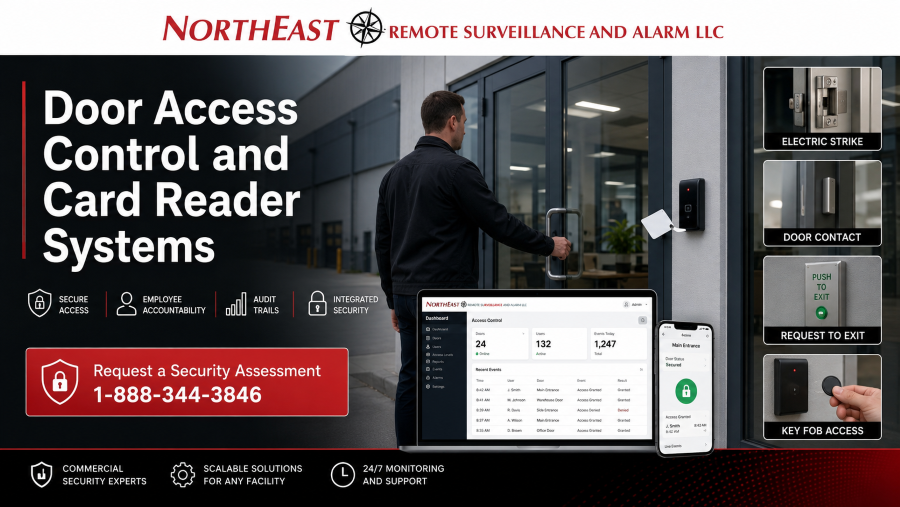
Door Access Control and Card Reader Systems for Commercial Facilities
A commercial access control system is only as strong as the doors it controls. Card readers, key fobs, mobile credentials, PIN readers, door contacts, request-to-exit devices, power supplies, controllers, and electrified door hardware all need to work together for the system to be reliable.
Poorly planned door access control can create problems. Employees may prop doors open, credentials may be shared, access events may not match video footage, doors may fail to latch, hardware may not support the building’s egress requirements, or managers may not have a clean way to review who entered a space.
Northeast Remote Surveillance and Alarm, LLC designs door access control and card reader systems around real commercial building conditions, including door type, traffic flow, employee movement, restricted spaces, visitor access, life-safety requirements, and long-term serviceability.
What a Door Access Control and Card Reader Systems Includes
A door access control system usually includes more than a reader on the wall. The complete door opening may involve a credential reader, controller, lock hardware, door position switch, request-to-exit device, power supply, cabling, software programming, schedules, users, alerts, and reporting.
Common components include:
- Card readers
- Key fob readers
- Mobile credential readers
- PIN or keypad readers
- Multi-technology readers
- Door controllers
- Electric strikes
- Electrified locksets
- Electrified trim
- Magnetic locks where appropriate
- Door position contacts
- Request-to-exit devices
- Power supplies
- Credential management software
- Access schedules
- User groups
- Audit trail reporting
Each component should be selected based on the door, the facility, the traffic pattern, and the level of control needed.
Card Readers, Key Fobs, and Mobile Credentials
Card reader systems allow businesses to replace uncontrolled keys with managed credentials. Instead of issuing physical keys that are difficult to track or recover, a business can assign cards, fobs, mobile credentials, or PINs to specific users.
When access is managed through software, the business can add users, remove users, change permissions, review access events, set schedules, and limit which doors each person can use.
Credential options may include:
- Proximity cards
- Smart cards
- Key fobs
- Mobile credentials
- PIN codes
- Multi-factor credential combinations
- Temporary credentials for vendors or contractors
The best credential type depends on the facility’s security needs, user volume, budget, management workflow, and whether the organization needs stronger identity control.
Where Door Access Control and Card Reader Systems Are Most Useful
Door access control is useful anywhere a business needs to control, document, or limit movement through a specific opening.
Common card reader locations include:
- Employee entrances
- Main staff doors
- Office suite doors
- Warehouse entrances
- Shipping and receiving offices
- IT rooms
- Electrical rooms
- Inventory rooms
- Tool rooms
- Medical office staff areas
- School staff entrances
- Municipal staff-only doors
- Tenant entry doors
- Mechanical rooms
- Interior restricted areas
- Office-to-warehouse transition doors
The door plan should be based on how people actually move through the building.
Employee Entrances and Staff Doors
Employee entrances are often the first doors businesses want to control. These doors may be used during shift changes, before and after normal hours, by cleaning crews, by management, by warehouse teams, or by staff entering from a parking area.
A properly designed card reader door can help the business control who enters, when they enter, and whether the door is held open or forced. It can also help reduce the need to rekey a facility every time an employee leaves.
Employee entrance planning should account for door traffic, weather exposure, lighting, reader placement, handicap accessibility, door hardware, video coverage, and emergency egress.
Restricted Rooms and Sensitive Areas
Not every employee needs access to every space. Commercial facilities often have restricted rooms that require tighter control than general employee entrances.
Restricted areas may include IT rooms, electrical rooms, inventory storage, file rooms, pharmaceutical storage, tool cribs, cash rooms, management offices, mechanical rooms, utility rooms, and production support spaces.
Door access control can help create accountability around these areas. Managers can review which credential was used, when the door opened, and whether access occurred outside an approved schedule.
Electric Door Hardware and Locking Devices
Card readers do not secure doors by themselves. The door also needs the correct locking hardware. That may involve an electric strike, electrified lockset, electrified trim, magnetic lock, delayed egress device, power transfer, request-to-exit device, or other door hardware depending on the opening.
Door hardware selection matters because the system must control access without creating unsafe egress conditions or unreliable door operation.
For deeper planning around locks, strikes, electrified trim, maglocks, request-to-exit devices, and commercial door hardware coordination, use Commercial Door Hardware and Locksmith Security.
Door Contacts and Request-to-Exit Devices
Door contacts and request-to-exit devices help the access control system understand what is happening at the opening.
A door contact can show whether the door is open or closed. This allows the system to report held-open doors, forced-door events, and door status. A request-to-exit device can help the system understand when someone is leaving through a controlled opening.
These devices are important because access control is not only about unlocking the door. It is also about knowing whether the door closed, whether it was forced, whether it was held open, and whether the event should be reviewed.
Access Control Software and User Permissions
Door access control systems need clean software management. The system should make it practical to add users, remove users, assign groups, set schedules, review events, and manage credentials.
Strong user management may include:
- Employee access groups
- Department-based permissions
- Shift-based schedules
- Temporary vendor access
- Contractor credentials
- Manager override permissions
- Multi-site user control
- Door schedules
- Holiday schedules
- Access event reporting
- Lost credential deactivation
The goal is to make access easier to manage while reducing the risk of uncontrolled keys, shared credentials, and undocumented entry.
Door Schedules and Access Rules
Different doors may need different rules. A main employee entrance may unlock only during business hours. A warehouse door may require credentials at all times. An IT room may allow only management or authorized technical staff. A contractor entrance may need temporary access during a project.
Door schedules should be based on operating hours, staffing levels, building use, shift changes, cleaning schedules, deliveries, and after-hours risks.
Access rules should be simple enough to manage but strong enough to protect the facility.
Video Surveillance and Door Event Review
Door access control becomes more useful when it can be reviewed with nearby video. A credential event can show that a card or fob was used. Video can show who actually entered, whether another person followed behind, whether the door was propped open, or whether the event matched expected activity.
This is especially useful around employee entrances, shipping offices, restricted rooms, visitor doors, contractor entrances, and high-traffic commercial openings.
For broader coordination between doors, cameras, alarms, intercoms, and event review, use Security System Integration.
Multi-Door and Multi-Site Access Control
Some businesses only need one or two controlled doors. Others need many doors across multiple buildings, multiple tenants, or multiple locations.
A larger door access control system should be planned around scalability. The business should be able to add doors, expand credentials, manage users, review events, and support future locations without rebuilding the entire system.
Multi-site access control may be useful for property managers, warehouse operators, healthcare groups, municipal organizations, school systems, industrial operators, and commercial businesses with more than one facility.
Door Access Control for Different Property Types
Door access control should be designed around the property type and how people use the building.
Office buildings may need card readers at employee entrances, tenant doors, shared corridors, IT rooms, and management spaces. Warehouses may need controlled employee entrances, office-to-warehouse doors, shipping offices, restricted inventory rooms, and dock-area access. Manufacturing plants may need controlled doors around production areas, tool rooms, mechanical areas, contractor entrances, and restricted rooms.
Healthcare, school, municipal, and institutional properties may need more careful planning around staff-only doors, public access, privacy-sensitive areas, emergency egress, visitor entry, and administrative control.
Compliance-Aware Door Access Planning
Door access control must be planned carefully because controlled doors are also part of a building’s egress and life-safety environment. Security should never prevent safe exit, interfere with required door function, compromise fire alarm operation, or create unsafe emergency conditions.
A compliance-aware access control design should consider door hardware, request-to-exit function, emergency release, fire alarm interface where required, ADA accessibility, signage, power loss behavior, and authority-having-jurisdiction expectations.
Access control does not make a building compliant by itself. It must be coordinated with the door, the hardware, the building use, and applicable life-safety requirements.
Documentation and Long-Term Support
Door access control systems should be documented clearly. Without documentation, even a good system becomes harder to service, expand, or troubleshoot.
Useful documentation may include:
- Door names
- Reader locations
- Controller locations
- Lock hardware type
- Door contact locations
- Request-to-exit devices
- Power supply locations
- Access groups
- Door schedules
- User permission structure
- Emergency release notes
- As-built wiring notes
- Service records
Good documentation helps the business manage the system as staff, tenants, doors, and operations change.
Why Businesses Choose NERSA for Door Access Control
Northeast Remote Surveillance and Alarm, LLC designs door access control and card reader systems for commercial and industrial facilities that need more than a reader mounted beside a door.
NERSA reviews the opening, traffic pattern, door hardware, access requirements, credential needs, life-safety conditions, user permissions, video review needs, and long-term support requirements before recommending a system design.
The goal is a card reader door system that controls access, supports accountability, works with the building, and remains manageable over time.
Request a Door Access Control and Card Reader Systems
If your facility needs card readers, key fobs, mobile credentials, controlled employee entrances, restricted-room access, door event reporting, or a better way to manage commercial doors, Northeast Remote Surveillance and Alarm, LLC can help design the system around the way your property actually operates.
Call 1-888-344-3846 or use the Request a Security Assessment page to begin a door access control review.
Frequently Asked Questions about Door Access Control and Card Reader Systems
What is a door access control system?
A door access control system controls who can enter a door using credentials such as key cards, fobs, mobile credentials, PINs, or other authorized methods. It can also help document door events, schedules, users, and access activity.
What is a Door Access Control and Card Reader system?
A card reader system uses a wall-mounted reader to identify an authorized credential and unlock a controlled door when access is approved. The system may use cards, key fobs, mobile credentials, PIN codes, or multi-technology readers.
What types of doors can use Door Access Control and Card Reader Systems?
Common doors include employee entrances, office suite doors, warehouse doors, IT rooms, inventory rooms, mechanical rooms, staff-only doors, tenant entrances, shipping offices, restricted rooms, and office-to-warehouse transition doors.
Are key cards better than physical keys?
For many commercial facilities, yes. Key cards and fobs can be added, removed, or changed in software. Physical keys are harder to track, recover, and manage when employees leave or access needs change.
Can Door Access Control and Card Reader Systems use mobile credentials?
Yes. Some access control systems support mobile credentials that allow approved users to use a smartphone instead of a physical card or fob. The right option depends on the platform, facility policy, user needs, and budget.
What hardware is needed for a card reader door?
A card reader door may require a reader, controller, electric strike or electrified lock hardware, door contact, request-to-exit device, power supply, cabling, software programming, and proper door hardware coordination.
Can access control work with existing doors?
Sometimes. Existing doors may be reused if they are in good condition and can support the required locking hardware, cabling, reader placement, and egress function. A site review is needed before deciding what can be reused.
What is a door contact?
A door contact is a device that tells the system whether the door is open or closed. It can help detect held-open doors, forced-door events, and door status.
What is a request-to-exit device?
A request-to-exit device helps the system recognize when someone is leaving through a controlled opening. It may be required depending on the lock type, door design, and egress requirements.
Can access control show who entered a door?
Yes. Access control systems can create event history showing which credential was used, which door was accessed, whether access was granted or denied, and when the event occurred.
Can card reader doors be scheduled?
Yes. Doors can usually be scheduled by time, day, holiday, user group, or access level depending on the system. This allows businesses to control access based on operating hours and staff roles.
Can access control integrate with cameras?
Yes. Access control can integrate with video surveillance so managers can review camera footage tied to door events, badge use, forced-door alarms, held-door alerts, and restricted-area access.
Does access control affect life safety?
It can, so access-controlled doors must be planned carefully. The system should not prevent safe egress, interfere with fire alarm operation, or compromise required door function.
Can access control be used for multiple buildings?
Yes. Many commercial access control systems can support multiple doors, multiple buildings, and multiple sites. The system should be designed for expansion before the first doors are installed.
What is the next step for installing Door Access Control and Card Reader Systems?
The next step is a site-specific assessment. NERSA reviews the door openings, hardware, traffic flow, user needs, credentials, schedules, infrastructure, and life-safety conditions before recommending a card reader system.