
NERSA designs trailer yard and truck parking surveillance around vehicle movements, cargo handoffs, gate activity, and the evidence your team needs to review an incident.

Request a NERSA security assessment
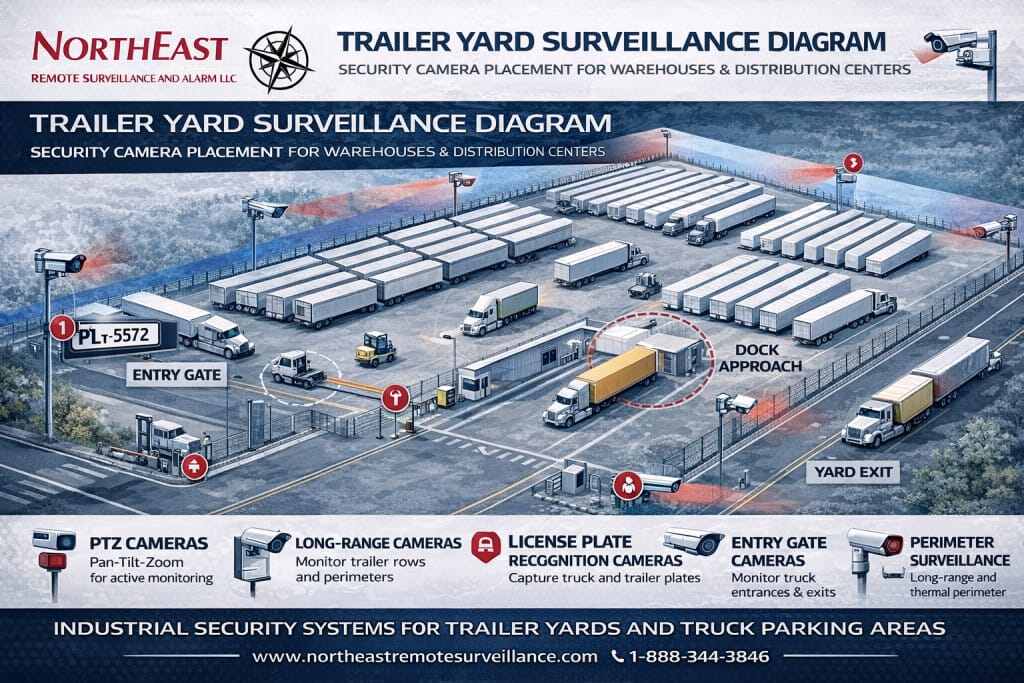
Plan coverage around how your yard operates
A trailer yard changes throughout the day as trailers arrive, parked equipment blocks sightlines, drivers queue at gates, and yard tractors reposition loads. A camera plan should reflect those changes rather than assume that an empty-yard view represents normal operations. Start by identifying the events that matter: an unauthorized arrival, a trailer departure, damage during a maneuver, or activity near a parked load.
For each event, decide what the recording must show and who will use it. Seeing that a vehicle crossed a large area is different from reading a plate, recognizing a trailer number, or reviewing a cargo-door interaction. Define these requirements before choosing camera models or quantities, and distinguish routine operational review from incidents that require an immediate response.
Use the commercial video surveillance guide for the broader recording, installation, and support decisions that apply across your facility.
Match each view to a specific task
Entrances and exits
Document every vehicle entrance, exit lane, pedestrian gate, and bypass route. An overview camera can show the sequence of an arrival or departure, while a separate identification view may be needed for a plate or other detail. Evaluate traffic direction, stopping position, headlight glare, turning movements, and the effect of a queue blocking the view. Test the required detail with vehicles moving through the actual lane.
Trailer parking rows and storage areas
Parked trailers create long, changing obstructions. Check the view with rows occupied and include spaces between trailers, rear cargo doors, and routes approaching stored equipment. A distant panoramic view may help locate an event without providing enough detail to establish what happened at an individual trailer. Identify which rows need closer coverage and which only need a general overview.
Truck courts and yard tractor routes
Review intersections, turning areas, pedestrian crossings, and the locations where vehicles reverse or exchange trailers. Mounting positions should avoid creating a new obstruction or interfering with normal maintenance and vehicle clearance. Record enough surrounding context to understand the sequence before and after a maneuver, while recognizing that video supplements site safety practices rather than replacing them.
Dock approaches and perimeter boundaries
Coordinate outdoor views with dock cameras so an event can be followed from the approach to the loading position. Along the perimeter, consider gates, fence openings, vegetation, adjacent roads, and public areas that should be excluded or masked. Define the boundary of interest and review how seasonal growth or a changed storage layout could affect coverage.
The loading dock surveillance guide explains the closer views needed around freight transfers and dock activity.
Choose equipment after defining the evidence requirement
Fixed cameras provide a consistent recorded view of a defined area. Multisensor cameras can cover several directions from one location, but each view still needs sufficient detail for its intended task. A pan-tilt-zoom camera can help an operator investigate activity; it should not be the only camera responsible for an event that could occur while it is pointed elsewhere.
License plate capture needs its own design and testing. A clear general view does not establish that plates will be readable under headlights, at night, or during a turn. Where plate recognition is proposed, confirm lane geometry, supported plate types, search functions, access permissions, and the handling of missed or incorrect readings. Avoid treating a recognition result as proof without reviewing the underlying image and context.
Thermal detection may support some perimeter applications, but detection and visual identification are separate tasks. Discuss the required outcome, likely environmental interference, and whether another view is needed to assess an alert. Equipment selection should also account for outdoor exposure, service access, mounting stability, and the manufacturer’s installation requirements.
Test lighting with real yard activity
Nighttime performance depends on more than whether an image appears bright. Headlights, reflective trailer surfaces, shadows, rain, and uneven illumination can obscure useful detail. Review each critical view during the conditions it must handle, including normal traffic and occupied parking rows. A still image from an empty yard is not an adequate test of moving-vehicle evidence.
Coordinate camera settings and any proposed lighting changes with the people responsible for the property. Document what remains visible when a light fails or part of the yard is unlit. If supplemental lighting is required, include its installation, power, maintenance, and impact on neighboring property in the scope rather than leaving it as an unstated assumption.
Plan power, connections, and recording
Walk the proposed cable routes and mounting locations before finalizing the design. Remote poles may need new power, underground pathways, fiber, or a carefully assessed wireless connection. Confirm ownership and permission to use existing poles, available pathways, and the work needed to reach each camera. Separate assumptions about existing infrastructure from items that have actually been inspected.
Recording capacity should reflect the chosen cameras, image settings, activity, and retention policy. Decide which recordings must remain available during an internet outage and how authorized staff will retrieve them. Document time synchronization, user permissions, system health alerts, and the process for exporting an incident without relying on a single employee’s personal account.
There is no reliable camera quantity based only on warehouse square footage. Yard shape, occupied rows, lanes, view distances, obstructions, and identification tasks drive the design. Request a coverage drawing that ties each proposed camera to a requirement and makes remaining limitations visible before installation begins.
Define monitoring and response responsibilities
Recording an event and responding to it are different services. If remote monitoring or analytics are included, specify monitored areas, schedules, alert conditions, verification steps, and escalation contacts. Agree on what happens when a gate is intentionally left open, an authorized driver arrives outside normal hours, or the primary contact does not answer.
Test alerts against ordinary yard activity before relying on them. Moving headlights, weather, animals, and changing parking arrangements can affect detection. Assign responsibility for reviewing unwanted alerts and approving changes to detection areas. Update the monitoring instructions when operating hours, tenant responsibilities, or access procedures change.
For a combined gate and camera project, use the access control planning guide to coordinate credentials, door or gate events, and authorized access.
Agree on acceptance tests and handover
Before installation, write down how the finished system will be accepted. Walk a representative arrival, departure, cargo-door interaction, and vehicle maneuver through the proposed views. Check both live and recorded images, including the ability to locate the event later. Where a plate or trailer number is required, verify that detail under the agreed conditions instead of accepting a broad overview as equivalent.
Have an authorized staff member retrieve and export a sample event using their assigned account. Confirm that the export includes the necessary time context and can be viewed by the intended recipient. Review the escalation procedure for a camera outage and establish who can change retention, accounts, or monitoring schedules. Keep the final camera map and system documentation available to the people who maintain the yard.
Schedule a review after operational changes such as new parking rows, added fencing, revised traffic lanes, or a relocated gate. Document limitations that cannot be resolved within the current scope and prioritize them for a later phase. This creates a clear record of what the system was designed to do without promising that cameras will prevent every theft or incident.
Regional planning resources
Choose the regional resource that matches your logistics facility.
- Lehigh Valley industrial parks — Find property-specific planning resources for local industrial parks.
- Route 33 industrial corridor — Review security planning for properties along Route 33.
- I-78 warehouse corridor — Explore planning for warehouse and logistics properties along I-78.
- Greater Reading industrial parks — Browse industrial-park resources around Greater Reading.
- Greater Scranton logistics guide — Find regional guidance for Scranton-area logistics facilities.
- Lehigh Valley video surveillance — Review regional camera-system planning resources.
- Scranton commercial security systems — Coordinate yard protection with the wider needs of a Scranton property.
Prepare for a yard assessment
Bring a current yard plan, normal operating hours, known problem areas, and examples of the incidents you need to review. Identify existing cameras, recording equipment, network connections, and available mounting locations. If details are unknown, flag them for the site visit rather than guessing. Include the people responsible for operations, security, and IT so the proposal addresses access, maintenance, and response expectations together.
Request a NERSA security assessment to review your trailer yard, current coverage, and project priorities.
Call 1-888-344-3846 to discuss your commercial or industrial facility.
Compliance, Codes & Project Standards
NERSA plans commercial and industrial security work with applicable code, documentation, inspection and authority-having-jurisdiction requirements in mind. Requirements vary by system, property and jurisdiction. These resources support project planning; they do not establish legal compliance, certification or AHJ approval.
Related guidance: Regulatory compliance & inspection readiness · Video surveillance compliance · NERSA project standards