
Commercial security infrastructure planning helps small businesses, growing companies and enterprise operations define the cabling, network, power, storage and communication paths behind their systems.

Turn site problems into a clear project scope
Bring IT, facilities and security into one practical plan. Define what stays, what changes, who owns each task, and how the finished work will be checked.
Discuss your infrastructure plan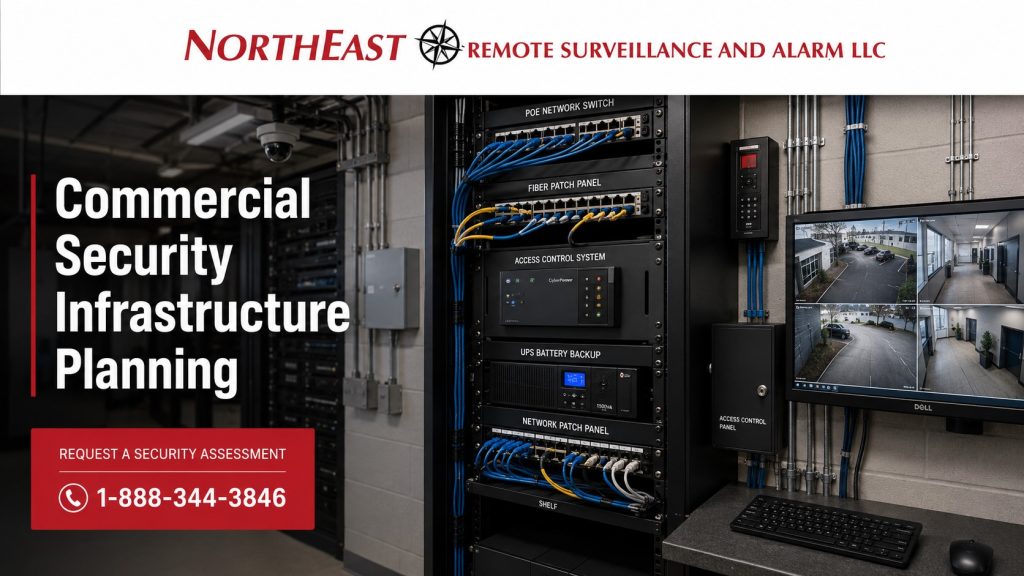
Use the commercial low-voltage infrastructure hub to select the service branches involved. This planning guide helps IT, facilities, security, and management agree on the scope and evidence needed to accept the work. For connected systems across buildings and locations, use Enterprise Security Systems Integration to define the wider responsibilities.
Bring These Details to the Planning Conversation
Start with five things: the site address and working hours; the problem or planned change; the equipment you already have; the rooms, doors, cameras or buildings affected; and your target timing. Approximate counts are useful. You do not need a finished technical design to begin.
Add any drawings, equipment records or previous test reports that are available. Identify who can approve network changes and who controls building access. Discuss sensitive configuration details through an agreed secure channel rather than placing passwords in the request form.
Decide what success looks like in everyday use: a recording staff can retrieve, a reliable connection to an outbuilding, or labeled outlets that a technician can trace. These examples are planning scenarios, not project results or performance guarantees.
Planning Tools for the Project Team
Backup-power planning helps define the equipment that must remain available and the desired recovery behavior.
Copper and fiber certification explains the test methods and handover records to specify before installation.
Wireless network planning helps define coverage, client requirements, surveys, and validation for the working building.
Security Systems Depend on Infrastructure
A commercial security system is only as reliable as the infrastructure behind it. Cameras need stable network paths, proper PoE power, storage capacity, and usable retention. Access control systems need reliable cabling, door hardware coordination, power supplies, controllers, and documentation. Intrusion alarm systems need clean device wiring, communication paths, user management, and monitoring support. Fire alarm systems require carefully planned communication, power, documentation, service access, and coordination with inspection requirements.
For commercial and industrial facilities, security infrastructure should not be treated as an afterthought. For example, poor infrastructure can create camera downtime, unreliable access-controlled doors, nuisance alarms, recording failures, communication trouble signals, weak remote access, cybersecurity exposure, and difficult future expansion.
Northeast Remote Surveillance and Alarm, LLC helps commercial and industrial facilities plan security infrastructure around long-term reliability, operational use, documentation, and future growth.
What Commercial Security Infrastructure Includes
Commercial security infrastructure may include structured low-voltage cabling, PoE switches, fiber pathways, wireless bridges, network cabinets, UPS backup, power supplies, cellular backup, video storage, server or NVR placement, access control panels, door controller wiring, alarm communication paths, monitoring connections, conduit, labeling, and system documentation.
First, define the facility’s needs. For example, a warehouse may need long cable runs, PoE switching, loading dock camera coverage, fiber between areas, and backup power for recording equipment. Manufacturing sites may need protected cable routes, separate network zones, and controlled entry to production areas. Offices may need structured wiring, controlled doors, remote management, and clear records for future tenant changes.
Infrastructure planning connects the security design to the building reality.
Why Infrastructure Planning Matters Before Installation
Weak infrastructure can interrupt a working camera, card reader, alarm contact, or monitoring connection. Therefore, check the supporting power and network paths when troubleshooting repeated failures.
Common problems include undersized switches, overloaded PoE budgets, poor cable routing, weak wireless links, insufficient storage, lack of backup power, unclear labeling, undocumented network settings, shared unmanaged networks, poor cabinet placement, and communication paths that are not reliable enough for critical systems.
Therefore, planning infrastructure first makes the security system easier to install, service, and expand.
Low-Voltage Cabling for Security Systems
Low-voltage cabling is the foundation for many commercial security systems. Video surveillance, access control, intrusion detection, intercoms, monitoring devices, and supporting network equipment all depend on clean cable paths and proper installation.
Cable planning should consider distance, pathway, protection, labeling, termination, service access, environmental exposure, ceiling conditions, riser needs, building layout, and future expansion. For this reason, commercial facilities should avoid random cabling that is difficult to trace, unsupported, undocumented, or installed without regard for future service.
PoE Switching for Video Surveillance and Security Devices
Power over Ethernet supplies many commercial cameras, intercoms, and other network devices. Plan PoE switching around device count, power draw, uplink capacity, switch location, and network design. Also allow for future devices and backup power.
However, a camera system can fail even with good cameras if the PoE infrastructure is weak. For example, undersized switches, overloaded power budgets, poor ventilation, weak uplinks, and lack of UPS backup can create reliability problems.
Fiber Infrastructure for Large Facilities
Fiber can be important for warehouses, industrial campuses, multi-building properties, large office sites, municipal buildings, schools, and logistics operations where long cable distances or building-to-building connectivity are required.
In addition, fiber infrastructure can support camera networks, remote switches, security head-end equipment, access control panels, inter-building communications, and high-bandwidth surveillance traffic. Planning should consider pathway, termination, switch compatibility, transceivers, redundancy, cabinet placement, and serviceability.
Wireless Bridges for Remote Cameras and Outbuildings
Some commercial properties need surveillance or security coverage in areas where trenching or new cabling is difficult. Wireless bridges can support remote cameras, gates, yard coverage, outbuildings, temporary structures, and exterior security locations when properly designed.
Before choosing a wireless bridge, check line of sight, distance, mounting height, power, interference, bandwidth, and weather exposure. Then test whether the link reliably supports the intended security application.
UPS and Backup Power for Security Systems
Plan security systems around reliable power. Cameras, NVRs, network switches, access control panels, intrusion alarm equipment, communication devices, and monitoring pathways may all require backup power depending on the system role.
UPS planning should consider runtime, connected load, PoE draw, battery condition, service access, replacement cycles, and which devices must remain online during a power interruption.
Video Storage and Retention Planning
Video retention planning determines how long recorded footage remains available and whether the system can support the resolution, frame rate, camera count, and recording method required by the business.
Without enough storage, poor retention planning can cause footage to be overwritten too soon or recorded at poor quality. Commercial facilities should consider camera count, resolution, compression, motion recording, continuous recording, event recording, storage size, remote access, export needs, and review workflow.
Network Segmentation and Cybersecurity Planning
Give commercial security systems a defined place in the network. Video surveillance, access control, intercoms, and remote access systems may need network segmentation, strong credential management, secure remote access, firmware planning, user permissions, and documentation.
Network segmentation helps reduce cybersecurity exposure and improves system management. This is especially important for businesses with IT departments, healthcare environments, municipal properties, multi-site operations, and larger industrial facilities.
Cellular Backup and Communication Paths
Commercial alarm and monitoring systems need reliable communication paths. As older phone-line systems are replaced, businesses may need cellular, IP, or approved communication alternatives for intrusion alarms, monitoring, fire alarm communication, and system notifications.
Communication planning should consider reliability, supervision, signal strength, carrier coverage, equipment compatibility, monitoring requirements, and documentation.
Documentation and Labeling Standards
Document the security infrastructure so facility teams can service, expand, inspect, and manage it over time. Documentation may include device schedules, cable labels, network diagrams, panel locations, switch information, camera names, door numbers, access control points, monitoring account details, and service records.
As a result, poor documentation creates long-term problems for facility managers, IT teams, service technicians, and future expansion work.
Infrastructure Planning for Warehouses and Industrial Facilities
Warehouses and industrial facilities often require stronger infrastructure planning than smaller commercial buildings. Large square footage, long cable distances, metal structures, loading docks, exterior yards, high ceilings, truck traffic, dust, temperature changes, and operational movement can all affect the system design.
Warehouse and industrial security infrastructure may include distributed switches, fiber backbones, protected conduit, loading dock camera pathways, access control power supplies, remote yard cameras, UPS-backed network cabinets, and structured documentation.
Warehouses and industrial facilities often need longer cable routes, remote equipment cabinets, yard connectivity, and room for additional devices. Review these conditions alongside the site’s operating schedule.
Infrastructure Planning for Offices, Healthcare, Schools, and Municipal Buildings
Commercial offices, healthcare facilities, schools, and municipal buildings also depend on clean infrastructure. These properties often need access-controlled doors, cameras at entrances and parking areas, intrusion detection, fire alarm coordination, documentation, user management, and long-term serviceability.
Consequently, infrastructure planning can help these facilities avoid messy wiring, undocumented systems, weak remote access, unreliable recording, and difficult future upgrades.
Frequently Asked Questions
What is commercial security infrastructure?
Commercial security infrastructure is the cabling, networking, power, storage, communication, documentation, and support equipment that allows security systems to operate reliably. It supports cameras, access control, intrusion alarms, monitoring, fire alarm communication, intercoms, and remote access.
Why does video surveillance need infrastructure planning?
Video surveillance depends on camera placement, cabling, PoE switching, network capacity, storage, retention, remote access, and backup power. Without infrastructure planning, cameras may record poorly, go offline, lose footage, or become difficult to service.
What infrastructure is needed for access control?
Access control infrastructure may include card readers, door controllers, electrified hardware, request-to-exit devices, door contacts, power supplies, network connections, wiring pathways, and documentation. The door opening and the supporting infrastructure both matter.
Why is PoE switching important for camera systems?
PoE switches provide both power and data connection to many IP cameras and network security devices. If the PoE switch is undersized, overloaded, poorly placed, or not backed up by UPS power, the camera system may become unreliable.
When does a facility need fiber for security systems?
Consider fiber when security equipment must connect across long distances or between buildings. It helps support high-bandwidth and long-distance security connections.
Should commercial security systems be on a separate network?
In many commercial environments, separate security systems from general business traffic according to the approved network design. Network segmentation can improve cybersecurity, reduce exposure, simplify management, and support better control over cameras, access control devices, and remote access.
How long should commercial surveillance footage be retained?
Retention depends on camera count, recording quality, storage capacity, business risk, incident review needs, and operational requirements. Some businesses need only short retention, while others require longer storage for documentation and investigation.
Why does backup power matter for security systems?
Backup power helps keep critical equipment running during power interruptions. Cameras, switches, NVRs, access control panels, alarm communicators, and monitoring equipment may need UPS support depending on the facility’s risk and system design.
What is cellular backup for alarm systems?
Cellular backup provides an alternate communication path for alarm or monitoring signals when a primary communication path is unavailable. It is commonly used for intrusion alarm systems, monitoring systems, and certain communication upgrades.
Why is documentation important for commercial security systems?
Documentation helps facility managers, technicians, IT teams, and inspectors understand how the system is built. Good documentation supports service, expansion, troubleshooting, user management, inspections, and long-term system reliability.
Check the Installed System at Handover
Agree on these checks with the project team before work begins. Record the result, the person who checked it, and any open issue.
- First, match each cable label to its patch-panel port and device record. Keep the test results with the site files.
- Next, check live views and saved clips at the agreed recording settings. Confirm that staff can find and export a test event.
- During an agreed outage test, verify which devices keep working and how faults reach the responsible team. Coordinate the test before interrupting any system.
- Finally, record the restored state and any limits that remain. Give authorized staff the account, support, and maintenance records they need.
Turn the Infrastructure Plan into an Installation Scope
Next, use the assessment to record cable routes, equipment locations, power dependencies, capacity requirements, and the tests needed at handover. Then review commercial and industrial infrastructure and cabling for installation, labeling, testing, and documentation. Agree on responsibilities with the facility and IT teams before scheduling work.
Assign Acceptance to the People Who Use the System
Create a short acceptance schedule with a task, responsible person, evidence, and completion status. IT can verify approved connectivity and management access. Facilities can review labeling, cabinet access, and the final drawings. Security can confirm recording, door events, and response workflows. Management can review open exceptions and ongoing costs before signing off.
Keep installation completion separate from unresolved dependencies. For example, an installed cable may be ready while the customer’s network configuration is still pending. Record that distinction and agree who closes the remaining task. This avoids a vague handover in which each team believes another team has checked the finished system.
Request Commercial Security Infrastructure Planning
If your facility needs cabling, PoE switching, fiber, wireless bridges, backup power, video retention, network segmentation, cellular backup, monitoring communication, or system documentation, Northeast Remote Surveillance and Alarm, LLC can help plan the infrastructure behind the system. Use the infrastructure assessment request form. Describe your facility, the problem, equipment you hope to retain and your preferred timing. NERSA can then discuss the scope and next steps with you.