This independent guide explains Alarm.com for Business security systems, compatible functions, and configuration questions for commercial buyers.
Request a Commercial Security Assessment
Inclusion does not establish a NERSA partnership, certification, authorization, or brand-specific installation or support capability.
For a broader comparison of security technologies, visit Security Technologies & Platforms.
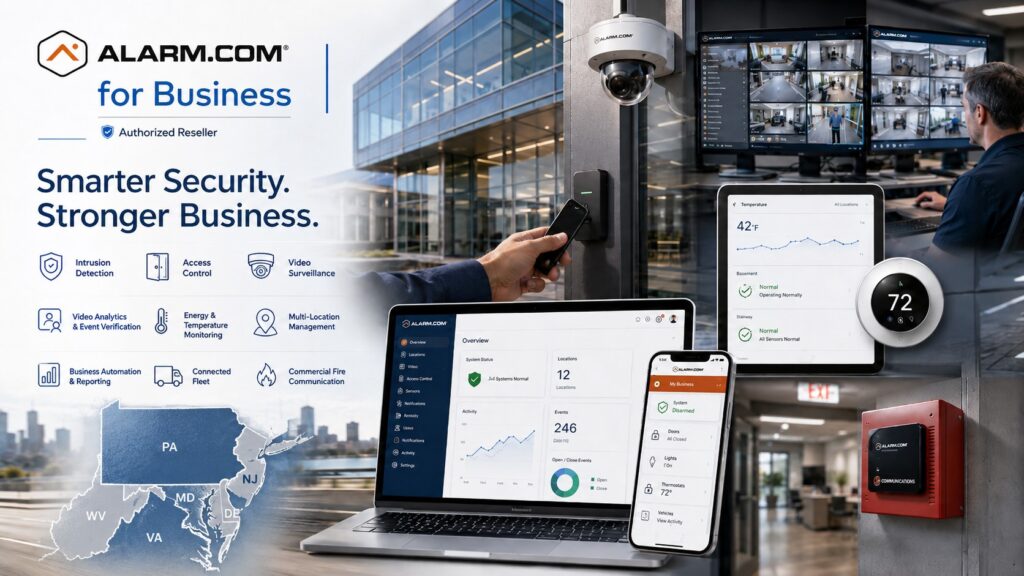
Alarm.com for Business can bring compatible intrusion detection, access control, video surveillance, automation, environmental monitoring, reporting, and other business-security functions into a coordinated cloud-managed environment.
Commercial Security Built Around the Business
Alarm.com for Business can serve a small property with a few staff or a business with many locations. The system can support multiple doors, cameras, users, and security systems.
Compatible Alarm.com services give authorized staff a shared way to manage security. Cameras, doors, alarms, thermostats, and business locations can be managed through supported services.
Start with what the property needs to do. Then check the equipment, subscriptions, integrations, and provider support required for the proposed Alarm.com setup.
For an independent comparison of product families, visit Security Technologies & Platforms.
System planning may consider:
- Intrusion protection
- Employee access
- Mobile credentials
- Video surveillance
- Video analytics
- Door and gate management
- Visitor entry
- Environmental monitoring
- Temperature-sensitive assets
- Energy management
- Business reporting
- Multiple locations
- Vehicle fleets
- Commercial fire communication
- Gunshot detection where appropriate
- Existing camera integration
- System automation
- Remote system administration
Not every property needs every capability.
The correct configuration should reflect the building, employees, operating hours, security risks, existing equipment, management requirements, and future expansion plans.
One Platform for Multiple Commercial Security Systems
A major advantage of the Alarm.com for Business architecture is the ability for compatible systems to share information and workflows.
For example, a business may link access-control activity with video or coordinate intrusion arming with employee access. It may also manage multiple locations from one dashboard, monitor critical temperatures and receive reports on unusual activity or operating conditions.
The objective is not simply to connect as many devices as possible.
The objective is to provide useful control and information without creating an unnecessarily complicated system.
Alarm.com for Business Services
Alarm.com Commercial Intrusion Detection
For commercial intrusion detection, automated arming, user-code management, remote alarm control, event awareness, and integration with other Alarm.com services, visit Alarm.com Commercial Intrusion Detection Systems.
Alarm.com supports automated arming, remote management, user codes, video-assisted event review, and integration with access-control schedules and card activity.
Alarm.com Commercial Access Control
For employee credentials, mobile access, card management, remote door control, schedules, access permissions, and integrated access-event video, visit Alarm.com Commercial Access Control Systems.
Alarm.com’s commercial access platform supports mobile credentials, centralized user management, remote locking and unlocking, schedules, automation rules, and video linked to access events.
Alarm.com Commercial Video Surveillance
For commercial-grade cameras, cloud-managed video, continuous recording options, video health monitoring, event storage, live viewing, and recorded-video management, visit Alarm.com Commercial Video Surveillance Systems.
Alarm.com currently supports commercial cameras, local and cloud recording options, video health monitoring, intelligent analytics, commercial SVRs, and compatible third-party camera integration.
Alarm.com Business Activity Analytics
For intelligent video rules, people and vehicle activity analysis, operational reporting, unusual-activity awareness, and smarter video notifications, visit Alarm.com Business Activity Analytics.
Use activity analytics to answer a defined operating question, such as where people gather or when an area is busiest, using compatible cameras and configured rules.
Alarm.com Smart Video Alerts & Event Verification
For rule-based video alerts, associated event footage, alarm-event verification, rapid incident review, and cloud-protected important video events, visit Alarm.com Smart Video Alerts & Event Verification.
Alarm.com Business Video Doorbell & Remote Visitor Entry
For video visitor verification, delivery management, remote communication, and compatible remote door release, visit Alarm.com Business Video Doorbell & Visitor Entry.
Alarm.com specifically supports business video doorbells that can provide visitor notifications, video analytics, communication, and remote entry through compatible access-control systems. (Alarm.com)
Alarm.com Energy Management
For commercial thermostat scheduling, remote temperature control, lockout ranges, energy automation, and centralized energy administration, visit Alarm.com Commercial Energy Management.
Alarm.com’s business energy capabilities include smart thermostats, schedules, remote set-point control, restrictions on local adjustments, and multi-location management.
Alarm.com Commercial Temperature Monitoring
For walk-in refrigeration, data closets, temperature-sensitive equipment, environmental alerts, temperature history, and multi-location temperature reporting, visit Alarm.com Commercial Temperature Monitoring.
Alarm.com Multi-Location Business Security
For centralized management of multiple business locations, users, intrusion systems, access permissions, cameras, temperatures, and reports, visit Alarm.com Multi-Location Business Security Management.
Alarm.com’s Enterprise Dashboard supports hierarchical organization and centralized management of intrusion, access, video, energy, users, settings, and reporting across multiple locations.
Alarm.com Business Insights & Reporting
For activity reports, open-and-close awareness, access histories, unusual-activity detection, operating trends, scheduled reports, and cross-location investigations, visit Alarm.com Business Insights & Reporting.
Alarm.com provides business reporting and activity-history tools that can associate system events with access information and video and can identify unexpected activity patterns. (Alarm.com)
Alarm.com Business Automation Rules & Schedules
For coordinated arming, employee access, doors, thermostats, schedules, alerts, and cross-system operating rules, visit Alarm.com Business Automation Rules and Schedules.
Test each automation with the affected staff and record its trigger, permitted action, schedule exceptions, and behavior when a connected service is unavailable.
Alarm.com Connected Fleet
For business vehicle location, trip reporting, driver-behavior information, vehicle-health alerts, maintenance awareness, fuel information, and fleet administration, visit Alarm.com Connected Fleet Planning for Business Vehicles.
Connected Fleet provides vehicle-location, driving-behavior, fuel, maintenance, and trip-reporting information for supported vehicles and service configurations.
Alarm.com Commercial Fire Communicator
For modernization of compatible commercial fire-alarm communications, dual-path signaling, monitoring-station communication, and Alarm.com fire-system visibility, visit Alarm.com Commercial Fire Communicator Planning.
Alarm.com launched the ADC-FC100 in July 2026; it provides broadband and LTE dual-path communication, connects compatible existing fire panels with monitoring and Alarm.com services, and is UL Listed and NFPA 72 compliant.
Fire-system design, monitoring, installation, permitting, testing, and communications still need to comply with the requirements applicable to the specific property and jurisdiction. (Alarm.com)
SDS Powered by Alarm.com Gunshot Detection
For compatible commercial and institutional applications requiring automated acoustic and infrared gunshot detection, location information, alerts, video association, and emergency-response workflows, visit SDS Powered by Alarm.com Gunshot Detection Planning.
Alarm.com states that SDS can detect gunshot events, send signals through its cloud platform, associate event information and video, and forward events to monitoring and emergency-response workflows. (Alarm.com)
Alarm.com OpenEye Video Integration
For larger or specialized commercial video systems requiring OpenEye cloud-managed video together with Alarm.com access control and intrusion information, visit OpenEye and Alarm.com Integration Planning.
The OpenEye integration links supported access and intrusion events to associated video, alerts, and event searches; available functions depend on the configured accounts and licensing tier.
Alarm.com Existing Camera & Third-Party Video Integration
For businesses interested in retaining compatible existing cameras while moving video management into an Alarm.com environment, visit Alarm.com Existing Camera & Third-Party Video Integration.
Alarm.com supports certain third-party cameras through its commercial video architecture, including compatible ONVIF cameras and Axis devices using supported integrations.
Confirm the Service Configuration and Handover
Before ordering, confirm the proposed equipment, service packages, recurring charges, recording limits, and supported integrations for each location. Identify the customer administrator and the provider responsible for monitoring, maintenance, and account changes. Demonstrate the agreed tasks with authorized users, including event review, permission changes, and relevant fault notifications. Keep the equipment list, account responsibilities, operating instructions, and accepted limitations with the handover records so later expansion starts from the actual installed configuration.
Existing Alarm.com Systems, Expansion & Modernization
Businesses may already have an Alarm.com-powered intrusion system, cameras, access control, thermostats, sensors, or related equipment and need to add capabilities rather than replace the entire platform.
A system review may consider:
- Current service level
- Installed controllers
- Alarm panel
- Cameras and recording
- Controlled doors
- Users and credentials
- Administrator accounts
- Existing sensors
- Network connectivity
- Cellular communication
- Software configuration
- Monitoring
- Reports and notifications
- Additional locations
- Future services
For broader existing-system modernization, visit Commercial Security System Upgrades, Retrofits & Takeovers.
Commercial Properties That Can Benefit From Alarm.com for Business
Alarm.com for Business may be appropriate for qualifying:
- Offices
- Retail operations
- Restaurants
- Warehouses
- Distribution facilities
- Manufacturing properties
- Contractor businesses
- Healthcare offices
- Multi-tenant buildings
- Commercial campuses
- Vehicle fleets
- Multi-location businesses
- Other commercial and industrial operations
System selection should be based on the property’s actual requirements rather than simply installing every available capability.
Frequently Asked Questions
What is Alarm.com for Business?
Alarm.com for Business is a cloud-managed platform that can bring compatible commercial intrusion detection, access control, video surveillance, energy management, reporting, multi-location management, and other services into a common environment. (Alarm.com)
Can Alarm.com manage multiple business locations?
Yes.
Alarm.com’s Enterprise Dashboard is designed for centralized management across multiple business locations and can organize locations into enterprise, subgroup, and individual-location levels. (Alarm.com)
Does Alarm.com offer commercial access control?
Yes.
Alarm.com provides cloud-managed commercial access control with user management, credentials, schedules, remote door control, automation, and video integration. (Alarm.com)
Can existing cameras work with Alarm.com?
Some can.
Alarm.com supports certain compatible third-party cameras through its commercial video products, including supported ONVIF and Axis integrations.
Compatibility should be confirmed before assuming existing equipment can be retained. (Alarm.com)
Does Alarm.com now support commercial fire monitoring?
Yes. Alarm.com announced the commercial ADC-FC100 Fire Communicator in July 2026, adding commercial fire communications to its business platform.
Does Alarm.com have fleet management?
Yes. Connected Fleet adds vehicle-location, trip, driving-behavior, fuel, maintenance, and vehicle-health information to the Alarm.com for Business ecosystem.
Prepare for a Commercial Security Assessment
Businesses considering Alarm.com for Business should begin by identifying which security and operational problems need to be solved.
Prepare an inventory of existing equipment, controlled doors, cameras, environmental monitoring needs, and business locations. Confirm current Alarm.com provider authorization, available services, account ownership, and support responsibilities directly. A general NERSA assessment inquiry does not establish availability of a particular brand.
Request a Commercial Security Assessment.
Compliance, Codes & Project Standards
NERSA plans commercial and industrial security work with applicable code, documentation, inspection and authority-having-jurisdiction requirements in mind. Requirements vary by system, property and jurisdiction. These resources support project planning; they do not establish legal compliance, certification or AHJ approval.
Related guidance: Regulatory compliance & inspection readiness · NERSA project standards · Documentation, testing & inspection readiness